Best overall
Asus ROG Swift 34 QD-OLED PG34WCDN
4.5 overall score
Highest ranked product in this category by consolidated review score.

Highest ranked product in this category by consolidated review score.
Balances a strong score with broader review coverage.
Leads this category on a matching scored feature.
Leads this category on a matching scored feature.
Most common complaint: Bass reproduction (2.3 category average)

This 360Hz QD-OLED ultrawide delivers exceptional gaming motion, vibrant HDR and dramatically cleaner text. Its high price, less-than-perfect bright-room blacks and occasional HDR dimming are the main reasons to hesitate.
Pros: color gamut, contrast
Cons: value for money, Resolution

The 360Hz QD-OLED panel delivers exceptional HDR gaming, responsive motion, and cleaner text than earlier ultrawides. Its 3440×1440 resolution is less sharp than 4K, and premium pricing remains a hurdle.
Pros: refresh rate, Text fringing
Cons: Resolution, GPU demands

A huge, sharp ultrawide workspace and unusually capable Thunderbolt dock make the U4025QW outstanding for demanding productivity and editing. Its high price, modest HDR, and imperfect motion handling keep it...
Pros: overall picture quality, color accuracy
Cons: value for money, built-in speakers

Lightning-fast 360Hz OLED gaming, rich color and an unusually flexible USB-C/KVM setup are the big draws. Strong room lighting, limited full-screen HDR brightness and static-content burn-in concerns keep it from...
Pros: color gamut, overall satisfaction
Cons: reflection handling, VRR flicker

The 27-inch 4K OLED picture is exceptionally crisp and responsive, with useful USB-C and KVM extras. Its high price, oversized stand, and bright-room compromises limit its appeal.
Pros: sharpness, overall satisfaction
Cons: value for money, VRR flicker

Best for exceptional 4K HDR, accurate color, fast 240Hz gaming, and strong work connectivity. Skip it if you need built-in speakers, ultrawide immersion, television-level HDR brightness, or a budget-friendly upgrade.
Pros: brightness, reflection handling
Cons: cable management

Superb SDR color accuracy, Mac color matching, and convenient Thunderbolt docking make this a compelling 32-inch creative workspace. The 60Hz refresh, modest HDR, weak speakers, and premium price are the...
Pros: color accuracy, stand adjustability
Cons: built-in speakers, Desk footprint

The MA270S combines beautifully crisp 5K Mac-friendly visuals with unusually useful docking and an adjustable stand. Its 70Hz response, glossy reflections, and basic audio make it less suitable for gamers...
Pros: port selection, color accuracy
Cons: built-in speakers, speaker quality

The AW3426DW brings vivid, fast ultrawide OLED gaming and much clearer text at an appealing price. Its missing USB-C video, KVM, and speakers make it less versatile than premium rivals.
Pros: brightness, value for money
Cons: port selection, built-in speakers

The glossy Tandem OLED panel delivers vivid, high-contrast HDR and exceptionally smooth 280Hz gaming at a competitive OLED price. The tradeoffs are mirror-like reflections, occasional VRR flicker and no USB-C...
Pros: overall satisfaction, response time
Cons: reflection handling, VRR flicker

Choose the RD280UG for coding, trading, writing, or creative work that benefits from a tall, sharp 3:2 screen and strong eye-care features. Skip it for serious HDR, color-critical creation, esports,...
Pros: productivity versatility, aspect ratio
Cons: value for money, competitive gaming suitability
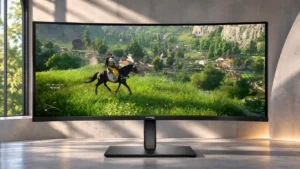
With phenomenal 360Hz QD-OLED motion, clean text and excellent laptop/KVM features, this is a compelling PC ultrawide. Limited console modes, bright-room blacks and OLED burn-in concerns narrow its appeal.
Pros: refresh rate, color accuracy
Cons: console gaming compatibility, DisplayPort connectivity

Best for fast 1440p OLED gaming, deep blacks, and a flexible stand at a bargain sale price. Skip it for bright rooms, USB-C/KVM productivity, or the reassurance of a three-year...
Pros: color gamut, overall picture quality
Cons: brightness, HDR performance
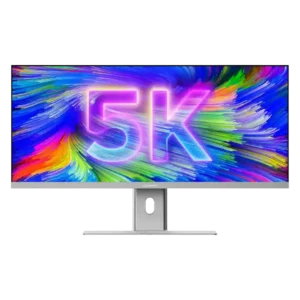
Best for a single, expansive Mac-friendly workspace with excellent color, sharp 5K2K detail, and one-cable docking. Skip it if you need strong HDR, competitive-gaming response, powerful speakers, or a stand...
Pros: productivity versatility, aspect ratio
Cons: built-in speakers, competitive gaming suitability

Best for elite 500Hz esports motion, OLED contrast, and strong matte glare control. Skip it if you want 4K sharpness, USB-C/KVM convenience, or better value from a lower-refresh or cheaper...
Pros: overall satisfaction, competitive gaming suitability
Cons: value for money, screen size

A sharp, immersive 39-inch OLED that handles both premium PC gaming and serious desktop work unusually well. Its biggest catches are demanding 5K2K graphics requirements, glossy reflections and HDR/edge-dimming quirks,...
Pros: overall satisfaction, Text fringing
Cons: brightness, Edge dimming behavior

Best for a seamless 6K command center that replaces several displays and docks a laptop through one cable. Skip it if you lack desk space or prioritize price, HDR, fast...
Pros: productivity versatility, overall satisfaction
Cons: value for money, response time
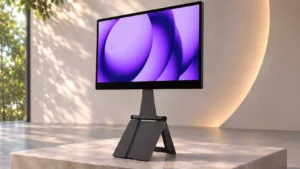
Its crisp, bright 4K touchscreen and unusually flexible stand make mobile dual-screen work feel premium. The high price, reflective glass, and middling color accuracy for critical editing demand thought.
Pros: overall satisfaction, stand adjustability
Cons: value for money, reflection handling

Choose the AW2725Q if you want a compact 27-inch 4K QD-OLED with elite sharpness, OLED contrast, and smooth 240Hz gaming. Skip it if you need high SDR brightness, KVM/USB-C display...
Pros: value for money, sharpness
Cons: brightness, USB hub functionality

Excellent factory color, crisp 4K detail, and 96W USB-C docking make this a standout affordable editing monitor. Weak contrast, modest HDR, and 60Hz refresh are the tradeoffs.
Pros: USB-C power delivery, port selection
Cons: HDR performance, refresh rate

Exceptionally clear 540Hz motion and vibrant Tandem OLED HDR make this a compelling esports display. The premium cost, mirror-like reflections, and blurry 720p boost mode are its clearest compromises.
Pros: black levels, motion clarity
Cons: value for money, Dual-mode versatility

The RGB-stripe OLED is exceptionally sharp for text and brilliantly fast for gaming at 4K 240Hz or 1080p 480Hz. However, uneven HDR brightness, glossy reflections and a steep price make...
Pros: black levels, sharpness
Cons: value for money, brightness

Spectacular 4K clarity, near-instant OLED response and unusually complete connectivity make this a standout 27-inch gaming monitor. High pricing, modest daylight brightness and intrusive panel-care prompts are the tradeoffs.
Pros: HDR performance, DisplayPort connectivity
Cons: value for money, brightness
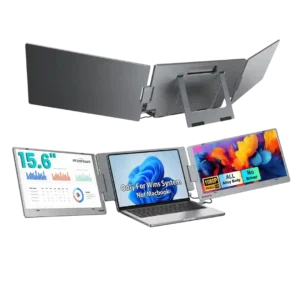
Choose the X90E if you want a fast, one-cable way to turn a compatible laptop into a three-screen workstation. Skip it if weight, strict device compatibility, color-critical work, or high-refresh...
Pros: overall satisfaction, portability and weight
Cons: reliability over time

This 360Hz QD-OLED delivers superb competitive motion and gorgeous contrast in darker rooms. Its limited HDMI and USB-C connectivity, reflective panel, and premium cost make it less versatile than the...
Pros: competitive gaming suitability, color gamut
Cons: brightness, HDMI 2.1 support

Extraordinary HDR brightness, sharp 5K detail and excellent Mac integration make this a compelling creative display. Its steep price, 27-inch size and narrow connectivity make it harder to justify outside...
Pros: refresh rate, HDR performance
Cons: value for money, Device compatibility

Glossy 4K/240Hz OLED visuals and exceptionally fast motion make this a standout for mixed-genre gamers. The 480Hz mode noticeably softens detail, while reflections and 15W USB-C charging limit versatility.
Pros: overall satisfaction, black levels
Cons: reflection handling, Color brightness

A remarkable 27-inch 4K gaming screen, with vivid QD-OLED color, near-instant response and strong glare control. The divisive matte coating, demanding 240Hz target and missing USB-C make the right setup...
Pros: reflection handling, color gamut
Cons: value for money, brightness

Spectacular HDR brightness, deep VA contrast and thoughtful laptop-docking features make the TCL 32R84 a compelling 4K all-rounder. Its grainy matte coating, narrow viewing angles and dark-scene VRR flicker are...
Pros: brightness, HDR performance
Cons: speaker quality, built-in speakers

The U3225QE shines as a sharp, color-accurate 4K office monitor with 120Hz and an unusually complete Thunderbolt dock. Its premium price buys productivity convenience, not OLED-class HDR or fast competitive-gaming...
Pros: port selection, overall satisfaction
Cons: value for money, competitive gaming suitability

Immense brightness, sharp 4K and a switchable 320Hz mode make this a versatile gaming-and-work monitor. Local dimming, small HDR highlights and color calibration need more attention than the headline specs...
Pros: HDR performance, overall satisfaction
Cons: HDR highlight detail, color accuracy

The Dell S3425DW makes multitasking easy with sharp ultrawide space, convenient USB-C docking, and accessible ports. Its low-reaching stand, missing full-size DisplayPort, and imperfect gaming motion are worth weighing.
Pros: overall satisfaction, screen size
Cons: stand adjustability, Photo editing

With vivid OLED blacks, accurate color, and exceptional 240Hz motion, the AW3425DW is a strong ultrawide gaming choice. It is less convincing for bright rooms, text-heavy work, or USB-C docking.
Pros: refresh rate, HDR performance
Cons: reflection handling, Text fringing
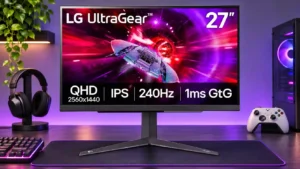
Excellent 1440p/240Hz speed, low latency, and HDMI 2.1 make this a strong PC-and-console gaming monitor at a discount. Weak HDR, limited blacks, and sparse productivity extras keep it from being...
Pros: refresh rate, overall satisfaction
Cons: HDR performance, contrast

Spectacular 4K OLED gaming, rapid 240Hz motion and improved bright-room blacks make this a flagship standout. Its high price, sprawling stand and occasionally troublesome text clarity are the main reasons...
Pros: overall satisfaction, black levels
Cons: value for money, stand adjustability

Sharp 4K detail, 120Hz smoothness and simple USB-C laptop docking make this a smart everyday work monitor with casual gaming perks. Weak HDR, visible fast-motion blur and the absence of...
Pros: value for money, Resolution
Cons: port selection, competitive gaming suitability

An excellent 4K/120Hz office hub with Thunderbolt 4, powerful laptop charging and easy device sharing, but slow pixel response, weak HDR dimming and occasional uniformity problems make it less convincing...
Pros: port selection, USB hub functionality
Cons: competitive gaming suitability, motion clarity

The 32-inch 4K QD-OLED image and exceptional built-in speakers make a compelling work-and-entertainment combination. Only two video inputs, modest SDR brightness and OLED burn-in concerns temper the appeal.
Pros: overall picture quality, overall satisfaction
Cons: port selection, brightness

For serious PC esports, the M10S combines remarkably clear 480Hz motion, rich OLED contrast, and an exceptionally space-efficient stand. Its steep price and 1440p-only focus make it harder to recommend...
Pros: refresh rate, overall satisfaction
Cons: value for money, port selection

This is a spectacular 39-inch 5K2K OLED for immersive gaming and crisp multitasking. The premium price, relatively modest native 165Hz rate, and limited OLED-care coverage make its value harder to...
Pros: Resolution, overall satisfaction
Cons: value for money, Image scaling