If you want better HDMI 2.1 support
Choose TCL 32R84. It scores 4.5 vs 1.9 for HDMI 2.1 support, with a 4.2 overall score.

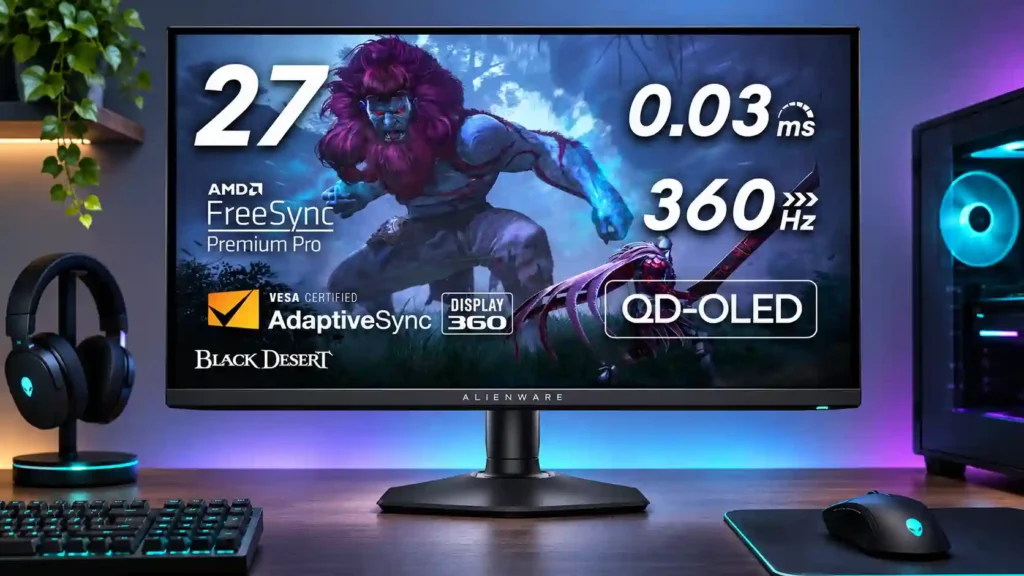
This 360Hz QD-OLED delivers superb competitive motion and gorgeous contrast in darker rooms. Its limited HDMI and USB-C connectivity, reflective panel, and premium cost make it less versatile than the picture quality suggests.
Competitive PC gamers with powerful systems and light-controlled rooms who also enjoy cinematic HDR games will benefit most from the 360Hz motion and OLED contrast.
People who require one-cable laptop docking, full-bandwidth console HDMI features, all-day static text work or a bright-window workspace should favor a different display.
The Alienware AW2725DF excels when a fast gaming PC can exploit its 1440p, 360Hz QD-OLED panel. Reviewers repeatedly praise near-instant pixel response, very low input lag, exceptionally clean motion, deep blacks and saturated HDR colors. Its compact adjustable stand and Dell's three-year burn-in warranty strengthen the appeal, and its sRGB Creator mode is often impressively accurate. The tradeoffs are important: full refresh requires DisplayPort, HDMI has restricted bandwidth despite its 2.1 branding, and there is no USB-C video input, KVM or built-in audio. The glossy panel also raises blacks under strong room light, while small-text fringing and OLED wear make all-day static work less ideal. Reports of flicker, eye discomfort and occasional hardware failures add caution. For competitive gaming in controlled lighting, though, the combination of speed and image quality remains extremely compelling.
Compared with other Monitors, this product is above average in SDR/HDR mode switching, competitive gaming suitability, HDR performance, near average in stand adjustability, color accuracy, below average in HDMI 2.1 support, sharpness, screen size.
| Attribute | This product | Category average | Difference |
|---|---|---|---|
| HDMI 2.1 support | 1.9 | 4.1 | -2.2 |
| sharpness | 2.0 | 4.5 | -2.5 |
| screen size | 2.0 | 4.5 | -2.5 |
| SDR/HDR mode switching | 5.0 | 2.7 | +2.3 |
| competitive gaming suitability | 5.0 | 3.3 | +1.6 |
| reflection handling | 2.2 | 3.9 | -1.7 |
| sleep and wake behavior | 1.0 | 2.8 | -1.8 |
| reliability over time | 1.7 | 3.4 | -1.7 |
Choose TCL 32R84. It scores 4.5 vs 1.9 for HDMI 2.1 support, with a 4.2 overall score.
Choose ASUS ROG Swift OLED PG27UCDM. It scores 4.7 vs 1.0 for sleep and wake behavior, with a 4.4 overall score.
Choose LG 27GM950B-B. It scores 4.6 vs 2.2 for reflection handling, with a 4.0 overall score.
Choose Asus ROG Swift 34 QD-OLED PG34WCDN. It scores 5.0 vs 1.7 for KVM switch performance, with a 4.5 overall score.
Products reviewers directly compared with this model, grouped into quick takeaways.
No. DisplayPort is needed for native 1440p at 360Hz; the HDMI connection has limited bandwidth and generally reaches up to 144Hz at native resolution.
Yes. Its OLED response times, low input lag and 360Hz refresh rate keep fast movements crisp, provided your PC can deliver sufficiently high frame rates.
Direct light can make blacks look purple or gray, and the semi-glossy finish can show reflections. A room with curtains or controlled lighting suits it much better.
No. The USB-C port is for downstream data and limited charging, not video input or full laptop docking; you need a separate video connection.
It can handle occasional desktop tasks and its Creator sRGB mode is useful, but colored text fringing and OLED burn-in risk make prolonged static work less appealing.
Dell offers three-year coverage that includes burn-in, subject to its terms. Pixel and panel refresh routines help mitigate wear but cannot eliminate the risk.
Dark scenes, bright small highlights and saturated colors look excellent. Sustained bright scenes are less impressive, and HDR preset and brightness behavior can vary.
These are a few of the reviews included in our analysis.

The AW2725DF combines a 360Hz refresh rate with the contrast of QD-OLED.
The Dell Alienware AW2725DF is a 27" 1440p 360Hz QD-OLED gaming monitor with HDR, VRR, a fully ergonomic stand and more!
The latest Review,,,reviews, breaking news, comment, reviews and features from the experts at GamesRadar+
We subject the Alienware AW2725DF QHD 360 Hz QD-OLED gaming monitor to our gamut of display tests and determine its ability to offer an...

This 360Hz QD-OLED ultrawide delivers exceptional gaming motion, vibrant HDR and dramatically cleaner text. Its high price, less-than-perfect bright-room blacks and occasional HDR dimming are the main reasons to hesitate.
Pros: color gamut, contrast
Cons: value for money, Resolution

The 27-inch 4K OLED picture is exceptionally crisp and responsive, with useful USB-C and KVM extras. Its high price, oversized stand, and bright-room compromises limit its appeal.
Pros: sharpness, overall satisfaction
Cons: value for money, VRR flicker

Best for exceptional 4K HDR, accurate color, fast 240Hz gaming, and strong work connectivity. Skip it if you need built-in speakers, ultrawide immersion, television-level HDR brightness, or a budget-friendly upgrade.
Pros: brightness, reflection handling
Cons: cable management
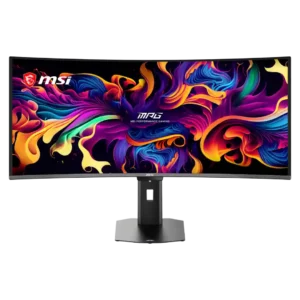
Best for class-leading 360Hz ultrawide motion, spectacular HDR, deep blacks, and unusually strong work-and-play connectivity. Skip it if you want 4K-like text sharpness, a matte screen, or the best value...
Pros: overall satisfaction, sharpness
Cons: Resolution, cable management