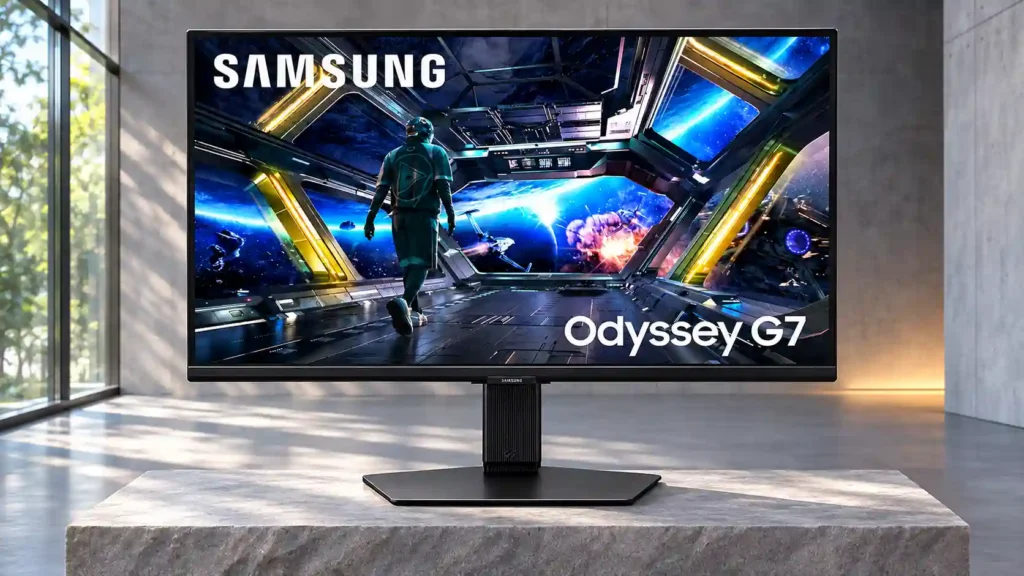
Samsung Odyssey G70D S32DG70

Samsung Odyssey G70D S32DG70 Monitor Review

Brand: Samsung
Released: December 1, 2024
Updated: 5 hours ago
3.1
Overall review score Expert score: 3.4 Customer score: 2.9
324
Review insights
83
Scored features
36
Total reviews
5 expert / 31 customer

Bottom Line

A crisp 4K/144Hz screen, excellent console connections and standalone streaming make this an appealing gaming-and-TV hybrid. Weak HDR and intrusive smart menus keep it from being an easy recommendation for desktop-only buyers.

Console gamers who want sharp 4K/120Hz-capable play and standalone streaming in a dorm, bedroom or mixed gaming-and-media setup, especially at a discounted price.

Dark-room HDR enthusiasts, color-critical creators and people seeking a no-fuss PC monitor or single-cable USB-C laptop dock.

Verdict

The Samsung Odyssey G70D S32DG70 makes most sense as a two-in-one console display and compact smart TV. Its 32-inch 4K screen looks sharp, 144Hz motion is generally clear, and low input lag plus HDMI 2.1 make modern console gaming a strong suit. Built-in Tizen apps, Bluetooth audio and the remote offer a genuinely convenient way to stream without starting a computer. The tradeoffs are substantial: shallow IPS blacks, ineffective local dimming and muted HDR highlights undermine darker games and movies. Several owners also report slow wake-up, persistent pop-ups, unreliable PC input detection or poor service, although others have smooth experiences. Its value therefore depends heavily on price and purpose. On sale, it can be a versatile bedroom or dorm screen; at full price, a simpler gaming monitor or better HDR display may be more sensible.

Feature Scorecards

Summary

83 reviewed features
  • Very positive 4.5-5.0
    16 (19%)
  • Positive 3.5-4.4
    19 (23%)
  • Neutral 2.5-3.4
    12 (14%)
  • Negative 1.5-2.4
    22 (27%)
  • Very negative below 1.5
    14 (17%)

Pros highlights

  • 4.2
    15 reviews low consensus
    PC gaming compatibility: 4.2, 15 reviews, low consensus
    The 4K/144Hz combination works well for owners who get a stable PC connection, but others report failed input detection and frustrating signal dropouts.
  • 4.0
    13 reviews low consensus
    overall picture quality: 4.0, 13 reviews, low consensus
    Many customers describe a clean, detailed, colorful picture; expert measurements temper that praise with weak HDR, mediocre contrast and uneven accuracy.
  • 4.3
    9 reviews strong consensus
    refresh rate: 4.3, 9 reviews, strong consensus
    The 144Hz ceiling is widely liked for responsive 4K gaming, though it is below the fastest esports-oriented alternatives and demands a capable PC to exploit fully.
  • 5.0
    8 reviews strong consensus
    console gaming compatibility: 5.0, 8 reviews, strong consensus
    The 4K screen, HDMI 2.1 and 120Hz support make this a particularly strong match for modern Xbox and PlayStation use, with several enthusiastic owner endorsements.
  • 5.0
    7 reviews strong consensus
    Resolution: 5.0, 7 reviews, strong consensus
    The 4K panel earns consistent praise for detailed games, fine text and console output, particularly at this 32-inch size.
  • 4.9
    6 reviews strong consensus
    sharpness: 4.9, 6 reviews, strong consensus
    High pixel density produces crisp text, game details and interfaces; sharpness is among the most reliable strengths.

Cons highlights

  • 2.6
    24 reviews low consensus
    overall satisfaction: 2.6, 24 reviews, low consensus
    Gamers often love the sharp image and feature mix, but strong negative owner accounts center on the TV-like interface, connection failures, pixel defects and support.
  • 3.0
    19 reviews low consensus
    Smart TV platform: 3.0, 19 reviews, low consensus
    Samsung’s integrated apps and standalone streaming are a standout advantage for hybrid setups. Desktop-first owners often resent the account setup, TV-like home screen and unwanted software prompts.
  • 3.1
    13 reviews low consensus
    value for money: 3.1, 13 reviews, low consensus
    Sale buyers are often satisfied with 4K/144Hz and streaming in one package. Experts question full-price value against displays with stronger HDR or better desktop features.
  • 2.6
    10 reviews low consensus
    Remote control usability: 2.6, 10 reviews, low consensus
    The bundled remote makes streaming and source changes TV-like, but several owners find its menus awkward or experience interference with other Samsung displays.
  • 1.4
    8 reviews strong consensus
    on-screen display usability: 1.4, 8 reviews, strong consensus
    Slow menus, repeated game-bar overlays and startup pop-ups are a common irritation, despite the convenient remote and gaming options.
  • 2.9
    7 reviews low consensus
    brightness: 2.9, 7 reviews, low consensus
    SDR brightness is often sufficient for ordinary rooms, but HDR highlights lack impact and at least one owner found the display disappointingly dim.

Use Cases

Best for

  • 4.2
    6 reviews low consensus
    Desktop productivity: 4.2, 6 reviews, low consensus
    The roomy, crisp 4K desktop is well suited to office work and spreadsheets; startup overlays and inconsistent PC signal behavior spoil it for some users.
  • 4.7
    3 reviews strong consensus
    Dorm-room gaming and streaming: 4.7, 3 reviews, strong consensus
    The combination of console gaming and built-in streaming suits compact dorm or bedroom setups, where one screen can handle entertainment without another device.
  • 4.2
    5 reviews low consensus
    Mixed work-and-play setups: 4.2, 5 reviews, low consensus
    One monitor can handle a large 4K workspace, fast gaming and streaming, but the smart interface can get in the way of workday simplicity.

Not ideal for

  • Dedicated PC monitor use
    1.5
    16 reviews low consensus
    Dedicated PC monitor use: 1.5, 16 reviews, low consensus
    A recurring customer complaint is that TV-style menus, account prompts and wake-up overlays get in the way of straightforward desktop use. Some PC gamers are satisfied, but buyers seeking a conventional no-fuss monitor should be cautious.
  • Dark-room viewing
    1.4
    4 reviews strong consensus
    Dark-room viewing: 1.4, 4 reviews, strong consensus
    Gray blacks, backlight bleed and ineffective dimming make the G70D a weak choice for dark-room gaming or movies.

Compared With Category Average

Compared with other Monitors, this product is above average in VRR flicker, console gaming compatibility, portability and weight, near average in PC gaming compatibility, viewing angles, below average in Packaging presentation, Blooming control, Power-on readiness.

Comparison summary

77 compared features
  • Above average 0.4+ pts higher
    13 (17%)
  • Same as average within 0.3 pts
    18 (23%)
  • Below average 0.4+ pts lower
    46 (60%)

Largest category differences

Attribute This product Category average Difference
Packaging presentation 1.0 4.3 -3.3
Blooming control 1.0 4.1 -3.1
Power-on readiness 1.0 4.1 -3.1
Operating noise 1.0 4.0 -3.0
PC-based monitor controls 1.0 4.0 -3.0
delivery condition 1.0 4.0 -3.0
heat management 1.0 3.9 -2.9
on-screen display usability 1.4 4.1 -2.7

Consider This Instead

If you want better Packaging presentation

Choose Dell S2725QS. It scores 5.0 vs 1.0 for Packaging presentation, with a 3.8 overall score.

Compare

If you want better on-screen display usability

Choose TCL 32R84. It scores 4.5 vs 1.4 for on-screen display usability, with a 4.2 overall score.

Compare

Compared in Reviews

Products reviewers directly compared with this model, grouped into quick takeaways.

Gigabyte M32U

  • Compared: Black levels and smart extras The Gigabyte has deeper blacks for dark-room gaming; Samsung adds streaming and a remote.
  • Compared: Dark-room contrast and smart OS The M32U is favored for a conventional PC monitor; Samsung’s edge is Tizen streaming.
  • Better: USB-C and KVM flexibility The Gigabyte adds USB-C and KVM connectivity that makes it more versatile for productivity.

Dell G3223Q

  • Better: Color, contrast and HDR The Dell is considered stronger for HDR brightness and image contrast, but lacks Samsung’s smart interface.
  • Better: HDR brightness and image quality The Dell is brighter in HDR and generally delivers stronger contrast and color.

FAQ

Is the G70D good for PS5 and Xbox Series X?

Yes. Its 4K panel, HDMI 2.1 inputs and 120Hz/VRR support suit current consoles, provided the game, settings and cable support the desired signal.

Does the Samsung G70D have a built-in smart TV interface?

Yes. The Tizen platform supports streaming apps and remote-controlled operation without a PC, but account prompts and TV-style menus are unwelcome for some desktop users.

How good is HDR on the G70D?

HDR is underwhelming. Poor contrast, ineffective local dimming and limited bright highlights make it a poor pick for dramatic HDR gaming or film viewing.

Can it be used as a single-cable USB-C laptop dock?

No. It lacks USB-C video input and USB-C power delivery, so laptops need suitable separate cables, a dock or adapters.

Does the monitor wake quickly and work well with dual displays?

Not consistently. Several owners report slow waking, intrusive game-bar pop-ups, display rearrangement or remote conflicts; others report normal behavior.

Is 144Hz worth it for PC gaming at 4K?

It provides noticeably smoother motion than 60Hz, but a capable GPU or reduced settings may be needed to approach 144fps in demanding games.

Who should buy it at a discount?

Console players who want 4K gaming and built-in streaming in one 32-inch bedroom or dorm display are its strongest audience. Dark-room HDR enthusiasts and traditional PC-monitor buyers are less well served.

Sample Expert Reviews We Analyzed

These are a few of the reviews included in our analysis.
Video Reviews

Article Reviews

rtings.com

The Samsung Odyssey G70D S32DG70 is a mid-range IPS gaming monitor featuring a 32-inch, 144Hz display and 4k resolution. It competes against...

Review score
3.5

Top Monitors to Consider

#1 Asus ROG Swift 34 QD-OLED PG34WCDN
4.5

This 360Hz QD-OLED ultrawide delivers exceptional gaming motion, vibrant HDR and dramatically cleaner text. Its high price, less-than-perfect bright-room blacks and occasional HDR dimming are the main reasons to hesitate.

Pros: color gamut, contrast

Cons: value for money, Resolution

#2 Dell U4025QW
4.4

A huge, sharp ultrawide workspace and unusually capable Thunderbolt dock make the U4025QW outstanding for demanding productivity and editing. Its high price, modest HDR, and imperfect motion handling keep it...

Pros: overall picture quality, color accuracy

Cons: value for money, built-in speakers

#3 ASUS ROG Strix OLED XG27ACDNG
4.4

Lightning-fast 360Hz OLED gaming, rich color and an unusually flexible USB-C/KVM setup are the big draws. Strong room lighting, limited full-screen HDR brightness and static-content burn-in concerns keep it from...

Pros: color gamut, overall satisfaction

Cons: reflection handling, VRR flicker

#4 ASUS ROG Swift OLED PG27UCDM
4.4

The 27-inch 4K OLED picture is exceptionally crisp and responsive, with useful USB-C and KVM extras. Its high price, oversized stand, and bright-room compromises limit its appeal.

Pros: sharpness, overall satisfaction

Cons: value for money, VRR flicker