ASUS ROG Swift OLED PG32UCWM

ASUS ROG Swift OLED PG32UCWM Monitor Review

Brand: ASUS
Released: July 15, 2026
Updated: 2 hours ago
4.3
Overall review score
316
Review insights
90
Scored features
9
Expert reviews

Bottom Line

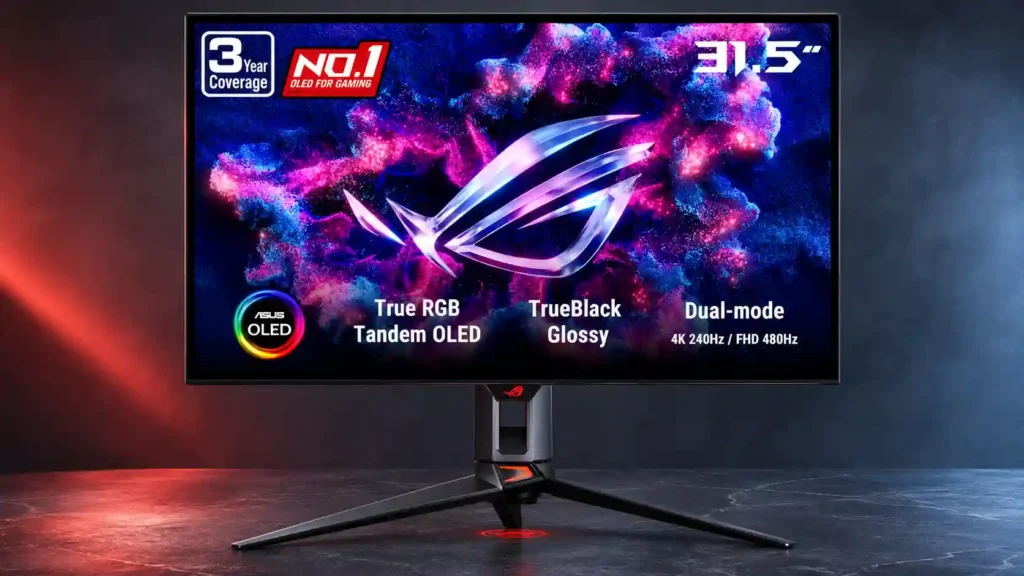
The RGB-stripe OLED is exceptionally sharp for text and brilliantly fast for gaming at 4K 240Hz or 1080p 480Hz. However, uneven HDR brightness, glossy reflections and a steep price make it a selective upgrade.

Enthusiasts who want one sharp 4K screen for desktop work, text-rich games, cinematic titles and fast competitive play, with 480Hz available when speed matters most.

Budget shoppers, people needing the brightest and most accurate HDR, or users with strong window reflections. Extensive static desktop use also requires OLED burn-in precautions.

Verdict

The PG32UCWM makes an unusually persuasive case for a single monitor that serves both a high-end gaming PC and a text-heavy workday. Its RGB-stripe Tandem WOLED panel produces exceptionally clean fonts, deep blacks and strong color accuracy when properly configured. Games are exceptionally responsive at 4K 240Hz, while the optional 1080p 480Hz mode supplies a worthwhile advantage for fast competitive titles. Useful USB-C, KVM and picture-by-picture options strengthen the all-round package. The catch is that its glossy finish can mirror nearby lights, and its HDR performance is less consistently impressive than the contrast suggests. Brighter HDR settings may lift shadows or undermine accuracy, while newer QD-OLED competitors can deliver stronger full-screen brightness and vividness. The wide stand and premium price add further friction. This is an excellent choice for gamers who also prioritize text clarity, but not an automatic upgrade for everyone who already owns a capable 4K OLED.

Feature Scorecards

Summary

90 reviewed features
  • Very positive 4.5-5.0
    53 (59%)
  • Positive 3.5-4.4
    18 (20%)
  • Neutral 2.5-3.4
    15 (17%)
  • Negative 1.5-2.4
    4 (4%)

Pros highlights

  • 5.0
    9 reviews strong consensus
    black levels: 5.0, 9 reviews, strong consensus
    Deep OLED blacks are a standout, and the WOLED design holds black depth unusually well even with ambient room lighting.
  • 5.0
    9 reviews strong consensus
    sharpness: 5.0, 9 reviews, strong consensus
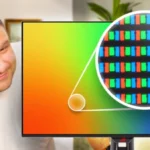
    The standard RGB-stripe layout and 4K resolution yield razor-sharp images and unusually clean fonts for a glossy gaming OLED.
  • 5.0
    9 reviews strong consensus
    Text fringing: 5.0, 9 reviews, strong consensus
    The familiar RGB stripe virtually eliminates the colored borders around text seen on many earlier OLEDs, especially useful for reading and office work.
  • 4.5
    8 reviews moderate consensus
    color accuracy: 4.5, 8 reviews, moderate consensus
    sRGB and calibrated modes can look exceptionally accurate, but the default wide-gamut SDR setting may oversaturate colors and the boosted HDR setting can distort tracking.
  • 3.8
    8 reviews moderate consensus
    HDR performance: 3.8, 8 reviews, moderate consensus
    HDR can look excellent in dark, high-contrast scenes, but limited full-screen brightness and imperfect bright-mode tracking keep it behind the best alternatives.
  • 5.0
    7 reviews strong consensus
    design and aesthetics: 5.0, 7 reviews, strong consensus
    The translucent rear shell and ROG lighting look distinctive and premium, although the elaborate gamer styling is not universally subtle.

Cons highlights

  • 2.1
    7 reviews low consensus
    value for money: 2.1, 7 reviews, low consensus
    Pricing around flagship territory divides opinion: the sharp RGB-stripe panel and feature set impress, but much cheaper 4K OLEDs often deliver comparable gaming thrills.
  • 2.9
    7 reviews strong consensus
    brightness: 2.9, 7 reviews, strong consensus
    Large bright scenes and full-screen white are less punchy than on some newer competitors, despite strong small highlights and enough SDR output for many users.
  • 2.7
    6 reviews low consensus
    reflection handling: 2.7, 6 reviews, low consensus
    The glossy coating preserves clean blacks and sharpness but reflects nearby windows, lamps and faces more directly than matte finishes.
  • 3.3
    6 reviews low consensus
    viewing angles: 3.3, 6 reviews, low consensus
    Color remains attractive head-on, but greenish edge or off-axis shifts are reported, ranging from barely visible to strongly distracting depending on the tester.
  • 3.0
    5 reviews strong consensus
    Automatic brightness limiting: 3.0, 5 reviews, strong consensus
    Brightness can shift as bright content fills more of the screen. Uniform Brightness steadies desktop viewing, but sacrificing higher peaks and HDR consistency remains part of the compromise.
  • 2.3
    4 reviews strong consensus
    Desk footprint: 2.3, 4 reviews, strong consensus
    The three-pronged stand is stable but takes up considerable desk depth, potentially crowding a shallow workstation or large mousepad.

Use Cases

Best for

  • 5.0
    6 reviews strong consensus
    Desktop productivity: 5.0, 6 reviews, strong consensus
    The RGB-stripe panel removes much of the text fringing found on older OLEDs and makes long documents and spreadsheets more pleasant, although static use still raises burn-in considerations.
  • 5.0
    5 reviews strong consensus
    Mixed work-and-play setups: 5.0, 5 reviews, strong consensus
    Very sharp fonts, accurate SDR colors and dual gaming speeds make the monitor unusually capable for people sharing one screen between work and play.
  • 4.8
    6 reviews strong consensus
    HDR gaming: 4.8, 6 reviews, strong consensus
    Deep blacks, vivid neon lighting and fast response make dark cinematic games look striking; very bright scenes lack the sustained punch of brighter rivals.

Not ideal for

  • Budget-conscious buyers
    1.8
    6 reviews strong consensus
    Budget-conscious buyers: 1.8, 6 reviews, strong consensus
    The flagship pricing is difficult to justify against considerably cheaper 32-inch 4K OLED alternatives, especially when the extra sharpness matters little to a buyer.
  • Portrait orientation
    2.0
    3 reviews strong consensus
    Portrait orientation: 2.0, 3 reviews, strong consensus
    The included stand cannot pivot through 90 degrees, so portrait use requires a compatible external arm.

Compared With Category Average

Compared with other Monitors, this product is above average in local dimming performance, PC-based monitor controls, Control button responsiveness, near average in input lag, HDR adjustment controls, below average in value for money, Desk footprint, brightness.

Comparison summary

89 compared features
  • Above average 0.4+ pts higher
    56 (63%)
  • Same as average within 0.3 pts
    23 (26%)
  • Below average 0.4+ pts lower
    10 (11%)

Largest category differences

Attribute This product Category average Difference
local dimming performance 5.0 3.0 +2.0
value for money 2.1 3.8 -1.6
PC-based monitor controls 5.0 3.3 +1.7
Control button responsiveness 5.0 3.3 +1.7
Desk footprint 2.3 3.8 -1.6
KVM switch performance 4.5 2.9 +1.6
24-inch mode quality 4.0 2.5 +1.5
port selection 5.0 3.6 +1.4

Consider This Instead

If you want better value for money

Choose MSI MPG 274URDFW E16M. It scores 4.5 vs 2.1 for value for money, with a 4.0 overall score.

Compare

If you want better reflection handling

Choose Dell Alienware AW3426DW. It scores 4.4 vs 2.7 for reflection handling, with a 4.4 overall score.

Compare

If you want better viewing angles

Choose LG 27GX790A-B. It scores 5.0 vs 3.3 for viewing angles, with a 4.0 overall score.

Compare

Compared in Reviews

Products reviewers directly compared with this model, grouped into quick takeaways.

ROG Strix OLED XG32UCWMG

  • Compared: brightness and color The earlier WOLED can achieve stronger overall brightness, but the Swift raises saturated color brightness and reduces text artifacts.
  • Older model: panel clarity and luminance The Swift improves color precision and text clarity, but peak output remains more limited than on brighter RGWB WOLED models.
  • Older model: panel clarity and feature set The newer Swift improves color and text clarity and adds DisplayPort 2.1, while the Strix remains brighter overall.

ROG Swift OLED PG32UCDM Gen3 (PG32UCDM3)

  • Better: HDR brightness and color The Gen3 QD-OLED is brighter, broader in color gamut and more flexible in HDR modes, although it lacks the Swift’s 480Hz dual mode.
  • Worse: text sharpness In side-by-side productivity work, the Swift’s RGB-stripe text appears sharper than on the QD-OLED Gen3.
  • Compared: color brightness and text rendering The Gen3 QD-OLED is brighter and more vivid, but the PG32UCWM has cleaner text and darker-looking blacks in bright rooms.

ROG Swift OLED PG32UCDP

  • Compared: HDR brightness The older PG32UCDP hits higher brightness in some window tests, despite the Swift’s newer RGB-stripe text improvement.
  • Older model: glossy coating and text clarity Compared with the older PG32UCDP, the Swift presents clearer text and a grain-free glossy image, though it is more reflective.
  • Older model: text clarity and coating The PG32UCWM has less text fringing, better color and newer DisplayPort, but its glossy screen reflects more than the PG32UCDP’s matte finish.

FAQ

Is the PG32UCWM good for competitive gaming?

Yes. It offers 4K at 240Hz or a faster 1080p 480Hz mode with very low latency. The faster mode sacrifices sharpness, particularly in its smaller simulated screen sizes.

Does the RGB-stripe OLED panel improve text clarity?

Yes. Traditional RGB subpixels largely eliminate the colored fringing of many older OLED monitors, making documents, browser text and text-heavy games noticeably cleaner.

How bright is its HDR picture?

Small highlights can be very striking, but bright full-screen scenes are relatively restrained. Pushing adjustable HDR brighter can raise dark-scene luminance and reduce accuracy.

Will the glossy screen work in a bright room?

It keeps blacks dark better than many QD-OLED alternatives, even with ambient light. However, direct windows and lights can create visible mirror reflections, so placement matters.

Can it replace a separate work monitor?

Its 4K detail, calibrated SDR colors, USB-C charging and KVM options make mixed work-and-play use practical. Extensive static desktop use still carries OLED burn-in risk.

Does it include speakers or a portrait stand?

No built-in speakers are provided, and the stock stand supports height, tilt and swivel but not 90-degree rotation. A headphone jack and included VESA adapter offer workarounds.

Is it worth paying extra over other 32-inch OLEDs?

It is most compelling if clean text and a 480Hz option matter to you. Shoppers who chiefly want the brightest HDR or the lowest price may find better value elsewhere.

Sample Expert Reviews We Analyzed

These are a few of the reviews included in our analysis.

Video Reviews

Article Reviews

rtings.com

The ASUS ROG Swift OLED PG32UCWM is a high-end 4k, 32-inch OLED gaming monitor. Sitting alongside the smaller ASUS ROG Swift OLED PG27UCWM...

Review score
4.3

Top Monitors to Consider

#1 Asus ROG Swift 34 QD-OLED PG34WCDN
4.5

This 360Hz QD-OLED ultrawide delivers exceptional gaming motion, vibrant HDR and dramatically cleaner text. Its high price, less-than-perfect bright-room blacks and occasional HDR dimming are the main reasons to hesitate.

Pros: color gamut, contrast

Cons: value for money, Resolution

#2 Dell U4025QW
4.4

A huge, sharp ultrawide workspace and unusually capable Thunderbolt dock make the U4025QW outstanding for demanding productivity and editing. Its high price, modest HDR, and imperfect motion handling keep it...

Pros: overall picture quality, color accuracy

Cons: value for money, built-in speakers

#3 ASUS ROG Strix OLED XG27ACDNG
4.4

Lightning-fast 360Hz OLED gaming, rich color and an unusually flexible USB-C/KVM setup are the big draws. Strong room lighting, limited full-screen HDR brightness and static-content burn-in concerns keep it from...

Pros: color gamut, overall satisfaction

Cons: reflection handling, VRR flicker

#4 ASUS ROG Swift OLED PG27UCDM
4.4

The 27-inch 4K OLED picture is exceptionally crisp and responsive, with useful USB-C and KVM extras. Its high price, oversized stand, and bright-room compromises limit its appeal.

Pros: sharpness, overall satisfaction

Cons: value for money, VRR flicker