If you want better black levels
Choose LG 27GX790A-B. It scores 5.0 vs 2.2 for black levels, with a 4.0 overall score.

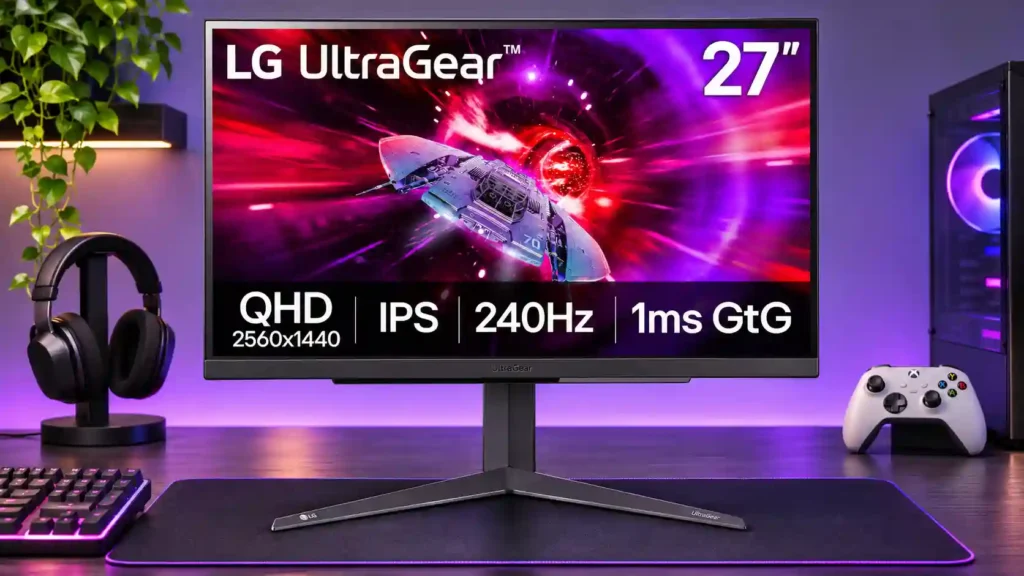
Excellent 1440p/240Hz speed, low latency, and HDMI 2.1 make this a strong PC-and-console gaming monitor at a discount. Weak HDR, limited blacks, and sparse productivity extras keep it from being an all-purpose standout.
Competitive PC players who want smooth 1440p/240Hz gaming and console owners needing HDMI 2.1, 120Hz, and VRR. It suits value-focused buyers especially well when discounted.
HDR enthusiasts and dark-room cinematic gamers who prioritize deep blacks and vivid highlights. USB-C laptop dockers and office-first users seeking an integrated KVM or compact base may also prefer another monitor.
The LG 27GR83Q-B gets the important gaming fundamentals right. Its 27-inch 1440p IPS panel, 240Hz refresh rate, low input lag, and well-controlled motion make fast PC games feel responsive without demanding 4K-level graphics power. Full-bandwidth HDMI 2.1 also makes it unusually convenient for PS5 and Xbox gaming, including 120Hz signals and VRR. The bright SDR picture, wide viewing angles, and strong calibration options give it more flexibility than a pure esports display. Its limits are just as clear: blacks are shallow, there is no meaningful local dimming, and HDR looks flat next to good mini-LED or OLED alternatives. The broad stand and lack of USB-C docking may also frustrate office users. Price is decisive. At a substantial discount it is a convincing high-refresh buy; at its original $500 positioning, several alternatives deserve a closer look.
Compared with other Monitors, this product is above average in VRR flicker, Image scaling, Display-mode switching reliability, near average in overall satisfaction, input lag, below average in HDR highlight detail, single-player cinematic gaming suitability, productivity versatility.
| Attribute | This product | Category average | Difference |
|---|---|---|---|
| HDR highlight detail | 1.0 | 3.4 | -2.4 |
| single-player cinematic gaming suitability | 2.0 | 4.4 | -2.4 |
| productivity versatility | 2.0 | 4.2 | -2.2 |
| VRR flicker | 5.0 | 3.0 | +2.0 |
| local dimming performance | 1.0 | 2.9 | -1.9 |
| Image scaling | 5.0 | 3.1 | +1.9 |
| Display-mode switching reliability | 4.5 | 2.6 | +1.9 |
| gaming image presets | 2.0 | 3.8 | -1.8 |
Choose LG 27GX790A-B. It scores 5.0 vs 2.2 for black levels, with a 4.0 overall score.
Choose MSI MPG 274URDFW E16M. It scores 5.0 vs 2.0 for productivity versatility, with a 4.0 overall score.
Choose ASUS ROG Strix Pulsar XG27AQNGV. It scores 4.9 vs 1.5 for Backlight strobing, with a 3.9 overall score.
Choose MSI MAG 274QPF X30MV. It scores 5.0 vs 2.0 for single-player cinematic gaming suitability, with a 3.9 overall score.
Products reviewers directly compared with this model, grouped into quick takeaways.
Yes. It supports 1440p at up to 240Hz, including through full-bandwidth HDMI 2.1, but your PC must produce high frame rates to make the most of it.
Yes. The HDMI 2.1 ports support useful console gaming functions including high-frame-rate 120Hz output and VRR; it can also accept a 4K/120Hz signal and downscale it to 1440p.
Usually not if you expect a dramatic HDR upgrade. With no effective local dimming and limited contrast, HDR highlights and dark scenes lack impact, and one owner preferred SDR.
240Hz and low input lag are strengths. Fast overdrive is a broadly useful choice at higher refresh rates; around 60Hz, Normal is often cleaner.
Yes for ordinary SDR work, especially after adjusting sRGB settings or calibrating. More demanding color work and HDR grading are less suitable.
No. It has HDMI 2.1, DisplayPort, a two-port USB-A hub, and headphone audio, but no built-in speakers or USB-C video/power docking.
Several reviewers favor it near $300–$400, with $350–$400 often discussed as attractive. At $500, competing mini-LED and 240Hz alternatives weaken its value.
These are a few of the reviews included in our analysis.

The LG 27GR83Q is a 27" 1440p 240Hz gaming monitor based on an IPS panel with a fast 1ms GtG response time and a wide 95% DCI-P3 color gamut.
Upgrade your gaming setup with the LG 27GR83Q-B 27-inch UltraGear QHD Gaming Monitor, now 40% off on Amazon. Experience lightning-fast 240Hz...
The LG 27GR83Q-B is a mid-range 27-inch, 1440p gaming monitor. Part of the 2023 UltraGear gaming lineup, it's a step-down model from the LG...
For PC gamers not using the latest high-end GPUs, 1440p gaming monitors provide an excellent compromise for playing at high refresh rates...
The LG 27 UltraGear Gaming Monitor (27GR83Q) is a great pick for users who own midrange PCs and favor performance and panel quality over an...

This 360Hz QD-OLED ultrawide delivers exceptional gaming motion, vibrant HDR and dramatically cleaner text. Its high price, less-than-perfect bright-room blacks and occasional HDR dimming are the main reasons to hesitate.
Pros: color gamut, contrast
Cons: value for money, Resolution

The 360Hz QD-OLED panel delivers exceptional HDR gaming, responsive motion, and cleaner text than earlier ultrawides. Its 3440×1440 resolution is less sharp than 4K, and premium pricing remains a hurdle.
Pros: refresh rate, Text fringing
Cons: Resolution, GPU demands

A huge, sharp ultrawide workspace and unusually capable Thunderbolt dock make the U4025QW outstanding for demanding productivity and editing. Its high price, modest HDR, and imperfect motion handling keep it...
Pros: overall picture quality, color accuracy
Cons: value for money, built-in speakers

Lightning-fast 360Hz OLED gaming, rich color and an unusually flexible USB-C/KVM setup are the big draws. Strong room lighting, limited full-screen HDR brightness and static-content burn-in concerns keep it from...
Pros: color gamut, overall satisfaction
Cons: reflection handling, VRR flicker