Dell Alienware AW3426DW

Dell Alienware AW3426DW Monitor Review

Brand: Dell
Released: July 9, 2026
Updated: 17 hours ago
4.4
Overall review score
575
Review insights
88
Scored features
21
Expert reviews

Bottom Line

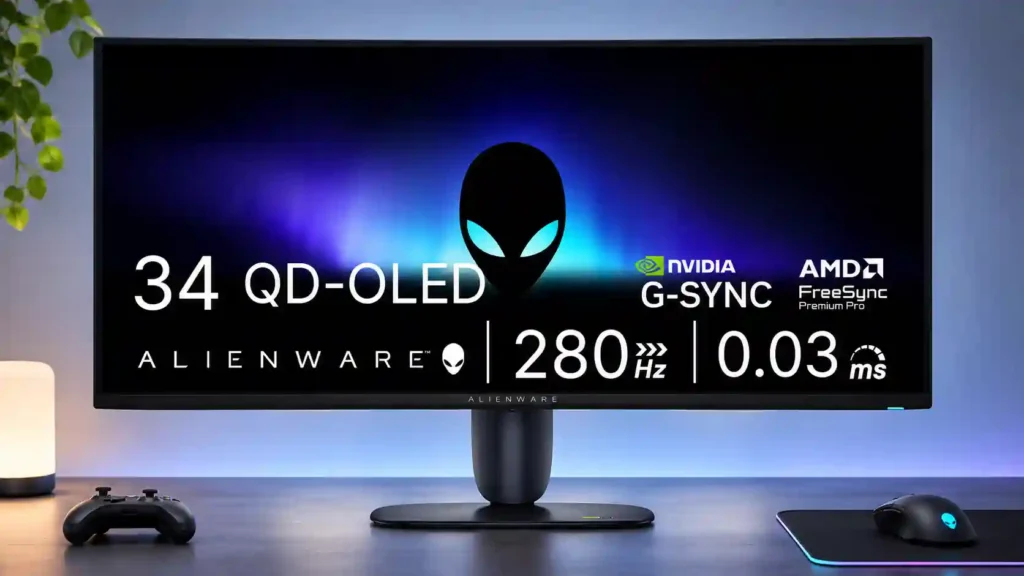
The AW3426DW brings vivid, fast ultrawide OLED gaming and much clearer text at an appealing price. Its missing USB-C video, KVM, and speakers make it less versatile than premium rivals.

PC gamers wanting immersive 21:9 HDR visuals, speedy motion and clearer text for occasional desktop work, without paying for flagship-level extras.

People who need single-cable USB-C laptop docking or a built-in KVM, and console-first players who prefer a full 16:9 picture. Competitive players pursuing every possible hertz may want a faster display.

Verdict

The Alienware AW3426DW gets the important things right for a gaming-first ultrawide: excellent OLED contrast, vibrant HDR, nearly instantaneous response times and a smooth 280Hz refresh rate. Its new RGB-stripe panel finally makes text much clearer for work as well as play, and a revised coating makes daylight use less frustrating. Reviewers repeatedly praise the value of receiving these improvements without moving into the price range of 360Hz flagships. There are tradeoffs. Peak HDR modes can dim full-screen scenes or distort intended brightness, and reflections are not completely eliminated. More importantly, the limited connectivity omits USB-C video, a KVM switch, audio output and speakers. Console owners also inherit the awkwardness of a 21:9 panel. For PC gamers who want immersion and image quality more than docking features or maximum esports speed, this is a very convincing buy.

Feature Scorecards

Summary

88 reviewed features
  • Very positive 4.5-5.0
    50 (57%)
  • Positive 3.5-4.4
    21 (24%)
  • Neutral 2.5-3.4
    12 (14%)
  • Negative 1.5-2.4
    3 (3%)
  • Very negative below 1.5
    2 (2%)

Pros highlights

  • 5.0
    20 reviews strong consensus
    brightness: 5.0, 20 reviews, strong consensus
    The five-layer panel is noticeably brighter in SDR and produces vivid, high-impact HDR highlights. Large bright HDR scenes remain more constrained than small specular effects.
  • 4.9
    19 reviews strong consensus
    value for money: 4.9, 19 reviews, strong consensus
    The newest QD-OLED image quality at around the original $800 launch price impresses many testers, though some would pay more for richer connectivity.
  • 5.0
    18 reviews strong consensus
    overall satisfaction: 5.0, 18 reviews, strong consensus
    The monitor earns enthusiastic recommendations as an approachable high-end OLED ultrawide, with connectivity and some specialist features trimmed to contain the price.
  • 4.8
    18 reviews strong consensus
    Text fringing: 4.8, 18 reviews, strong consensus
    The new RGB-stripe structure largely fixes the colored outlines around fine text that bothered older QD-OLEDs, although one tester still noticed some fringing.
  • 4.4
    17 reviews strong consensus
    reflection handling: 4.4, 17 reviews, strong consensus
    The revised anti-reflective coating noticeably cuts the old magenta tint and distracting glare. Direct reflections still matter more than on some WOLED alternatives.
  • 4.5
    16 reviews strong consensus
    refresh rate: 4.5, 16 reviews, strong consensus
    At 280Hz the screen feels extremely smooth and offers a useful step up from older models. It deliberately stops short of pricier 360Hz esports-focused options.

Cons highlights

  • 2.7
    9 reviews strong consensus
    port selection: 2.7, 9 reviews, strong consensus
    Two HDMI 2.1 inputs and DisplayPort cover core video needs, while limited USB, no audio jack and no video-capable USB-C leave the hub side basic.
  • 1.9
    6 reviews strong consensus
    built-in speakers: 1.9, 6 reviews, strong consensus
    There are no integrated speakers, so games and videos require an external audio solution. Several testers consider that an inconvenient omission.
  • 2.9
    6 reviews strong consensus
    DisplayPort connectivity: 2.9, 6 reviews, strong consensus
    DisplayPort 1.4 with compression handles native gaming well, but enthusiasts miss the newer DisplayPort 2.1 bandwidth and uncompressed option.
  • 3.1
    6 reviews moderate consensus
    Automatic brightness limiting: 3.1, 6 reviews, moderate consensus
    Desktop brightness is fairly steady, but high-peak HDR modes can dim brighter full-screen scenes. The modes trade consistency against dramatic small highlights.
  • 3.4
    6 reviews strong consensus
    Resolution: 3.4, 6 reviews, strong consensus
    3440×1440 suits immersive gaming and side-by-side windows without 4K's graphics demands, but it cannot match the text detail of higher-density 4K screens.
  • 1.0
    5 reviews strong consensus
    KVM switch performance: 1.0, 5 reviews, strong consensus
    There is no integrated KVM switch for sharing peripherals between computers, a notable compromise compared with more fully equipped competitors.

Use Cases

Best for

  • 4.8
    16 reviews strong consensus
    Desktop productivity: 4.8, 16 reviews, strong consensus
    The 21:9 workspace fits multiple windows comfortably, and improved text rendering makes office work much nicer than on earlier OLED generations. Limited docking features reduce all-in-one convenience.
  • 5.0
    7 reviews strong consensus
    HDR gaming: 5.0, 7 reviews, strong consensus
    Bright flashes, dark environments and vivid colors make HDR games spectacular, with little apparent input penalty. Best results depend on the chosen HDR preset.
  • 4.3
    15 reviews strong consensus
    Bright-room viewing: 4.3, 15 reviews, strong consensus
    Improved surface treatment and higher brightness make daytime use far more practical than older QD-OLED ultrawides. Reflections and some black-level lift remain possible opposite bright windows.

Not ideal for

  • USB-C laptop docking
    1.1
    7 reviews strong consensus
    USB-C laptop docking: 1.1, 7 reviews, strong consensus
    Despite its downstream USB-C socket, there is no USB-C video input or single-cable docking for laptops.
  • Single-cable laptop docking
    1.0
    4 reviews strong consensus
    Single-cable laptop docking: 1.0, 4 reviews, strong consensus
    The USB-C port cannot carry display video, preventing the one-cable laptop connection offered by better-equipped alternatives.

Compared With Category Average

Compared with other Monitors, this product is above average in Video cadence compatibility, HDR performance, Dolby Vision support, near average in refresh rate, design and aesthetics, below average in Headphone output quality, KVM switch performance, Color calibration controls.

Comparison summary

87 compared features
  • Above average 0.4+ pts higher
    53 (61%)
  • Same as average within 0.3 pts
    16 (18%)
  • Below average 0.4+ pts lower
    18 (21%)

Largest category differences

Attribute This product Category average Difference
Headphone output quality 1.2 3.4 -2.2
KVM switch performance 1.0 3.0 -2.0
Video cadence compatibility 5.0 3.1 +1.9
HDR performance 4.9 3.4 +1.5
Dolby Vision support 4.2 2.7 +1.5
Color calibration controls 2.6 4.1 -1.5
local dimming performance 5.0 3.4 +1.6
screen coating durability 4.6 3.2 +1.4

Consider This Instead

If you want better KVM switch performance

Choose TCL 32R84. It scores 4.5 vs 1.0 for KVM switch performance, with a 4.2 overall score.

Compare

If you want better SDR/HDR mode switching

Choose Dell Alienware AW2725DF. It scores 5.0 vs 2.5 for SDR/HDR mode switching, with a 4.2 overall score.

Compare

Compared in Reviews

Products reviewers directly compared with this model, grouped into quick takeaways.

  • Similar: brightness and refresh rate Dell closely matches HDR brightness but runs at 280Hz rather than MSI’s 360Hz.
  • Alternative: price, refresh and hub extras The MSI reaches 360Hz and has USB-C/KVM functions, though it costs more.
  • More expensive: price and features Dell undercuts the MSI while giving up its higher-spec connectivity.

Dell Alienware AW3425DW

  • Older model: overall screen performance The newer display improves the previous 34-inch OLED across several image-quality dimensions.
  • Older model: brightness, text and price Dell improves panel quality without increasing the launch price.
  • Older model: brightness, black levels and text The newer display raises brightness and improves text and ambient-light performance.

ASUS ROG Swift OLED PG34WCDN

  • More expensive: price and refresh rate The 280Hz model is cheaper than ASUS’s 360Hz edition.
  • More expensive: price and feature set Alienware uses similar panel technology for significantly less money, sacrificing some extras.
  • More expensive: price and refresh A lower refresh ceiling enables a more accessible asking price than the ASUS rival.

FAQ

Is the Alienware AW3426DW good for PC gaming?

Yes. The 34-inch 21:9 QD-OLED combines excellent contrast, vibrant HDR, fast pixel response and smooth 280Hz operation for immersive PC games.

Is text clearer than on older QD-OLED ultrawides?

Yes. Its RGB-stripe subpixel layout largely eliminates the colored text fringing associated with earlier panels, although its 3440×1440 resolution is not as crisp as 4K.

Does it support one-cable USB-C laptop docking?

No. Its USB-C socket is for downstream data and low-power charging, not a video input or laptop dock.

What are the HDR strengths and compromises?

Deep blacks and striking small highlights are strengths. True Black favors more consistent brightness, while Peak 1300 modes prioritize highlights and may dim or overbrighten some scenes.

Will it work well with an Xbox or PlayStation?

It can accept compatible console signals, including up to 4K 120Hz with the appropriate mode, but consoles do not fill its ultrawide aspect ratio. No speakers or audio output are built in.

Is 280Hz enough for competitive gaming?

It is very smooth and has an esports crop mode, but dedicated 16:9 monitors with higher refresh rates may be preferable for highly competitive players.

Is burn-in covered by the warranty?

The reviews describe three-year coverage that includes OLED burn-in, alongside automatic pixel care; they also note that the care controls are limited.

Sample Expert Reviews We Analyzed

These are a few of the reviews included in our analysis.

Video Reviews

Article Reviews

rtings.com

The Dell Alienware AW3426DW is a high-end ultrawide gaming monitor. With a 34-inch screen, 3440x1440 resolution, and 280Hz refresh rate, it's...

Review score
4.3

Top Monitors to Consider

#1 Asus ROG Swift 34 QD-OLED PG34WCDN
4.5

This 360Hz QD-OLED ultrawide delivers exceptional gaming motion, vibrant HDR and dramatically cleaner text. Its high price, less-than-perfect bright-room blacks and occasional HDR dimming are the main reasons to hesitate.

Pros: color gamut, contrast

Cons: value for money, Resolution

#2 ASUS ROG Strix OLED XG27ACDNG
4.4

Lightning-fast 360Hz OLED gaming, rich color and an unusually flexible USB-C/KVM setup are the big draws. Strong room lighting, limited full-screen HDR brightness and static-content burn-in concerns keep it from...

Pros: color gamut, overall satisfaction

Cons: reflection handling, VRR flicker

#3 ASUS ROG Swift OLED PG27UCDM
4.4

The 27-inch 4K OLED picture is exceptionally crisp and responsive, with useful USB-C and KVM extras. Its high price, oversized stand, and bright-room compromises limit its appeal.

Pros: sharpness, overall satisfaction

Cons: value for money, VRR flicker

#4 MSI MPG 322UR QD-OLED X24
4.4

Best for exceptional 4K HDR, accurate color, fast 240Hz gaming, and strong work connectivity. Skip it if you need built-in speakers, ultrawide immersion, television-level HDR brightness, or a budget-friendly upgrade.

Pros: brightness, reflection handling

Cons: cable management