If you want better local dimming performance
Choose ASUS ROG Swift OLED PG27UCDM. It scores 5.0 vs 1.0 for local dimming performance, with a 4.4 overall score.

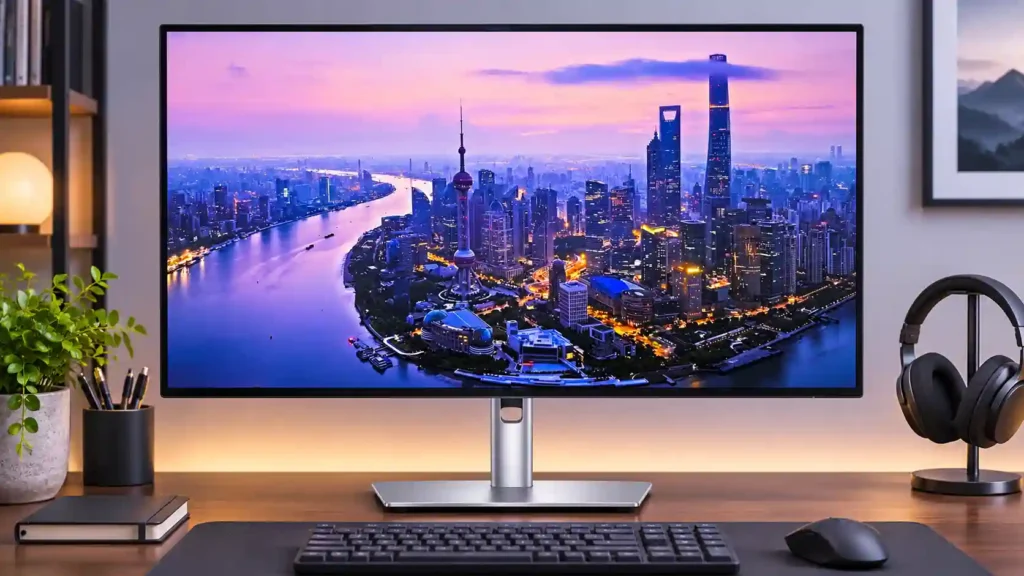
An excellent 4K/120Hz office hub with Thunderbolt 4, powerful laptop charging and easy device sharing, but slow pixel response, weak HDR dimming and occasional uniformity problems make it less convincing for gaming and exacting creative work.
Laptop-centered office desks, MacBook productivity, programmers and people managing two computers benefit from the crisp 4K screen, 120Hz scrolling, Thunderbolt charging and shared peripherals.
Competitive gamers, buyers seeking impressive HDR, color professionals demanding uniform brightness, and shoppers who do not need a high-end USB hub are better served by more focused or less expensive monitors.
The Dell U2725QE is most persuasive as a complete workstation hub rather than simply a 27-inch 4K panel. Sharp text, rich IPS Black contrast and notably smoother 120Hz scrolling make office work satisfying, while Thunderbolt 4, high-power laptop charging, abundant USB ports and a KVM can replace several desk accessories. Its compact, adjustable stand also suits two-screen desks. The compromise is display performance outside that comfort zone: pixel transitions leave visible blur in fast games, and crude HDR local dimming causes blooming. Some tests also found darker screen edges or inconsistent color across the panel, a concern for demanding visual work. At its premium price, the docking convenience needs to be something you will actually use. If gaming, precise edge-to-edge grading or cinematic HDR matters most, a more specialized display makes better sense.
Compared with other Monitors, this product is above average in KVM switch performance, USB-C power delivery, USB hub functionality, near average in refresh rate, overall satisfaction, below average in local dimming performance, response time, overdrive tuning.
| Attribute | This product | Category average | Difference |
|---|---|---|---|
| local dimming performance | 1.0 | 3.6 | -2.6 |
| response time | 1.6 | 4.1 | -2.5 |
| overdrive tuning | 1.5 | 3.9 | -2.4 |
| motion clarity | 1.9 | 4.2 | -2.4 |
| ghosting control | 1.4 | 3.7 | -2.3 |
| Included accessories | 2.0 | 4.1 | -2.1 |
| KVM switch performance | 4.8 | 2.9 | +1.9 |
| competitive gaming suitability | 1.5 | 3.3 | -1.8 |
Choose ASUS ROG Swift OLED PG27UCDM. It scores 5.0 vs 1.0 for local dimming performance, with a 4.4 overall score.
Choose LG 27GM950B-B. It scores 4.4 vs 1.5 for competitive gaming suitability, with a 4.0 overall score.
Choose ASUS ROG Swift OLED PG32UCDM Gen3. It scores 5.0 vs 1.4 for ghosting control, with a 4.2 overall score.
Choose AOC Q27G3XMN. It scores 5.0 vs 2.0 for Included accessories, with a 3.9 overall score.
Products reviewers directly compared with this model, grouped into quick takeaways.
Yes. Crisp 4K text, smoother 120Hz scrolling, adjustable ergonomics and a generous docking hub make it especially strong for daily productivity.
Yes, compatible Thunderbolt 4 laptops can receive up to 140W power along with display and data. It can often replace a separate dock and laptop charger.
It supports up to 4K at 120Hz, including modern console signals, and slower games can be enjoyable. Fast motion tends to blur and aggressive overdrive can create ghosting, so competitive gamers should look elsewhere.
HDR can be bright and colorful, but the limited edge-lit dimming frequently produces blooming and visible brightness shifts. It is far below strong mini-LED or OLED HDR performance.
Yes. Its KVM can switch connected keyboard, mouse and USB devices between two computers, with picture-by-picture support. The optional Dell software is less consistently polished.
It offers downstream Thunderbolt and DisplayPort connections, but available bandwidth and the computer’s support determine which multi-screen configurations work. Full 4K/120Hz daisy chains are not guaranteed.
Its wide-gamut calibrated modes can be accurate, but several tests found dim edges or uneven color across the panel. Work requiring uniformity across the entire screen deserves caution.
These are a few of the reviews included in our analysis.

In-depth review of the Dell UltraSharp U2725QE. We benchmark its 2000:1 IPS Black contrast, 120Hz refresh rate, Thunderbolt 4 hub, and...
It's the best-looking LCD I've ever seen, and the built-in TB4 hub is a game-changer.
Discover the best new music, travel, film, gaming, arts, food, culture and book content on Australia's premier independent online...
With an upgraded 4K 120Hz panel, Thunderbolt 4 and improved HDR, this is the most versatile 27in Dell UltraSharp yet
Another fine addition to the UltraSharp family, but the U2725QE's gaming talents still fall short despite the upgrades

The 27-inch 4K OLED picture is exceptionally crisp and responsive, with useful USB-C and KVM extras. Its high price, oversized stand, and bright-room compromises limit its appeal.
Pros: sharpness, overall satisfaction
Cons: value for money, VRR flicker

Best for exceptional 4K HDR, accurate color, fast 240Hz gaming, and strong work connectivity. Skip it if you need built-in speakers, ultrawide immersion, television-level HDR brightness, or a budget-friendly upgrade.
Pros: brightness, reflection handling
Cons: cable management

Best for class-leading 360Hz ultrawide motion, spectacular HDR, deep blacks, and unusually strong work-and-play connectivity. Skip it if you want 4K-like text sharpness, a matte screen, or the best value...
Pros: overall satisfaction, sharpness
Cons: Resolution, cable management

Choose the RD280UG for coding, trading, writing, or creative work that benefits from a tall, sharp 3:2 screen and strong eye-care features. Skip it for serious HDR, color-critical creation, esports,...
Pros: productivity versatility, aspect ratio
Cons: value for money, competitive gaming suitability