Skip to content
Scorata
  • Entertainment
    • Movies
    • TV Shows
    • Video Games
  • Gaming
    • Gaming Keyboards
    • Gaming Mice
    • Headsets
    • Video Games
    • Video Game Controllers
  • Headphones
    • Earbud Headphones
    • Headsets
    • Open-Ear Headphones
    • Over-Ear Headphones
  • Home
    • Air Purifiers
    • Coffee Machines
    • Home Security
      • Cameras
      • Doorbells
      • Home Security Systems
    • Smart Home
      • Smart Locks
      • Smart Thermostats
    • Vacuums
      • Carpet Cleaning Machines
      • Handheld Vacuums
      • Robotic Vacuums
      • Shop Wet Dry Vacuums
      • Stick Vacuums & Electric Brooms
      • Upright Vacuums
  • Speakers
    • Bookshelf Speakers
    • Portable Bluetooth Speakers
    • Sound Bars
  • Wearable Tech
    • Activity & Fitness Trackers
    • Smart Glasses
    • Smart Watch
  1. Home
  2. Electronics
  3. Monitors
  4. Multi-computer workflows

Best Monitors for Multi-computer workflows

What matters
brightness build quality color accuracy color gamut competitive gaming suitability contrast design and aesthetics eye comfort features on-screen display usability panel type port selection premium feel productivity versatility reflection handling refresh rate Resolution screen size sharpness software support stand adjustability
Best for
All use cases Multi-computer workflows
Multi-computer workflows
Explore: brightnessbuild quality
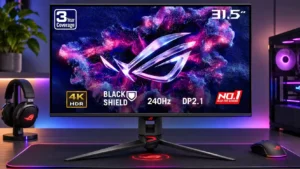
#1 ASUS ROG Swift OLED PG32UCDM Gen3
ASUS ROG Swift OLED PG32UCDM Gen3
5.0

The KVM and USB-C connection make switching between a laptop and desktop convenient, although different per-input color profiles are not remembered automatically.

Pros: overall satisfaction, black levels

Cons: value for money, stand adjustability

  • About
  • Contact Us
  • Privacy Policy
Follow Us

© 2026 Scorata. All rights reserved.