If you want better gaming image presets
Choose Alienware 27 4K Gaming Monitor AW2725Q. It scores 4.0 vs 2.0 for gaming image presets, with a 4.3 overall score.

Choose it for exceptional 4K HDR, accurate color, fast 240Hz gaming, and strong work connectivity. Skip it if you need built-in speakers, ultrawide immersion, television-level HDR brightness, or a budget-friendly upgrade.
Best for high-end PC and console gamers who want a sharp 32-inch 4K OLED for cinematic games, fast play, and daytime productivity. USB-C, KVM support, and strong calibration also suit mixed gaming-and-work setups.
Skip it if you primarily play competitive esports on a smaller screen, need ultrawide or curved immersion, expect television-level HDR brightness, require built-in speakers, or want a low-cost monitor.
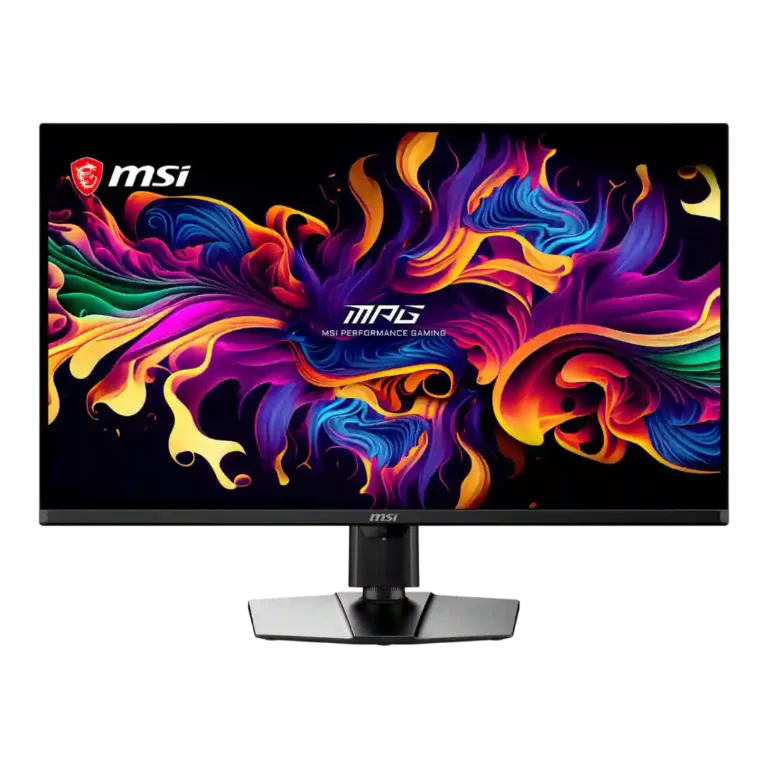
The MSI MPG 322UR QD-OLED X24 is one of the most complete 32-inch 4K gaming monitors available. Its Penta Tandem QD-OLED panel pairs near-perfect blacks, vivid wide-gamut color, excellent calibration, and exceptionally clean 240Hz motion with noticeably improved bright-room performance. DisplayPort 2.1a, dual HDMI 2.1, USB-C power delivery, KVM support, and a flexible stand make it equally convincing for high-end PC gaming, consoles, and daily productivity. The compromises are familiar rather than fatal: HDR brightness still trails premium OLED televisions and strong mini-LED displays, the glossy surface can reflect direct light, there are no speakers, and burn-in cannot be ruled out for prolonged static use. At $1,099 it is expensive, but its feature set and image quality justify the premium better than most same-class rivals.
Compared with other Monitors, this product is above average in HDR performance, screen uniformity, ghosting control, near average in refresh rate, viewing angles, below average in curved screen immersion, built-in speakers, gaming image presets.
| Attribute | This product | Category average | Difference |
|---|---|---|---|
| curved screen immersion | 1.5 | 3.8 | -2.3 |
| built-in speakers | 1.0 | 2.8 | -1.8 |
| HDR performance | 4.6 | 3.1 | +1.6 |
| gaming image presets | 2.0 | 3.6 | -1.6 |
| screen uniformity | 5.0 | 3.6 | +1.4 |
| ultrawide gaming experience | 2.5 | 3.8 | -1.3 |
| ghosting control | 5.0 | 3.8 | +1.3 |
| DisplayPort connectivity | 5.0 | 3.9 | +1.1 |
Choose Alienware 27 4K Gaming Monitor AW2725Q. It scores 4.0 vs 2.0 for gaming image presets, with a 4.3 overall score.
Choose Samsung Odyssey OLED G6 G60SF. It scores 5.0 vs 3.8 for VRR compatibility, with a 4.3 overall score.
Choose MSI MPG 341CQR QD-OLED X36. It scores 4.7 vs 1.5 for curved screen immersion, with a 4.4 overall score.
Choose Gigabyte MO27U2 Gaming Monitor. It scores 5.0 vs 4.3 for input lag, with a 4.1 overall score.
Products reviewers directly compared with this model, grouped into quick takeaways.
DarkArmor significantly reduces the purple tint and improves perceived black depth compared with older QD-OLED panels. Direct light can still create reflections and some raised blacks, so controlled placement remains helpful.
Yes. Its HDMI 2.1 ports support 4K at 120Hz, VRR, and CEC for modern Xbox and PlayStation systems. It has no speakers, and its black-frame-insertion mode is not available from a 120Hz console signal.
Probably not for gaming performance alone because resolution, refresh rate, and response remain similar. The upgrade makes more sense for buyers who specifically want brighter SDR, deeper bright-room blacks, DisplayPort 2.1a, or newer OLED Care features.
Yes. The 4K panel is sharp, the calibrated color modes are excellent, and USB-C power delivery plus KVM support simplify multi-device setups. Very faint text fringing can appear up close, but reviewers generally found it negligible at normal distance.
Burn-in remains possible with prolonged static content, but MSI includes pixel shifting, panel refresh routines, presence-based protection, and a three-year warranty that covers burn-in. Reviewers considered the practical risk manageable rather than eliminated.
These are a few of the reviews included in our analysis.

The MSI MPG 322UR QD-OLED X24 is a 32" 4K 240Hz gaming monitor with HDR True Black 500, DarkArmor Finish, DP 2.1, USB-C 98W PD, KVM and more!
MSI has debuted the MSI MPG 322UR QD-OLED X24, a 4K 240Hz fourth-generation Tandem QD-OLED gaming monitor that features DarkArmor Film.
The MSI MPG 322UR X24 packs Samsung's latest QD-OLED panel with 300 nits full-screen brightness, 240Hz, and near-perfect HDR into a 32-inch...
The MSI MPG 322UR QD-OLED X24 is a no-excuses 4K HDR OLED gaming experience.
MSI delivers blistering performance and pro-level color accuracy from its MPG 322UR X24 gaming monitor.

Best for exceptional 4K HDR, accurate color, fast 240Hz gaming, and strong work connectivity. Skip it if you need built-in speakers, ultrawide immersion, television-level HDR brightness, or a budget-friendly upgrade.
Pros: brightness, reflection handling
Cons: cable management

Best for class-leading 360Hz ultrawide motion, spectacular HDR, deep blacks, and unusually strong work-and-play connectivity. Skip it if you want 4K-like text sharpness, a matte screen, or the best value...
Pros: overall satisfaction, sharpness
Cons: Resolution, cable management

Choose the RD280UG for coding, trading, writing, or creative work that benefits from a tall, sharp 3:2 screen and strong eye-care features. Skip it for serious HDR, color-critical creation, esports,...
Pros: productivity versatility, aspect ratio
Cons: value for money, competitive gaming suitability

Best for fast 1440p OLED gaming, deep blacks, and a flexible stand at a bargain sale price. Skip it for bright rooms, USB-C/KVM productivity, or the reassurance of a three-year...
Pros: color gamut, overall picture quality
Cons: brightness, HDR performance