If you want better picture-in-picture and picture-by-picture
Choose ASUS ROG Swift OLED PG32UCDM Gen3. It scores 5.0 vs 2.0 for picture-in-picture and picture-by-picture, with a 4.2 overall score.

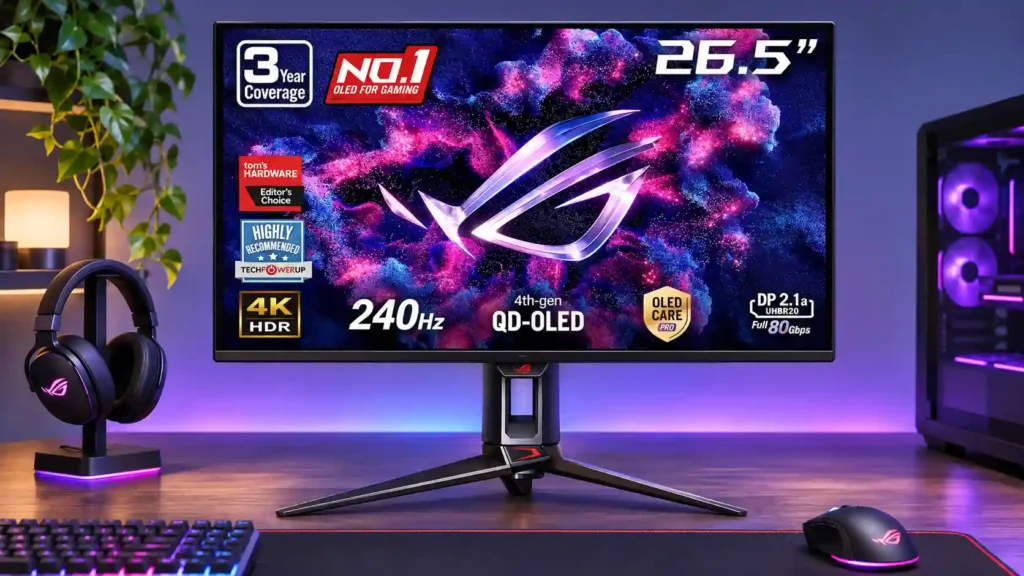
The 27-inch 4K OLED picture is exceptionally crisp and responsive, with useful USB-C and KVM extras. Its high price, oversized stand, and bright-room compromises limit its appeal.
Competitive PC players and HDR gamers who want very sharp 4K detail in a 27-inch display, especially in dim rooms. It also suits mixed laptop-and-desktop setups that benefit from USB-C and KVM.
Budget buyers, people working all day with fixed code or documents, and users who need a bright sunlit display. Those wanting more cinematic screen area may prefer a 32-inch OLED.
The PG27UCDM is one of the most compelling ways to get 4K detail and 240Hz smoothness in a 27-inch screen. Its dense QD-OLED panel makes fine text and game geometry unusually clean, while very fast pixel response, deep blacks, and vivid HDR highlights make games feel both sharp and cinematic. Full-bandwidth DisplayPort 2.1, HDMI 2.1, Dolby Vision, a KVM switch, and 90W USB-C power provide versatility beyond gaming. The tradeoffs are real: bright lights can raise black levels and cause reflections, HDR modes involve brightness-versus-accuracy compromises, and VRR flicker persists in some games. The deep three-legged stand is awkward on smaller desks, and long static work sessions carry OLED burn-in risk despite protective features. With similar competitors often costing less, the premium makes the most sense for someone who specifically wants this combination of 27-inch 4K sharpness, speed, and connectivity.
Compared with other Monitors, this product is above average in Firmware updateability, Blooming control, sleep and wake behavior, near average in overall satisfaction, single-player cinematic gaming suitability, below average in SDR/HDR mode switching, value for money, picture-in-picture and picture-by-picture.
| Attribute | This product | Category average | Difference |
|---|---|---|---|
| Firmware updateability | 5.0 | 1.8 | +3.3 |
| Blooming control | 5.0 | 2.7 | +2.3 |
| SDR/HDR mode switching | 1.5 | 3.6 | -2.1 |
| sleep and wake behavior | 4.7 | 2.7 | +2.0 |
| KVM switch performance | 4.7 | 2.9 | +1.8 |
| value for money | 2.2 | 3.9 | -1.7 |
| picture-in-picture and picture-by-picture | 2.0 | 3.7 | -1.7 |
| local dimming performance | 5.0 | 3.3 | +1.7 |
Choose ASUS ROG Swift OLED PG32UCDM Gen3. It scores 5.0 vs 2.0 for picture-in-picture and picture-by-picture, with a 4.2 overall score.
Choose Dell U2725QE. It scores 5.0 vs 2.7 for Desk footprint, with a 4.2 overall score.
Choose Samsung Odyssey OLED G6 G60SF. It scores 4.8 vs 3.0 for design and aesthetics, with a 4.3 overall score.
Choose MSI MPG 341CQR QD-OLED X36. It scores 5.0 vs 3.9 for screen size, with a 4.4 overall score.
Products reviewers directly compared with this model, grouped into quick takeaways.
Yes, through its full-bandwidth DisplayPort 2.1 connection with a compatible GPU and cable. Other connections can use display stream compression to reach high refresh rates.
Yes. It supports up to 4K at 120Hz on supported consoles; Xbox users also get Dolby Vision for compatible content. The 240Hz maximum is primarily a PC benefit.
It can handle ordinary indoor light, but direct lighting causes more obvious reflections and raises QD-OLED blacks toward gray or purple. A bright LCD is often better for sunlit spaces.
Text is unusually sharp for OLED and fringing is slight for most users. However, the need for scaling and prolonged static-content burn-in risk make all-day office use a conditional choice.
Its USB-C input carries video, data, and up to 90W of charging power to compatible laptops. The KVM switch can share connected keyboard and mouse peripherals between two computers.
There is still a risk of permanent burn-in with persistent static images, plus occasional VRR flicker in dark scenes. OLED-care controls and the proximity sensor help reduce wear but do not eliminate risk.
No. You will need headphones or external speakers for audio, though the monitor includes a headphone output.
These are a few of the reviews included in our analysis.


The ASUS ROG Swift OLED PG27UCDM review explains whether this 27-inch 4K 240Hz QD-OLED is worth $1,099, covering HDR, DisplayPort 2.1, USB-C...
The ASUS PG27UCDM is a 27" 4K 240Hz QD-OLED gaming monitor with USB-C (DP Alt Mode and 90W PD), DP 2.1, KVM and more!
Today we take a closer look at the ASUS ROG Swift PG27UCDM, the little brother of the PG32UCDM. This is another 4K OLED monitor with a...
27-inch 4K QD-OLED gaming monitor with 240 Hz, Adaptive-Sync, HDR10, and wide gamut color.
The ASUS ROG Swift OLED PG27UCDM is a high-end gaming monitor. It's one of the first to come out with a 4k, 240Hz 27-inch QD-OLED panel...

The 27-inch 4K OLED picture is exceptionally crisp and responsive, with useful USB-C and KVM extras. Its high price, oversized stand, and bright-room compromises limit its appeal.
Pros: sharpness, overall satisfaction
Cons: value for money, VRR flicker

Best for exceptional 4K HDR, accurate color, fast 240Hz gaming, and strong work connectivity. Skip it if you need built-in speakers, ultrawide immersion, television-level HDR brightness, or a budget-friendly upgrade.
Pros: brightness, reflection handling
Cons: cable management

Best for class-leading 360Hz ultrawide motion, spectacular HDR, deep blacks, and unusually strong work-and-play connectivity. Skip it if you want 4K-like text sharpness, a matte screen, or the best value...
Pros: overall satisfaction, sharpness
Cons: Resolution, cable management

Choose the RD280UG for coding, trading, writing, or creative work that benefits from a tall, sharp 3:2 screen and strong eye-care features. Skip it for serious HDR, color-critical creation, esports,...
Pros: productivity versatility, aspect ratio
Cons: value for money, competitive gaming suitability