If you want better reflection handling
Choose Dell Alienware AW3426DW. It scores 4.4 vs 2.0 for reflection handling, with a 4.4 overall score.

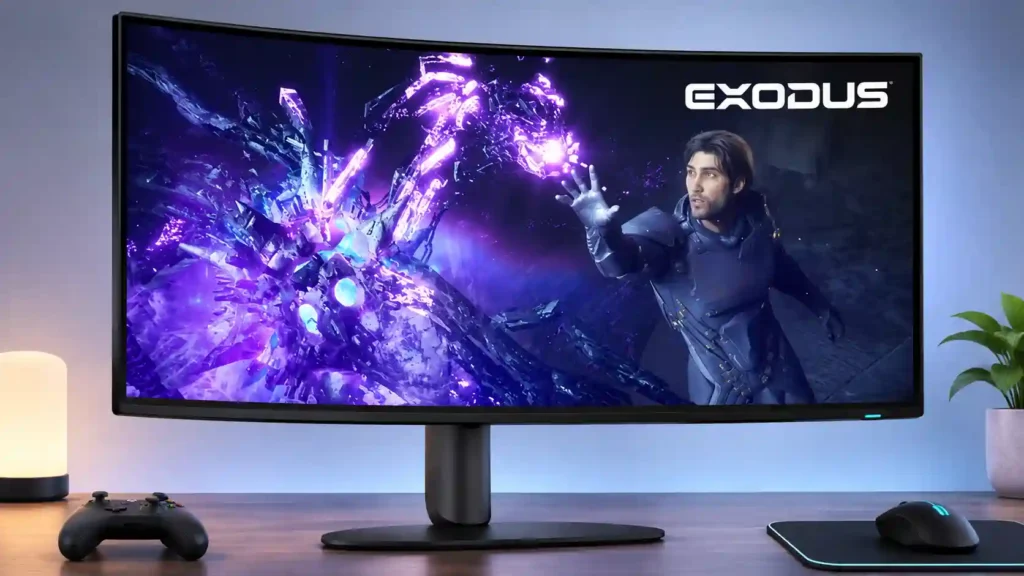
A sharp, immersive 39-inch OLED that handles both premium PC gaming and serious desktop work unusually well. Its biggest catches are demanding 5K2K graphics requirements, glossy reflections and HDR/edge-dimming quirks, some addressed through firmware.
PC gamers and desktop power users who want one immersive 5K2K OLED for cinematic gaming, text-heavy work, and multiple connected computers.
Buyers with small desks, weak GPUs, extremely bright rooms, or an absolute need for native 240Hz-plus esports speed or color-critical uniformity.
The Alienware AW3926QW makes a compelling case for 39-inch ultrawide OLED. Its 5120×2160 resolution, RGB-stripe text rendering and glossy surface deliver the combination that older WOLED displays often struggled to achieve: immersive gaming with genuinely crisp everyday productivity. Games benefit from deep blacks, vivid colors, near-instant response and a useful 330Hz mode for faster play. USB-C charging, KVM functionality and a compact stand make a shared work-and-gaming desk practical, while its launch pricing significantly undercuts the closest LG rival. There are real compromises. Native 165Hz is modest for a flagship, dropping to 330Hz blurs the picture, and the GPU required for high-quality 5K2K gaming can be costly. Large bright HDR areas are weaker than on LG’s white-subpixel panel, and some units showed tint or edge dimming. A November firmware update provides a CPC edge-dimming toggle, but does not remove every uniformity concern or OLED burn-in consideration.
Compared with other Monitors, this product is above average in KVM switch performance, Firmware updateability, warranty and support service, near average in overall satisfaction, sharpness, below average in reliability over time, VRR compatibility, Device compatibility.
| Attribute | This product | Category average | Difference |
|---|---|---|---|
| reliability over time | 1.0 | 3.3 | -2.3 |
| KVM switch performance | 5.0 | 2.9 | +2.1 |
| VRR compatibility | 2.0 | 4.2 | -2.2 |
| Device compatibility | 2.0 | 4.2 | -2.2 |
| reflection handling | 2.0 | 3.9 | -1.9 |
| USB port accessibility | 3.0 | 5.0 | -2.0 |
| Firmware updateability | 5.0 | 3.1 | +1.9 |
| sleep and wake behavior | 1.0 | 2.9 | -1.9 |
Choose Dell Alienware AW3426DW. It scores 4.4 vs 2.0 for reflection handling, with a 4.4 overall score.
Choose Dell Alienware AW2725DF. It scores 5.0 vs 2.0 for SDR/HDR mode switching, with a 4.2 overall score.
Choose ASUS ROG Swift OLED PG27UCDM. It scores 4.7 vs 1.0 for sleep and wake behavior, with a 4.4 overall score.
Choose TCL 32R84. It scores 5.0 vs 2.4 for Automatic brightness limiting, with a 4.2 overall score.
Products reviewers directly compared with this model, grouped into quick takeaways.
Yes. Its 39-inch 5K2K ultrawide canvas, sharp RGB-stripe text and OLED response work particularly well for a combined desktop and gaming setup.
It increases responsiveness at 2560×1080, but the picture is noticeably softer than native 5120×2160 at 165Hz. It is most worthwhile for competitive games.
Earlier firmware could dim the screen edges during gaming. A firmware update released November 5, 2026 adds a CPC edge-dimming toggle; switching it off removes that effect, though inherent panel tint variation can remain.
It handles moderate ambient light well, but direct reflections are visible on the glossy screen and large bright areas can look less luminous than on some rivals.
Yes. USB-C provides video and up to 90W laptop charging, and the integrated KVM helps share keyboard and mouse peripherals between computers.
Console-friendly 4K and 120Hz modes are available, but typical console content uses a centered 16:9 picture with black side bars rather than the full ultrawide width.
It remains a consideration with static interfaces. Dell provides a three-year burn-in warranty, pixel-care routines, and an optional edge-dimming protection setting.
These are a few of the reviews included in our analysis.



We tested the Alienware AW3926QW, a 39-inch 5K2K OLED ultrawide. See how its sharp text, HDR, and $1,099.99 price hold up.
Our Alienware AW3926QW review: a 39-inch 5K2K RGB stripe OLED with razor-sharp text, 165Hz gaming and proper console support. $1,999 AUD.
We've spent some time with Alienware's AW3926QW gaming monitor and come away deeply enamored with the colorful, vibrant ultrawide OLED.
The Dell Alienware AW3926QW is a high-end 39-inch ultrawide OLED gaming monitor. It features a curved and glossy screen with a 5120x2160...
Discover the best new music, travel, film, gaming, arts, food, culture and book content on Australia's premier independent online...

This 360Hz QD-OLED ultrawide delivers exceptional gaming motion, vibrant HDR and dramatically cleaner text. Its high price, less-than-perfect bright-room blacks and occasional HDR dimming are the main reasons to hesitate.
Pros: color gamut, contrast
Cons: value for money, Resolution

Lightning-fast 360Hz OLED gaming, rich color and an unusually flexible USB-C/KVM setup are the big draws. Strong room lighting, limited full-screen HDR brightness and static-content burn-in concerns keep it from...
Pros: color gamut, overall satisfaction
Cons: reflection handling, VRR flicker

The 27-inch 4K OLED picture is exceptionally crisp and responsive, with useful USB-C and KVM extras. Its high price, oversized stand, and bright-room compromises limit its appeal.
Pros: sharpness, overall satisfaction
Cons: value for money, VRR flicker

Best for exceptional 4K HDR, accurate color, fast 240Hz gaming, and strong work connectivity. Skip it if you need built-in speakers, ultrawide immersion, television-level HDR brightness, or a budget-friendly upgrade.
Pros: brightness, reflection handling
Cons: cable management