If you want better USB-C power delivery
Choose ASUS ROG Swift OLED PG32UCWM. It scores 4.7 vs 1.3 for USB-C power delivery, with a 4.3 overall score.

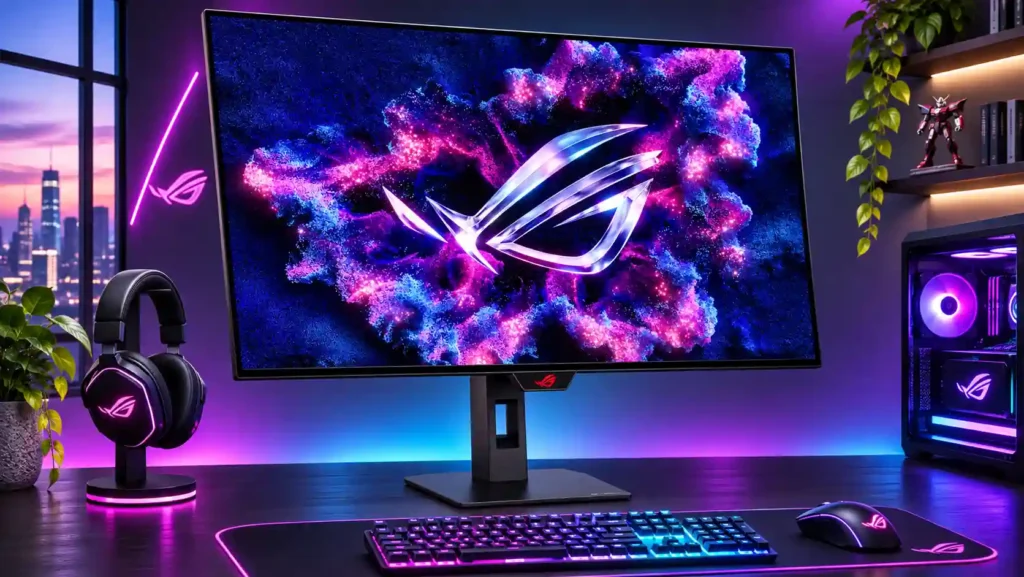
Glossy 4K/240Hz OLED visuals and exceptionally fast motion make this a standout for mixed-genre gamers. The 480Hz mode noticeably softens detail, while reflections and 15W USB-C charging limit versatility.
PC gamers alternating between cinematic 4K games and fast competitive titles, especially those who can control room reflections and drive high frame rates. It also suits console-plus-PC gaming setups.
Anyone wanting a single-cable high-power laptop dock, glare-free viewing opposite windows, or sustained static office work with minimal OLED maintenance. The 480Hz mode is less valuable when games cannot exceed 240fps.
The ASUS ROG Strix OLED XG32UCWMG brings an unusually clear TrueBlack glossy finish to a fast 32-inch 4K WOLED panel. Its deep blacks, sharp highlights and near-instant response make games look and feel excellent, while 4K/240Hz and 1080p/480Hz modes let players choose between image detail and extreme speed. The compact, stable stand, versatile HDMI inputs and useful OLED-care tools round out the package. The tradeoffs are important: 1080p is visibly soft on a screen this large, so 480Hz only pays off for players who can sustain very high frame rates and prioritize motion over clarity. Brightly placed lamps and windows reflect sharply in the gloss, VRR can flicker in dark scenes, and USB-C supplies just 15W. For a gaming-first setup with manageable lighting, the picture and responsiveness are compelling; buyers seeking effortless laptop docking or strict color accuracy should look elsewhere.
Compared with other Monitors, this product is above average in 60 fps capped gaming, KVM switch performance, local dimming performance, near average in overall satisfaction, color accuracy, below average in USB-C power delivery, eye comfort features, VRR flicker.
| Attribute | This product | Category average | Difference |
|---|---|---|---|
| 60 fps capped gaming | 5.0 | 2.3 | +2.7 |
| USB-C power delivery | 1.3 | 3.7 | -2.4 |
| KVM switch performance | 5.0 | 3.0 | +2.0 |
| local dimming performance | 5.0 | 2.9 | +2.1 |
| eye comfort features | 2.0 | 4.0 | -2.0 |
| VRR flicker | 1.6 | 3.2 | -1.5 |
| competitive gaming suitability | 5.0 | 3.6 | +1.4 |
| Cleaning ease | 5.0 | 3.3 | +1.7 |
Choose ASUS ROG Swift OLED PG32UCWM. It scores 4.7 vs 1.3 for USB-C power delivery, with a 4.3 overall score.
Choose MSI MPG 274URDFW E16M. It scores 5.0 vs 1.6 for VRR flicker, with a 4.0 overall score.
Choose ASUS ROG Strix OLED XG27AQWMG. It scores 4.7 vs 3.8 for color gamut, with a 4.4 overall score.
Choose Samsung Odyssey OLED G80SH S32HG802S. It scores 4.9 vs 2.9 for reflection handling, with a 4.1 overall score.
Products reviewers directly compared with this model, grouped into quick takeaways.
Yes, but only when switching from native 4K/240Hz to 1080p/480Hz. The reduced pixel density makes the full-screen image noticeably softer, so the mode mainly suits competitive play.
It retains deep black levels well under ambient light, but windows and lamps directly facing the screen can cause sharp, distracting reflections. Placement matters more than room brightness alone.
Its HDMI 2.1 ports support 4K/120Hz console gaming with impressive OLED contrast. The monitor has no built-in speakers, and some tests noted specific 4K/60Hz reporting quirks.
4K resolution produces very sharp text, and Uniform Brightness helps desktop consistency. Long static sessions carry OLED retention risk, and color-critical work may need calibration.
USB-C supplies only 15W, so it does not replace a normal laptop charger or high-power docking station. The KVM remains useful for sharing peripherals.
The screen includes pixel shifting, cleaning routines, dimming and a proximity sensor; several assessments cite a three-year warranty with burn-in coverage. Confirm the local warranty terms before buying.
Glossy reflections, occasional VRR flicker, soft full-screen 1080p at 480Hz, limited USB-C charging and missing built-in speakers are the recurring complaints.
These are a few of the reviews included in our analysis.




Asus ROG Strix OLED XG32UCWMG 32" pros and cons, Amazon price history. Liked: Glossy screen layer provides enhanced clarity and color...
Our ASUS ROG Strix OLED XG32UCWMG review covers 4K/240Hz, 1080p/480Hz, glossy OLED image quality, HDR, VRR flicker, USB-C limits, DP 1.4, and...
Our ASUS ROG Strix OLED XG32UCWMG review examines 4K/240Hz, 1080p/480Hz, HDR, glossy OLED image quality, VRR flicker, USB-C, DP 1.4, and value.
The ASUS ROG Strix OLED XG32UCWMG review verdict: 4K/240Hz and 1080p/480Hz OLED gaming are excellent, but glossy reflections, 15W USB-C, VRR...
Asus ROG Strix XG32UCWMG review: 92/100. Glossy 4K WOLED with 240Hz or 480Hz dual-mode. A top 32-inch OLED pick for competitive gaming in...

This 360Hz QD-OLED ultrawide delivers exceptional gaming motion, vibrant HDR and dramatically cleaner text. Its high price, less-than-perfect bright-room blacks and occasional HDR dimming are the main reasons to hesitate.
Pros: color gamut, contrast
Cons: value for money, Resolution

The 360Hz QD-OLED panel delivers exceptional HDR gaming, responsive motion, and cleaner text than earlier ultrawides. Its 3440×1440 resolution is less sharp than 4K, and premium pricing remains a hurdle.
Pros: refresh rate, Text fringing
Cons: Resolution, GPU demands

A huge, sharp ultrawide workspace and unusually capable Thunderbolt dock make the U4025QW outstanding for demanding productivity and editing. Its high price, modest HDR, and imperfect motion handling keep it...
Pros: overall picture quality, color accuracy
Cons: value for money, built-in speakers

Lightning-fast 360Hz OLED gaming, rich color and an unusually flexible USB-C/KVM setup are the big draws. Strong room lighting, limited full-screen HDR brightness and static-content burn-in concerns keep it from...
Pros: color gamut, overall satisfaction
Cons: reflection handling, VRR flicker