ASUS ROG Strix OLED XG27ACDNG

ASUS ROG Strix OLED XG27ACDNG Monitor Review

Brand: ASUS
Released: August 20, 2024
Updated: 22 minutes ago
4.4
Overall review score
482
Review insights
80
Scored features
17
Expert reviews

Bottom Line

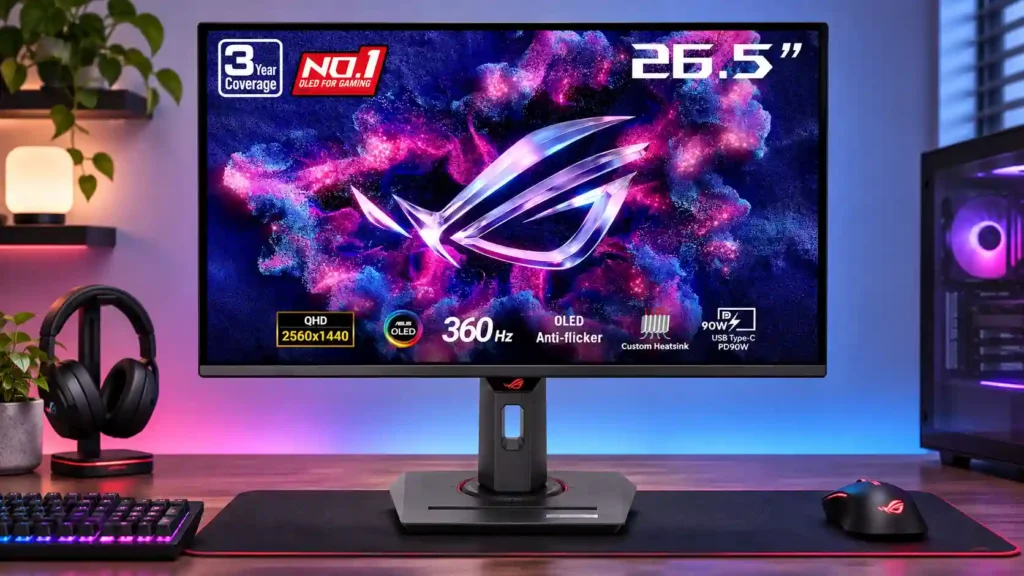
Lightning-fast 360Hz OLED gaming, rich color and an unusually flexible USB-C/KVM setup are the big draws. Strong room lighting, limited full-screen HDR brightness and static-content burn-in concerns keep it from being the best fit for everyone.

Competitive PC players who can sustain high frame rates and value deep OLED contrast in controlled lighting, plus people juggling a gaming desktop and USB-C laptop.

All-day static office users, brightly sunlit desks, shoppers needing true 4K detail, or buyers who rarely benefit from speeds above 240Hz.

Verdict

The ASUS ROG Strix OLED XG27ACDNG is an excellent option for high-frame-rate PC gaming. Its 360Hz QD-OLED panel combines superb motion clarity, low input lag, deep dark-room blacks and vibrant color, while HDMI 2.1, a USB-C input with up to 90W power delivery and a KVM switch make it unusually capable at a mixed-device desk. Console gaming is also strong, although the panel remains native 1440p even when it accepts a 4K signal. The tradeoffs matter: bright light can wash blacks toward purple, full-screen HDR scenes lack the impact of the brightest alternatives, and some games exhibit VRR flicker. Desktop text is adequate rather than class-leading, and prolonged static work introduces burn-in risk. Its premium is easiest to defend when 360Hz and the extra connectivity are genuinely useful, especially at a discounted price.

Feature Scorecards

Summary

80 reviewed features
  • Very positive 4.5-5.0
    46 (57%)
  • Positive 3.5-4.4
    23 (29%)
  • Neutral 2.5-3.4
    10 (13%)
  • Negative 1.5-2.4
    1 (1%)

Pros highlights

  • 4.9
    17 reviews strong consensus
    color gamut: 4.9, 17 reviews, strong consensus
    The broad QD-OLED gamut produces exceptionally vivid reds and rich colors, with sRGB clamping available when restraint matters more than saturation.
  • 4.7
    16 reviews strong consensus
    overall satisfaction: 4.7, 16 reviews, strong consensus
    The overall experience is strongly praised for fast, gorgeous gaming and abundant features, with lighting, HDR brightness and value providing the principal caveats.
  • 5.0
    14 reviews strong consensus
    contrast: 5.0, 14 reviews, strong consensus
    Pixel-level light control delivers exceptionally strong dark-scene contrast and convincing image depth without LCD-style backlight halos.
  • 4.9
    14 reviews strong consensus
    overall picture quality: 4.9, 14 reviews, strong consensus
    Its combination of deep blacks, bright accents and vivid color makes both SDR and HDR images exceptionally appealing.
  • 4.9
    14 reviews strong consensus
    refresh rate: 4.9, 14 reviews, strong consensus
    The native 360Hz panel delivers wonderfully fluid motion, especially over 240fps; that advantage shrinks in slower games or on consoles.
  • 5.0
    13 reviews strong consensus
    motion clarity: 5.0, 13 reviews, strong consensus
    Fast transitions and 360Hz make moving detail look unusually sharp and stable, with little visible smearing.

Cons highlights

  • 3.0
    10 reviews moderate consensus
    reflection handling: 3.0, 10 reviews, moderate consensus
    The coating keeps some reflections under control but cannot entirely overcome direct light, and stronger illumination can raise black levels.
  • 2.5
    7 reviews moderate consensus
    VRR flicker: 2.5, 7 reviews, moderate consensus
    Flicker can be visible during fluctuating frame rates in dark games or menus; the mitigation settings may narrow VRR's operating range and cause other compromises.
  • 3.1
    7 reviews moderate consensus
    ELMB strobing quality: 3.1, 7 reviews, moderate consensus
    Its OLED black-frame insertion can improve clarity at 120Hz and 180Hz; the loss of brightness, HDR and variable refresh makes it a niche alternative to normal 360Hz operation.
  • 3.3
    6 reviews low consensus
    premium feel: 3.3, 6 reviews, low consensus
    The screen assembly looks and feels sturdy, but opinions split over the more ordinary plastic stand and its fit with the premium ROG aesthetic.
  • 3.0
    4 reviews strong consensus
    HDR tone mapping accuracy: 3.0, 4 reviews, strong consensus
    True Black mode can track its target well, but higher-peak modes trade accuracy and brightness behavior, with occasional clipping or dimming complaints.
  • 2.8
    3 reviews low consensus
    cable management: 2.8, 3 reviews, low consensus
    Routing behind the stand is basic, and one hands-on setup found cables hanging visibly when the monitor was raised.

Use Cases

Best for

  • 5.0
    11 reviews strong consensus
    Dark-room viewing: 5.0, 11 reviews, strong consensus
    Controlled lighting unlocks the panel's deepest blacks, rich contrast and striking HDR highlights, making night gaming and viewing particularly rewarding.
  • 4.6
    7 reviews strong consensus
    HDR gaming: 4.6, 7 reviews, strong consensus
    Dark games with isolated lights, sparks or neon look excellent; brighter overall scenes expose the panel's more limited sustained HDR brightness.
  • 4.6
    6 reviews strong consensus
    Color-critical work: 4.6, 6 reviews, strong consensus
    Wide color coverage and strong calibration potential make it capable for color-sensitive projects, although the most accurate setup may require selecting a suitable preset or tuning it.

Not ideal for

  • Bright-room viewing
    2.4
    9 reviews strong consensus
    Bright-room viewing: 2.4, 9 reviews, strong consensus
    Some find its SDR brightness surprisingly serviceable, but reflections and lifted purple-looking blacks can make sunlit desks a poor match.
  • Programming and coding
    2.0
    1 review
    Programming and coding: 2.0, 1 review
    Long hours with static development-tool windows are a cautious fit because of text rendering compromises and burn-in risk.

Compared With Category Average

Compared with other Monitors, this product is above average in KVM switch performance, competitive gaming suitability, Gaming feature selection, near average in overall satisfaction, brightness, below average in Image scaling, screen size, cable management.

Comparison summary

76 compared features
  • Above average 0.4+ pts higher
    42 (55%)
  • Same as average within 0.3 pts
    23 (30%)
  • Below average 0.4+ pts lower
    11 (14%)

Largest category differences

Attribute This product Category average Difference
KVM switch performance 4.7 2.9 +1.8
competitive gaming suitability 5.0 3.4 +1.6
Image scaling 1.5 3.3 -1.8
Gaming feature selection 4.8 3.3 +1.5
local dimming performance 5.0 3.4 +1.6
Software and driver support 4.5 2.9 +1.6
ghosting control 5.0 3.7 +1.3
screen size 3.0 4.4 -1.4

Consider This Instead

If you want better Automatic brightness limiting

Choose TCL 32R84. It scores 5.0 vs 3.5 for Automatic brightness limiting, with a 4.2 overall score.

Compare

If you want better SDR/HDR mode switching

Choose Dell Alienware AW2725DF. It scores 5.0 vs 2.8 for SDR/HDR mode switching, with a 4.2 overall score.

Compare

If you want better reflection handling

Choose Dell Alienware AW3426DW. It scores 4.4 vs 3.0 for reflection handling, with a 4.4 overall score.

Compare

Compared in Reviews

Products reviewers directly compared with this model, grouped into quick takeaways.

  • More expensive: price and design materials ASUS was listed cheaper, although the Alienware had a more premium-looking stand and better cable routing.
  • More expensive: pricing and brightness The ASUS is portrayed as cheaper and brighter, despite using a similar QD-OLED panel.
  • Better: factory calibration The ASUS is slightly behind the Alienware on factory color accuracy.
  • Better: text clarity The newer 4K model has visibly superior text clarity.
  • Compared: resolution versus refresh rate The 4K PG27UCDM gives sharper text and Dolby Vision, while the ASUS provides a faster 360Hz panel.

ASUS ROG Strix OLED XG27AQDMG

  • Compared: upgrade value and text sharpness The reviewer finds little reason to leave the older WOLED, which they personally see as sharper.
  • Older model: speed, colors and connectivity The ASUS XG27ACDNG gains 360Hz, richer colors, USB-C and KVM over the lower-end model.
  • Better: bright-room black levels The glossy WOLED comparison maintains darker blacks when external light strikes the screen.

FAQ

Is it good for competitive PC gaming?

Yes. Its 360Hz panel, extremely fast pixel response and low input lag are excellent for fast shooters, assuming your PC can deliver high frame rates.

Does it work well with PS5 and Xbox?

Yes. HDMI 2.1 supports fast console play, including supported 120Hz and VRR modes. It can accept 4K input, but the physical screen is 2560×1440.

Will the blacks look perfect in a bright room?

Not always. QD-OLED black levels can look gray or purple under strong ambient light, and direct reflections can be distracting.

Is the HDR picture bright?

Small highlights can be striking against deep black, but broad bright HDR scenes are dimmer, and different HDR modes balance brightness and accuracy differently.

Is this a good monitor for everyday office work?

The USB-C and KVM features help, but small-text fringing and the risk from prolonged static windows make it less attractive for full-time office use.

Does it support USB-C laptop charging and KVM?

Yes. A compatible laptop can use USB-C for video and up to 90W charging, and the KVM can share a keyboard and mouse between connected systems.

Is the 360Hz upgrade worth paying extra for?

It makes most sense if your games regularly run above 240fps. If you mainly play slower games, a less expensive 240Hz OLED may deliver similar motion quality at your actual frame rate.

Sample Expert Reviews We Analyzed

These are a few of the reviews included in our analysis.
Video Reviews

Article Reviews

rtings.com

The ASUS ROG Strix OLED XG27ACDNG is a premium 27-inch, 1440p gaming monitor with a QD-OLED panel. Featuring a 360Hz refresh rate, it...

Review score
4.7

Top Monitors to Consider

#1 Asus ROG Swift 34 QD-OLED PG34WCDN
4.5

This 360Hz QD-OLED ultrawide delivers exceptional gaming motion, vibrant HDR and dramatically cleaner text. Its high price, less-than-perfect bright-room blacks and occasional HDR dimming are the main reasons to hesitate.

Pros: color gamut, contrast

Cons: value for money, Resolution

#2 This product ASUS ROG Strix OLED XG27ACDNG
ASUS ROG Strix OLED XG27ACDNG
4.4

Lightning-fast 360Hz OLED gaming, rich color and an unusually flexible USB-C/KVM setup are the big draws. Strong room lighting, limited full-screen HDR brightness and static-content burn-in concerns keep it from...

Pros: color gamut, overall satisfaction

Cons: reflection handling, VRR flicker

#3 ASUS ROG Swift OLED PG27UCDM
4.4

The 27-inch 4K OLED picture is exceptionally crisp and responsive, with useful USB-C and KVM extras. Its high price, oversized stand, and bright-room compromises limit its appeal.

Pros: sharpness, overall satisfaction

Cons: value for money, VRR flicker

#4 MSI MPG 322UR QD-OLED X24
4.4

Best for exceptional 4K HDR, accurate color, fast 240Hz gaming, and strong work connectivity. Skip it if you need built-in speakers, ultrawide immersion, television-level HDR brightness, or a budget-friendly upgrade.

Pros: brightness, reflection handling

Cons: cable management