If you want better Resolution
Choose ASUS ROG Swift OLED PG27UCDM. It scores 5.0 vs 3.4 for Resolution, with a 4.4 overall score.

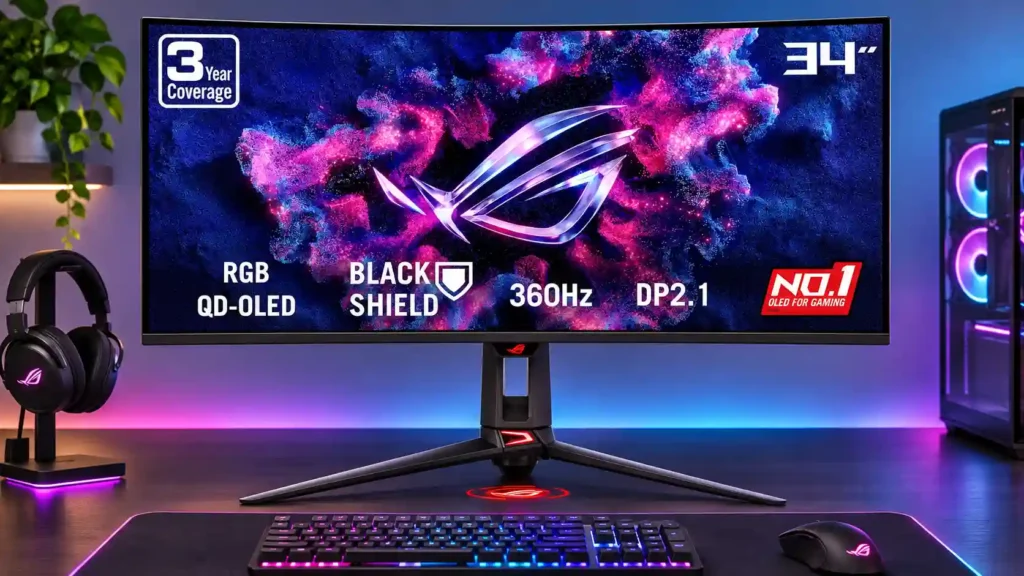
This 360Hz QD-OLED ultrawide delivers exceptional gaming motion, vibrant HDR and dramatically cleaner text. Its high price, less-than-perfect bright-room blacks and occasional HDR dimming are the main reasons to hesitate.
Competitive PC gamers, ultrawide OLED enthusiasts and people who want high-speed play alongside occasional desktop work benefit from the fast panel, improved text clarity and flexible connections.
Budget-focused shoppers, people who work all day with static windows, and buyers who need the deepest blacks in a brightly lit room may be better served by cheaper or non-OLED alternatives.
The ASUS ROG Swift OLED PG34WCDN is an excellent choice for someone who wants elite gaming speed without giving up rich OLED picture quality or readable desktop text. Its 360Hz refresh rate, near-instant response and very low input lag make fast multiplayer games feel exceptionally clean. RGB-stripe subpixels also address one of older QD-OLED monitors’ biggest annoyances: colored fringes around small text. The 34-inch ultrawide canvas, accurate color modes, high-bandwidth DisplayPort 2.1 and 90W USB-C docking add real everyday utility. There are tradeoffs. Some HDR modes dim or overbrighten scenes, the BlackShield coating does not fully preserve deep blacks in bright rooms, and OLED burn-in remains a consideration for prolonged static work. The flagship price is difficult to justify if a more affordable 240Hz or 280Hz ultrawide would satisfy you. Competitive gamers and display enthusiasts benefit most.
Compared with other Monitors, this product is above average in KVM switch performance, sleep and wake behavior, AI scene optimization, near average in Color calibration controls, input lag, below average in Gradient smoothness, eye comfort features, value for money.
| Attribute | This product | Category average | Difference |
|---|---|---|---|
| KVM switch performance | 5.0 | 2.9 | +2.1 |
| sleep and wake behavior | 4.7 | 2.7 | +2.0 |
| AI scene optimization | 5.0 | 3.0 | +2.0 |
| competitive gaming suitability | 5.0 | 3.5 | +1.5 |
| HDR performance | 4.8 | 3.4 | +1.4 |
| local dimming performance | 5.0 | 3.4 | +1.6 |
| Gradient smoothness | 3.0 | 4.4 | -1.4 |
| USB-C power delivery | 5.0 | 3.6 | +1.4 |
Choose ASUS ROG Swift OLED PG27UCDM. It scores 5.0 vs 3.4 for Resolution, with a 4.4 overall score.
Choose Dell Alienware AW2725DF. It scores 4.0 vs 2.7 for Gamma tracking, with a 4.2 overall score.
Choose ASUS ROG Swift OLED PG32UCDM Gen3. It scores 4.5 vs 3.0 for screen coating durability, with a 4.2 overall score.
Choose Dell Alienware AW3426DW. It scores 4.9 vs 3.0 for value for money, with a 4.4 overall score.
Products reviewers directly compared with this model, grouped into quick takeaways.
Yes. The 360Hz refresh rate, very fast OLED pixel response and extremely low input lag make it especially good for fast shooters. A powerful PC is needed to approach its full frame-rate potential.
Yes. The RGB-stripe subpixel arrangement largely eliminates the colored text fringing associated with older QD-OLED designs, making desktop apps much easier to read.
Deep blacks, vibrant color and small highlights reaching around 1,300 nits make HDR impressive. Brighter modes can dim or overbrighten scenes, while True Black 500 favors accuracy over peak brightness.
It is better than previous QD-OLED generations, with less purple-tinted black lift and subdued reflections. Strong ambient light can still make blacks appear gray, and some WOLED panels handle this better.
Yes. USB-C supports DisplayPort Alt Mode and up to 90W power delivery, letting a compatible laptop send video and receive power through one cable.
Yes. It accepts common console formats, including downscaled 4K signals, but you need to select 16:9 to avoid stretching since consoles do not output ultrawide 21:9 images.
The cleaner text, higher refresh rate and connectivity upgrades are meaningful for enthusiasts. If budget matters or you rarely approach 360fps, a less expensive 240Hz or 280Hz model may be the better value.
These are a few of the reviews included in our analysis.




Find the latest technology stories, breaking news and reviews on Yahoo Tech.
The Asus ROG Swift OLED delivers thanks to its stunning picture quality and fast performance. It’s an excellent gaming monitor for...
ASUS ROG PG34WCDN pairs a 34 inch QD-OLED panel with 360 Hz refresh and near-perfect color accuracy. We put it through full calibration and...
The ASUS ROG Swift OLED PG34WCDN is a high-end ultrawide OLED gaming monitor. It has a 34-inch screen with a 1800R curve, 3440x1440...
Asus embraces RGB Stripe OLED tech in its new ROG Swift PG34WCDN.

This 360Hz QD-OLED ultrawide delivers exceptional gaming motion, vibrant HDR and dramatically cleaner text. Its high price, less-than-perfect bright-room blacks and occasional HDR dimming are the main reasons to hesitate.
Pros: color gamut, contrast
Cons: value for money, Resolution

Lightning-fast 360Hz OLED gaming, rich color and an unusually flexible USB-C/KVM setup are the big draws. Strong room lighting, limited full-screen HDR brightness and static-content burn-in concerns keep it from...
Pros: color gamut, overall satisfaction
Cons: reflection handling, VRR flicker

The 27-inch 4K OLED picture is exceptionally crisp and responsive, with useful USB-C and KVM extras. Its high price, oversized stand, and bright-room compromises limit its appeal.
Pros: sharpness, overall satisfaction
Cons: value for money, VRR flicker

Best for exceptional 4K HDR, accurate color, fast 240Hz gaming, and strong work connectivity. Skip it if you need built-in speakers, ultrawide immersion, television-level HDR brightness, or a budget-friendly upgrade.
Pros: brightness, reflection handling
Cons: cable management