espresso Pro 15 Monitor Review

Released: April 14, 2025
Updated: 5 hours ago
4.3
Overall review score
316
Review insights
56
Scored features
17
Expert reviews

Bottom Line

Its crisp, bright 4K touchscreen and unusually flexible stand make mobile dual-screen work feel premium. The high price, reflective glass, and middling color accuracy for critical editing demand thought.

Traveling professionals, remote workers, and mobile creators who want a sharp second screen and a compact, adjustable dual-monitor setup.

Budget-focused buyers, fast-paced gamers, Nintendo Switch 2 players seeking plug-and-play convenience, or editors who require reference-grade color accuracy.

Verdict

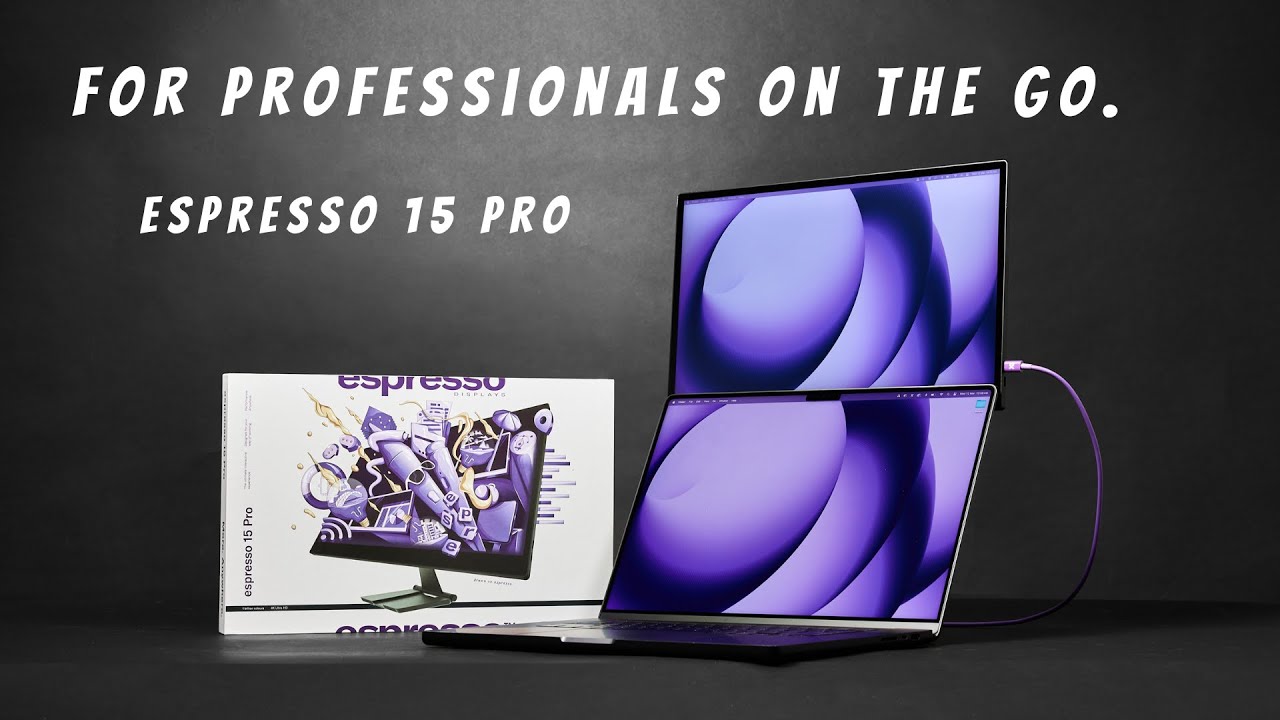
The espresso Pro 15 is an unusually polished portable second screen. Its dense 4K panel keeps text and photos crisp, brightness helps in cafés and bright offices, and the sturdy magnetic Stand+ can place the display above a laptop on a tiny table. Modern Macs and Windows laptops usually need just one USB-C cable, while touch, rotation and workspace tools add flexibility. This is particularly valuable to mobile professionals and creators who miss their desktop setup. The tradeoffs are real: the glossy glass reflects windows, the built-in speakers are weak, and the 60Hz ceiling limits fast gaming. Color looks rich, but several tests and hands-on comparisons raise doubts about precision for red tones and strict grading. It can also drain a laptop battery quickly or need additional power with smaller devices. The premium price is easiest to justify when portability, touch and stand ergonomics are daily necessities.

Feature Scorecards

Summary

56 reviewed features
  • Very positive 4.5-5.0
    27 (48%)
  • Positive 3.5-4.4
    11 (20%)
  • Neutral 2.5-3.4
    5 (9%)
  • Negative 1.5-2.4
    10 (18%)
  • Very negative below 1.5
    3 (5%)

Pros highlights

  • 5.0
    16 reviews strong consensus
    overall satisfaction: 5.0, 16 reviews, strong consensus
    Most accounts enthusiastically recommend the high-end portable experience, especially for work. Price, glare, color precision, and gaming limitations keep it from being universal.
  • 5.0
    16 reviews strong consensus
    stand adjustability: 5.0, 16 reviews, strong consensus
    The magnetic Stand+ is a standout, offering height, tilt, landscape, portrait, and above-laptop placements in a compact folding form.
  • 4.9
    16 reviews strong consensus
    brightness: 4.9, 16 reviews, strong consensus
    Unusually high brightness for a portable monitor is consistently praised. It helps in cafés, offices, and some outdoor situations, although glare still matters.
  • 4.8
    16 reviews strong consensus
    portability and weight: 4.8, 16 reviews, strong consensus
    Its thin aluminum body is easy to pack, especially compared with the larger Pro 17. The heavier metal construction and stand are the main carrying compromises.
  • 5.0
    15 reviews strong consensus
    build quality: 5.0, 15 reviews, strong consensus
    The solid aluminum chassis and protective glass feel substantially more durable than budget plastic portable monitors. Reviewers repeatedly call the construction premium.
  • 3.8
    13 reviews low consensus
    USB-C power delivery: 3.8, 13 reviews, low consensus
    Single-cable power is impressively convenient on full-power laptops, but phones, tablets, and consoles sometimes require a second power supply or cause brightness cutoffs.

Cons highlights

  • 2.9
    13 reviews moderate consensus
    value for money: 2.9, 13 reviews, moderate consensus
    The premium materials, stand, and 4K touch display explain the price, but several reviewers still find it expensive compared with simpler portable alternatives.
  • 2.3
    6 reviews strong consensus
    reflection handling: 2.3, 6 reviews, strong consensus
    The glossy glass behaves almost like a mirror near windows and lights. Bright output offsets some glare without eliminating reflections.
  • 1.4
    5 reviews strong consensus
    built-in speakers: 1.4, 5 reviews, strong consensus
    The integrated speakers are a recurring weak point: reviewers describe thin, quiet, sometimes scratchy audio that falls behind laptop speakers.
  • 2.3
    5 reviews strong consensus
    refresh rate: 2.3, 5 reviews, strong consensus
    The 60Hz ceiling is the main display-speed compromise. It is adequate for office tasks and video but disappointing for fast games and motion-sensitive workflows.
  • 2.7
    5 reviews moderate consensus
    on-screen display usability: 2.7, 5 reviews, moderate consensus
    Touch gestures give access to basic brightness, contrast, and volume controls, but precision is limited and the gesture can fail in nonstandard orientations.
  • 2.0
    3 reviews strong consensus
    port selection: 2.0, 3 reviews, strong consensus
    Only two USB-C ports are provided. They suit modern laptops but complicate HDMI-only computers and some console connections.

Use Cases

Best for

  • 5.0
    17 reviews strong consensus
    Travel: 5.0, 17 reviews, strong consensus
    The slim 15-inch display fits into laptop bags and is praised as a practical travel companion. The metal stand adds weight, and power needs vary by host device.
  • 5.0
    14 reviews strong consensus
    Dual-monitor setups: 5.0, 14 reviews, strong consensus
    The screen and tall stand make it easy to recreate a stacked or side-by-side two-display workspace almost anywhere, with less desk space than traditional monitors.
  • 5.0
    13 reviews strong consensus
    Single-cable laptop docking: 5.0, 13 reviews, strong consensus
    The simple USB-C connection delivers video and power for many laptops, removing the need for a separate display power adapter in routine work.

Not ideal for

  • Budget-conscious buyers
    1.8
    2 reviews limited evidence
    Budget-conscious buyers: 1.8, 2 reviews, limited evidence
    A $699-class price and optional accessories put the monitor outside most value-focused shopping lists; simpler alternatives offer much lower entry costs.
  • Handheld gaming
    1.0
    1 review
    Handheld gaming: 1.0, 1 review
    It is difficult to recommend as a primary portable console monitor when a handheld requires its dock and multiple power connections.

Compared With Category Average

Compared with other Monitors, this product is above average in reliability over time, Desk footprint, software support, near average in setup ease, Device compatibility, below average in console gaming compatibility, panel type, Color calibration controls.

Comparison summary

52 compared features
  • Above average 0.4+ pts higher
    25 (48%)
  • Same as average within 0.3 pts
    9 (17%)
  • Below average 0.4+ pts lower
    18 (35%)

Largest category differences

Attribute This product Category average Difference
console gaming compatibility 1.5 3.8 -2.3
panel type 2.0 4.2 -2.2
Color calibration controls 1.8 3.8 -2.1
refresh rate 2.3 4.3 -2.0
speaker quality 1.0 3.0 -2.0
PC gaming compatibility 2.5 4.5 -2.0
reliability over time 5.0 3.1 +1.9
Power efficiency 2.0 3.8 -1.8

Consider This Instead

If you want better built-in speakers

Choose Dell S3425DW. It scores 4.6 vs 1.4 for built-in speakers, with a 4.2 overall score.

Compare

If you want better speaker quality

Choose Dell S2725QC. It scores 4.6 vs 1.0 for speaker quality, with a 4.2 overall score.

Compare

If you want better console gaming compatibility

Choose KYY X90E. It scores 5.0 vs 1.5 for console gaming compatibility, with a 4.2 overall score.

Compare

Compared in Reviews

Products reviewers directly compared with this model, grouped into quick takeaways.

espresso Pro 17

  • Compared: compactness versus larger screen The smaller Pro keeps the refinement of the 17-inch model and fits a more mobile setup.
  • Compared: brightness and size The 15 Pro is much brighter and less cumbersome to transport.
  • Compared: compactness, brightness, design The 15 Pro retains the familiar look but is more compact and brighter.

espresso Display 15 Non-touch

  • Cheaper: price, 4K and touchscreen The Display 15 is much cheaper if 4K and touchscreen controls are not required.
  • Older model: screen resolution and touchscreen The Pro offers 4K sharpness and a touch interface absent from the lower-tier non-touch model.

13-inch iPad Pro

  • Alternative: native tablet utility versus portable second display An iPad Pro offers broader tablet features and Sidecar, though the Espresso has a larger portable display.

FAQ

Is the espresso Pro 15 good for working on the go?

Yes. Its sharp 4K screen, bright panel and foldable Stand+ give laptop users a practical second display even on small tables or while traveling.

Does its touchscreen work with Macs and iPads?

Mac touch works through a trackpad-like interface, enhanced by espressoFlow, though some apps and small controls feel awkward. The reviews report that touch features do not work with iPadOS.

Can a laptop power it with one USB-C cable?

Many Macs and Windows laptops provide video and power through one connection. Some phones, tablets, consoles and low-power laptops need a second power source; laptop battery life may also fall markedly.

How accurate are the colors for photo or video editing?

The display offers broad Adobe RGB coverage and vivid images, making it useful for portable creation. However, measurements and hands-on accounts note red or sRGB accuracy issues, so critical work may need calibration and a reference display.

Is it a good gaming monitor or Nintendo Switch 2 accessory?

Slower games can be enjoyable, but its 60Hz refresh rate is not ideal for fast-paced play. Switch 2 use is especially awkward because it needs a dock, special cable and extra power.

Is the magnetic Stand+ included?

Yes. The included metal stand can tilt, raise, and rotate the display, including positioning it above a laptop; it does add noticeable weight to a travel setup.

Sample Expert Reviews We Analyzed

These are a few of the reviews included in our analysis.
Video Reviews

Article Reviews

rtings.com

The espresso Pro 15 is a high-end portable monitor. Higher-end than the espresso Display 15 Touch, it has a 4k resolution for high pixel...

Review score
4.4

Top Monitors to Consider

#1 Asus ROG Swift 34 QD-OLED PG34WCDN
4.5

This 360Hz QD-OLED ultrawide delivers exceptional gaming motion, vibrant HDR and dramatically cleaner text. Its high price, less-than-perfect bright-room blacks and occasional HDR dimming are the main reasons to hesitate.

Pros: color gamut, contrast

Cons: value for money, Resolution

#2 Dell U4025QW
4.4

A huge, sharp ultrawide workspace and unusually capable Thunderbolt dock make the U4025QW outstanding for demanding productivity and editing. Its high price, modest HDR, and imperfect motion handling keep it...

Pros: overall picture quality, color accuracy

Cons: value for money, built-in speakers

#3 ASUS ROG Strix OLED XG27ACDNG
4.4

Lightning-fast 360Hz OLED gaming, rich color and an unusually flexible USB-C/KVM setup are the big draws. Strong room lighting, limited full-screen HDR brightness and static-content burn-in concerns keep it from...

Pros: color gamut, overall satisfaction

Cons: reflection handling, VRR flicker

#4 ASUS ROG Swift OLED PG27UCDM
4.4

The 27-inch 4K OLED picture is exceptionally crisp and responsive, with useful USB-C and KVM extras. Its high price, oversized stand, and bright-room compromises limit its appeal.

Pros: sharpness, overall satisfaction

Cons: value for money, VRR flicker