If you want better HDR performance
Choose TCL 32R84. It scores 4.8 vs 1.6 for HDR performance, with a 4.2 overall score.

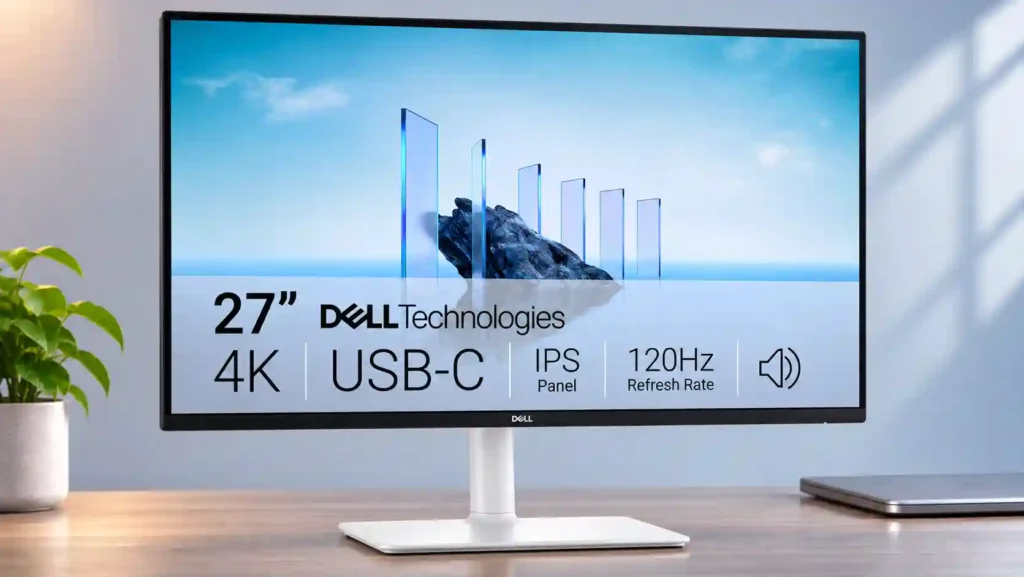
Sharp 4K detail, 120Hz smoothness and simple USB-C laptop docking make this a smart everyday work monitor with casual gaming perks. Weak HDR, visible fast-motion blur and the absence of a KVM limit its versatility.
Office productivity, USB-C laptop workstations, Mac setups and people who mix routine work with casual console or PC games. Sharp text, easy charging and 120Hz help without paying for a specialist monitor.
Competitive shooters, serious HDR viewing, and color-critical grading where stronger contrast, wider gamut or faster pixel response matter. Multi-computer power users may also miss a KVM or Thunderbolt dock.
The S2725QC brings together the parts of a monitor that matter most for daily use: a sharp 27-inch 4K screen, visibly smoother 120Hz scrolling, flexible positioning, and USB-C that can carry video, accessories, and up to 65W of laptop power over one cable. The retractable USB connectors and usable built-in speakers make it easy to assemble a tidy Mac or Windows workspace. Two HDMI 2.1 inputs, low lag, and VRR add credible after-hours console and PC gaming. Its limits become clear when expectations shift toward premium image quality or esports: SDR color is generally good in sRGB, but HDR looks flat, blacks are gray, and fast motion can leave pronounced trails. Stand stability varies between accounts, and a lack of KVM, Thunderbolt, and an audio jack may frustrate complex desks. For productivity with occasional play, especially at a discount, this is a compelling compromise.
Compared with other Monitors, this product is above average in speaker quality, Power efficiency, built-in speakers, near average in stand adjustability, refresh rate, below average in HDR highlight detail, motion clarity, Thunderbolt docking connectivity.
| Attribute | This product | Category average | Difference |
|---|---|---|---|
| HDR highlight detail | 1.7 | 4.1 | -2.4 |
| motion clarity | 1.8 | 4.2 | -2.3 |
| Thunderbolt docking connectivity | 2.0 | 4.2 | -2.2 |
| delivery condition | 2.0 | 4.1 | -2.1 |
| HDR performance | 1.6 | 3.5 | -1.8 |
| Included accessories | 2.0 | 3.9 | -1.9 |
| Headphone output quality | 1.5 | 3.3 | -1.8 |
| local dimming performance | 1.8 | 3.5 | -1.8 |
Choose TCL 32R84. It scores 4.8 vs 1.6 for HDR performance, with a 4.2 overall score.
Choose LG 27GM950B-B. It scores 4.8 vs 2.0 for Included accessories, with a 4.0 overall score.
Choose ASUS ProArt Display 6K PA32QCV. It scores 5.0 vs 1.5 for Headphone output quality, with a 4.1 overall score.
Choose Dell U2725QE. It scores 5.0 vs 2.0 for Thunderbolt docking connectivity, with a 4.2 overall score.
Products reviewers directly compared with this model, grouped into quick takeaways.
It is enjoyable for casual PC and console gaming thanks to 120Hz, VRR and low input lag. Fast action can leave obvious motion trails, making it less suitable for competitive play.
Yes. Its HDMI 2.1 inputs support compatible 4K 120Hz console or PC sources, though some Xbox signal modes have limitations.
Yes. USB-C handles the display, hub data and up to 65W charging. Most ultrabooks are covered, but high-power laptops may still need their own charger.
The crisp 4K image, 120Hz refresh and USB-C convenience make it an attractive Mac companion. Some macOS settings and non-integer video frame rates may require third-party software.
HDR support is basic rather than cinematic. Limited brightness, low IPS contrast and weak black levels make highlights and dark scenes look relatively flat.
No integrated KVM or traditional 3.5mm audio output is identified in the more detailed assessments. The monitor has built-in speakers and a useful USB hub, but advanced multi-computer switching needs extra equipment.
The speakers are generally useful for meetings, YouTube and everyday listening, though bass is limited. The stand adjusts in several directions, but reports about wobble are mixed.
These are a few of the reviews included in our analysis.


Le Dell S2725QC est un moniteur bureautique de 27 pouces qui associe une définition 4K UHD, une dalle IPS 120 Hz et une connectique moderne...
Dell 27 Plus S2725QC review: This 4K 120Hz monitor combines USB-C, HDMI 2.1, and sharp visuals into a superb all-around package.
The Dell S2725QC is a cost-friendly 4k, 27-inch productivity monitor. Part of Dell's Plus Series of monitors, it's an updated version of the...
Discover the best new music, travel, film, gaming, arts, food, culture and book content on Australia's premier independent online...
After I got the MacBook M4 14" with matte nanotexture display, I wanted an ultra-affordable matte 27" display with unified single-cable...

This 360Hz QD-OLED ultrawide delivers exceptional gaming motion, vibrant HDR and dramatically cleaner text. Its high price, less-than-perfect bright-room blacks and occasional HDR dimming are the main reasons to hesitate.
Pros: color gamut, contrast
Cons: value for money, Resolution

Lightning-fast 360Hz OLED gaming, rich color and an unusually flexible USB-C/KVM setup are the big draws. Strong room lighting, limited full-screen HDR brightness and static-content burn-in concerns keep it from...
Pros: color gamut, overall satisfaction
Cons: reflection handling, VRR flicker

The 27-inch 4K OLED picture is exceptionally crisp and responsive, with useful USB-C and KVM extras. Its high price, oversized stand, and bright-room compromises limit its appeal.
Pros: sharpness, overall satisfaction
Cons: value for money, VRR flicker

Best for exceptional 4K HDR, accurate color, fast 240Hz gaming, and strong work connectivity. Skip it if you need built-in speakers, ultrawide immersion, television-level HDR brightness, or a budget-friendly upgrade.
Pros: brightness, reflection handling
Cons: cable management