ASUS ROG Swift OLED PG32UCDM Gen3

ASUS ROG Swift OLED PG32UCDM Gen3 Monitor Review

Brand: ASUS
Released: February 1, 2026
Updated: 21 minutes ago
4.2
Overall review score
463
Review insights
73
Scored features
20
Expert reviews

Bottom Line

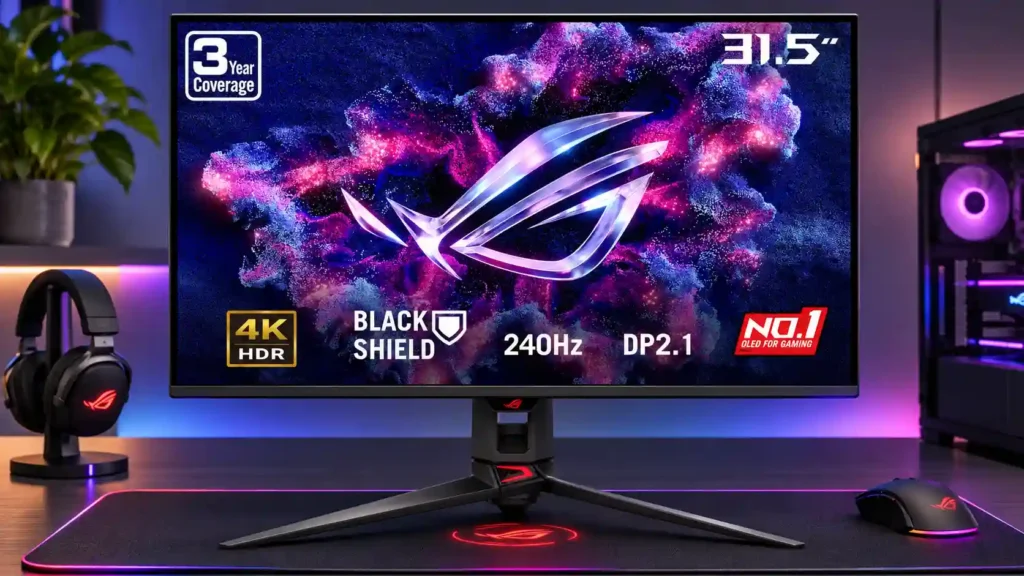
Spectacular 4K OLED gaming, rapid 240Hz motion and improved bright-room blacks make this a flagship standout. Its high price, sprawling stand and occasionally troublesome text clarity are the main reasons to hesitate.

Technology enthusiasts with powerful gaming PCs who want vivid, cinematic 4K HDR at 240Hz; also appealing for premium console setups and mixed workstations using USB-C and KVM.

Budget-conscious buyers, esports specialists seeking 360Hz or faster on a smaller screen, and people especially sensitive to OLED text fringing or eye discomfort during desktop work.

Verdict

The PG32UCDM Gen3 combines some of the most compelling 4K gaming visuals with outstanding speed. Its QD-OLED panel provides vibrant colors, near-instant pixel response, deep contrast and an excellent 240Hz experience, while BlackShield improves black appearance under room lighting and makes the screen easier to clean. Full-bandwidth DisplayPort 2.1, 90W USB-C, KVM switching and OLED care features add genuine everyday usefulness. Yet it remains a costly, incremental upgrade over earlier models. The wide tripod stand takes valuable desk space, there are no built-in speakers, and strong room lighting still compromises black depth. Several testers also identify HDR dimming and VRR flicker, while a small number of owners find text softness or fringing uncomfortable during desktop use. For immersive PC and console gaming with a high-end system, it is exceptionally good; buyers prioritizing value, prolonged text work or the fastest esports refresh rates should compare alternatives.

Feature Scorecards

Summary

73 reviewed features
  • Very positive 4.5-5.0
    42 (58%)
  • Positive 3.5-4.4
    16 (22%)
  • Neutral 2.5-3.4
    9 (12%)
  • Negative 1.5-2.4
    5 (7%)
  • Very negative below 1.5
    1 (1%)

Pros highlights

  • 4.5
    18 reviews low consensus
    overall satisfaction: 4.5, 18 reviews, low consensus
    Most reviewers consider this one of the most polished 32-inch 4K OLED gaming monitors available. Price and minor ergonomic issues temper that enthusiasm, while a small number of owners describe serious discomfort or reading problems.
  • 4.4
    17 reviews strong consensus
    black levels: 4.4, 17 reviews, strong consensus
    The QD-OLED panel delivers exceptionally deep blacks in dark environments, and BlackShield reduces the old purple cast under room lighting. Bright light can still make blacks appear gray compared with the best WOLED alternatives.
  • 4.9
    16 reviews strong consensus
    contrast: 4.9, 16 reviews, strong consensus
    Per-pixel OLED dimming gives bright highlights striking separation from deep dark scenes with essentially no blooming. Contrast is most impressive when ambient light is controlled.
  • 4.5
    16 reviews moderate consensus
    HDR performance: 4.5, 16 reviews, moderate consensus
    Rich color, nearly perfect blacks, and bright highlights make HDR gaming a standout experience. Actual brightness gains over previous QD-OLED generations are more modest than the marketing suggests, and dimming varies by HDR mode.
  • 4.2
    15 reviews moderate consensus
    brightness: 4.2, 15 reviews, moderate consensus
    SDR and larger-area HDR brightness have improved over earlier versions, helping colorful games and desktop apps. Several tests still find small-highlight gains modest and OLED television HDR considerably brighter.
  • 3.9
    15 reviews low consensus
    sharpness: 3.9, 15 reviews, low consensus
    The 4K image generally looks very crisp, and many reviewers find text sharp enough for work. A few owners report unusually soft text, fringing, and discomfort that settings did not resolve.

Cons highlights

  • 2.8
    12 reviews strong consensus
    value for money: 2.8, 12 reviews, strong consensus
    Flagship image quality and build are widely praised, but the high asking price faces strong competition from cheaper OLEDs. Owners of the original PG32UCDM gain relatively little unless the coating improvements matter to them.
  • 3.1
    11 reviews moderate consensus
    stand adjustability: 3.1, 11 reviews, moderate consensus
    Height, tilt, and swivel feel solid, smooth, and stable, but portrait rotation is missing. The stand also cannot sit as low as some users would prefer.
  • 1.9
    9 reviews low consensus
    Desk footprint: 1.9, 9 reviews, low consensus
    The broad three-legged stand is repeatedly criticized for occupying desk space and obstructing large mousepads. Its sturdy construction helps stability but does not make it convenient on compact desks.
  • 3.3
    9 reviews low consensus
    Text fringing: 3.3, 9 reviews, low consensus
    Most testers find the 4K pixel density makes QD-OLED edge color artifacts hard to notice. Some sensitive owners see softer text or distracting fringing, especially when reading light text against dark backgrounds.
  • 2.1
    6 reviews strong consensus
    built-in speakers: 2.1, 6 reviews, strong consensus
    There are no integrated speakers, a repeated frustration given the premium price. Console and casual media users need a headset, soundbar, or external speakers.
  • 3.1
    6 reviews moderate consensus
    competitive gaming suitability: 3.1, 6 reviews, moderate consensus
    Instant response and low lag make the monitor fast enough for serious play, with simulated smaller-screen modes available. Some competitive players prefer 27-inch models with 360Hz or higher refresh rates to this larger 240Hz display.

Use Cases

Best for

  • 5.0
    3 reviews strong consensus
    Technology enthusiasts: 5.0, 3 reviews, strong consensus
    Buyers seeking premium OLED technology, rich imagery, modern connectivity, and advanced gaming extras get an unusually complete package, albeit with a substantial price.
  • 4.8
    3 reviews strong consensus
    Movies and streaming: 4.8, 3 reviews, strong consensus
    4K OLED contrast and Dolby Vision produce detailed, colorful films and shows on a screen large enough for close-up viewing. Separate audio equipment remains essential.
  • 5.0
    2 reviews limited evidence
    Video editing: 5.0, 2 reviews, limited evidence
    The large 4K canvas, broad gamut, and calibration options provide credible room for timelines and tools. Text-fringing sensitivity and color-mode choices may still matter for long editing sessions.

Not ideal for

  • Budget-conscious buyers
    1.2
    3 reviews strong consensus
    Budget-conscious buyers: 1.2, 3 reviews, strong consensus
    This flagship's premium price is difficult to justify when older or competing 4K OLED monitors deliver similar gaming performance for substantially less.
  • Low-distraction use
    1.0
    1 review
    Low-distraction use: 1.0, 1 review
    For a sensitive owner, distracting softness and fringing made reading and coding uncomfortable despite adjustments, making extended focused work a poor fit.

Compared With Category Average

Compared with other Monitors, this product is above average in HDR performance, sleep and wake behavior, KVM switch performance, near average in reflection handling, black levels, below average in eye comfort features, portability and weight, reliability over time.

Comparison summary

55 compared features
  • Above average 0.4+ pts higher
    34 (62%)
  • Same as average within 0.3 pts
    11 (20%)
  • Below average 0.4+ pts lower
    10 (18%)

Largest category differences

Attribute This product Category average Difference
eye comfort features 1.0 4.2 -3.2
portability and weight 2.0 3.8 -1.8
reliability over time 2.0 3.7 -1.7
HDR performance 4.5 3.2 +1.3
sleep and wake behavior 4.1 2.7 +1.4
stand adjustability 3.1 4.3 -1.2
black equalizer performance 3.0 4.3 -1.3
design and aesthetics 3.3 4.5 -1.2

Consider This Instead

If you want better stand adjustability

Choose MSI MPG 322URX QD-OLED. It scores 4.4 vs 3.1 for stand adjustability, with a 4.1 overall score.

Compare

Compared in Reviews

Products reviewers directly compared with this model, grouped into quick takeaways.

  • Cheaper: purchase price and display performance The Gen3 has better light management but the MSI model is presented as a significantly cheaper OLED alternative.

ASUS ROG Strix OLED XG32UCWMG

  • Better: text quality The owner finds Gen3 desktop text visibly softer than on the previous WOLED display.
  • Compared: color, coating and HDR This owner now prefers the Gen3 over the WOLED alternative because BlackShield significantly narrows the black-level gap.
  • Compared: OLED black levels and saturated colors The newer BlackShield treatment brings the Gen3 close enough in blacks that its richer QD-OLED colors win for this reviewer.

ASUS ROG Swift OLED PG32UCDMR (2025)

  • Older model: generational benefits The Gen3 looks richer but is not judged worth replacing an already excellent updated PG32UCDMR.
  • Older model: generational benefit The newer coating is attractive, but the incremental change is difficult to justify for recent revision owners.
  • Older model: new panel brightness and coating The Gen3 improves panel brightness and bright-room black depth while retaining the previous revision’s connection upgrades.

FAQ

Is the PG32UCDM Gen3 worth upgrading to from the original PG32UCDM?

The brighter panel, BlackShield coating and updated connectivity are welcome, but multiple testers consider the visual improvement incremental. It is hardest to justify if the earlier model already works well in your room.

Does it handle bright rooms better than older QD-OLED monitors?

Yes. BlackShield reduces the purple tint and helps manage reflections, though direct lights can still raise blacks and glossy WOLED options may perform better.

How good is the monitor for 4K PC gaming?

Its 240Hz refresh rate, instant OLED response and very low lag deliver excellent gaming performance. Reaching 240fps at 4K still requires substantial GPU power.

Does it work well with PS5 and Xbox consoles?

Testing supports 4K at 120Hz, VRR and HDR with current consoles. There are no internal speakers, so audio requires a connected headset or external system.

Is it suitable for writing, coding and video editing?

The 32-inch 4K screen, broad colors and USB-C/KVM features suit many work setups. Text is sharp for most testers, but some owners find QD-OLED fringing and softness distracting or physically uncomfortable.

What are the main drawbacks?

A premium price, wide stand, missing speakers and imperfect bright-room blacks. HDR dimming, VRR flicker and text rendering can also matter depending on the user.

Sample Expert Reviews We Analyzed

These are a few of the reviews included in our analysis.

Video Reviews

Article Reviews

rtings.com

The ASUS ROG Swift OLED PG32UCDM Gen3 is a premium 32-inch, 4k, 240Hz gaming monitor. It's an updated version of the ASUS ROG Swift OLED...

Review score
4.2
computerbase.de

Der Asus ROG Swift OLED PG32UCDM Gen3 bietet eine höhere Helligkeit und ein BlackShield gegen den lila Farbstich bei direktem Lichteinfall.

Review score
4.5

Top Monitors to Consider

#1 MSI MPG 322UR QD-OLED X24
4.4

Best for exceptional 4K HDR, accurate color, fast 240Hz gaming, and strong work connectivity. Skip it if you need built-in speakers, ultrawide immersion, television-level HDR brightness, or a budget-friendly upgrade.

Pros: brightness, reflection handling

Cons: cable management

#2 MSI MPG 341CQR QD-OLED X36
4.4

Best for class-leading 360Hz ultrawide motion, spectacular HDR, deep blacks, and unusually strong work-and-play connectivity. Skip it if you want 4K-like text sharpness, a matte screen, or the best value...

Pros: overall satisfaction, sharpness

Cons: Resolution, cable management

#3 BenQ RD280UG
4.4

Choose the RD280UG for coding, trading, writing, or creative work that benefits from a tall, sharp 3:2 screen and strong eye-care features. Skip it for serious HDR, color-critical creation, esports,...

Pros: productivity versatility, aspect ratio

Cons: value for money, competitive gaming suitability
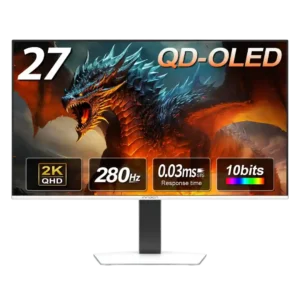
#4 InnoCN GA27S1Q
4.3

Best for fast 1440p OLED gaming, deep blacks, and a flexible stand at a bargain sale price. Skip it for bright rooms, USB-C/KVM productivity, or the reassurance of a three-year...

Pros: color gamut, overall picture quality

Cons: brightness, HDR performance