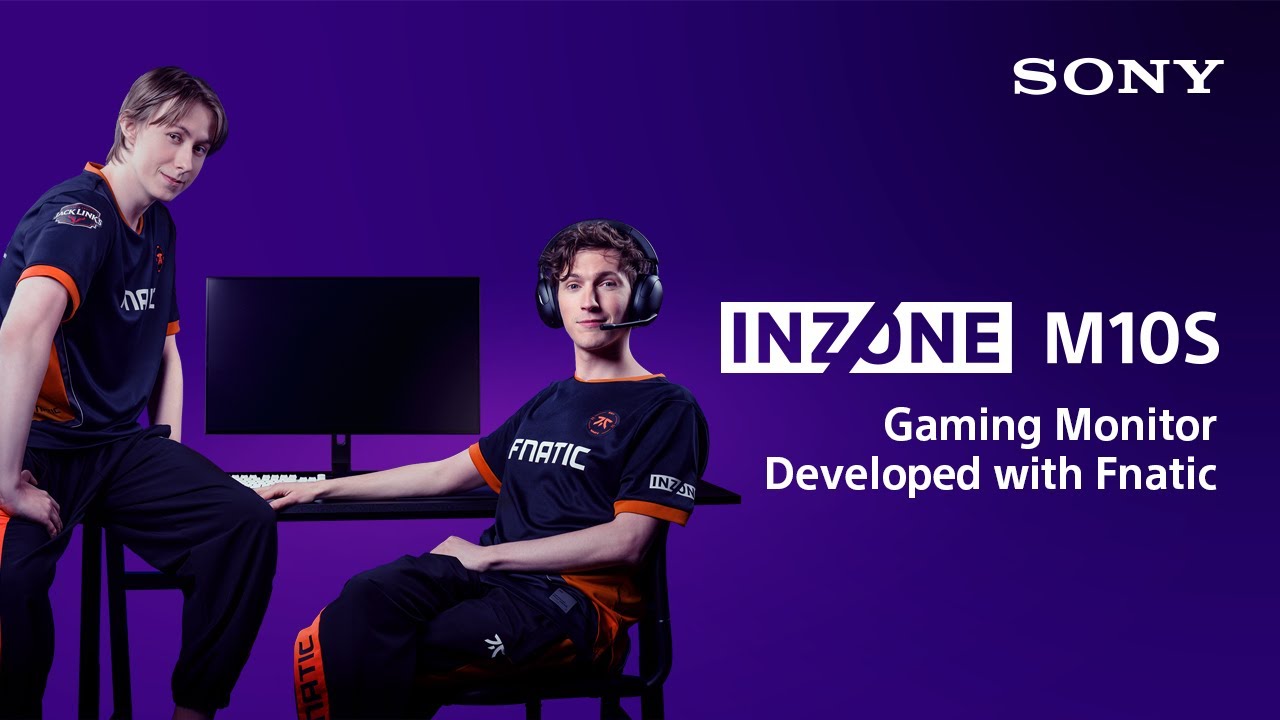
Sony INZONE M10S Monitor Review

Brand: Sony
Released: September 24, 2024
Updated: 1 hour ago
4.2
Overall review score
556
Review insights
85
Scored features
21
Expert reviews

Bottom Line

For serious PC esports, the M10S combines remarkably clear 480Hz motion, rich OLED contrast, and an exceptionally space-efficient stand. Its steep price and 1440p-only focus make it harder to recommend for casual gaming or general desktop use.

Dedicated PC esports players, especially tactical-shooter competitors who can drive very high frame rates and value low blur, the 24.5-inch view, and a compact keyboard-friendly stand.

Budget-focused or casual players, 4K-first console gamers, and people relying on USB-C laptop docking or portrait-oriented work. Cheaper or higher-resolution alternatives fit those needs better.

Verdict

The Sony INZONE M10S is built around an unusually specific promise: elite competitive speed without the washed-out picture of a conventional tournament monitor. Its 480Hz 1440p OLED panel makes fast-moving targets look exceptionally clear, with near-instant response and low input lag. The tiny, sturdy stand also deserves its praise, freeing room for aggressive keyboard and mouse positioning, while the 24.5-inch mode and FPS Pro+ profiles cater to familiar esports habits. Deep blacks and lively HDR mean slower games can still look beautiful. The tradeoffs are substantial. The price regularly exceeds similarly capable OLED rivals, USB-C docking is absent, and 1440p cannot deliver the detail of a 4K cinematic or work display. Brightness fluctuations, occasional VRR flicker, and an unremarkable desktop text experience also matter. The M10S is compelling when competitive PC gaming is the priority, not when broad versatility or value is the goal.

Feature Scorecards

Summary

85 reviewed features
  • Very positive 4.5-5.0
    29 (34%)
  • Positive 3.5-4.4
    28 (33%)
  • Neutral 2.5-3.4
    15 (18%)
  • Negative 1.5-2.4
    13 (15%)

Pros highlights

  • 5.0
    21 reviews strong consensus
    refresh rate: 5.0, 21 reviews, strong consensus
    The 480Hz ceiling is a standout for 1440p esports play, and fast-action smoothness earns broad praise. Real benefits depend on game frame limits and a powerful enough PC.
  • 4.2
    21 reviews moderate consensus
    overall satisfaction: 4.2, 21 reviews, moderate consensus
    The overall experience is highly regarded for esports speed, beautiful OLED visuals, and thoughtful construction. Most reservations focus on whether the premium cost suits the buyer's gaming habits.
  • 5.0
    20 reviews strong consensus
    overall picture quality: 5.0, 20 reviews, strong consensus
    Vibrant colors, deep blacks, and precise fast-moving images make the OLED panel a major attraction. Less-than-4K detail and occasional profile quirks are the main visual compromises.
  • 5.0
    18 reviews strong consensus
    response time: 5.0, 18 reviews, strong consensus
    Near-instant OLED pixel response keeps fast targets distinct, even during abrupt movement. This helps the high refresh rate translate into real motion clarity.
  • 4.9
    18 reviews strong consensus
    competitive gaming suitability: 4.9, 18 reviews, strong consensus
    Extremely fast refresh, low latency, clear motion, and targeted esports tools make this an unusually capable competitive display. Its greatest advantages need high frame rates and a serious competitive focus.
  • 4.9
    18 reviews strong consensus
    motion clarity: 4.9, 18 reviews, strong consensus
    At high frame rates, motion looks startlingly crisp and fluid, especially in competitive shooters. The gains over 240Hz are apparent to some players but modest to others.

Cons highlights

  • 2.1
    21 reviews strong consensus
    value for money: 2.1, 21 reviews, strong consensus
    High-end performance is undeniable, but the cost is frequently difficult to justify against 240Hz, 360Hz, and rival 480Hz OLEDs. Discounts make it a much more appealing purchase.
  • 2.8
    9 reviews low consensus
    port selection: 2.8, 9 reviews, low consensus
    Modern HDMI and DisplayPort inputs are welcome, but the lack of USB-C is repeatedly criticized at this price. The USB selection also limits laptop and multi-device flexibility.
  • 3.2
    7 reviews moderate consensus
    DisplayPort connectivity: 3.2, 7 reviews, moderate consensus
    DisplayPort 2.1 is a welcome connection, but the UHBR10 implementation still relies on DSC for 1440p at 480Hz. It is not the full-bandwidth version some buyers expect.
  • 3.3
    6 reviews moderate consensus
    Text fringing: 3.3, 6 reviews, moderate consensus
    Text is improved over earlier WOLED generations, but tiny letters and sharp edges can still show faint color fringing or haze. A conventional high-resolution LCD or 4K OLED is preferable for intensive text work.
  • 3.4
    6 reviews moderate consensus
    console gaming compatibility: 3.4, 6 reviews, moderate consensus
    Current consoles work well with VRR and vivid OLED gaming, but they cannot exploit 480Hz and some output or HDR conveniences differ. A dedicated 4K console display is often a better investment.
  • 2.6
    5 reviews low consensus
    warranty and support service: 2.6, 5 reviews, low consensus
    Sony's initially short warranty drew criticism, but coverage was subsequently extended to three years, including burn-in. Check local terms, since the older complaints no longer describe that updated policy.

Use Cases

Best for

  • 4.9
    7 reviews strong consensus
    Tactical shooter gaming: 4.9, 7 reviews, strong consensus
    Fast shooters benefit from exceptionally low delay, clean motion, and distinctive enemy-outline presets. The M10S is particularly well suited to committed tactical players.
  • 4.5
    12 reviews strong consensus
    24-inch competitive viewing: 4.5, 12 reviews, strong consensus
    The cropped tournament-size view helps competitive players keep the whole field visible and maintain familiar positioning. It is less important away from esports practice.
  • 4.6
    7 reviews strong consensus
    RPG and exploratory gaming: 4.6, 7 reviews, strong consensus
    Exploratory, RPG, and horror titles can look beautiful on the OLED panel, particularly with HDR enabled. Buyers mainly chasing cinematic 4K detail may prefer a different monitor.

Not ideal for

  • Budget-conscious buyers
    1.7
    15 reviews strong consensus
    Budget-conscious buyers: 1.7, 15 reviews, strong consensus
    Budget-conscious shoppers can get strong OLED picture quality and refresh rates at much lower prices. The M10S makes sense financially only when its specialized advantages really matter.
  • Casual gaming
    2.1
    8 reviews strong consensus
    Casual gaming: 2.1, 8 reviews, strong consensus
    Casual players still get lovely OLED images, but seldom need 480Hz or esports-specific modes. Cheaper or higher-resolution monitors offer a better match for typical gaming.

Compared With Category Average

Compared with other Monitors, this product is above average in Panel quality control, Display-mode switching reliability, 24-inch mode quality, near average in overall satisfaction, stand adjustability, below average in Included accessories, Color brightness, value for money.

Comparison summary

80 compared features
  • Above average 0.4+ pts higher
    28 (35%)
  • Same as average within 0.3 pts
    28 (35%)
  • Below average 0.4+ pts lower
    24 (30%)

Largest category differences

Attribute This product Category average Difference
Panel quality control 5.0 2.5 +2.5
Included accessories 1.8 4.0 -2.2
Color brightness 2.0 4.2 -2.2
value for money 2.1 3.7 -1.6
Display-mode switching reliability 4.8 2.8 +1.9
24-inch mode quality 4.4 2.7 +1.6
HDR tone mapping accuracy 5.0 3.1 +1.9
competitive gaming suitability 4.9 3.6 +1.3

Consider This Instead

If you want better Automatic HGiG tone mapping

Choose MSI MPG 272URX QD-OLED. It scores 5.0 vs 2.0 for Automatic HGiG tone mapping, with a 4.2 overall score.

Compare

If you want better Included accessories

Choose Dell Alienware AW3425DW. It scores 5.0 vs 1.8 for Included accessories, with a 4.2 overall score.

Compare

Compared in Reviews

Products reviewers directly compared with this model, grouped into quick takeaways.

  • Cheaper: refresh-rate premium Sony is quicker but costs more than the 360Hz Alienware.
  • Compared: benchmark OLED competition Alienware is among the 360Hz displays used for performance comparisons.
  • Alternative: 4K and larger screen versus refresh rate Alienware gives general gamers a larger 4K display for roughly the same price.

ASUS ROG Swift OLED PG27AQDP

  • Cheaper: same-panel premium ASUS costs less for a similar high-refresh panel.
  • Cheaper: similar 480Hz panel price Sony costs more than the similar ASUS 480Hz WOLED.
  • Cheaper: similar motion and warranty Sony delivers comparable motion but costs more and originally offered shorter warranty coverage.

FAQ

Does 480Hz make a noticeable difference?

It can feel clearer and more responsive than 240Hz in high-frame-rate competitive shooters, especially with a fast PC. Some players find the difference small, and many games cannot reach 480 fps.

Is the Sony INZONE M10S good for PS5 gaming?

Yes for vibrant OLED images and supported VRR, but consoles top out far below 480Hz. A 4K-focused monitor may be better value for primarily console gaming.

What is the 24.5-inch mode for?

It shrinks the active image to a tournament-style 24.5-inch field for esports practice, with positioning options. You can return to the full 27-inch 1440p screen for other games.

How useful are FPS Pro and FPS Pro+?

FPS Pro resembles familiar tournament-style LCD color, while FPS Pro+ emphasizes certain colored enemy outlines. They can help competitive visibility, but their unusual colors are not ideal for general use.

Is it suitable for work and content creation?

It can handle ordinary work and has a useful color range, especially with the right preset or calibration. Small-text clarity, 1440p workspace, and missing USB-C reduce its appeal as a professional all-rounder.

Does the M10S have burn-in protection and a warranty?

It includes pixel-shifting and other OLED-care features. Early warranty criticism predates a reported extension to three years with burn-in coverage; confirm current terms for your country and seller.

What are the biggest drawbacks?

Price is the main recurring concern. Missing USB-C and speakers, some VRR flicker, brightness shifts, and the lack of native 4K are also worth weighing.

Sample Expert Reviews We Analyzed

These are a few of the reviews included in our analysis.

Video Reviews

Article Reviews

prosettings.net

In our SONY INZONE M10S review, we focus on the competitive performance and go over the features, specs, and performance of the monitor.

Review score
4.7
rtings.com

The Sony INZONE M10S is a premium 27-inch 1440p OLED gaming monitor with a 480Hz refresh rate. It competes with other monitors with the same...

Review score
4.4

Top Monitors to Consider

#1 Asus ROG Swift 34 QD-OLED PG34WCDN
4.5

This 360Hz QD-OLED ultrawide delivers exceptional gaming motion, vibrant HDR and dramatically cleaner text. Its high price, less-than-perfect bright-room blacks and occasional HDR dimming are the main reasons to hesitate.

Pros: color gamut, contrast

Cons: value for money, Resolution
#2 MSI MPG 341CQR QD-OLED X36
4.4

The 360Hz QD-OLED panel delivers exceptional HDR gaming, responsive motion, and cleaner text than earlier ultrawides. Its 3440×1440 resolution is less sharp than 4K, and premium pricing remains a hurdle.

Pros: refresh rate, Text fringing

Cons: Resolution, GPU demands
#3 Dell U4025QW
4.4

A huge, sharp ultrawide workspace and unusually capable Thunderbolt dock make the U4025QW outstanding for demanding productivity and editing. Its high price, modest HDR, and imperfect motion handling keep it...

Pros: overall picture quality, color accuracy

Cons: value for money, built-in speakers
#4 ASUS ROG Strix OLED XG27ACDNG
4.4

Lightning-fast 360Hz OLED gaming, rich color and an unusually flexible USB-C/KVM setup are the big draws. Strong room lighting, limited full-screen HDR brightness and static-content burn-in concerns keep it from...

Pros: color gamut, overall satisfaction

Cons: reflection handling, VRR flicker