If you want better port selection
Choose MSI MPG 322URX QD-OLED. It scores 4.6 vs 1.6 for port selection, with a 4.0 overall score.

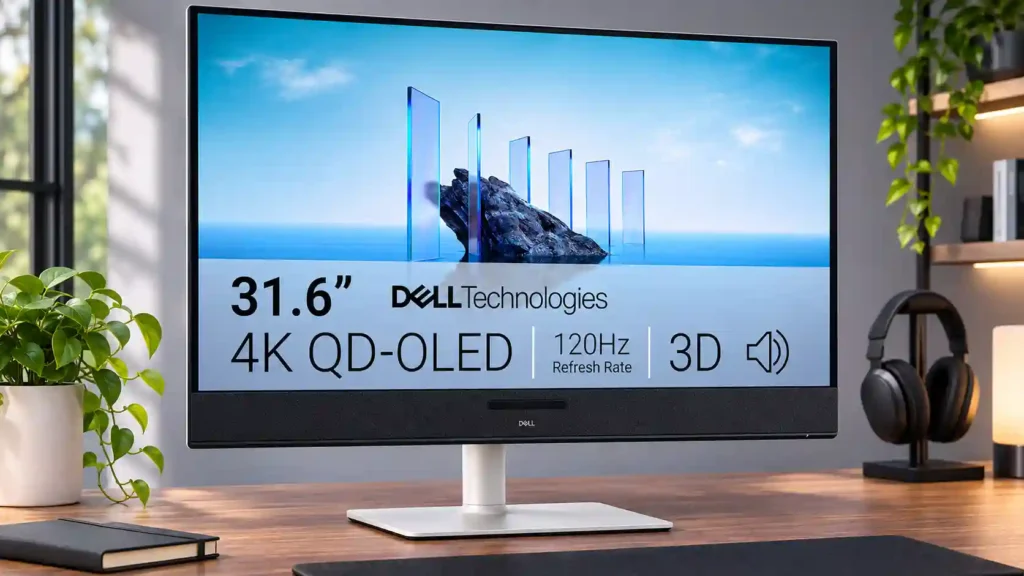
The 32-inch 4K QD-OLED image and exceptional built-in speakers make a compelling work-and-entertainment combination. Only two video inputs, modest SDR brightness and OLED burn-in concerns temper the appeal.
Mixed work-and-entertainment desks, HDR-oriented content creators, movie watchers and casual console or PC gamers who want a 4K OLED screen with capable sound and single-cable laptop charging.
Competitive gamers seeking 240Hz, users with multiple HDMI devices, bright sunlit desks, and people who spend all day on static office interfaces or need extensive docking features.
The Dell S3225QC stands out as an entertainment-friendly 4K monitor that also works well on a creative desk. Its QD-OLED panel provides rich colors, deep blacks and responsive 120Hz motion, while the five-speaker system sounds substantially better than typical integrated monitor audio. A convenient front USB-C connection and up to 90W laptop charging make mixed-use setups pleasant. The compromises are more consequential than they first appear: one HDMI and one USB-C video input make multi-device use awkward, and the lack of a conventional DisplayPort or KVM limits office versatility. HDR is impressive in dark scenes but less forceful across bright areas, while low SDR brightness hurts sunny-room use. Long hours of static windows also raise burn-in concerns, and reported warranty terms vary. It is most persuasive at a good discount for creators and casual gamers who also watch plenty of films.
Compared with other Monitors, this product is above average in built-in speakers, Pixel defect control, Speaker volume control, near average in color accuracy, overall satisfaction, below average in DisplayPort connectivity, Headphone jack convenience, Cleaning ease.
| Attribute | This product | Category average | Difference |
|---|---|---|---|
| DisplayPort connectivity | 1.4 | 4.0 | -2.6 |
| Headphone jack convenience | 1.0 | 3.7 | -2.7 |
| Cleaning ease | 1.0 | 3.7 | -2.7 |
| Operating noise | 1.5 | 4.2 | -2.7 |
| built-in speakers | 4.7 | 2.5 | +2.2 |
| port selection | 1.6 | 3.7 | -2.1 |
| Pixel defect control | 5.0 | 2.6 | +2.4 |
| Display Stream Compression clarity | 2.0 | 4.4 | -2.4 |
Choose MSI MPG 322URX QD-OLED. It scores 4.6 vs 1.6 for port selection, with a 4.0 overall score.
Choose LG 27GX790A-B. It scores 4.9 vs 2.1 for competitive gaming suitability, with a 4.0 overall score.
Choose ASUS ROG Strix OLED XG27AQWMG. It scores 5.0 vs 2.0 for Gaming feature selection, with a 4.4 overall score.
Choose Samsung Odyssey OLED G80SH S32HG802S. It scores 4.6 vs 1.4 for DisplayPort connectivity, with a 4.1 overall score.
Products reviewers directly compared with this model, grouped into quick takeaways.
Yes for casual PC and console gaming: the 4K OLED image, 120Hz refresh and fast response look smooth. Competitive players may prefer a 240Hz model.
The five-speaker 25W system is far stronger than usual monitor audio, with spacious playback and useful volume. Deep bass and true surround precision remain limited.
Yes. The video-capable USB-C input supports up to 90W power delivery, making one-cable operation convenient for many laptops.
There is one HDMI 2.1 input and one USB-C DisplayPort Alt Mode video input. That is limiting if you need a desktop, game console and streaming device connected simultaneously.
It is better in controlled lighting. SDR brightness is fairly modest, and reflections and purplish-looking blacks can appear in brighter environments.
Yes, especially with prolonged static windows, menus and taskbars. Automatic pixel refresh helps, but confirm the currently offered warranty and burn-in coverage before purchasing.
Its wide gamut, detailed 4K image and HDR capability are appealing. More exacting color-critical work may require calibration and finer controls than this model offers.
These are a few of the reviews included in our analysis.

A 2026 Dell S3225QC review built on RTINGS, Tom's Hardware and PCWorld lab data: a flat 120Hz 4K QD-OLED with 90W USB-C and 25W speakers, why...
Find the latest technology stories, breaking news and reviews on Yahoo Tech.
The Dell S3225QC is a 32-inch, 4k QD-OLED monitor. It's the flagship model of the Dell Plus Series lineup, and it's the only one with an OLED...
A stunning QD-OLED panel and good built-in speakers make for a great all-round monitor – but it’s not perfect
The Dell S3225QC is a 32-inch 4K QD-OLED monitor with 120 Hz, HDR10, Dolby Vision, Adaptive-Sync, wide gamut color, and spatial audio.

This 360Hz QD-OLED ultrawide delivers exceptional gaming motion, vibrant HDR and dramatically cleaner text. Its high price, less-than-perfect bright-room blacks and occasional HDR dimming are the main reasons to hesitate.
Pros: color gamut, contrast
Cons: value for money, Resolution

A huge, sharp ultrawide workspace and unusually capable Thunderbolt dock make the U4025QW outstanding for demanding productivity and editing. Its high price, modest HDR, and imperfect motion handling keep it...
Pros: overall picture quality, color accuracy
Cons: value for money, built-in speakers

Lightning-fast 360Hz OLED gaming, rich color and an unusually flexible USB-C/KVM setup are the big draws. Strong room lighting, limited full-screen HDR brightness and static-content burn-in concerns keep it from...
Pros: color gamut, overall satisfaction
Cons: reflection handling, VRR flicker

The 27-inch 4K OLED picture is exceptionally crisp and responsive, with useful USB-C and KVM extras. Its high price, oversized stand, and bright-room compromises limit its appeal.
Pros: sharpness, overall satisfaction
Cons: value for money, VRR flicker