If you want better DisplayPort connectivity
Choose MSI MPG 322UR QD-OLED X24. It scores 5.0 vs 2.8 for DisplayPort connectivity, with a 4.4 overall score.

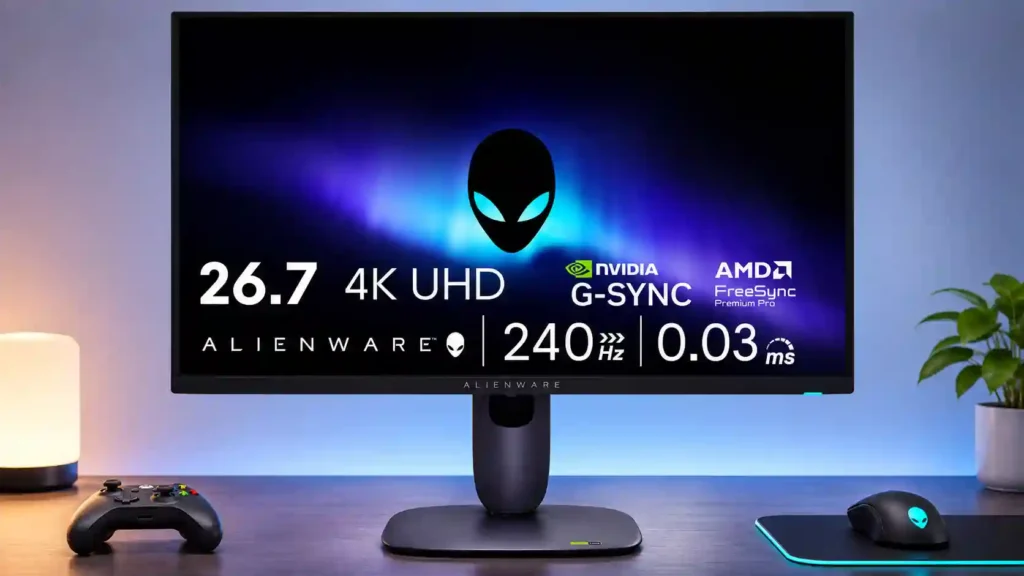
Choose the AW2725Q if you want a compact 27-inch 4K QD-OLED with elite sharpness, OLED contrast, and smooth 240Hz gaming. Skip it if you need high SDR brightness, KVM/USB-C display convenience, speakers, or DisplayPort 2.1.
Best for PC or console gamers who want a compact 27-inch OLED with 4K sharpness, vivid HDR-leaning contrast, and very smooth 240Hz motion. It also fits users who value desk space and text clarity more than a larger, more immersive screen.
Not for users who need a bright-room productivity hub with KVM, one-cable USB-C laptop docking, built-in speakers, or DisplayPort 2.1. It is also harder to justify for people who already own a strong OLED monitor or mainly play at lower resolutions.
The Alienware AW2725Q’s strongest case is its 27-inch 4K QD-OLED panel: reviewers repeatedly praised the crisp pixel density, saturated color, deep blacks, fast response, and smooth 240Hz gaming. It also earns credit for a refreshed compact design, useful ergonomic stand, solid HDMI 2.1 console support, and relatively attractive pricing versus rival 27-inch 4K OLEDs. The tradeoff is that Alienware trimmed convenience features to hit that value point. Bright-room SDR use, DisplayPort 2.1, KVM, USB-C display input, stronger USB-C charging, and built-in audio all came up as limitations, so the monitor feels more like a focused gaming display than a do-everything desktop hub.
Compared with other Monitors, this product is above average in local dimming performance, HDR performance, overdrive tuning, near average in port selection, design and aesthetics, below average in software support, eye comfort features, brightness.
| Attribute | This product | Category average | Difference |
|---|---|---|---|
| local dimming performance | 5.0 | 2.8 | +2.2 |
| software support | 2.0 | 3.8 | -1.8 |
| HDR performance | 4.6 | 3.2 | +1.4 |
| eye comfort features | 2.5 | 4.0 | -1.5 |
| overdrive tuning | 5.0 | 3.5 | +1.5 |
| console gaming compatibility | 4.9 | 3.7 | +1.1 |
| ghosting control | 5.0 | 3.9 | +1.1 |
| screen uniformity | 4.8 | 3.7 | +1.1 |
Choose MSI MPG 322UR QD-OLED X24. It scores 5.0 vs 2.8 for DisplayPort connectivity, with a 4.4 overall score.
Choose InnoCN GA27S1Q. It scores 5.0 vs 2.0 for software support, with a 4.3 overall score.
Choose Dell UltraSharp 52 Thunderbolt Hub Monitor, U5226KW. It scores 4.9 vs 2.9 for USB hub functionality, with a 4.3 overall score.
Choose BenQ RD280UG. It scores 5.0 vs 3.4 for productivity versatility, with a 4.4 overall score.
Compared with Dell Alienware AW2725Q
Yes. Reviewers repeatedly praised the 27-inch 4K QD-OLED panel for sharpness, vibrant color, deep blacks, and strong contrast.
It is most useful with a powerful PC that can push high frame rates at 4K. Reviewers still found the monitor smooth and responsive, but consoles top out below the panel’s full 240Hz capability.
Brightness is the biggest display caveat. Some reviewers liked HDR highlights or found brightness sufficient, but many noted lower SDR brightness or weaker performance near direct sunlight.
It can be, mainly because the 166 PPI 4K panel gives very sharp text. The downsides are OLED burn-in risk, no KVM, no USB-C display input, and limited USB-C charging.
The HDMI 2.1 support and basic USB hub are useful, but reviews repeatedly called out the lack of DisplayPort 2.1, KVM, and proper USB-C display/charging support.
Not automatically. Reviewers saw the AW2725Q as a great first OLED or compact 4K upgrade, but less compelling if you already own a strong OLED, especially a larger 32-inch or ultrawide model.
These are a few of the reviews included in our analysis.




This 360Hz QD-OLED ultrawide delivers exceptional gaming motion, vibrant HDR and dramatically cleaner text. Its high price, less-than-perfect bright-room blacks and occasional HDR dimming are the main reasons to hesitate.
Pros: color gamut, contrast
Cons: value for money, Resolution

The 360Hz QD-OLED panel delivers exceptional HDR gaming, responsive motion, and cleaner text than earlier ultrawides. Its 3440×1440 resolution is less sharp than 4K, and premium pricing remains a hurdle.
Pros: refresh rate, Text fringing
Cons: Resolution, GPU demands

A huge, sharp ultrawide workspace and unusually capable Thunderbolt dock make the U4025QW outstanding for demanding productivity and editing. Its high price, modest HDR, and imperfect motion handling keep it...
Pros: overall picture quality, color accuracy
Cons: value for money, built-in speakers

Lightning-fast 360Hz OLED gaming, rich color and an unusually flexible USB-C/KVM setup are the big draws. Strong room lighting, limited full-screen HDR brightness and static-content burn-in concerns keep it from...
Pros: color gamut, overall satisfaction
Cons: reflection handling, VRR flicker