If you want better Gradient smoothness
Choose ASUS ROG Strix OLED XG27ACDNG. It scores 5.0 vs 2.0 for Gradient smoothness, with a 4.4 overall score.

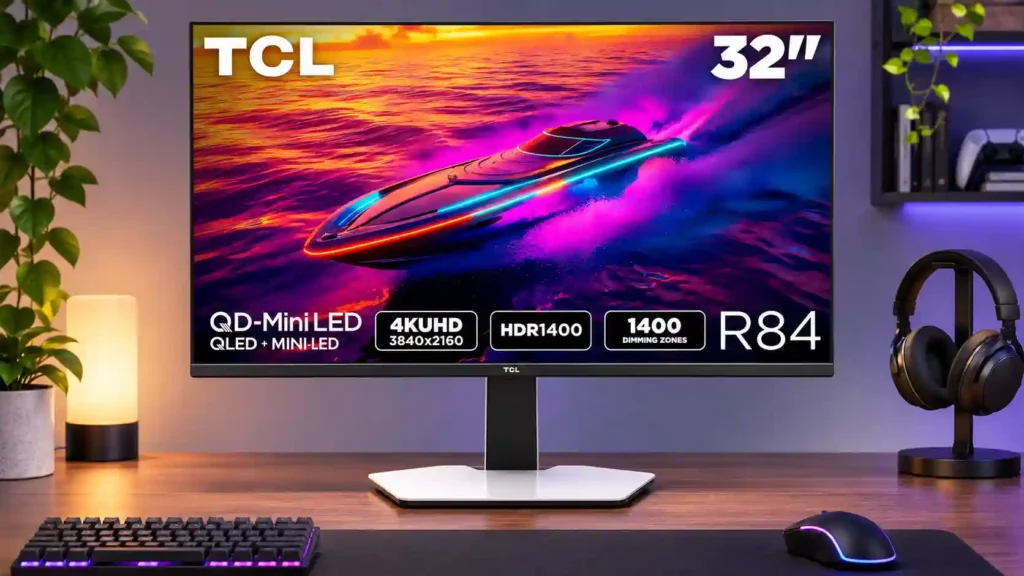
Spectacular HDR brightness, deep VA contrast and thoughtful laptop-docking features make the TCL 32R84 a compelling 4K all-rounder. Its grainy matte coating, narrow viewing angles and dark-scene VRR flicker are the biggest compromises.
HDR-focused PC and console players who also want a sharp 32-inch work display, plus laptop users who benefit from USB-C charging and a KVM.
Flicker-sensitive competitive gamers, people who regularly view the screen off-angle, and buyers who cannot tolerate visible matte grain.
The TCL 32R84 makes a persuasive case for high-end Mini LED rather than OLED. Its 32-inch 4K picture combines exceptional HDR brightness, convincing dark-scene contrast and colorful, detailed images. The 165Hz VA panel is unusually responsive for its technology, while HDMI 2.1, USB-C laptop charging and a KVM make the display genuinely useful for work as well as games. That versatility is especially attractive for people who leave static desktop windows open all day and want to avoid OLED burn-in worries. There are tradeoffs: colors fade when viewed from the side, the matte coating can look grainy, and some dark scenes show distracting VRR flicker. Speakers receive mixed assessments, and competing dual-mode monitors offer higher esports refresh rates. At a good sale price, its HDR impact and everyday practicality can outweigh those compromises.
Compared with other Monitors, this product is above average in Automatic brightness limiting, KVM switch performance, HDR performance, near average in single-player cinematic gaming suitability, Blooming control, below average in Gradient smoothness, Integrated power supply, viewing angles.
| Attribute | This product | Category average | Difference |
|---|---|---|---|
| Gradient smoothness | 2.0 | 4.6 | -2.6 |
| Integrated power supply | 2.0 | 4.1 | -2.1 |
| viewing angles | 2.4 | 4.4 | -2.0 |
| Automatic brightness limiting | 5.0 | 3.1 | +1.9 |
| build quality | 2.5 | 4.3 | -1.8 |
| VRR flicker | 1.3 | 3.1 | -1.8 |
| KVM switch performance | 4.5 | 2.9 | +1.6 |
| Dual-mode versatility | 2.0 | 3.7 | -1.7 |
Choose ASUS ROG Strix OLED XG27ACDNG. It scores 5.0 vs 2.0 for Gradient smoothness, with a 4.4 overall score.
Choose ASUS ROG Swift OLED PG27UCDM. It scores 5.0 vs 2.0 for Integrated power supply, with a 4.4 overall score.
Choose Dell Alienware AW2725DF. It scores 5.0 vs 2.4 for viewing angles, with a 4.2 overall score.
Choose LG 27GM950B-B. It scores 4.6 vs 2.0 for Dual-mode versatility, with a 4.0 overall score.
Products reviewers directly compared with this model, grouped into quick takeaways.
Yes. Its 1,400-zone Mini LED backlight, strong native contrast and unusually high peak brightness give HDR games striking highlights and rich dark scenes.
It provides much brighter HDR highlights and avoids OLED-style burn-in concerns with static desktop content. OLED still wins on precise per-pixel blacks, response speed and wide viewing angles.
Yes. The sources describe 4K 120Hz and VRR support on PS5 and positive Xbox compatibility, with Switch 2 output limited to 4K 60Hz or lower-resolution 120Hz modes.
Yes. A hands-on test measured up to 90W power delivery alongside 4K video, although one account reported 65W, so check the specification for the unit you are buying.
Opinions differ. It reduces reflections, but some users notice grain or pearly sheen, especially when sitting close or viewing bright details.
It can. Dark scenes and large frame-rate swings triggered visible VRR flicker in testing, so flicker-sensitive players may prefer a steadier frame rate or disabled VRR.
The sharp 32-inch 4K screen, KVM, USB hub and adjustable stand are excellent productivity tools. Its broad color gamut also helps creative work, but color-critical workflows may require calibration.
These are a few of the reviews included in our analysis.
TCL is probably a name most people associate with televisions rather than PC monitors, but that is beginning to change. The company has...
The TCL 32R84 is a 4k, 32-inch Mini LED monitor. It's a bigger alternative to TCL's other monitors, like the 27R94 and the 27C2A models, and...
TCL's 32R84 pairs 1,400 dimming zones with searing HDR brightness and a 165Hz 4K panel. It can't match OLED contrast, but you'll never fret...
INNOCN 27M2Vに脳を灼かれたあの日から早2年、Mini LEDゲーミングモニターの性能はもっぱら横ばい気味です。しかし、今回レビューするゲーミングモニター「TCL 32R84」が約2年の停滞に終止符を打ち、新時代の4K...

This 360Hz QD-OLED ultrawide delivers exceptional gaming motion, vibrant HDR and dramatically cleaner text. Its high price, less-than-perfect bright-room blacks and occasional HDR dimming are the main reasons to hesitate.
Pros: color gamut, contrast
Cons: value for money, Resolution

Lightning-fast 360Hz OLED gaming, rich color and an unusually flexible USB-C/KVM setup are the big draws. Strong room lighting, limited full-screen HDR brightness and static-content burn-in concerns keep it from...
Pros: color gamut, overall satisfaction
Cons: reflection handling, VRR flicker

The 27-inch 4K OLED picture is exceptionally crisp and responsive, with useful USB-C and KVM extras. Its high price, oversized stand, and bright-room compromises limit its appeal.
Pros: sharpness, overall satisfaction
Cons: value for money, VRR flicker

Best for exceptional 4K HDR, accurate color, fast 240Hz gaming, and strong work connectivity. Skip it if you need built-in speakers, ultrawide immersion, television-level HDR brightness, or a budget-friendly upgrade.
Pros: brightness, reflection handling
Cons: cable management