
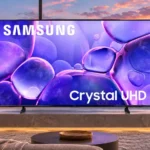
Samsung U8000F Feature Scores
Explore all 133 feature scores for Samsung U8000F, organized into pros and cons.
Scores by Feature
Summary
133 reviewed features-
Very positive 4.5-5.017 (13%)
-
Positive 3.5-4.440 (30%)
-
Neutral 2.5-3.434 (26%)
-
Negative 1.5-2.433 (25%)
-
Very negative below 1.59 (7%)
Pros
Sort
-
Major streaming apps and catch-up services are widely available, making a separate streaming stick unnecessary for most viewers.
-
The feet slot into position quickly and securely, making assembly easier than screw-fastened stands.
-
Input lag is consistently very low, giving button presses an immediate feel even on this inexpensive 60Hz set.
-
Fine detail in 4K material looks crisp, and several sizes reproduce HD-to-4K detail well. It does not deliver sharper motion simply because the panel has 4K resolution.
-
The slot-in feet and straightforward first setup are repeated bright spots, with no screwdriver needed for the stand.
-
HD sources upscale respectably and often look clean, though the result can seem a little soft. Very low-resolution streams remain the weak point.
-
Natural skin tones and balanced SDR color help ordinary images look believable, though cooler HDR colors can undermine that look.
-
Detailed textures and fine edges are a strength for the price, especially with good-quality 4K or HD sources.
-
Auto low-latency switching is a useful convenience, putting the TV into its responsive game setting when a console starts.
-
Natural SDR colors and convincing skin tones are recurring strengths, although HDR color errors, blue casts, and panel differences leave accuracy uneven overall.
-
Dialogue remains easy to follow at normal volumes, making ordinary television and conversational shows comfortable without extra speakers.
-
Tizen provides a familiar, capable smart-TV experience with strong content access, though budget hardware can make it sluggish.
-
SmartThings integration and compatible routines are useful for managing the TV alongside other connected devices.
-
The internal speakers perform respectably at ordinary levels, but bass power and maximum volume are not their strong points.
-
Built-in AirPlay makes it convenient to send content from iPhones, iPads, and Macs without adding another box.
-
Big sizes are tempting at entry-level prices, though several competitors promise noticeably stronger image quality for little extra.
-
White balance and color temperature can be very good in SDR, though some settings or models lean too cool and dark.
-
Treble is generally clear, though sometimes a bit bright or thin at higher frequencies.
-
Samsung TV Plus offers a convenient no-extra-subscription stream of channels, including programming beyond the major paid services.
-
Unboxing is straightforward, with the television well protected and key parts easy to identify.
-
Most gradual shading is acceptable, but dark gray and green gradients can reveal visible bands.
-
Gaming Hub offers convenient cloud-gaming access where services are available, although support and subscriptions vary by location.
-
Its restrained design and thin bezels look tidy from the front, while plastic details and a bulky rear lower the premium impression.
-
Standard-definition-range picture quality is frequently balanced and natural, especially in carefully chosen presets.
-
Narrow bezels make the screen look relatively modern, although a small inactive border remains visible on some versions.
-
OTS Lite lends voices and effects a more convincing screen position than the simple stereo speaker count suggests.
-
The basic menus are approachable and common adjustments are accessible, despite some delays during navigation.
-
HDR10+ is a welcome supported alternative, although its benefits cannot compensate for the TV's relatively modest panel brightness.
-
Flexible zoom and aspect-ratio controls help older 4:3 video fill the screen when desired.
-
Permanent image retention is an unlikely concern with this direct-lit LCD panel, even during prolonged static-image use.
-
The speakers avoid obvious buzzing and crackling even as louder effects play, an advantage at this price.
-
AirPlay makes it easy to mirror a Mac screen without purchasing a separate Apple TV box.
-
Phone-to-TV mirroring is especially handy for owners of Apple devices who want a simple display connection.
-
Netflix, Disney+, Apple TV, and other popular services work conveniently through the built-in streaming platform.
-
The 43-inch model held a stable wireless connection even at a considerable distance from the router, without noticeable streaming lag.
-
Included remotes are generally usable and comfortable, though the basic models omit conveniences such as a microphone or solar charging.
-
Equalizer and channel-balance options offer useful control over the sound without adding external equipment.
-
PC text is generally readable with full chroma support, but the BGR subpixel arrangement may cause issues in certain desktop applications.
-
Q-Symphony is a useful option with compatible Samsung soundbars for combining audio output and adding impact.
-
The full-button remote offers more direct controls; the smaller smart remote is easier to hold but more minimalist.
-
Screen sizes run from compact bedrooms to very large living-room options, giving buyers considerable size flexibility.
-
The audio has pleasing balance and occasional directional width, but it does not deliver a powerful cinematic soundstage.
-
Closed captions are a useful accessibility option when voices need to remain readable in a noisy household.
-
Adaptive Sound can tailor the tonal balance usefully to a particular room, even if it cannot add much raw speaker power.
-
Personal images can double as an idle-screen gallery, offering a basic display alternative to Samsung's more advanced art modes.
-
Samsung device casting is convenient through the TV's smart interface, alongside supported Apple mirroring.
-
Samsung Knox is presented as a worthwhile extra safeguard for connected apps and services, a welcome touch on an inexpensive smart TV.
-
Sleep-timer functions can stop an idle TV and avoid unnecessary power use.
-
Gradients are generally smooth for the price, with only moderate banding showing up in select dark colors.
-
HDR brightness tracking is reasonably faithful in many scenes, but the dim panel and raised near-black areas keep it from full accuracy.
-
Protective packaging and included basic hardware make initial handling uncomplicated.
-
Long-term dimming risk appears relatively low for this direct-lit LCD design, although component failures remain possible.
-
SmartThings provides a workable phone-based alternative when the physical remote is inconvenient.
-
A software refresh brings the newer One UI interface; the experience can still be less responsive than on pricier Samsungs.
-
The supplied legs hold the panel securely without elaborate mounting hardware.
-
Film-like frame rates can avoid micro-judder, which helps slower cinematic scenes feel steady.
-
The lightweight cabinet is easier to handle, but larger models still benefit from help during unboxing.
Cons
Sort
-
Small bright details struggle to stand out in HDR. This is not a strong choice for the brilliant highlights associated with premium HDR displays.
-
HDR10+ playback is supported, but real HDR impact is often underwhelming because highlights are dim and color lacks pop. Standard mode receives better comments than Filmmaker Mode in some sizes.
-
The native 60Hz ceiling is a firm limitation for high-frame-rate console and PC play; ordinary 60fps games remain usable.
-
Anyone used to 120Hz or faster screens will notice the 60Hz limit, which makes this a poor upgrade for competitive high-refresh play.
-
The missing optical audio output disappoints owners of older sound equipment; some video descriptions conflict on connection layouts.
-
HDR colors lack the depth and brightness of more advanced displays, with some rich shades looking muted or flat.
-
Bright HDR highlights may lose subtle shading or simply lack enough luminance to stand out.
-
All three HDMI ports lack full 2.1 gaming bandwidth, constraining configurations that need 4K at 120Hz.
-
Without effective local dimming, darker parts of mixed-brightness scenes can appear gray, and backlight behavior may be distracting. Avoid expecting distinct bright highlights against deep blacks.
-
Abrupt changes between bright and dark shots can provoke distracting backlight pumping that settings do not fully eliminate.
-
Slow pixel transitions are a drawback for sharper fast-paced gaming and sports, especially on the tested 60Hz panel.
-
Bright reflections remain conspicuous in harsher rooms, despite one more favorable appraisal of the screen's coating.
-
Wide-set, minimally adjustable feet can demand a broad cabinet and complicate soundbar placement.
-
Opening streaming services can take longer than expected on this budget processor, despite the broad app catalog.
-
The included smart remote lacks solar charging, so replacing batteries remains part of ownership.
-
Bass tends to be shallow or only adequate, leaving action and music less full-bodied than a separate soundbar can provide.
-
Daytime visibility is a weak point: brightness and reflection handling often fall short when the curtains are open.
-
Dolby Vision is unavailable, so services and discs using that format cannot use its dynamic metadata here.
-
Settings can be easy to locate, although delayed responses and sluggish navigation frustrate some users.
-
Peak brightness is the most persistent weakness, particularly under strong ambient light or in HDR. A few owners find it sufficient for ordinary evening television.
-
The roughly 48–60Hz VRR window is too restrictive to prevent tearing when a game dips further in frame rate.
-
The limited gamut reduces saturation and HDR impact, even though colors often look balanced in regular SDR viewing.
-
Menu navigation and launches feel quick to some owners but slow to several expert testers, particularly on demanding Tizen screens.
-
Large uniform fields reveal uneven shading, side bands, or vignetting on some screens, which can distract during sports.
-
Black shading is relatively even on some screens, while other samples show visible clouding in dark scenes.
-
The Gaming Hub is useful for consolidating sources, but the more capable Samsung Game Bar and its overlays are absent.
-
There is little help for tidying cables behind the set, particularly when several external devices are connected.
-
No DTS passthrough is a drawback for Blu-ray owners using lossless DTS audio tracks.
-
Low-bitrate streaming artifacts are not cleaned up particularly well; blockiness and pixelization can remain visible.
-
SDR remains dim by bright-room standards, even when the most luminous preset is selected.
-
VA versions can give dark scenes reasonable depth, especially in Standard mode, but black areas can turn gray when brighter objects enter the frame. IPS examples struggle more with dark blacks.
-
Overhead lights may be tolerable, but windows and direct reflections can make the dim picture harder to enjoy.
-
Rear-facing HDMI ports make wall-mounted devices and cables harder to connect cleanly.
-
Some quick color transitions leave visible red or other motion artifacts, although a few owners notice little smearing.
-
Voice commands generally require a phone app or external assistant rather than a microphone in the included remote.
-
Contrast is more convincing in some VA-panel tests than in IPS examples, yet still lacks the separation and depth of stronger backlit TVs.
-
Off-center picture quality depends on panel type: VA samples lose contrast and shift color at the sides, while one IPS version fares much better.
-
Three HDMI sockets cover simple setups but can be restrictive once a console, soundbar, and streaming device are all connected.
-
Basic VRR is present on several models, but the narrow operating range means its practical improvement is limited.
-
Home-screen advertisements cannot be completely removed, even though targeted advertising can be disabled.
-
Black-frame insertion produces distracting image duplication and flicker, limiting its usefulness for cleaning up motion.
-
Backlight flicker could trouble sensitive viewers, with behavior varying by mode and brightness setting.
-
Missing HDMI 2.1 bandwidth limits access to higher-refresh 4K modes, though casual users may not miss it.
-
The available HDR formats provide basic compatibility, but limited luminance and missing Dolby Vision reduce the appeal for format-focused viewers.
-
Short fixed feet leave little clearance beneath some sizes, so placing a soundbar directly in front may need planning.
-
The basic plastic feet are functional but feel cheaper than the rest of Samsung's design language.
-
Wall mounting is possible, but rear-facing connections can require extra clearance or right-angle cables.
-
Some online features need a Samsung account and current software, an extra hurdle for anyone wanting a sign-in-free TV.
-
Picture calibration can improve accuracy, but achieving the best results can require extensive tweaking or prove frustrating.
-
The television can look slim from the front, but its thickest rear sections are less elegant than premium designs.
-
A mild dirty-screen effect and patchiness are visible in tests, though several reviewers find them less noticeable with real content.
-
SDR images can look impressively faithful, especially in Movie or Filmmaker presets. HDR accuracy is less convincing, with some samples showing cooler, less natural colors.
-
Motion adjustment can improve judder on some samples, but other testing finds interpolation inconsistent or ineffective.
-
Some VA panels look reasonably convincing for evening films, but clouding, shallow blacks, and dimming behavior limit serious dark-room appeal.
-
Tone mapping works surprisingly well on some samples in Standard mode, but other settings flatten highlights, shift shadows, or clip bright detail.
-
Native 24p material can play smoothly, but some sources or settings introduce visible judder that requires tuning.
-
The basic LCD architecture can offer respectable native contrast on VA-panel examples, but the absence of zone-by-zone backlight control limits the result.
-
The TV can display 4K game signals at 60Hz, but not the high-frame-rate 4K modes of newer gaming displays.
-
Dolby Digital Plus passthrough can work well, but DTS and some multichannel LPCM configurations remain restricted.
-
Blooming is not a major annoyance on the tested VA model, although that reflects its simple, globally lit design rather than precise local dimming.
-
FreeSync-style variable refresh can help in a narrow band, but dips below the supported window can still show tearing.
-
G-SYNC-compatible VRR behavior is limited by the TV's narrow refresh range, so it is less helpful than on a proper gaming display.
-
Game Mode keeps controls feeling snappy, though it cannot fix sluggish pixel transitions or the modest HDR picture.
-
Targeted ads can be switched off, but this does not remove all promotional material from the home screen.
-
Motion results vary considerably, from pleasingly smooth after adjustments to noticeable blur and color trails in fast action.
-
Speaker volume suits many everyday rooms, but reviewers disagree about its headroom and several find it too quiet for large or noisy spaces.
-
Lower-quality broadcasts may preserve jagged edges, blocks, or softness; HD input fares much better than 480p material.
-
Build quality is mixed: inexpensive plastics and flex bother some testers, while others find the lightweight body adequately sturdy.
-
Shadow visibility varies with picture mode and screen version. Some tests praise preserved dark-scene detail, while others find shadowy areas hard to distinguish.
-
Rapid action can lose fine detail or look smeared, even though some reviewers find the motion quite acceptable for normal television.
-
Standard mode looks best to several testers; other presets offer accuracy but can dim or flatten the image, making adjustments a tradeoff.
-
The low entry price attracts budget shoppers, but several reviewers argue that competing Mini LED televisions deliver substantially more picture quality per dollar.
-
Casual 60fps play is responsive enough, but motion blur and restricted image performance keep gaming from being a standout strength.
-
Opinions span from a very satisfying bargain to a disappointing entry-level set. The divide largely comes down to expectations for brightness, contrast, and picture quality.
-
Picture quality splits opinion: crisp, natural-looking SDR images win praise, but weak brightness, restrained color, and uneven dark scenes stop this from feeling like a premium 4K screen.
-
Built-in sound is often clean, balanced, and better than expected for a budget set, but it lacks the weight and output of a proper sound system.
Use Cases
Best for
Sort
-
1080i broadcasting is deinterlaced cleanly, making conventional television feeds look better than expected.
-
SD and broadcast video can look surprisingly clean once upscaled, with strong deinterlacing noted on several sizes.
-
Built-in speakers suit clear dialogue and everyday shows, but a soundbar becomes attractive for more impact or bass.
-
Built-in streaming services make popular shows and movies easy to access; image quality is best with controlled lighting.
-
Moderate or controlled lighting helps its natural SDR colors and modest backlight look more convincing.
-
Apple households benefit from easy AirPlay and native Apple TV app access rather than relying on an extra streaming box.
-
1080p material tends to upscale more cleanly than very low-resolution sources and can look satisfyingly detailed.
-
Casual 60fps console play is a reasonable fit thanks to low lag; demanding competitive games expose blurry motion and the 60Hz cap.
-
As a second TV, its straightforward apps and modest price make more sense than as the centerpiece of a premium home theater.
-
Budget shoppers get familiar smart-TV software and a large screen, but should weigh this against brighter, faster rivals at similar prices.
-
Bedroom use suits the smaller versions, whose built-in streaming and acceptable evening picture do not demand a high-end panel.
-
The compact 43-inch model can fit especially well in a small office or den.
-
SmartThings integration is a handy fit for existing Samsung connected-device households.
-
PC use benefits from readable text and low input lag, though slight text softness and subpixel quirks can be limiting.
-
A soundbar can give the basic stereo output welcome bass and body; using one does not address the picture shortcomings.
-
The direct-lit LCD format carries little permanent burn-in risk, which is reassuring for years of routine viewing.
-
Displaying personal photos as a screen saver is a welcome way to customize an otherwise basic TV.
-
Laid-back 60fps games are more forgiving of motion softness and benefit from the low input lag.
-
Family seating arrangements are panel dependent: some IPS sets maintain side views well, while VA models favor the central sofa seat.
Conditional or not ideal for
Sort
-
Bright-room viewingA brightly sunlit room exposes the TV's low luminance and reflections, so stronger screens are preferable.
-
Shared-screen viewingSide-viewing suitability depends on panel: VA examples lose contrast rapidly, while an IPS sample tolerates wider group seating.
-
Daytime sports viewingSports look softer under bright lights and during rapid motion, despite occasional reports of acceptable playback.
-
Dark-scene gamingDark horror-game scenes can look cloudy and gray on IPS versions, limiting their atmosphere.
-
HDR gamingDim HDR highlights and limited refresh make HDR gaming a weak selling point, despite good button responsiveness.
-
Photosensitive playersPWM backlight flicker may make the TV unsuitable for anyone particularly sensitive to flickering displays.
-
Home theater viewingFor a serious home theater, weak HDR brightness, inconsistent blacks, and variable backlight behavior are major compromises.
-
PlayStation 5 gamingPS5 games can be played at 4K/60Hz with low input lag, but 4K/120Hz output is off the table.
-
Movie watchingMovies can look natural in SDR and Standard mode, but dim HDR, uneven dark scenes, and narrow VA viewing angles limit cinematic appeal.
-
Sports watchingMotion blur, restricted brightness, and screen uniformity issues hold it back for sports, despite some more favorable views.
-
External streaming device useAn external streamer can be connected, but rear-facing sockets may require adapters or more wall clearance.
-
Console gamingConsole play feels responsive at 60Hz, but higher-end PS5 or Xbox features cannot be fully used and motion is not always crisp.
-
Everyday living-room viewingFor routine living-room shows, the TV offers convenient streaming and decent sound, provided strong glare and premium HDR are not priorities.