
Overall: 4.1/5
A full-size DisplayPort is welcomed as a versatile option alongside USB-C and HDMI.
Pros: USB hub functionality, USB-C power delivery
Cons: speaker quality

Overall: 4.1/5
A full-size DisplayPort is welcomed as a versatile option alongside USB-C and HDMI.
Pros: USB hub functionality, USB-C power delivery
Cons: speaker quality
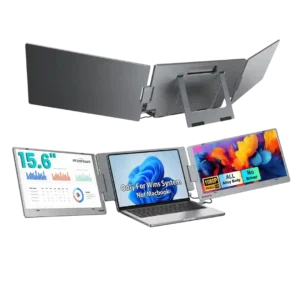
Overall: 4.2/5
The ALT-DP USB-C connection is a strong part of the design because it can carry video to both screens through one cable. The catch is that the host device needs...
Pros: overall satisfaction, portability and weight
Cons: reliability over time

Overall: 4.2/5
The full-bandwidth DP 2.1 UHBR20 input is a key differentiator, enabling uncompressed 4K/240Hz with compatible hardware. Older GPUs can use DSC, although some driver features and refresh options may differ.
Pros: HDR performance, DisplayPort connectivity
Cons: value for money, brightness

Overall: 4.3/5
High-bandwidth DisplayPort is useful for high-refresh PC setups, and older DP 1.4 graphics cards can still drive the full mode with DSC.
Pros: black levels, motion clarity
Cons: value for money, Dual-mode versatility

Overall: 4.4/5
Full 80Gbps DisplayPort 2.1 can deliver uncompressed 4K at 240Hz with compatible hardware, bypassing DSC-related limitations. The visible difference from working DSC is usually small.
Pros: sharpness, overall satisfaction
Cons: value for money, VRR flicker
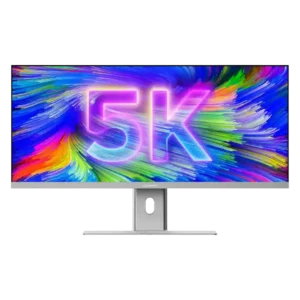
Overall: 4.3/5
DisplayPort 1.4 gives PC users a direct, adapter-free connection and preserves the intended visual experience. It is a strong alternative when USB-C is unavailable.
Pros: productivity versatility, aspect ratio
Cons: built-in speakers, competitive gaming suitability
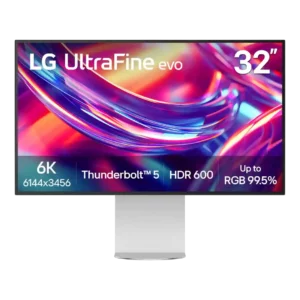
Overall: 3.9/5
DisplayPort 2.1 joins Thunderbolt 5 and HDMI 2.1 in a very modern port mix. Reviewers view the overall wired connectivity as a major strength.
Pros: port selection, overall satisfaction
Cons: value for money, cable management

Overall: 4.0/5
DisplayPort is the preferred route to full 1440p at 180Hz; one reviewer wishes the port were a newer version.
Pros: overall satisfaction, refresh rate
Cons: HDR performance, HDMI 2.1 support

Overall: 4.1/5
DisplayPort 1.4 with DSC handles the monitor’s 4K 240Hz output without a meaningful real-world penalty. The lack of DisplayPort 2.1 is mostly academic.
Pros: motion clarity, PC gaming compatibility
Cons: color accuracy, software support

Overall: 4.4/5
DisplayPort 1.4 with DSC runs the native QHD/280Hz combination capably, even though the connection is not the newest DP 2.1 standard.
Pros: overall satisfaction, response time
Cons: reflection handling, VRR flicker

Overall: 3.7/5
The DisplayPort input works well for a PC connection and can support 4K at 120Hz, complementing the two HDMI ports.
Pros: value for money, Resolution
Cons: stand adjustability, viewing angles

Overall: 4.0/5
DisplayPort offers the full 4K160 option with DSC, giving desktop PC users a capable connection.
Pros: Dual-mode versatility, refresh rate
Cons: black levels, contrast

Overall: 4.2/5
DisplayPort 1.4 handles 4K at the full 165Hz refresh rate, making it a practical option for high-refresh PCs.
Pros: brightness, HDR performance
Cons: speaker quality, built-in speakers

Overall: 3.7/5
DisplayPort 1.4 is the connection to use for the full 200Hz PC experience. HDMI is limited to a lower refresh rate.
Pros: overall satisfaction, PC gaming compatibility
Cons: color accuracy, local dimming performance

Overall: 3.6/5
DisplayPort 2.1 is a welcome advantage over some rivals, but bandwidth limits still require compression at 4K/240Hz. Certain graphics-card and driver combinations may need attention.
Pros: refresh rate, Dual-mode versatility
Cons: motion clarity, black levels

Overall: 3.7/5
DisplayPort supports the full ultrawide refresh specification, although high-bit-depth 180Hz operation can require DSC.
Pros: ultrawide gaming experience, black levels
Cons: HDR performance, viewing angles

Overall: 4.2/5
DisplayPort 1.4 works for 240Hz with compression, but the absence of newer DP 2.1 bandwidth disappoints some enthusiasts.
Pros: refresh rate, HDR performance
Cons: reflection handling, Text fringing

Overall: 4.1/5
DisplayPort 2.1 offers modern connectivity, but its bandwidth falls short of the UHBR20 maximum, so full-resolution high-refresh signals can require compression. One setup also suffered HDMI-versus-DisplayPort reliability differences.
Pros: Resolution, overall satisfaction
Cons: value for money, GPU demands

Overall: 4.3/5
DisplayPort 1.4 with DSC can drive the full 1440p/500Hz experience and was considered functionally adequate. Still, several testers wanted DisplayPort 2.1 at this premium price.
Pros: overall satisfaction, competitive gaming suitability
Cons: value for money, screen size

Overall: 3.5/5
DisplayPort works for high-resolution PC use, but full-speed 4K requires compression, and some switching arrangements are awkward.
Pros: HDR performance, overall satisfaction
Cons: local dimming performance, Blooming control

Overall: 3.8/5
DisplayPort works for high-refresh output, but one tester needed to correct Nvidia’s default limited-range RGB setting.
Pros: value for money, Resolution
Cons: port selection, HDR performance

Overall: 4.2/5
Its broad connector layout is valuable, though the absence of DisplayPort 2.1 disappoints at this price.
Pros: port selection, USB hub functionality
Cons: competitive gaming suitability, motion clarity

Overall: 3.9/5
DisplayPort 1.4 can drive the native 300Hz mode and supports firmware updates, though it lacks the bandwidth headroom of newer versions.
Pros: HDR performance, black levels
Cons: viewing angles, response time

Overall: 4.3/5
DisplayPort connectivity was a weakness because reviewers repeatedly criticized the lack of DisplayPort 2.1.
Pros: value for money, sharpness
Cons: brightness, USB hub functionality

Overall: 3.6/5
DisplayPort 1.4 handles the native high-refresh mode but lacks the newer 2.1 connectivity found on some premium alternatives.
Pros: reflection handling, HDR performance
Cons: screen uniformity, Screen coating clarity

Overall: 4.2/5
DisplayPort 1.4 with DSC runs advertised modes, but the missing DP 2.1 connection feels less future-ready to enthusiasts with newer graphics cards.
Pros: overall satisfaction, black levels
Cons: reflection handling, Color brightness

Overall: 4.0/5
DisplayPort can drive the native high-refresh mode with compression, while turning compression off forces significant signal compromises.
Pros: brightness, contrast
Cons: Text fringing, speaker quality

Overall: 4.2/5
USB-C DisplayPort Alt Mode replaces a conventional full-size DisplayPort socket, which may complicate connecting devices that rely on a standard DP cable.
Pros: value for money, Resolution
Cons: port selection, competitive gaming suitability

Overall: 4.2/5
DisplayPort 1.4 with compression can carry the full 4K/240Hz image, but some buyers expect DisplayPort 2.1 in this price range. Actual picture clarity is not a major complaint.
Pros: reflection handling, color gamut
Cons: value for money, brightness

Overall: 4.1/5
DisplayPort 1.4 works with compression but feels dated for such a demanding 5K display; several would prefer DisplayPort 2.1.
Pros: Pixel density, Resolution
Cons: GPU demands, HDR performance

Overall: 3.7/5
DisplayPort 1.4 works for conventional connectivity, but the lack of the newer 2.1 standard disappoints at this price. Some would expect more forward-looking ports on such an expensive display.
Pros: glasses-free 3D quality, AI 2D-to-3D conversion
Cons: 3D compatible game library, value for money
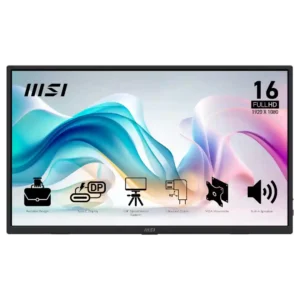
Overall: 4.1/5
USB-C display connectivity can be convenient, but at least one owner found it unreliable across phones and foldables.
Pros: value for money, portability and weight
Cons: built-in speakers, color gamut

Overall: 4.2/5
There is no full-size DisplayPort socket. DisplayPort Alt Mode over USB-C works, but may require the right adapter or cable for certain graphics cards.
Pros: overall picture quality, overall satisfaction
Cons: port selection, brightness

Overall: 4.2/5
There is no conventional DisplayPort socket, a recurring complaint for desktop users with DisplayPort-centric graphics cards.
Pros: overall satisfaction, screen size
Cons: stand adjustability, Photo editing