If you want better HDR adjustment controls
Choose LG 27GX790A-B. It scores 5.0 vs 2.0 for HDR adjustment controls, with a 4.0 overall score.

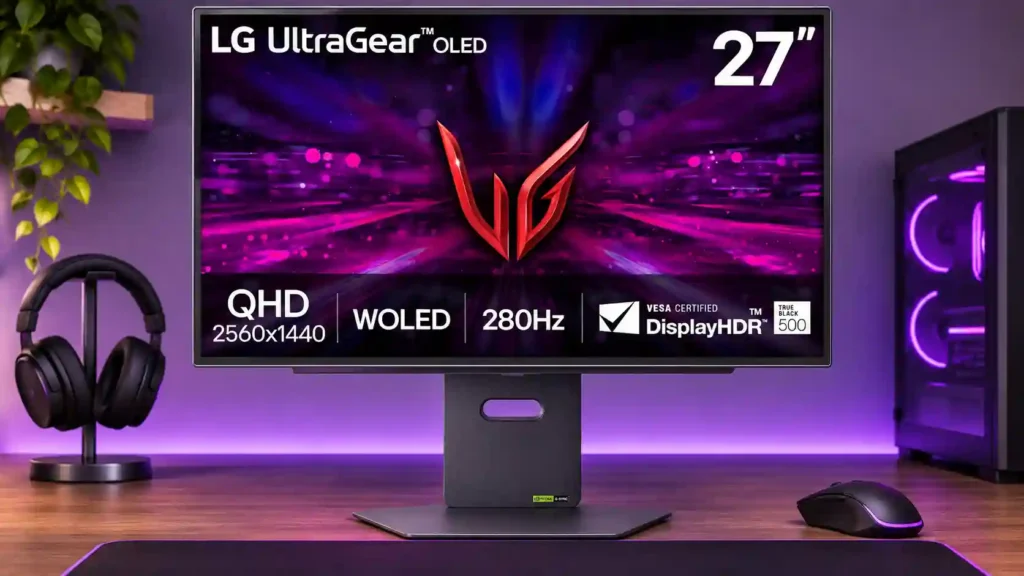
The 27GX700A-B delivers superbly fluid 1440p OLED gaming and punchy contrast, especially at a discount. Uneven HDR accuracy, possible dark-gray banding, and a divisive matte coating hold it back.
Competitive PC gamers wanting fluid 1440p OLED motion, and HDR game enthusiasts who value deep contrast and can buy at a meaningful discount. Bright-room players also benefit from the matte glare reduction.
HDR color graders, small-text coders, or people who need precise color without tuning. Work-laptop and multi-computer users seeking USB-C docking or integrated KVM should look elsewhere.
The LG 27GX700A-B is at its best in fast 1440p games, where its 280Hz refresh rate, near-instant OLED response, and low input lag produce beautifully clear motion. The Tandem OLED panel brings vivid color, deep blacks, and stronger brightness than many older WOLED displays, while the matte surface helps with reflections. But the picture is not consistently faithful: HDR modes can brighten content unnaturally or lose shadow detail, and some units show vertical bands in dark gray scenes. The matte finish also divides opinion, ranging from pleasantly subtle to distractingly grainy. Console performance is broadly capable, though Xbox Dolby Vision is missing and 120Hz may require a menu adjustment. Everyday work is possible, but small text and missing USB-C/KVM conveniences make this less appealing as a productivity-first display. Its recommendation improves substantially when sale prices undercut better-equipped alternatives.
Compared with other Monitors, this product is above average in competitive gaming suitability, ghosting control, GPU demands, near average in HDR performance, console gaming compatibility, below average in USB-C power delivery, HDR adjustment controls, Gamma tracking.
| Attribute | This product | Category average | Difference |
|---|---|---|---|
| USB-C power delivery | 1.0 | 3.6 | -2.6 |
| HDR adjustment controls | 2.0 | 4.0 | -2.0 |
| Gamma tracking | 1.8 | 3.6 | -1.8 |
| Shadow detail | 2.0 | 3.7 | -1.7 |
| warranty and support service | 2.0 | 3.8 | -1.8 |
| HDR highlight detail | 2.0 | 3.7 | -1.7 |
| Photo editing | 2.5 | 4.1 | -1.6 |
| screen uniformity | 2.4 | 3.9 | -1.4 |
Choose LG 27GX790A-B. It scores 5.0 vs 2.0 for HDR adjustment controls, with a 4.0 overall score.
Choose ASUS ROG Swift OLED PG27AQWP-W. It scores 4.3 vs 2.0 for warranty and support service, with a 4.3 overall score.
Choose MSI MAG 274QPF X30MV. It scores 5.0 vs 2.4 for screen uniformity, with a 3.9 overall score.
Choose Dell Alienware AW2725DF. It scores 5.0 vs 2.0 for HDR highlight detail, with a 4.2 overall score.
Products reviewers directly compared with this model, grouped into quick takeaways.
Yes. Its 280Hz refresh rate, near-instant pixel response, low input lag, and adaptive sync make fast PC games look sharp and feel responsive.
It can look spectacular, but some test units and presets brighten the picture too aggressively or crush shadows. HDR tuning is a major tradeoff, especially for accuracy-focused viewing.
Opinions vary widely. It suppresses mirror reflections, but some users notice graininess or haze and prefer a glossy OLED.
It supports useful 120Hz console modes, although a HDMI compatibility setting may need changing. Xbox users do not get Dolby Vision, and signal handling can differ by console.
It is usable for occasional office and creative tasks, but fine text is softer than on 4K displays and exact color work may require calibration. The absence of USB-C docking and KVM also limits work-first desks.
Near-black vertical banding can vary across panels and may appear in dark scenes. OLED burn-in risk also matters with long-running static interfaces, even with panel-care features.
It is most compelling at a substantial discount for high-refresh 1440p gaming. At higher prices, compare glossy Tandem OLED monitors and alternatives with better docking features or warranty coverage.
These are a few of the reviews included in our analysis.

The 27GX700A pairs a 280 Hz ceiling with an OLED panel that can light a small highlight without lighting the pixels around it.
Looking for the best gaming monitor under 400 USD? In this guide, you'll find only the best of OLED, mini LED, ultrawide and other models.
The LG 27GX700A-B is a fast 280Hz 1440p OLED gaming monitor. Our review covers HDR brightness, text clarity, burn-in, uniformity, ports...
LG UltraGear 27GX700A pushes gaming further: spectacular HDR and real differences between PS5 and Xbox in our test
Exploring issues reported on Tandem WOLED panels with banding artefacts in certain situations. Is this a widespread issue and why?

This 360Hz QD-OLED ultrawide delivers exceptional gaming motion, vibrant HDR and dramatically cleaner text. Its high price, less-than-perfect bright-room blacks and occasional HDR dimming are the main reasons to hesitate.
Pros: color gamut, contrast
Cons: value for money, Resolution

Lightning-fast 360Hz OLED gaming, rich color and an unusually flexible USB-C/KVM setup are the big draws. Strong room lighting, limited full-screen HDR brightness and static-content burn-in concerns keep it from...
Pros: color gamut, overall satisfaction
Cons: reflection handling, VRR flicker

The 27-inch 4K OLED picture is exceptionally crisp and responsive, with useful USB-C and KVM extras. Its high price, oversized stand, and bright-room compromises limit its appeal.
Pros: sharpness, overall satisfaction
Cons: value for money, VRR flicker

Best for exceptional 4K HDR, accurate color, fast 240Hz gaming, and strong work connectivity. Skip it if you need built-in speakers, ultrawide immersion, television-level HDR brightness, or a budget-friendly upgrade.
Pros: brightness, reflection handling
Cons: cable management