If you want better USB hub functionality
Choose TCL 32R84. It scores 4.3 vs 1.4 for USB hub functionality, with a 4.2 overall score.

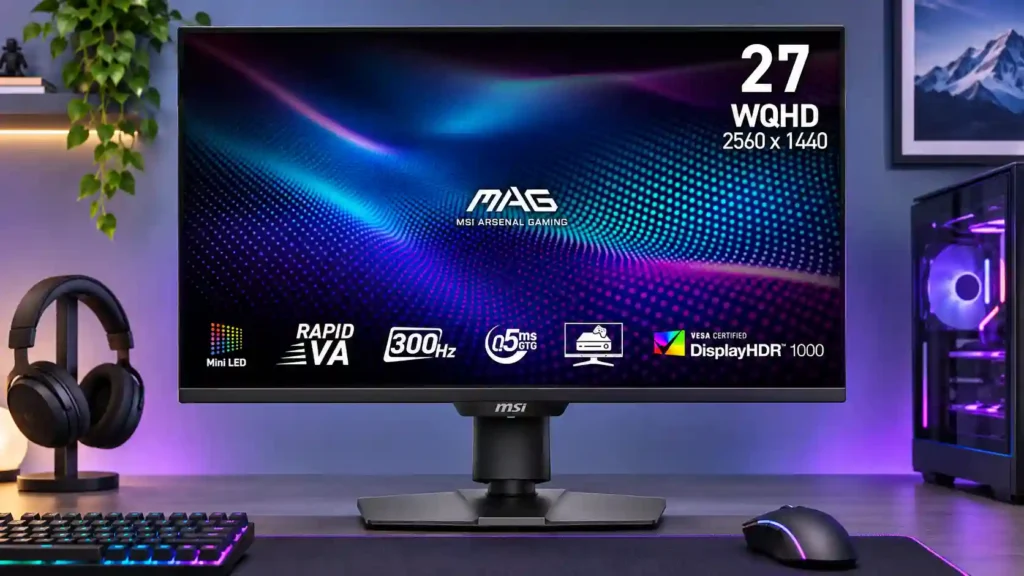
Deep blacks, vivid HDR and 300Hz refresh make this a strong gaming option, especially at a discount. Dark-scene smearing, variable-refresh flicker and no USB hub are the main compromises.
PC and console gamers who value bright HDR, deep blacks and responsive 1440p gameplay, especially in well-lit rooms. It also suits cinematic solo games and movie watching.
Color-critical professionals who need plug-and-play accuracy, users distracted by dark smearing or VRR flicker, and laptop owners who want USB-C docking or a built-in KVM.
The MSI MAG 274QPF X30MV stands out by combining a 300Hz QHD refresh rate with a bright 1,152-zone Mini-LED backlight and the naturally deep blacks of a VA panel. It can make HDR games and movies look remarkably vivid, and HDMI 2.1 gives modern consoles useful 120Hz and VRR support. Bright-room performance, low input lag and a fully adjustable stand add to its appeal. The tradeoffs are real: fast dark transitions can smear, VRR may flicker in shadowy scenes, and local dimming can alter brightness or color accuracy. Side-angle color shift and the absence of USB-C, a USB hub or KVM also make it less capable as a work dock. At a low local price it's a compelling LCD alternative to OLED, but the value weakens sharply where similarly equipped competitors cost less.
Compared with other Monitors, this product is above average in Automatic brightness limiting, HDR performance, Image scaling, near average in value for money, sharpness, below average in software support, on-screen display usability, USB hub functionality.
| Attribute | This product | Category average | Difference |
|---|---|---|---|
| software support | 1.0 | 3.7 | -2.7 |
| on-screen display usability | 1.5 | 4.2 | -2.7 |
| USB hub functionality | 1.4 | 3.7 | -2.3 |
| viewing angles | 2.2 | 4.4 | -2.2 |
| build quality | 2.0 | 4.4 | -2.4 |
| premium feel | 2.0 | 4.2 | -2.2 |
| ghosting control | 2.0 | 3.9 | -1.9 |
| port selection | 2.0 | 3.8 | -1.8 |
Choose TCL 32R84. It scores 4.3 vs 1.4 for USB hub functionality, with a 4.2 overall score.
Choose ASUS ROG Swift OLED PG27UCDM. It scores 4.5 vs 1.0 for software support, with a 4.4 overall score.
Choose Dell Alienware AW2725DF. It scores 5.0 vs 2.0 for ghosting control, with a 4.2 overall score.
Choose Asus ROG Swift 34 QD-OLED PG34WCDN. It scores 5.0 vs 1.8 for KVM switch performance, with a 4.5 overall score.
Products reviewers directly compared with this model, grouped into quick takeaways.
Yes for compatible PCs capable of very high frame rates, although dark VA transitions can still smear. Consoles generally use up to 120Hz modes rather than 300Hz.
Its Mini-LED backlight produces impressive bright highlights and deep blacks. Local dimming can cause haloing, tone changes and small-highlight darkening in difficult scenes.
Yes, HDMI 2.1 and Console Mode allow high-refresh console signals, VRR and scaled 4K input. Dolby Vision is not supported and some unusual video cadences are missing.
No. It has HDMI and DisplayPort video inputs plus a headphone jack, but cannot replace a single-cable laptop dock.
Its wide color gamut and sharp QHD picture help, but accurate work may require calibration and turning off aggressive local dimming.
Several sources describe firmware updating over DisplayPort, despite an earlier review suggesting otherwise. Follow the compatible firmware instructions for this exact model.
Dark scenes can show black smearing and variable-refresh flicker, particularly when frame rates fluctuate. How distracting they are varies between users and testing conditions.
These are a few of the reviews included in our analysis.

See how the MSI MAG 274QPF X30MV balances 300Hz 1440p gaming and Mini-LED HDR against black smearing, VRR flicker, haloing and limited...
A detailed MSI MAG 274QPF X30MV review covering 1440p 300Hz gaming, Mini-LED HDR, dark-scene smearing, VRR flicker, console modes and missing...
The MSI MAG 274QPF X30MV pairs 1440p, 300Hz and 1,152-zone Mini-LED HDR. See how its VA smearing, VRR flicker and missing USB hub affect the...
The MSI MAG 274QPF X30MV is an entry-level 1440p gaming monitor with a 27-inch screen and 300Hz refresh rate. It uses a VA panel with quantum...
A full review of the MSI MAG 274QPF X30MV monitor with a 27" 300Hz VA panel and Mini LED This screen offers an attractive price point for a...

This 360Hz QD-OLED ultrawide delivers exceptional gaming motion, vibrant HDR and dramatically cleaner text. Its high price, less-than-perfect bright-room blacks and occasional HDR dimming are the main reasons to hesitate.
Pros: color gamut, contrast
Cons: value for money, Resolution

Lightning-fast 360Hz OLED gaming, rich color and an unusually flexible USB-C/KVM setup are the big draws. Strong room lighting, limited full-screen HDR brightness and static-content burn-in concerns keep it from...
Pros: color gamut, overall satisfaction
Cons: reflection handling, VRR flicker

The 27-inch 4K OLED picture is exceptionally crisp and responsive, with useful USB-C and KVM extras. Its high price, oversized stand, and bright-room compromises limit its appeal.
Pros: sharpness, overall satisfaction
Cons: value for money, VRR flicker

Best for exceptional 4K HDR, accurate color, fast 240Hz gaming, and strong work connectivity. Skip it if you need built-in speakers, ultrawide immersion, television-level HDR brightness, or a budget-friendly upgrade.
Pros: brightness, reflection handling
Cons: cable management