If you want better heat management
Choose MSI MPG 274URDFW E16M. It scores 5.0 vs 1.0 for heat management, with a 4.0 overall score.

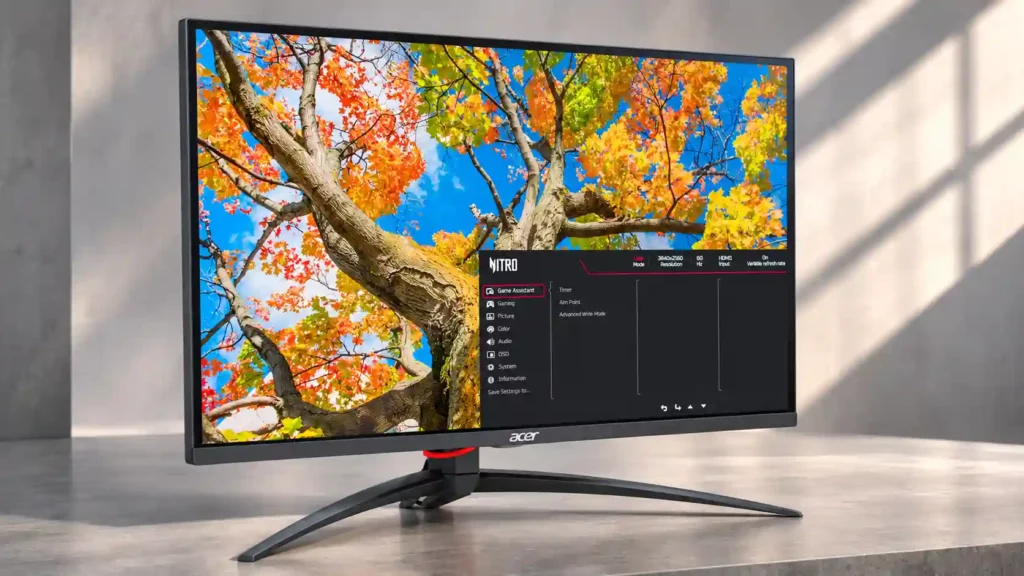
Sharp 4K detail, 160Hz/320Hz gaming flexibility and useful laptop connections make this a strong mixed-use monitor. HDR-only local dimming and awkward controls are the biggest reasons to hesitate.
PC gamers who also write, browse or occasionally edit on a sharp 4K display, especially those who want a 320Hz speed option and laptop connectivity.
Buyers who primarily watch dark-room SDR content, require calibrated colors out of the box, or demand simple controls and compact mounting.
The Acer Nitro XV275K P5biipruzx combines two useful gaming priorities in one monitor: sharp 4K at 160Hz for detailed play and 1080p at 320Hz when speed matters more. Its 27-inch panel is especially appealing for text-heavy work, and owners praise its substantial brightness, low input lag, adjustable stand and laptop-friendly connections. Bright HDR games can look impressive, too. The compromise is image consistency. The IPS panel has weak native blacks, its mini-LED local dimming is tied to HDR, and testing finds haloing, black crush and dim small highlights. Owners also criticize the clumsy physical controls and large stand footprint; one reports persistent 160Hz detection trouble and damaged button housing after longer use. Buyers focused solely on dark-room picture quality or OLED-like motion may prefer an alternative. At a good sale price, it remains a capable one-screen solution for both work and PC gaming.
Compared with other Monitors, this product is above average in Text fringing, port selection, Retail availability, near average in brightness, tripod mount versatility, below average in heat management, Control button responsiveness, on-screen display usability.
| Attribute | This product | Category average | Difference |
|---|---|---|---|
| heat management | 1.0 | 3.9 | -2.9 |
| Control button responsiveness | 1.3 | 3.8 | -2.5 |
| on-screen display usability | 1.7 | 4.1 | -2.4 |
| HDR adjustment controls | 1.7 | 3.9 | -2.2 |
| HDR mode versatility | 1.8 | 3.8 | -2.1 |
| audio settings | 2.0 | 4.0 | -2.0 |
| Display-mode switching reliability | 1.0 | 2.9 | -1.9 |
| Shadow detail | 1.8 | 3.6 | -1.8 |
Choose MSI MPG 274URDFW E16M. It scores 5.0 vs 1.0 for heat management, with a 4.0 overall score.
Choose Samsung Odyssey OLED G80SH S32HG802S. It scores 5.0 vs 1.8 for HDR mode versatility, with a 4.1 overall score.
Choose Gigabyte MO27Q28G. It scores 4.5 vs 1.7 for HDR adjustment controls, with a 4.0 overall score.
Choose ASUS ROG Strix OLED XG27ACDNG. It scores 5.0 vs 1.8 for Shadow detail, with a 4.4 overall score.
Products reviewers directly compared with this model, grouped into quick takeaways.
Yes. It uses 4K at up to 160Hz for sharp detail and a separate 1080p mode at up to 320Hz for higher-frame-rate competitive play.
Testing and owners repeatedly report that independent local dimming is tied to HDR rather than normal SDR operation, leaving SDR blacks grayer.
HDMI 2.1 and 4K/120Hz console operation make it a solid option, but some users report HDR setup quirks; the 160Hz and 320Hz modes are most useful on PC.
The crisp 27-inch 4K image makes text and everyday work enjoyable. Occasional video editing is practical, but color-critical results require calibration.
HDR is very bright and can deepen dark scenes, although measured testing found halos, shadow crush and overly dim small highlights; owners vary in how noticeable these are.
The wide stand uses desk space, its 75×75mm mounting pattern may require standoffs, and its physical display buttons are awkward; Acer’s Windows widget is a helpful alternative.
These are a few of the reviews included in our analysis.

Acer Nitro XV275K P5 combines a 4K Mini LED panel, 160Hz refresh rate, and strong connectivity. Here’s how it performs for gaming, work...
The Acer Nitro XV275K P5biipruzx is a mid-range, 27-inch Mini LED gaming monitor. Competing with other Mini LED options, like the INNOCN...

This 360Hz QD-OLED ultrawide delivers exceptional gaming motion, vibrant HDR and dramatically cleaner text. Its high price, less-than-perfect bright-room blacks and occasional HDR dimming are the main reasons to hesitate.
Pros: color gamut, contrast
Cons: value for money, Resolution

A huge, sharp ultrawide workspace and unusually capable Thunderbolt dock make the U4025QW outstanding for demanding productivity and editing. Its high price, modest HDR, and imperfect motion handling keep it...
Pros: overall picture quality, color accuracy
Cons: value for money, built-in speakers

Lightning-fast 360Hz OLED gaming, rich color and an unusually flexible USB-C/KVM setup are the big draws. Strong room lighting, limited full-screen HDR brightness and static-content burn-in concerns keep it from...
Pros: color gamut, overall satisfaction
Cons: reflection handling, VRR flicker

The 27-inch 4K OLED picture is exceptionally crisp and responsive, with useful USB-C and KVM extras. Its high price, oversized stand, and bright-room compromises limit its appeal.
Pros: sharpness, overall satisfaction
Cons: value for money, VRR flicker