If you want better premium feel
Choose Samsung Odyssey OLED G6 G60SF. It scores 5.0 vs 4.2 for premium feel, with a 4.3 overall score.

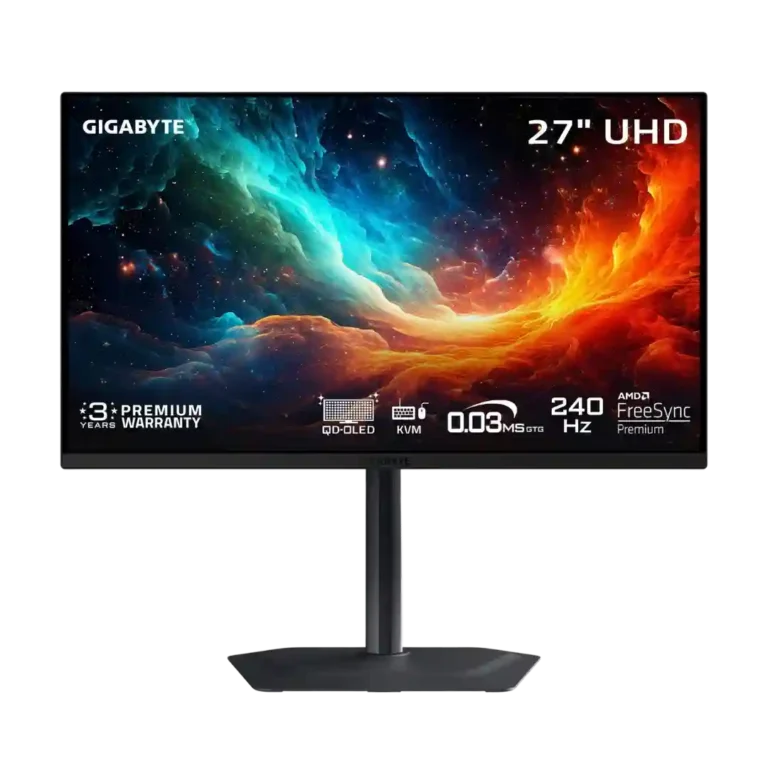
Choose it for razor-sharp 4K 240Hz OLED motion, excellent contrast, and a superb compact stand. Skip it at full price if you need accurate HDR, strong bright-room performance, or polished software.
Best for PC and console gamers who want a compact 27-inch 4K OLED with elite motion clarity, low latency, deep contrast, HDMI 2.1, and a highly adjustable small-footprint stand.
Skip it for bright-room use, critical color work, static desktop-heavy workloads, or full-price shopping when similarly performing rivals cost less.
The MO27U2 pairs a superb 27-inch 4K QD-OLED panel with 240Hz refresh, near-instant response, excellent contrast, and one of the best compact stands in its class. Games look exceptionally sharp and motion stays clean, while HDMI 2.1, USB-C, KVM functionality, and broad ergonomic adjustment add versatility. The weaknesses are unusually consistent: factory color accuracy is only average, HDR modes involve awkward brightness-versus-accuracy tradeoffs, bright rooms lift the black floor, and Gigabyte Control Center is unreliable. The hardware warranty is reassuring, but the $1,000 launch price is difficult to defend when cheaper rivals offer similar panel performance or better calibration. It becomes compelling mainly when discounted.
Compared with other Monitors, this product is above average in local dimming performance, overdrive tuning, screen uniformity, near average in build quality, input lag, below average in color accuracy, software support, gaming image presets.
| Attribute | This product | Category average | Difference |
|---|---|---|---|
| local dimming performance | 5.0 | 2.8 | +2.2 |
| color accuracy | 2.5 | 4.1 | -1.6 |
| overdrive tuning | 5.0 | 3.5 | +1.5 |
| screen uniformity | 5.0 | 3.6 | +1.4 |
| software support | 2.5 | 3.7 | -1.2 |
| ghosting control | 5.0 | 3.9 | +1.1 |
| competitive gaming suitability | 4.7 | 3.6 | +1.1 |
| backlight bleed control | 5.0 | 4.0 | +1.0 |
Choose Samsung Odyssey OLED G6 G60SF. It scores 5.0 vs 4.2 for premium feel, with a 4.3 overall score.
Choose MSI MPG 322UR QD-OLED X24. It scores 5.0 vs 3.7 for single-player cinematic gaming suitability, with a 4.4 overall score.
Choose BenQ RD280UG. It scores 4.9 vs 3.5 for reflection handling, with a 4.4 overall score.
Choose Dell UltraSharp 52 Thunderbolt Hub Monitor, U5226KW. It scores 5.0 vs 4.0 for DisplayPort connectivity, with a 4.3 overall score.
Compared with Gigabyte MO27U2 Gaming Monitor
Yes. Its 240Hz refresh rate, near-instant OLED response, very low input lag, G-Sync support, and tactical 24-inch and aspect-ratio modes make it highly competitive.
HDR looks excellent in dark, high-contrast scenes, but bright scenes lack sustained punch. The accurate mode is limited to roughly 450 nits, while the brighter 1,000-nit mode can over-brighten darker content.
It is usable, but not ideal. Ambient light can lift QD-OLED blacks toward gray or magenta, and full-screen brightness is lower than many LCD monitors.
The 4K resolution and high pixel density produce clear text and comfortable multitasking. Long static desktop sessions still carry OLED burn-in risk, and the panel is not the best choice for color-critical work.
They are serviceable for casual videos and can sound loud and punchy, but opinions are mixed and dedicated speakers or headphones will provide better sound.
At about $1,000, two sources considered it poor value beside cheaper or better-calibrated competitors. It becomes much easier to recommend when discounted near or below those alternatives.
These are a few of the reviews included in our analysis.
Excellent motion clarity and vibrant color can’t fully offset its awkward image controls

This 360Hz QD-OLED ultrawide delivers exceptional gaming motion, vibrant HDR and dramatically cleaner text. Its high price, less-than-perfect bright-room blacks and occasional HDR dimming are the main reasons to hesitate.
Pros: color gamut, contrast
Cons: value for money, Resolution

The 360Hz QD-OLED panel delivers exceptional HDR gaming, responsive motion, and cleaner text than earlier ultrawides. Its 3440×1440 resolution is less sharp than 4K, and premium pricing remains a hurdle.
Pros: refresh rate, Text fringing
Cons: Resolution, GPU demands

A huge, sharp ultrawide workspace and unusually capable Thunderbolt dock make the U4025QW outstanding for demanding productivity and editing. Its high price, modest HDR, and imperfect motion handling keep it...
Pros: overall picture quality, color accuracy
Cons: value for money, built-in speakers

Lightning-fast 360Hz OLED gaming, rich color and an unusually flexible USB-C/KVM setup are the big draws. Strong room lighting, limited full-screen HDR brightness and static-content burn-in concerns keep it from...
Pros: color gamut, overall satisfaction
Cons: reflection handling, VRR flicker