If you want better ghosting control
Choose Samsung Odyssey OLED G80SH S32HG802S. It scores 5.0 vs 2.7 for ghosting control, with a 4.1 overall score.

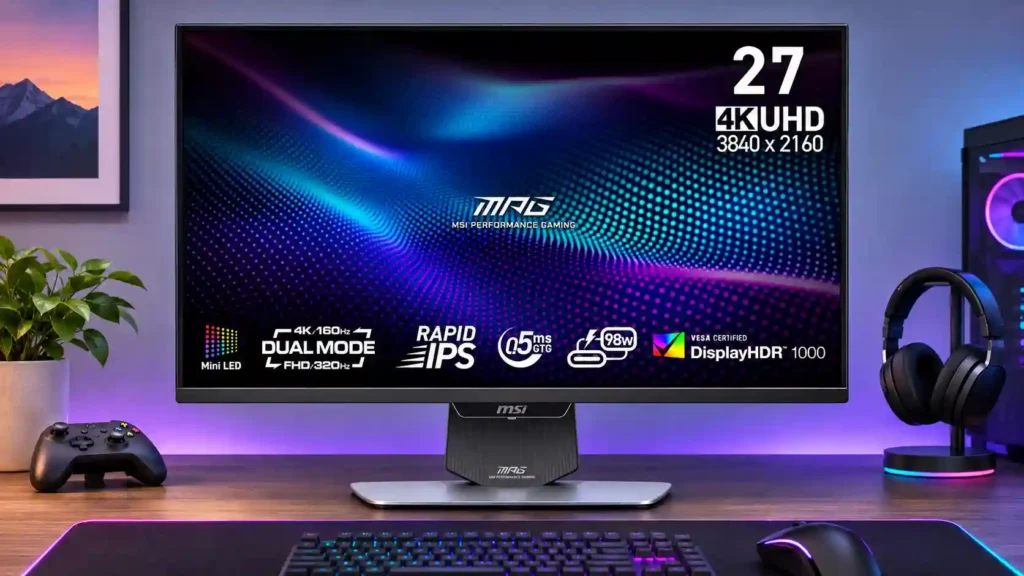
Bright Mini-LED HDR, razor-sharp 4K and a 320Hz speed mode make this a compelling single monitor for work and gaming. IPS black depth, uneven local dimming and overdrive quirks prevent a clean sweep.
People combining bright HDR or cinematic gaming with fast competitive play, plus laptop productivity or video editing on one 4K monitor.
Those seeking OLED-perfect dark-room blacks, flawless SDR local dimming or the absolute best 320Hz motion response without FHD softness.
The MSI MPG 274URDFW E16M is most persuasive as a do-everything gaming and productivity screen. Its 27-inch 4K image is crisp for text and creative work, while a 1080p 320Hz option gives competitive players a meaningful speed boost. Mini-LED backlighting delivers impressively bright HDR, broad color coverage and deeper blacks than ordinary IPS displays. Strong USB-C laptop power, KVM functionality and flexible ergonomics make it especially practical for a shared work-and-play desk. The tradeoffs are not minor for everyone: 1080p looks softer, motion tuning can overshoot at lower frame rates, and one test found unreliable mode switching. Local dimming is the most divisive feature, particularly for SDR accuracy and haloing around small highlights. It is a strong value when versatility and bright HDR matter more than OLED-like blacks or elite esports response times.
Compared with other Monitors, this product is above average in Image retention, VRR flicker, PWM flicker comfort, near average in competitive gaming suitability, refresh rate, below average in Integrated power supply, Dolby Vision support, software support.
| Attribute | This product | Category average | Difference |
|---|---|---|---|
| Image retention | 5.0 | 2.7 | +2.3 |
| Integrated power supply | 2.0 | 4.3 | -2.3 |
| VRR flicker | 5.0 | 2.8 | +2.2 |
| PWM flicker comfort | 5.0 | 3.0 | +2.0 |
| Dolby Vision support | 1.0 | 3.0 | -2.0 |
| 24-inch mode quality | 4.0 | 2.1 | +1.9 |
| software support | 2.0 | 3.7 | -1.7 |
| Automatic brightness adjustment | 2.0 | 3.6 | -1.6 |
Choose Samsung Odyssey OLED G80SH S32HG802S. It scores 5.0 vs 2.7 for ghosting control, with a 4.1 overall score.
Choose LG 27GX790A-B. It scores 5.0 vs 3.2 for black levels, with a 4.0 overall score.
Choose ASUS ROG Strix OLED XG27ACDNG. It scores 4.8 vs 2.0 for Integrated power supply, with a 4.4 overall score.
Choose TCL 32R84. It scores 4.5 vs 3.3 for contrast, with a 4.2 overall score.
Products reviewers directly compared with this model, grouped into quick takeaways.
No. Its native mode is 4K up to 160Hz, while dual mode reaches 320Hz only at 1080p.
It is often brighter across large HDR scenes and avoids OLED burn-in, but OLED delivers more precise blacks and tiny highlights without halos.
It is usable for competitive games but plainly softer than native 4K, and pixel response does not fully keep up with 320Hz.
Yes. USB-C supports DisplayPort video and up to 98W rated power delivery; one test measured about 90W.
HDR brightness and contrast improve substantially, but some scenes show blooming or black crush. Several tests find SDR dimming particularly inconsistent.
Yes. HDMI 2.1 allows 4K up to 120Hz and VRR on supported consoles, but Xbox Dolby Vision is not available.
Yes. Sharp 4K RGB text, broad color gamut and lower static-image risk suit work, though critical color tasks may need calibration and local dimming adjustments.
These are a few of the reviews included in our analysis.


See how MSI’s 27-inch Mini-LED monitor balances 4K/160Hz, 1080p/320Hz, HDR, USB-C charging, and console support—and what compromises to expect.
The MPG 274URDFW E16M is a do-it-all monitor that refuses to be pinned down to one job, and for the most part it does a stellar job.
Check out our full review of the MSI MPG 274URDFW E16M Monitor as well as our YouTube video which you can see examples of games.
The MSI MPG 274URDFW E16M is a mid-range 27-inch gaming monitor. It uses Mini LED backlighting with 1,152 zones, and it has a native 4k...
The MSI MPG 274URDFW E16M is a 4K/160Hz and 1080p/320Hz gaming monitor that offers intense versatility, all within a gorgeous white physical...

This 360Hz QD-OLED ultrawide delivers exceptional gaming motion, vibrant HDR and dramatically cleaner text. Its high price, less-than-perfect bright-room blacks and occasional HDR dimming are the main reasons to hesitate.
Pros: color gamut, contrast
Cons: value for money, Resolution

A huge, sharp ultrawide workspace and unusually capable Thunderbolt dock make the U4025QW outstanding for demanding productivity and editing. Its high price, modest HDR, and imperfect motion handling keep it...
Pros: overall picture quality, color accuracy
Cons: value for money, built-in speakers

Lightning-fast 360Hz OLED gaming, rich color and an unusually flexible USB-C/KVM setup are the big draws. Strong room lighting, limited full-screen HDR brightness and static-content burn-in concerns keep it from...
Pros: color gamut, overall satisfaction
Cons: reflection handling, VRR flicker

The 27-inch 4K OLED picture is exceptionally crisp and responsive, with useful USB-C and KVM extras. Its high price, oversized stand, and bright-room compromises limit its appeal.
Pros: sharpness, overall satisfaction
Cons: value for money, VRR flicker