If you want better ghosting control
Choose MSI MPG 322URX QD-OLED. It scores 5.0 vs 1.5 for ghosting control, with a 4.1 overall score.

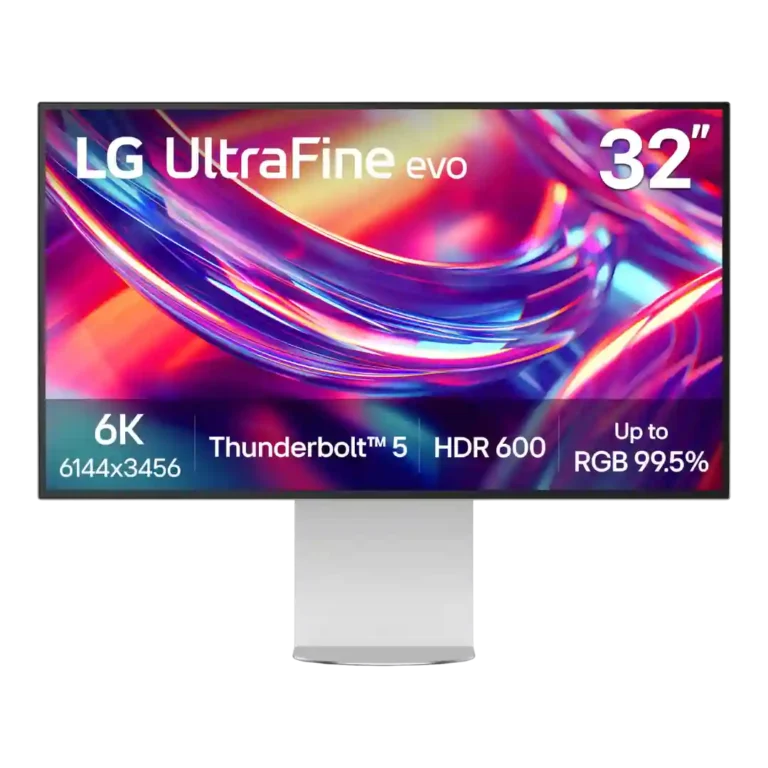
Choose it for razor-sharp 6K creative work, expansive desktop space, accurate color, and Thunderbolt-heavy setups. Skip it for serious gaming, strong HDR, glossy-screen preferences, or if premium metal construction and lower pricing matter more.
Creative professionals, developers, and Mac-heavy workstation users who genuinely benefit from a 32-inch 6K canvas, accurate color, and Thunderbolt 5 connectivity.
Competitive gamers, HDR-focused creators, glossy-screen devotees, or value shoppers who would rather trade resolution for faster OLED performance, stronger HDR, or more premium materials.
The UltraFine 6K's strongest case is simple: its 32-inch, 224ppi canvas makes text, photos, code, and 4K editing workflows look exceptionally crisp while leaving abundant room for tools and timelines. Color accuracy, wide gamut coverage, brightness, Thunderbolt 5 connectivity, and multi-computer flexibility also earn broad praise. The tradeoff is that the rest of the display does not always feel as advanced as the resolution. At 60Hz, motion is mediocre, HDR lacks deep local contrast, the plastic construction and cable routing feel ordinary for the price, and LG's software and calibration controls divide reviewers. Most testers still like the monitor for professional productivity, but severe color-uniformity problems reported on multiple units make quality control a meaningful caveat.
Compared with other Monitors, this product is above average in sleep and wake behavior, KVM switch performance, brightness, near average in design and aesthetics, built-in speakers, below average in local dimming performance, motion clarity, ghosting control.
| Attribute | This product | Category average | Difference |
|---|---|---|---|
| local dimming performance | 1.8 | 4.6 | -2.7 |
| sleep and wake behavior | 5.0 | 2.4 | +2.6 |
| motion clarity | 2.0 | 4.6 | -2.6 |
| ghosting control | 1.5 | 4.1 | -2.6 |
| single-player cinematic gaming suitability | 2.0 | 4.5 | -2.5 |
| cable management | 1.9 | 3.8 | -1.9 |
| refresh rate | 2.5 | 4.3 | -1.8 |
| competitive gaming suitability | 1.5 | 3.5 | -2.0 |
Choose MSI MPG 322URX QD-OLED. It scores 5.0 vs 1.5 for ghosting control, with a 4.1 overall score.
Choose Dell UltraSharp 52 Thunderbolt Hub Monitor, U5226KW. It scores 4.4 vs 1.9 for cable management, with a 4.3 overall score.
Choose BenQ RD280UG. It scores 4.8 vs 2.5 for refresh rate, with a 4.4 overall score.
Choose Samsung Odyssey OLED G6 G60SF. It scores 5.0 vs 1.5 for competitive gaming suitability, with a 4.3 overall score.
Products reviewers directly compared with this model, grouped into quick takeaways.
Yes for text clarity, high-resolution images, and workspace-heavy creative apps. Reviewers consistently see the extra density, though some say the jump in perceived detail is less dramatic than the price premium suggests.
It is very strong for SDR creative work thanks to sharpness, wide gamut coverage, and generally excellent color accuracy. HDR mastering is a weaker fit because contrast and local dimming are limited.
Not for serious or competitive gaming. The 60Hz refresh rate, 5ms-class response, ghosting, and mediocre motion clarity are recurring limitations even though measured input lag is low.
Connectivity is one of the strongest parts of the monitor, with Thunderbolt 5, USB-C hub functions, HDMI 2.1, DisplayPort 2.1, KVM switching, and daisy-chaining support praised across reviews.
Reviews disagree sharply. Some found them surprisingly clear and usable, while others considered them weak or terrible, so external speakers or headphones are the safer expectation.
It reduces glare effectively in bright rooms, but the texture is polarizing. Several reviewers noticed sparkle, grain, or slightly muted-looking color compared with glossy displays.
Yes. Most reviews did not report major panel defects, but one reviewer returned two units for severe color-uniformity problems and another also saw blue tinting around the screen perimeter.
These are a few of the reviews included in our analysis.
With Apple's discontinuation of the Pro Display XDR earlier this year, Mac users looking for a larger high-resolution display suddenly found...
You're going to have to really want all those pixels
The LG Ultrafine Evo 32U990A-S is a 6K monitor with great color performance and high-speed Thunderbolt 5, though it’s hampered by lackluster...
The LG Ultrafine Evo 6K is a formidable monitor for creatives who value fine detail and modern looks above all.
The first 6K display with full Thunderbolt 5 support.

Best for exceptional 4K HDR, accurate color, fast 240Hz gaming, and strong work connectivity. Skip it if you need built-in speakers, ultrawide immersion, television-level HDR brightness, or a budget-friendly upgrade.
Pros: brightness, reflection handling
Cons: cable management

Best for class-leading 360Hz ultrawide motion, spectacular HDR, deep blacks, and unusually strong work-and-play connectivity. Skip it if you want 4K-like text sharpness, a matte screen, or the best value...
Pros: overall satisfaction, sharpness
Cons: Resolution, cable management

Choose the RD280UG for coding, trading, writing, or creative work that benefits from a tall, sharp 3:2 screen and strong eye-care features. Skip it for serious HDR, color-critical creation, esports,...
Pros: productivity versatility, aspect ratio
Cons: value for money, competitive gaming suitability

Best for fast 1440p OLED gaming, deep blacks, and a flexible stand at a bargain sale price. Skip it for bright rooms, USB-C/KVM productivity, or the reassurance of a three-year...
Pros: color gamut, overall picture quality
Cons: brightness, HDR performance