If you want better screen uniformity
Choose ASUS ROG Strix OLED XG27ACDNG. It scores 5.0 vs 1.8 for screen uniformity, with a 4.4 overall score.

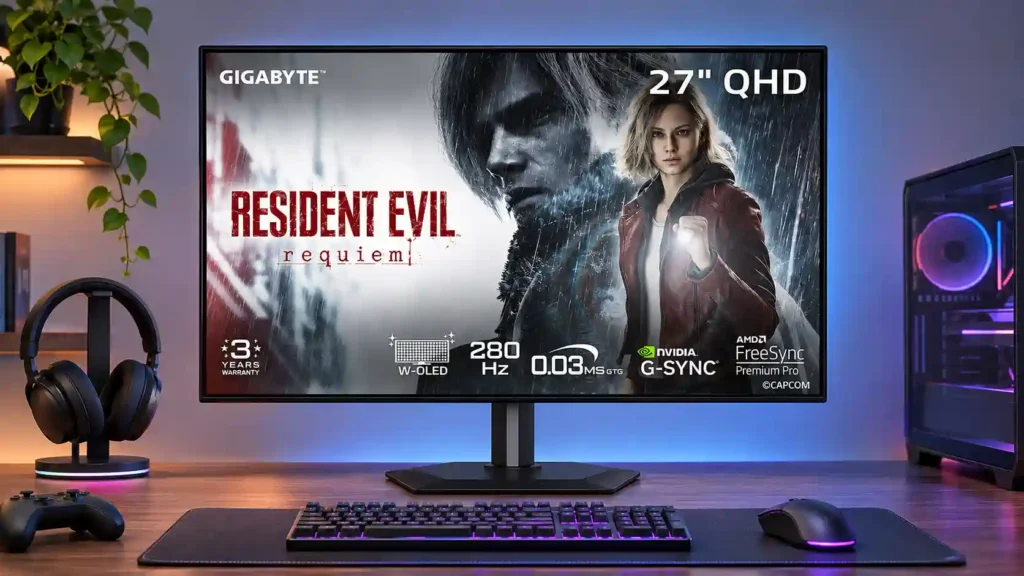
Brilliant OLED motion, high brightness and aggressive value make the MO27Q28G a compelling QHD gaming monitor. Dark-gray banding, occasional color tint and HDR tuning quirks keep it from being a universal pick.
PC gamers seeking fast QHD competitive play or vivid HDR games, especially in rooms where a matte anti-glare screen helps. Budget-minded OLED buyers also benefit from the panel performance for its price.
People doing all-day static office work, precision color-critical editing, or demanding single-cable laptop docking. Buyers requiring perfectly uniform dark grays or a glossy finish may prefer alternatives.
The Gigabyte MO27Q28G makes fourth-generation Tandem WOLED feel attainable without losing the qualities gamers prize: rapid pixel transitions, exceptionally low input lag, deep blacks and a vividly bright picture. Its 280Hz QHD panel suits fast competitive titles and cinematic HDR games alike, while the matte surface handles ambient light better than many glossy OLED rivals. A compact adjustable stand, KVM switch and gaming extras further strengthen the package. The compromises matter, though. Dark-gray banding and occasional tinted shades undermine uniformity, text is less crisp than on comparable LCDs, and some HDR modes trade accuracy for more eye-catching highlights. Variable-refresh flicker can intrude when frame rates fluctuate. USB-C charging and HDMI bandwidth also deserve scrutiny for laptop or compression-sensitive setups. For gaming-first buyers prioritizing image impact per dollar, the balance remains appealing; exacting color editors and all-day static-office users face more caveats.
Compared with other Monitors, this product is above average in local dimming performance, KVM switch performance, Headphone jack convenience, near average in reflection handling, refresh rate, below average in Gradient smoothness, screen uniformity, sharpness.
| Attribute | This product | Category average | Difference |
|---|---|---|---|
| Gradient smoothness | 2.0 | 4.0 | -2.0 |
| screen uniformity | 1.8 | 3.7 | -1.9 |
| sharpness | 2.5 | 4.4 | -1.9 |
| local dimming performance | 5.0 | 3.1 | +1.9 |
| KVM switch performance | 4.6 | 2.9 | +1.7 |
| HDMI 2.1 support | 2.4 | 4.0 | -1.6 |
| Screen coating clarity | 2.3 | 3.8 | -1.5 |
| DisplayPort connectivity | 2.5 | 4.0 | -1.5 |
Choose ASUS ROG Strix OLED XG27ACDNG. It scores 5.0 vs 1.8 for screen uniformity, with a 4.4 overall score.
Choose MSI MPG 274URDFW E16M. It scores 5.0 vs 2.5 for sharpness, with a 4.0 overall score.
Choose Samsung Odyssey OLED G80SH S32HG802S. It scores 5.0 vs 2.4 for HDMI 2.1 support, with a 4.1 overall score.
Choose LG 27GX790A-B. It scores 5.0 vs 4.2 for panel type, with a 4.0 overall score.
Products reviewers directly compared with this model, grouped into quick takeaways.
Yes. Its 280Hz refresh rate, near-instant OLED response and low input lag make fast motion unusually clear, although demanding games need a strong PC to reach the highest frame rates.
HDR offers deep blacks and unusually bright small highlights for an OLED. The most aggressive brightness presets can alter highlight accuracy or saturation, so the more conservative modes may look more natural.
It suppresses mirror-like reflections and works well in brighter rooms, but it can introduce mild grain and softness compared with glossy alternatives.
Occasional work and light photo or video editing are viable thanks to a broad gamut and useful brightness. Remaining text fringing, dark-gray uniformity issues and burn-in concerns make all-day static or precision-critical work less ideal.
It supports video and data, and charging depends on the Smart PD setting. Charging power may be insufficient for higher-demand laptops, so a separate charger can still be necessary.
Dark-gray banding, occasional red tint in some samples, and VRR flicker during frame-rate swings appear in testing. HDR and gamma settings can also affect shadow and highlight detail.
Console modes include high-refresh options and 4K input downscaling, but some combinations involve chroma subsampling and HDMI bandwidth limitations. Check the signal format you plan to use.
These are a few of the reviews included in our analysis.

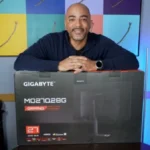
The Gigabyte MO27Q28GB represents a new phase in the evolution of WOLED screens, arriving with a Tandem OLED panel that promises to turn the...
Gigabyte leverages Tandem OLED tech to bring a huge color gamut to its MO27Q28G.
Sporting a 4th-generation LG tandem WOLED panel, the Gigabyte MO27Q28G is proof that more advanced display tech is now available for a more...
The $899 Gigabyte MO27Q28G represents good value particularly for those wanting OLED contrast without the premium of pro-grade panels.
The Gigabyte MO27Q28G is a 1440p, 280Hz OLED gaming monitor. It's one of Gigabyte's first monitors to use the fourth-gen RGB Tandem OLED...

This 360Hz QD-OLED ultrawide delivers exceptional gaming motion, vibrant HDR and dramatically cleaner text. Its high price, less-than-perfect bright-room blacks and occasional HDR dimming are the main reasons to hesitate.
Pros: color gamut, contrast
Cons: value for money, Resolution

A huge, sharp ultrawide workspace and unusually capable Thunderbolt dock make the U4025QW outstanding for demanding productivity and editing. Its high price, modest HDR, and imperfect motion handling keep it...
Pros: overall picture quality, color accuracy
Cons: value for money, built-in speakers

Lightning-fast 360Hz OLED gaming, rich color and an unusually flexible USB-C/KVM setup are the big draws. Strong room lighting, limited full-screen HDR brightness and static-content burn-in concerns keep it from...
Pros: color gamut, overall satisfaction
Cons: reflection handling, VRR flicker

The 27-inch 4K OLED picture is exceptionally crisp and responsive, with useful USB-C and KVM extras. Its high price, oversized stand, and bright-room compromises limit its appeal.
Pros: sharpness, overall satisfaction
Cons: value for money, VRR flicker