If you want better HDR performance
Choose AOC Q27G3XMN. It scores 4.6 vs 1.6 for HDR performance, with a 3.9 overall score.

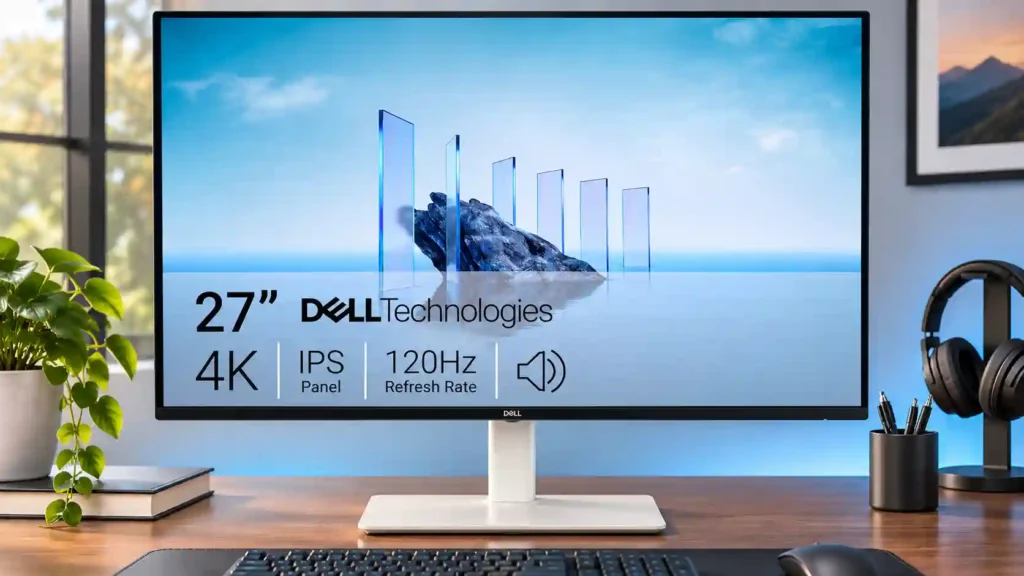
A crisp 4K panel and fluid 120Hz desktop experience make this a compelling affordable work monitor. Missing USB-C docking, weak HDR, and slow pixel transitions limit its appeal for laptop-only or serious gaming setups.
Desktop productivity, sRGB-oriented work, budget-minded home offices, and occasional PC or console gaming where 4K detail matters more than esports-grade motion.
One-cable laptop desks, professional wide-gamut color work, competitive players, or anyone seeking dramatic HDR movie and game performance.
The Dell S2725QS is at its best on a desk where sharp text and smooth everyday interactions matter. Its dense 27-inch 4K panel makes documents and fine detail look clean, while 120Hz scrolling is a noticeable upgrade from typical office monitors. An adjustable stand, attractive design, accurate sRGB color and useful built-in speakers strengthen the value proposition, particularly on sale. It can also handle casual PC and console games at 4K/120Hz, with low input lag and adaptive sync. The compromises are substantial for some buyers: there is no USB-C video or charging, no USB hub, and moving objects blur more than they do on dedicated gaming displays. HDR is basic, dark-room blacks are grayish, and speaker quality divides opinion. For conventional desktop productivity with occasional entertainment, the balance is compelling; for one-cable laptops or competitive play, it is not.
Compared with other Monitors, this product is above average in VRR flicker, portability and weight, value for money, near average in productivity versatility, sharpness, below average in motion clarity, USB-C power delivery, USB hub functionality.
| Attribute | This product | Category average | Difference |
|---|---|---|---|
| motion clarity | 1.6 | 4.2 | -2.7 |
| USB-C power delivery | 1.0 | 3.7 | -2.7 |
| USB hub functionality | 1.1 | 3.7 | -2.6 |
| picture-in-picture and picture-by-picture | 1.0 | 3.8 | -2.8 |
| port selection | 1.7 | 4.2 | -2.4 |
| local dimming performance | 1.0 | 3.6 | -2.6 |
| warranty and support service | 1.0 | 3.6 | -2.6 |
| overdrive tuning | 1.5 | 3.9 | -2.4 |
Choose AOC Q27G3XMN. It scores 4.6 vs 1.6 for HDR performance, with a 3.9 overall score.
Choose KOORUI S2721PM. It scores 4.5 vs 1.0 for picture-in-picture and picture-by-picture, with a 3.7 overall score.
Choose ASUS ROG Swift OLED PG27UCDM. It scores 5.0 vs 1.0 for local dimming performance, with a 4.4 overall score.
Choose Dell U2725QE. It scores 5.0 vs 1.1 for USB hub functionality, with a 4.2 overall score.
Products reviewers directly compared with this model, grouped into quick takeaways.
Yes. The 27-inch 4K display renders text cleanly, handles side-by-side windows well, and feels notably smoother at 120Hz.
No. The S2725QS uses HDMI and DisplayPort without a USB hub or USB-C power delivery; a laptop may need an adapter or dock.
Yes, compatible consoles can use 4K/120Hz over HDMI 2.1, although an Xbox 1440p/120Hz signal was not supported in one test. Fast action still shows motion blur.
It accepts HDR signals, but its limited brightness, gray blacks and lack of local dimming prevent convincing HDR impact. SDR is often the better experience.
They are serviceable for videos and casual use, and some testers liked their fuller sound. Others found them too loud and lacking detail, so serious listening may call for separate speakers.
It offers pivot adjustment, but several testers found the clearance awkward. A 100×100 mm VESA monitor arm is a better option for regular portrait use.
Its sRGB accuracy and 4K resolution suit standard-gamut work, but wider Adobe RGB/DCI-P3 editing needs more complete coverage and careful calibration.
These are a few of the reviews included in our analysis.


We review Dell S2725QS: 120Hz and 120 Hz, pros, limits and current price context before buying, with alternatives and ideal use cases.
4K at 120Hz for about $230: the cheapest way to get genuinely sharp text on a 27-inch screen. Testing-based scores, full specs, and who...
The Dell S2725QS delivers sharp 27-inch 4K, 120Hz, good ergonomics, and low input lag—but lacks USB-C and has weak HDR and motion clarity.
The Dell S2725QS review finds a sharp 27-inch 4K 120Hz monitor that is excellent for productivity and casual gaming, but it lacks USB-C and...
4K 27-inch monitor with HDMI and DisplayPort. No USB-C docking. Read the honest review: who it suits, what works, what doesn't.

The 27-inch 4K OLED picture is exceptionally crisp and responsive, with useful USB-C and KVM extras. Its high price, oversized stand, and bright-room compromises limit its appeal.
Pros: sharpness, overall satisfaction
Cons: value for money, VRR flicker

Best for exceptional 4K HDR, accurate color, fast 240Hz gaming, and strong work connectivity. Skip it if you need built-in speakers, ultrawide immersion, television-level HDR brightness, or a budget-friendly upgrade.
Pros: brightness, reflection handling
Cons: cable management

Best for class-leading 360Hz ultrawide motion, spectacular HDR, deep blacks, and unusually strong work-and-play connectivity. Skip it if you want 4K-like text sharpness, a matte screen, or the best value...
Pros: overall satisfaction, sharpness
Cons: Resolution, cable management

Choose the RD280UG for coding, trading, writing, or creative work that benefits from a tall, sharp 3:2 screen and strong eye-care features. Skip it for serious HDR, color-critical creation, esports,...
Pros: productivity versatility, aspect ratio
Cons: value for money, competitive gaming suitability