
An unusually expansive collection of USB, Thunderbolt, HDMI, DisplayPort and Ethernet connectors makes the screen a desk hub in its own right.
Pros: port selection, USB hub functionality
Cons: competitive gaming suitability, motion clarity

An unusually expansive collection of USB, Thunderbolt, HDMI, DisplayPort and Ethernet connectors makes the screen a desk hub in its own right.
Pros: port selection, USB hub functionality
Cons: competitive gaming suitability, motion clarity

DisplayPort 2.1, two HDMI 2.1 inputs, USB-C, and a USB hub give this compact display unusually broad connectivity. Its KVM adds everyday utility.
Pros: sharpness, overall satisfaction
Cons: value for money, VRR flicker
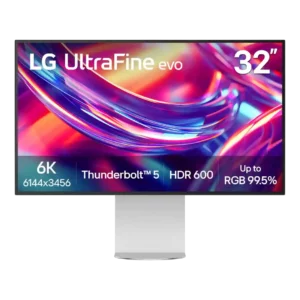
Connectivity is one of the clearest consensus strengths: Thunderbolt 5, USB-C, HDMI 2.1, and DisplayPort 2.1 cover most modern workflows. Reviewers repeatedly praise the flexibility for laptops, desktops, daisy chains,...
Pros: port selection, overall satisfaction
Cons: value for money, cable management

Dual HDMI 2.1, DisplayPort and USB-C make the connection mix unusually versatile at this tier.
Pros: HDR performance, overall satisfaction
Cons: local dimming performance, Blooming control

The mix of HDMI 2.1, DisplayPort, USB-C, USB-A and audio output covers gaming PCs, consoles and laptops well.
Pros: HDR performance, overall satisfaction
Cons: HDR highlight detail, color accuracy
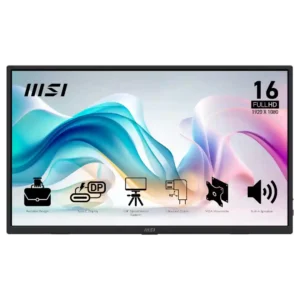
Port selection is a major strength, especially full-size HDMI plus USB-C. Several owners specifically value avoiding mini-HDMI adapters.
Pros: value for money, portability and weight
Cons: built-in speakers, color gamut
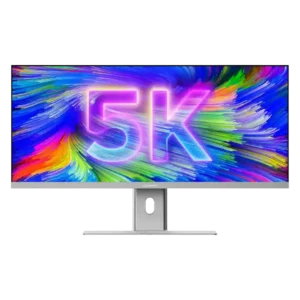
USB-C, DisplayPort, HDMI, Ethernet, audio, and downstream USB-C cover most modern workstation needs. The main omissions are USB-A, an SD card reader, and faster accessory ports.
Pros: productivity versatility, aspect ratio
Cons: built-in speakers, competitive gaming suitability

Multiple HDMI, DisplayPort, USB-C and USB-A connections are a practical advantage, though the limited USB-C charging output holds back laptop use.
Pros: Pixel density, Resolution
Cons: GPU demands, HDR performance

Two HDMI 2.1 inputs, DisplayPort, USB-C and USB ports create solid flexibility; USB 2.0 speed is a clear blemish.
Pros: Dual-mode versatility, refresh rate
Cons: black levels, contrast

Multiple HDMI 2.1, DisplayPort, USB-C and USB ports make it well equipped for a mixed gaming and productivity desk.
Pros: brightness, HDR performance
Cons: speaker quality, built-in speakers

USB-C, USB-A, HDMI and DisplayPort cover most ordinary office connections, with an especially handy retractable pair. Very fast transfer speeds and dedicated audio outputs are not its strengths.
Pros: USB hub functionality, USB-C power delivery
Cons: speaker quality

HDMI, DisplayPort, USB-C and USB-A give this gaming display a useful mix of connectivity, albeit without a generous peripheral hub.
Pros: brightness, contrast
Cons: Text fringing, speaker quality
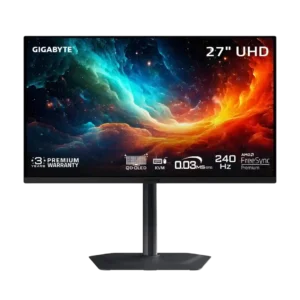
The monitor covers the major gaming and productivity connections, including dual HDMI 2.1, DisplayPort, USB-C, USB hub ports, and audio. DisplayPort 2.1 is the main omission.
Pros: motion clarity, PC gaming compatibility
Cons: color accuracy, software support

Thunderbolt 4, DisplayPort, HDMI and USB provide above-average versatility. Users with numerous peripherals or multiple HDMI devices may still want more ports.
Pros: value for money, Resolution
Cons: HDR performance, refresh rate

Port selection was generally adequate to good, but reviewers often framed it as trimmed versus pricier rivals.
Pros: value for money, sharpness
Cons: brightness, USB hub functionality

Two HDMI 2.1 inputs, DisplayPort, and USB-A ports serve gaming setups well. USB-C video, KVM and newer DisplayPort standards are missing.
Pros: overall satisfaction, value for money
Cons: reflection handling, screen uniformity
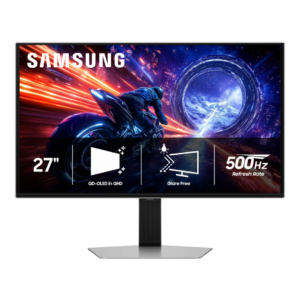
The core gaming ports are practical and easy to reach, with HDMI 2.1, DisplayPort, USB-A, and audio covered. Missing USB-C, KVM, and DisplayPort 2.1 keep the selection from feeling fully...
Pros: overall satisfaction, competitive gaming suitability
Cons: value for money, screen size

USB-C, two HDMI inputs and convenient downstream USB ports cover mainstream needs. Missing a normal DisplayPort jack, 3.5mm output, KVM and Thunderbolt limits more complex desks.
Pros: value for money, Resolution
Cons: port selection, competitive gaming suitability

Two HDMI inputs, DisplayPort and a useful USB hub cover most gaming needs, but there is no dedicated audio passthrough and no KVM.
Pros: value for money, overall satisfaction
Cons: HDR performance, Headphone output quality

Two HDMI sockets and versatile USB-C connections serve modern desks well, but the absence of full-size DisplayPort is a meaningful restriction.
Pros: overall satisfaction, screen size
Cons: stand adjustability, Photo editing

Two HDMI inputs, DisplayPort and a small USB-A hub cover essential devices, but USB-C and audio output are missing.
Pros: ultrawide gaming experience, black levels
Cons: HDR performance, viewing angles

Useful HDMI, DisplayPort and USB-A connections cover basic PC gaming, but absent USB-C and audio ports narrow its flexibility.
Pros: overall satisfaction, refresh rate
Cons: HDR performance, HDMI 2.1 support

Dual HDMI and a DisplayPort cover basic connections; missing USB ports, USB-C, and HDMI 2.1 limit convenience and versatility.
Pros: refresh rate, value for money
Cons: HDR performance, contrast

Full-bandwidth DisplayPort and two HDMI 2.1 inputs are strong gaming choices, but the missing USB-C and KVM reduce its appeal for laptop and dual-computer users.
Pros: black levels, motion clarity
Cons: value for money, Dual-mode versatility

Two HDMI 2.1 inputs, DisplayPort, USB-A hub ports, and headphones cover straightforward gaming. USB-C and a KVM are missing for more elaborate desks.
Pros: reflection handling, HDR performance
Cons: screen uniformity, Screen coating clarity
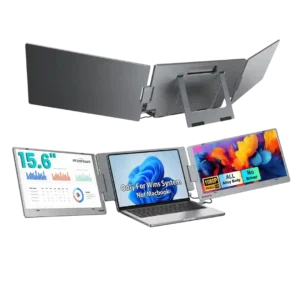
Port selection is restrictive. The expert review notes that the two USB-C ports are effectively split between connection and power, limiting multi-device use and leaving no HDMI input.
Pros: overall satisfaction, portability and weight
Cons: reliability over time

Video connections cover basic PC and console use, but older HDMI, no USB connections, and few office extras hold back its versatility.
Pros: overall satisfaction, PC gaming compatibility
Cons: color accuracy, local dimming performance

Two conveniently placed USB-C ports make laptop wiring tidy but provide no native HDMI input; compatibility is the recurring frustration.
Pros: brightness, portability and weight
Cons: value for money, port selection

Two HDMI 2.1 inputs and DisplayPort cover video needs, but no USB-C data, USB-A ports or KVM makes the connections sparse for a versatile workstation.
Pros: HDR performance, black levels
Cons: viewing angles, response time

Two HDMI 2.1 inputs, DisplayPort and USB-A cover basic gaming. No USB-C or KVM limits modern docking and shared-device flexibility.
Pros: overall satisfaction, response time
Cons: reflection handling, VRR flicker

Only two USB-C ports are provided. They suit modern laptops but complicate HDMI-only computers and some console connections.
Pros: overall satisfaction, stand adjustability
Cons: value for money, reflection handling

Two HDMI ports and DisplayPort cover conventional hookups, but no USB-C, USB hub or headphone jack is a recurring inconvenience.
Pros: value for money, Resolution
Cons: port selection, HDR performance

The main recurring weakness is connectivity: one HDMI and one USB-C video input, no dedicated DisplayPort and few additional sockets.
Pros: overall picture quality, overall satisfaction
Cons: port selection, brightness