Best for heat management
Samsung Odyssey OLED G6 G60SF
5.0 attribute score
Highest scored product for this attribute based on supporting review evidence.

Highest scored product for this attribute based on supporting review evidence.
Balances the attribute score, supporting reviews, and overall product strength.
Has the broadest review evidence for this attribute.
Strongest overall product among items with scored evidence for this attribute.

Overall: 4.3/5
Samsung’s passive heat-pipe and graphite-based cooling is repeatedly praised for keeping the OLED panel under control without active fan noise. The thermal system also supports burn-in prevention and longevity.
Pros: overall satisfaction, competitive gaming suitability
Cons: value for money, screen size

Overall: 4.2/5
Samsung’s thermal system draws praise for running cool without noisy fans or intrusive maintenance. It is a distinctive strength of the design.
Pros: reflection handling, color gamut
Cons: value for money, brightness

Overall: 4.2/5
The passive thermal design remains quiet and cool during testing, with no obvious heat issues from the internal power supply.
Pros: overall satisfaction, black levels
Cons: value for money, stand adjustability

Overall: 4.3/5
A tested unit stayed cool enough that no warmth was detected at its rear vents. The understated ventilation suits a neat office desk.
Pros: USB-C power delivery, port selection
Cons: HDR performance, refresh rate

Overall: 3.8/5
The enclosure stays comfortably cool to the touch in use, without drawing attention to heat buildup.
Pros: value for money, Resolution
Cons: HDR performance, port selection

Overall: 4.3/5
Low power consumption helps the monitor run cool during use.
Pros: color gamut, overall picture quality
Cons: brightness, HDR performance

Overall: 4.0/5
Passive cooling keeps the display from needing an intrusive fan system.
Pros: Dual-mode versatility, refresh rate
Cons: black levels, contrast

Overall: 4.3/5
Internal heatsinks and a newer power design support cool operation without fans, with hands-on temperature checks finding modest chassis warmth.
Pros: black levels, sharpness
Cons: value for money, brightness

Overall: 3.9/5
Cooling and internal heat distribution appear well controlled during extended tests, without troublesome surface temperatures.
Pros: brightness, color gamut
Cons: AI scene optimization, value for money

Overall: 4.4/5
A custom heatsink enables effective passive cooling without relying on a fan, supporting a quiet desktop setup.
Pros: sharpness, overall satisfaction
Cons: value for money, VRR flicker

Overall: 4.3/5
Despite its enormous illuminated surface, the monitor stayed surprisingly cool in testing and ran cooler than some competing ultrawides.
Pros: productivity versatility, overall satisfaction
Cons: value for money, response time

Overall: 4.2/5
One owner found the monitor noticeably cooler than their other 4K displays at similar brightness settings.
Pros: HDR performance, overall satisfaction
Cons: HDR highlight detail, color accuracy

Overall: 4.1/5
Active cooling, thermal monitoring and the metal rear help manage panel temperature as Samsung pushes OLED brightness higher.
Pros: PC gaming compatibility, reflection handling
Cons: color accuracy, VRR flicker

Overall: 4.0/5
The display uses active cooling but has not shown worrying external heat levels in hands-on checks.
Pros: Resolution, Dual-mode versatility
Cons: value for money, GPU demands

Overall: 4.2/5
Internal cooling can keep the bright panel operating without distracting noise, even in warm rooms.
Pros: refresh rate, HDR performance
Cons: value for money, Device compatibility

Overall: 4.3/5
Heat management was viewed positively, with the active fan described as inaudible in normal use.
Pros: value for money, sharpness
Cons: brightness, USB hub functionality
Overall: 3.9/5
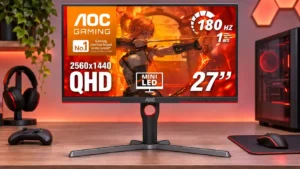
It runs without a cooling fan and can throttle extreme sustained white HDR output to protect against heat, without disrupting typical gaming use.
Pros: value for money, HDR performance
Cons: on-screen display usability, port selection

Overall: 4.1/5
A fanless design stays quiet through lengthy editing sessions, although the panel can become warm during use.
Pros: value for money, Resolution
Cons: HDR performance, refresh rate

Overall: 4.5/5
The updated panel material offers added brightness without a stated increase in heat generation, an encouraging efficiency improvement.
Pros: color gamut, contrast
Cons: value for money, Resolution

Overall: 3.7/5
Thermal brightness management is presented as a useful safeguard for keeping the large OLED panel comfortable and protected.
Pros: value for money, black levels
Cons: refresh rate, portability and weight

Overall: 4.4/5
Passive cooling avoids fan noise; one side-by-side tester measured more warmth at maximum output but found better temperature behavior at matched brightness.
Pros: brightness, value for money
Cons: port selection, built-in speakers

Overall: 4.0/5
Fanless cooling is praised for quiet operation, but one owner reported an unpleasant burning-electronics odor from two units.
Pros: overall satisfaction, DisplayPort connectivity
Cons: value for money, reliability over time
Overall: 4.1/5
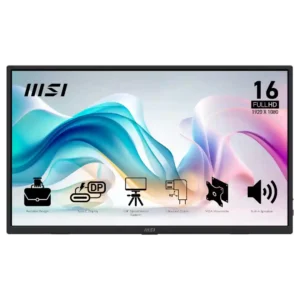
The monitor itself can stay cool over long sessions, but one owner reported alarming laptop heat when powering it over USB-C.
Pros: value for money, portability and weight
Cons: built-in speakers, color gamut

Overall: 3.8/5
A modest graphite heat spreader helps protect the OLED panel, though it is less elaborate than premium cooling designs.
Pros: value for money, panel type
Cons: brightness, port selection

Overall: 3.6/5
Internal active cooling does not appear intrusive in normal use and keeps the premium panel operating quietly.
Pros: overall satisfaction, brightness
Cons: Dolby Vision support, VRR flicker
Overall: 3.9/5
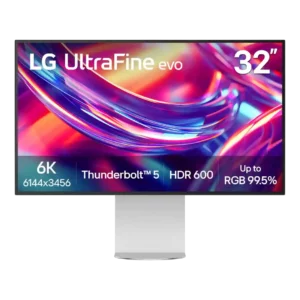
One reviewer noticed substantially more heat coming from the display at high brightness. It is not described as a failure, but high-output use can make the panel noticeably warm.
Pros: port selection, overall satisfaction
Cons: value for money, cable management

Overall: 3.7/5
The panel can become noticeably warm when local dimming is unexpectedly disabled, raising concern during bright prolonged use.
Pros: overall satisfaction, PC gaming compatibility
Cons: color accuracy, local dimming performance

Overall: 4.1/5
The rear can become noticeably hot after extended sessions, although high heat is understandable for this demanding panel.
Pros: Resolution, overall satisfaction
Cons: value for money, Image scaling

Overall: 3.1/5
Two owners describe unusually high heat, making thermal behavior a concern worth checking during the return window.
Pros: PC gaming compatibility, overall picture quality
Cons: overall satisfaction, Smart TV platform

Overall: 3.5/5
One user reports substantial heat buildup and worries about how it may affect longevity.
Pros: HDR performance, overall satisfaction
Cons: local dimming performance, Blooming control