If you want better KVM switch performance
Choose ASUS ROG Swift OLED PG27UCDM. It scores 4.7 vs 2.0 for KVM switch performance, with a 4.4 overall score.

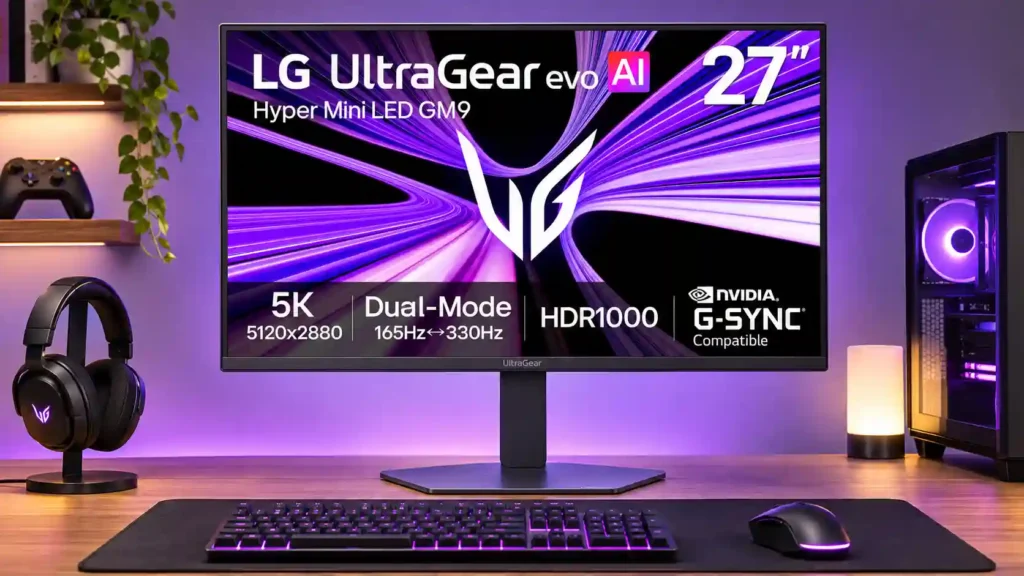
Brilliant 5K text clarity and a genuinely useful 330Hz gaming mode make this monitor unusually flexible. Its high price, inconsistent HDR tone mapping and early firmware headaches prevent an easy recommendation.
PC gamers who also work with dense text, photography or editing tasks, and Mac users who want sharp 5K scaling with more gaming flexibility than a standard office display.
Budget-focused buyers, players expecting uncompromised dark-scene HDR, or users who need a large workstation canvas and integrated Thunderbolt/KVM docking.
The LG 27GM950B-B brings an unusually practical mix of 5K desktop clarity and high-speed gaming. Its native 165Hz mode makes text, photos and editing work razor-sharp, while the dedicated QHD/330Hz switch offers smooth, responsive play without the heavy GPU burden of 5K. Mini LED backlighting adds impressive blacks, restrained halos and rich HDR color, and the bright anti-glare screen works well in daylight. There are real compromises. Some tests find limited sparkle in tiny highlights, and a long-term owner strongly criticizes dark-scene HDR accuracy. One testing outlet also reported a persistent brightness reduction after several minutes, which another did not reproduce. Software updates have been awkward, and 27 inches can feel small for expensive productivity gear. At its original price, this makes the most sense for buyers who genuinely need both sharp 5K work and competitive gaming in one screen.
Compared with other Monitors, this product is above average in SDR/HDR mode switching, Blooming control, competitive gaming suitability, near average in refresh rate, Color calibration controls, below average in Packaging presentation, Automatic brightness limiting, software support.
| Attribute | This product | Category average | Difference |
|---|---|---|---|
| Packaging presentation | 2.5 | 4.8 | -2.3 |
| Automatic brightness limiting | 1.5 | 3.4 | -1.9 |
| software support | 1.8 | 3.6 | -1.9 |
| picture-in-picture and picture-by-picture | 2.0 | 3.7 | -1.7 |
| cable management | 2.3 | 3.9 | -1.6 |
| value for money | 2.5 | 3.9 | -1.4 |
| reliability over time | 2.0 | 3.5 | -1.5 |
| SDR/HDR mode switching | 4.5 | 3.0 | +1.5 |
Choose ASUS ROG Swift OLED PG27UCDM. It scores 4.7 vs 2.0 for KVM switch performance, with a 4.4 overall score.
Choose Dell S2725QS. It scores 4.8 vs 2.5 for value for money, with a 3.8 overall score.
Choose AOC Q27G3XMN. It scores 4.0 vs 1.5 for Automatic brightness limiting, with a 3.9 overall score.
Choose Dell U2725QE. It scores 5.0 vs 2.0 for picture-in-picture and picture-by-picture, with a 4.2 overall score.
Products reviewers directly compared with this model, grouped into quick takeaways.
Yes, particularly for text, images and detail-rich desktop work at 27 inches. In many modern games, the improvement over 4K is more modest and costs significant GPU performance.
Yes, in the 2560×1440 dual mode with compatible graphics hardware and connectivity. Native 5K runs at up to 165Hz, and the 1440p image is softer than native QHD.
It can deliver deep blacks, wide color and bright large highlights, but very small lights may be dimmed excessively. One independent tester reported a noticeable sustained brightness reduction, while another did not reproduce it.
Mac testers praised its 5K text scaling, USB-C display connection and charging. The available refresh rate varies by Mac model, and some users prefer the glossy finish of Apple displays.
Yes. PlayStation testing confirmed 4K at 120Hz with HDR and VRR, and lower-resolution consoles may benefit from the monitor’s optional AI upscaling.
USB-C carries display and data and supplies up to 90W of charging on compatible laptops. Its small USB-A hub does not provide KVM or the breadth of a dedicated Thunderbolt dock.
It is easier to justify for people who need both native 5K desktop clarity and fast competitive gaming. Buyers focused mainly on gaming or HDR can find cheaper 4K OLED and Mini LED alternatives.
These are a few of the reviews included in our analysis.


The LG 27GM950B-B will give you 5K, QHD, onboard AI upscaling, UHBR2 2.0, and more. It is a premium offering that is on sale for $799.99.
Hace unos meses os trajimos el análisis del monitor LG de 52 pulgadas más grande del mundo; hoy nos toca hacer lo propio con otro monitor de...
See what the LG UltraGear evo AI GM9 offers, including its 5K/165Hz and QHD/330Hz modes, Mini LED specifications, AI features, ports, and...
Beim UltraGear evo 27GM950B-B setzt LG auf besonders hohe Spitzenhelligkeit, knackige Schärfe und ein praktisches Upscaling. Unser Test:
A 27-inch 5K 165Hz IPS with a 2,304-zone Mini LED backlight and a 1440p 330Hz dual mode, for the sharpest text of any gaming monitor we cover.

The 27-inch 4K OLED picture is exceptionally crisp and responsive, with useful USB-C and KVM extras. Its high price, oversized stand, and bright-room compromises limit its appeal.
Pros: sharpness, overall satisfaction
Cons: value for money, VRR flicker

Best for exceptional 4K HDR, accurate color, fast 240Hz gaming, and strong work connectivity. Skip it if you need built-in speakers, ultrawide immersion, television-level HDR brightness, or a budget-friendly upgrade.
Pros: brightness, reflection handling
Cons: cable management

Best for class-leading 360Hz ultrawide motion, spectacular HDR, deep blacks, and unusually strong work-and-play connectivity. Skip it if you want 4K-like text sharpness, a matte screen, or the best value...
Pros: overall satisfaction, sharpness
Cons: Resolution, cable management

Choose the RD280UG for coding, trading, writing, or creative work that benefits from a tall, sharp 3:2 screen and strong eye-care features. Skip it for serious HDR, color-critical creation, esports,...
Pros: productivity versatility, aspect ratio
Cons: value for money, competitive gaming suitability