If you want better warranty and support service
Choose MSI MPG 341CQR QD-OLED X36. It scores 4.7 vs 1.1 for warranty and support service, with a 4.4 overall score.

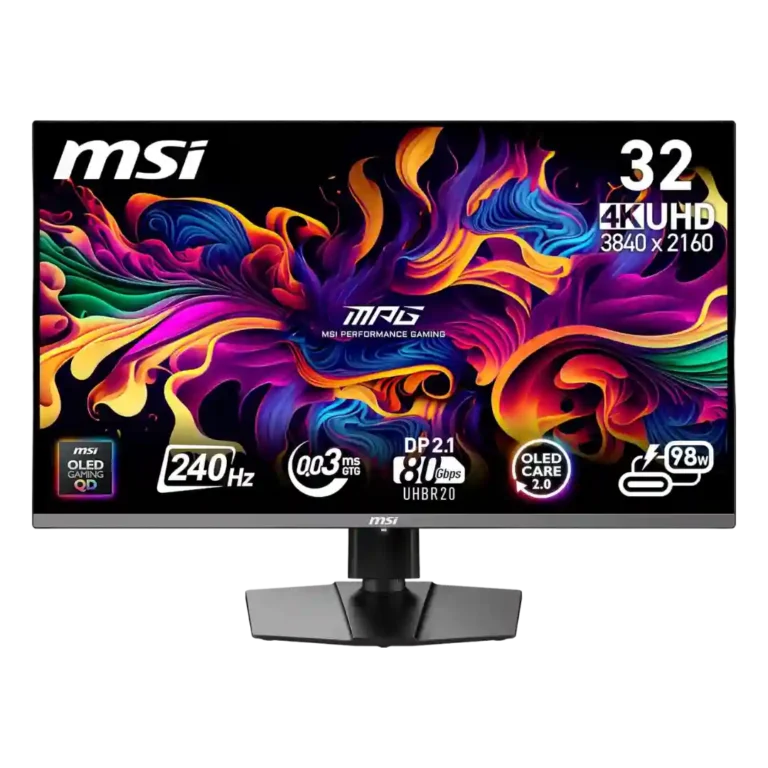
Choose it for breathtaking 4K OLED contrast, color, and 240Hz speed—especially with a high-end PC. Skip it at full price if bright-room use, effortless reliability, or proven DisplayPort durability matters most.
Enthusiast PC gamers with powerful GPUs, controlled room lighting, and enough desk depth will get the most from its 4K 240Hz speed, OLED contrast, and modern connectivity. It also suits mixed gaming and productivity setups that benefit from USB-C and KVM.
Skip it for bright offices, small desks, console-only 60Hz use, or text-heavy all-day work where OLED maintenance and reflections are undesirable. Risk-averse buyers should also consider the repeated DisplayPort and support complaints.
The MPG 322URX delivers the kind of image that makes LCD monitors feel dated: perfect blacks, vivid and accurate color, sharp 4K detail, near-instant response, and exceptionally clean 240Hz motion. Its 32-inch format also works well for cinematic gaming, media, and multitasking, while DisplayPort 2.1, HDMI 2.1, USB-C, and KVM support make it unusually flexible. The tradeoffs are significant, however. Brightness is only average in large bright scenes, reflections demand controlled lighting, OLED Care can interrupt use, and the launch premium over the similar 321URX is difficult to defend. Most importantly, multiple owners reported early DisplayPort failures, wake problems, firmware trouble, and poor support experiences. It is a spectacular performer when working properly, but the reliability pattern makes sale pricing and a strong return policy especially important.
Compared with other Monitors, this product is above average in adaptive sync performance, HDR performance, ghosting control, near average in DisplayPort connectivity, value for money, below average in warranty and support service, eye comfort features, delivery condition.
| Attribute | This product | Category average | Difference |
|---|---|---|---|
| warranty and support service | 1.1 | 3.7 | -2.6 |
| eye comfort features | 2.0 | 4.4 | -2.4 |
| delivery condition | 2.3 | 4.1 | -1.8 |
| reliability over time | 2.8 | 3.8 | -1.0 |
| adaptive sync performance | 5.0 | 3.6 | +1.4 |
| reflection handling | 2.9 | 4.2 | -1.2 |
| sleep and wake behavior | 1.6 | 2.9 | -1.3 |
| HDR performance | 4.1 | 3.1 | +1.0 |
Choose MSI MPG 341CQR QD-OLED X36. It scores 4.7 vs 1.1 for warranty and support service, with a 4.4 overall score.
Choose Alienware 27 4K Gaming Monitor AW2725Q. It scores 4.1 vs 3.5 for value for money, with a 4.3 overall score.
Choose InnoCN GA27S1Q. It scores 5.0 vs 2.8 for reliability over time, with a 4.3 overall score.
Choose Samsung Odyssey OLED G6 G60SF. It scores 4.0 vs 2.0 for eye comfort features, with a 4.3 overall score.
Products reviewers directly compared with this model, grouped into quick takeaways.
Usually not at a large premium. The main gains are DisplayPort 2.1 UHBR20, faster USB ports, slightly higher USB-C power delivery, and official G-Sync support; core image and motion performance are very similar.
It is usable, but not ideal. Full-screen brightness is limited and the glossy QD-OLED coating can show reflections while ambient light lifts blacks toward purple or gray.
Yes. Dual HDMI 2.1 ports support current consoles well, including 4K at up to 120Hz with VRR, though console-only buyers may not benefit from the costly DisplayPort 2.1 upgrade.
No. Several reviewers explicitly confirmed that the monitor has no built-in speakers, so headphones or an external audio system are required.
Yes for mixed use: the 32-inch 4K desktop, clear text, USB-C power delivery, USB hub, and KVM are useful. All-day static work still brings OLED-care interruptions and long-term burn-in considerations.
Yes. Multiple owners reported early DisplayPort failures, source-detection or wake problems, failed firmware updates, and difficult support experiences, although many other buyers reported trouble-free units.
These are a few of the reviews included in our analysis.

Hands-on review of the MSI MPG 322URX QD-OLED, a 32-inch 4K 240Hz OLED gaming monitor with HDR and DisplayPort 2.1a. Pros, cons, and who it...
The MSI MPG 322URX QD-OLED is an excellent 4K, 240Hz display with numerous features, but is it worth its rather steep $1000 price point?...
MSI's high-end MPG 322URX QD-OLED monitor gets put through its paces in our latest review to see how it stacks up against market rivals.
The latest Review,,,reviews, breaking news, comment, reviews and features from the experts at PC Gamer
MSI levels up with the new MPG 322URX gaming monitor - an upgraded beast replacing its top model, but it comes with a steeper price tag.

Best for exceptional 4K HDR, accurate color, fast 240Hz gaming, and strong work connectivity. Skip it if you need built-in speakers, ultrawide immersion, television-level HDR brightness, or a budget-friendly upgrade.
Pros: brightness, reflection handling
Cons: cable management

Best for class-leading 360Hz ultrawide motion, spectacular HDR, deep blacks, and unusually strong work-and-play connectivity. Skip it if you want 4K-like text sharpness, a matte screen, or the best value...
Pros: overall satisfaction, sharpness
Cons: Resolution, cable management

Choose the RD280UG for coding, trading, writing, or creative work that benefits from a tall, sharp 3:2 screen and strong eye-care features. Skip it for serious HDR, color-critical creation, esports,...
Pros: productivity versatility, aspect ratio
Cons: value for money, competitive gaming suitability

Best for fast 1440p OLED gaming, deep blacks, and a flexible stand at a bargain sale price. Skip it for bright rooms, USB-C/KVM productivity, or the reassurance of a three-year...
Pros: color gamut, overall picture quality
Cons: brightness, HDR performance