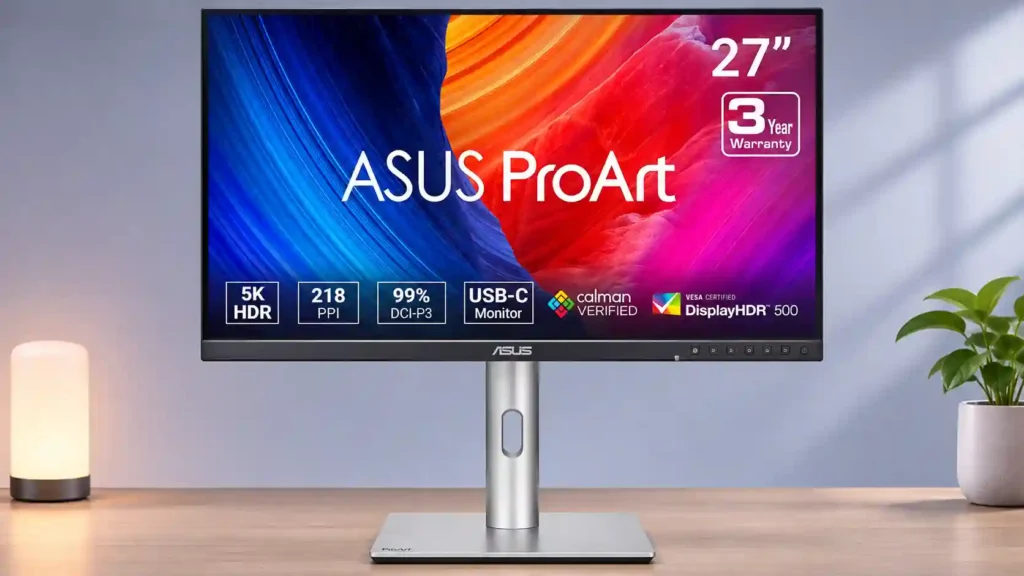
ASUS ProArt Display 6K PA32QCV

ASUS ProArt Display 6K PA32QCV Monitor Review

Brand: ASUS
Released: July 18, 2025
Updated: 1 hour ago
4.1
Overall review score
474
Review insights
80
Scored features
27
Expert reviews

Bottom Line

The PA32QCV brings exceptionally roomy, Mac-friendly 6K detail and capable color tools at a comparatively accessible price. Its matte coating, inconsistent panel uniformity and weak HDR are the clearest compromises.

Creative professionals doing detailed SDR photo and video work, programmers who value sharp text, and Mac or Windows laptop users wanting a roomy one-cable desktop.

Competitive gamers, colorists relying on reference-grade HDR blacks, and print-focused photographers who need complete Adobe RGB coverage should consider alternatives.

Verdict

The ASUS ProArt Display 6K PA32QCV excels as a high-density working canvas for editors, photographers, programmers and anyone juggling large documents or multiple creative panels. Its 32-inch 6K resolution, accurate SDR color, bright anti-glare image and flexible stand are repeatedly praised, while Thunderbolt 4 docking, 96W laptop charging and an Auto KVM make it especially practical on Mac-and-PC desks. The price is compelling compared with many other 6K displays. The tradeoffs matter, though. Several testers find that the LuxPixel matte finish softens fine text or creates visible grain, and some units exhibit disappointing white uniformity. HDR lacks the controlled blacks and highlights of OLED or full-array Mini LED, and 60Hz motion is not suited to competitive gaming. For primarily SDR creation and productivity, it remains a strong option; for reference-grade HDR or flawless glossy clarity, it is less convincing.

Feature Scorecards

Summary

80 reviewed features
  • Very positive 4.5-5.0
    31 (39%)
  • Positive 3.5-4.4
    19 (24%)
  • Neutral 2.5-3.4
    11 (14%)
  • Negative 1.5-2.4
    17 (21%)
  • Very negative below 1.5
    2 (3%)

Pros highlights

  • 4.8
    24 reviews strong consensus
    value for money: 4.8, 24 reviews, strong consensus
    This is one of the most affordable ways to get a large 6K panel with serious creative features. The savings require accepting plastic construction and limited HDR.
  • 5.0
    22 reviews strong consensus
    Resolution: 5.0, 22 reviews, strong consensus
    The 32-inch 6K canvas is the headline advantage, bringing far more usable pixels than 4K and providing beautiful detail for creative applications.
  • 4.9
    19 reviews strong consensus
    stand adjustability: 4.9, 19 reviews, strong consensus
    The included stand is a standout: height, swivel, tilt and pivot adjustments let users dial in many professional desk positions.
  • 4.6
    19 reviews moderate consensus
    color accuracy: 4.6, 19 reviews, moderate consensus
    Accurate, well-calibrated color is a major attraction for web, photo and video work. Some test samples show modest errors or benefit from further calibration for exacting jobs.
  • 4.9
    18 reviews strong consensus
    reflection handling: 4.9, 18 reviews, strong consensus
    The LuxPixel matte finish is consistently excellent at suppressing bright lights and reflections. That benefit comes with a possible grainy or softened image.
  • 4.6
    15 reviews moderate consensus
    brightness: 4.6, 15 reviews, moderate consensus
    Brightness is a consistent strength, with measurements and hands-on impressions describing a remarkably luminous SDR image. A few color presets limit adjustment, however.

Cons highlights

  • 2.4
    12 reviews moderate consensus
    HDR performance: 2.4, 12 reviews, moderate consensus
    HDR is the primary image-quality compromise: decent brightness cannot make up for limited dimming and modest contrast. It is more suitable for occasional previewing than final reference grading.
  • 2.2
    11 reviews strong consensus
    refresh rate: 2.2, 11 reviews, strong consensus
    A 60Hz cap is acceptable for traditional creative timelines and normal office work but disappointing for fast games or people accustomed to 120Hz-plus displays.
  • 2.9
    11 reviews low consensus
    contrast: 2.9, 11 reviews, low consensus
    Opinions vary on its IPS contrast: several find it respectable for LCD technology, but others find the blacks and overall depth disappointing beside OLED or Mini LED.
  • 2.9
    11 reviews low consensus
    Screen coating clarity: 2.9, 11 reviews, low consensus
    The matte coating is divisive: some see crisp, unobstructed detail while others notice haze, shimmer or grain that undermines 6K text clarity.
  • 2.6
    9 reviews low consensus
    premium feel: 2.6, 9 reviews, low consensus
    Opinions split between solid, professional construction and an obviously plastic, less luxurious finish. It does not mimic Apple's aluminum-and-glass feel.
  • 2.3
    7 reviews low consensus
    screen uniformity: 2.3, 7 reviews, low consensus
    Unit consistency is a real concern. Some screens show noticeable corner brightness or white-balance variation; others, including one replacement, look far better.

Use Cases

Best for

  • 4.9
    16 reviews strong consensus
    Apple ecosystem households: 4.9, 16 reviews, strong consensus
    macOS-friendly 6K pixel density, color presets and Thunderbolt docking make this a compelling option for Mac users. Mac and Windows compatibility broadens its appeal beyond Apple-only displays.
  • 5.0
    14 reviews strong consensus
    Desktop productivity: 5.0, 14 reviews, strong consensus
    This is one of its strongest roles: 6K clarity and 32-inch workspace make documents, multiple windows and daily creative tasks easy to arrange together.
  • 4.9
    13 reviews strong consensus
    Video editing: 4.9, 13 reviews, strong consensus
    Ample pixel space keeps full-resolution footage, tool panels and timelines visible together. SDR editing shines; precise HDR finishing is less convincing.

Not ideal for

  • HDR color grading
    2.0
    3 reviews strong consensus
    HDR color grading: 2.0, 3 reviews, strong consensus
    High color fidelity helps with standard footage, but the weak black control and modest HDR contrast make this a conditional choice for critical HDR finishing.
  • Dark-room viewing
    2.0
    1 review
    Dark-room viewing: 2.0, 1 review
    Dark rooms expose the panel's elevated blacks and weaker shadow depth, making cinematic dark-scene viewing less satisfying than on higher-contrast displays.

Compared With Category Average

Compared with other Monitors, this product is above average in Headphone output quality, Thunderbolt docking connectivity, Image scaling, near average in color gamut, overall satisfaction, below average in refresh rate, Shadow detail, response time.

Comparison summary

74 compared features
  • Above average 0.4+ pts higher
    29 (39%)
  • Same as average within 0.3 pts
    16 (22%)
  • Below average 0.4+ pts lower
    29 (39%)

Largest category differences

Attribute This product Category average Difference
Headphone output quality 5.0 2.1 +3.0
refresh rate 2.2 4.4 -2.2
Shadow detail 2.0 4.4 -2.4
response time 2.0 4.1 -2.1
Thunderbolt docking connectivity 4.9 3.0 +1.9
motion clarity 2.2 4.2 -2.0
SDR/HDR mode switching 1.0 3.0 -2.0
Blooming control 2.0 4.0 -2.0

Consider This Instead

If you want better speaker quality

Choose Dell S2725QC. It scores 4.6 vs 1.5 for speaker quality, with a 4.2 overall score.

Compare

If you want better SDR/HDR mode switching

Choose LG 27GM950B-B. It scores 4.5 vs 1.0 for SDR/HDR mode switching, with a 4.0 overall score.

Compare

If you want better screen uniformity

Choose TCL 32R84. It scores 5.0 vs 2.3 for screen uniformity, with a 4.2 overall score.

Compare

If you want better refresh rate

Choose Dell U2725QE. It scores 4.6 vs 2.2 for refresh rate, with a 4.2 overall score.

Compare

Compared in Reviews

Products reviewers directly compared with this model, grouped into quick takeaways.

Apple Pro Display XDR (2019)

  • More expensive: 6K resolution, panel build and HDR The ASUS supplies 6K Mac workspace for less, sacrificing metal construction and XDR-grade contrast.
  • Better: HDR, uniformity and power-on speed Apple looks sharper and handles HDR more seamlessly, while ASUS emphasizes the lower price.
  • More expensive: 6K monitor budget The video positions ASUS as a significantly cheaper way to obtain a Retina-density 32-inch 6K screen.

Apple Studio Display (2022)

  • Compared: price and pixel count The ASUS offers a larger 6K panel for a price compared to Apple’s smaller 5K monitor.
  • More expensive: retail price versus Apple monitor The 32-inch ASUS costs less than the 27-inch Apple Studio Display cited in the review.
  • Compared: matte glare control versus crisp glossy text ASUS provides a larger screen and better glare rejection but less crisp text and lower SDR color accuracy.

ASUS ProArt Display OLED PA32UCDM

  • Better: premium finish The cheaper 6K IPS model lacks the luxurious finish of the ProArt OLED.
  • Better: HDR contrast and filmmaker image depth OLED supplies richer blacks for grading while ASUS trades that punch for more pixels and quiet operation.
  • Better: Adobe RGB coverage and contrast A 4K OLED alternative offers broader Adobe RGB coverage and stronger contrast at the expense of 6K sharpness.

FAQ

Does the PA32QCV work well with Macs?

Yes. Its 6K pixel density maps well to macOS Retina-style scaling, with Mac-oriented color presets and Thunderbolt 4 laptop connections. It also works with compatible Windows PCs.

Is 6K text especially sharp?

The pixel density makes small text and design details remarkably fine. Some viewers nevertheless notice haze or grain from the LuxPixel matte coating, so perceived clarity varies.

Is it suitable for professional photo and video editing?

It is strongest for SDR editing, detailed photos and large video timelines. Narrower Adobe RGB coverage and limited HDR contrast make certain print and HDR-finishing jobs less ideal.

Can it handle gaming?

Casual or slow-paced games are usable, but 60Hz refresh and modest motion clarity make it a weak choice for competitive gaming.

Can one cable charge a laptop and carry the picture?

Yes, a compatible Thunderbolt 4 connection carries 6K video, data and up to 96W power delivery, reducing desk cables.

Can I connect two computers or monitors?

Auto KVM can share a keyboard and mouse between machines, and Thunderbolt-out supports daisy-chaining another display. Complex USB setups and high-refresh secondary screens may need workarounds.

How does it perform in bright rooms?

High SDR brightness and a highly effective anti-reflection coating make it well suited to bright offices and studios, although the matte layer can soften fine details.

Sample Expert Reviews We Analyzed

These are a few of the reviews included in our analysis.

Video Reviews

Article Reviews

tech-critter.com

ASUS released a brand new monitor called the ProArt Display 6K PA32QCV that is specifically made for content creators who care about colors...

Review score
4.5
rtings.com

The ASUS ProArt Display 6k PA32QCV is a high-end 32-inch, 6k monitor geared towards content creators. It's the only 6k monitor in the ProArt...

Review score
3.6

Top Monitors to Consider

#1 Asus ROG Swift 34 QD-OLED PG34WCDN
4.5

This 360Hz QD-OLED ultrawide delivers exceptional gaming motion, vibrant HDR and dramatically cleaner text. Its high price, less-than-perfect bright-room blacks and occasional HDR dimming are the main reasons to hesitate.

Pros: color gamut, contrast

Cons: value for money, Resolution

#2 ASUS ROG Swift OLED PG27UCDM
4.4

The 27-inch 4K OLED picture is exceptionally crisp and responsive, with useful USB-C and KVM extras. Its high price, oversized stand, and bright-room compromises limit its appeal.

Pros: sharpness, overall satisfaction

Cons: value for money, VRR flicker

#3 MSI MPG 322UR QD-OLED X24
4.4

Best for exceptional 4K HDR, accurate color, fast 240Hz gaming, and strong work connectivity. Skip it if you need built-in speakers, ultrawide immersion, television-level HDR brightness, or a budget-friendly upgrade.

Pros: brightness, reflection handling

Cons: cable management
#4 MSI MPG 341CQR QD-OLED X36
4.4

Best for class-leading 360Hz ultrawide motion, spectacular HDR, deep blacks, and unusually strong work-and-play connectivity. Skip it if you want 4K-like text sharpness, a matte screen, or the best value...

Pros: overall satisfaction, sharpness

Cons: Resolution, cable management