If you want better GPU demands
Choose Acer Nitro XF243Y Pbmiiprx. It scores 5.0 vs 2.9 for GPU demands, with a 3.7 overall score.

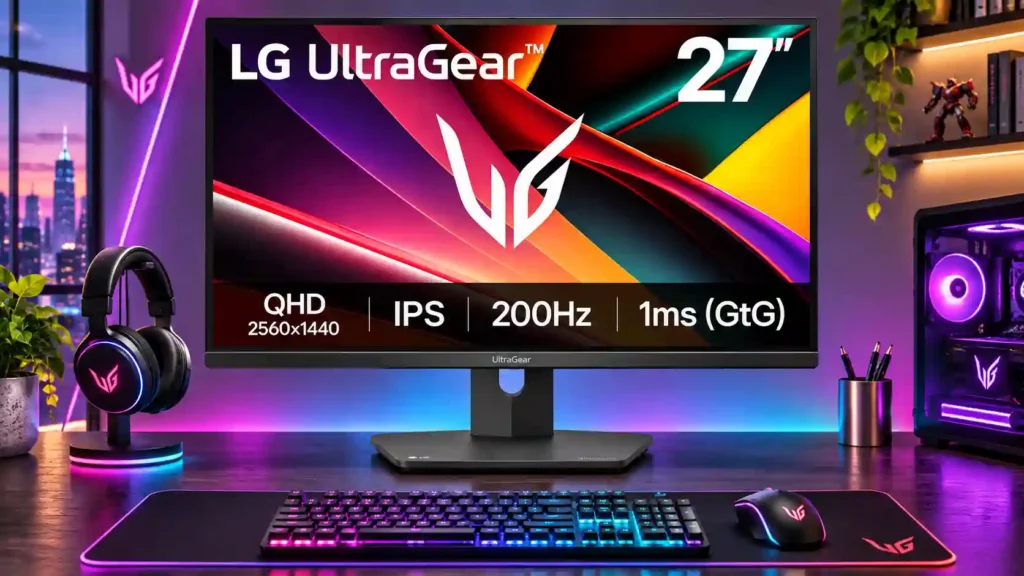
The LG 27G610A-B makes fast 1440p PC gaming unusually affordable, with sharp everyday visuals and flexible stand adjustments. Its weak HDR, basic ports and lower-refresh ghosting are the key compromises.
Budget-conscious PC gamers, especially those playing fast competitive games at high frame rates, plus people who want one sharp screen for games and desktop work.
HDR-focused gamers, color-critical creators who need reliable factory accuracy, and PS5 owners who require VRR. It is less appealing for lower-frame-rate gaming or users who want a built-in USB hub.
The LG 27G610A-B earns its place as a budget-friendly 1440p gaming monitor by putting speed first. Its 200Hz refresh rate and low input lag make fast PC games feel responsive, and the 27-inch IPS image looks sharp for documents, browsing and general gaming. Adjustable height, tilt, swivel and pivot add valuable flexibility. The tradeoffs matter, though: contrast is modest, HDR lacks punch, and inverse ghosting becomes more noticeable as refresh rates fall. USB ports and built-in speakers are absent, while stand quality draws mixed reactions, including reports of wobble. Color impressions range from vibrant and pleasing to insufficiently accurate before calibration, so professional editing is not its strongest role. At a good sale price it is an appealing gaming-first choice, but alternatives can offer cleaner motion or better connectivity.
Compared with other Monitors, this product is above average in Pixel defect control, reliability over time, competitive gaming suitability, near average in adaptive sync performance, Screen bezel design, below average in Stand stability, PS5 gaming, premium feel.
| Attribute | This product | Category average | Difference |
|---|---|---|---|
| Pixel defect control | 5.0 | 2.6 | +2.4 |
| Stand stability | 2.0 | 4.3 | -2.3 |
| PS5 gaming | 2.0 | 4.3 | -2.3 |
| premium feel | 2.0 | 4.2 | -2.2 |
| setup ease | 2.5 | 4.6 | -2.1 |
| Packaging presentation | 2.0 | 4.1 | -2.1 |
| USB hub functionality | 1.7 | 3.7 | -2.0 |
| contrast | 2.3 | 4.1 | -1.8 |
Choose Acer Nitro XF243Y Pbmiiprx. It scores 5.0 vs 2.9 for GPU demands, with a 3.7 overall score.
Choose Dell Alienware AW2725DM. It scores 5.0 vs 2.0 for Stand stability, with a 4.0 overall score.
Choose Dell S2725QS. It scores 5.0 vs 2.0 for Packaging presentation, with a 3.8 overall score.
Choose Dell Alienware AW2523HF. It scores 5.0 vs 2.0 for premium feel, with a 3.9 overall score.
Products reviewers directly compared with this model, grouped into quick takeaways.
Yes. Its 200Hz refresh rate, low input lag, and quick response provide a fast, responsive experience with a suitably powerful PC. Lower frame rates can reveal inverse ghosting.
Reviewers find the QHD image noticeably sharper than 1080p for games, text, and everyday work. It balances clarity with lower GPU demands than 4K.
No. HDR 400 support offers limited impact, with low native contrast, gray-looking blacks, and less convincing highlights than premium HDR panels.
It can be used for PS5 gaming at high refresh rates, but the comparison testing notes a lack of PS5 VRR support. The HDMI 2.0 connections also lack some HDMI 2.1 capabilities.
It offers height, tilt, swivel, and pivot adjustments, which many reviewers appreciate. However, at least one firsthand test found it wobbly even while typing.
No. The available connections are basic HDMI and DisplayPort video inputs with a headphone jack; it does not provide integrated speakers or USB hub functionality.
The sharp, vivid IPS display is useful for productivity and general editing, but factory color accuracy can vary. Color-critical projects may call for calibration or a more accurate display.
These are a few of the reviews included in our analysis.
Pros: Sharp and vibrant visuals thanks to 1440p resolution on a 27-inch IPS panel 200Hz refresh rate delivers ultra-smooth and responsive...
The LG 27G610A-B is an entry-level 1440p gaming monitor. Part of LG's UltraGear lineup of gaming displays, it sits just below the LG...

This 360Hz QD-OLED ultrawide delivers exceptional gaming motion, vibrant HDR and dramatically cleaner text. Its high price, less-than-perfect bright-room blacks and occasional HDR dimming are the main reasons to hesitate.
Pros: color gamut, contrast
Cons: value for money, Resolution

The 360Hz QD-OLED panel delivers exceptional HDR gaming, responsive motion, and cleaner text than earlier ultrawides. Its 3440×1440 resolution is less sharp than 4K, and premium pricing remains a hurdle.
Pros: refresh rate, Text fringing
Cons: Resolution, GPU demands

A huge, sharp ultrawide workspace and unusually capable Thunderbolt dock make the U4025QW outstanding for demanding productivity and editing. Its high price, modest HDR, and imperfect motion handling keep it...
Pros: overall picture quality, color accuracy
Cons: value for money, built-in speakers

Lightning-fast 360Hz OLED gaming, rich color and an unusually flexible USB-C/KVM setup are the big draws. Strong room lighting, limited full-screen HDR brightness and static-content burn-in concerns keep it from...
Pros: color gamut, overall satisfaction
Cons: reflection handling, VRR flicker