If you want better local dimming performance
Choose Samsung Odyssey OLED G6 G60SF. It scores 5.0 vs 1.0 for local dimming performance, with a 4.3 overall score.

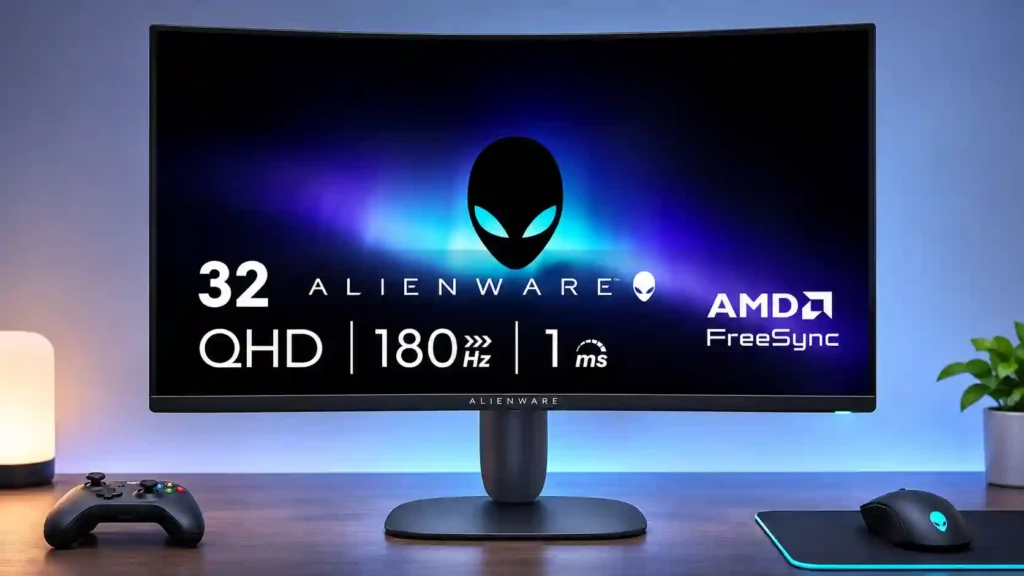
A roomy curved screen, bright SDR picture and smooth 180Hz gaming make this a strong value. Its weak HDR system, visible motion smearing and modest 32-inch pixel density are the tradeoffs.
Budget-minded PC and console players who want a large, curved 180Hz screen for SDR adventures, racing games and everyday gaming; also suitable for a combined work-and-play desk.
Competitive esports players sensitive to smearing, people prioritizing high-quality HDR or very crisp 32-inch text, and shoppers who need easy shared-screen viewing or built-in audio.
The Alienware AW3225DM delivers the appeal of a large, curved gaming monitor without the cost of 4K or OLED. Its bright SDR picture, vivid colors and deep VA-panel blacks make everyday games feel spacious and immersive. A 180Hz refresh rate, useful dual HDMI inputs, USB passthrough and a compact, adjustable stand round out a surprisingly capable package. It also works well for office tasks and ordinary video editing. The tradeoffs matter, however. At 32 inches, 1440p looks less finely detailed than it does on a smaller display, and quick motion can show VA smearing. The most serious concern is HDR: some hands-on impressions are positive, but the technical assessment strongly criticizes its forced local dimming. This is an easier recommendation for budget-focused SDR gaming, racing and immersive adventures than for competitive esports, color-critical work or demanding HDR entertainment.
Compared with other Monitors, this product is above average in GPU demands, gaming image presets, Shadow detail, near average in panel type, HDR performance, below average in local dimming performance, Headphone output quality, Image scaling.
| Attribute | This product | Category average | Difference |
|---|---|---|---|
| local dimming performance | 1.0 | 3.6 | -2.6 |
| GPU demands | 5.0 | 2.8 | +2.2 |
| Headphone output quality | 1.5 | 3.3 | -1.8 |
| Image scaling | 1.5 | 3.2 | -1.7 |
| viewing angles | 2.7 | 4.4 | -1.7 |
| Pixel density | 2.8 | 4.2 | -1.4 |
| gaming image presets | 5.0 | 3.7 | +1.3 |
| Packaging presentation | 3.0 | 4.3 | -1.3 |
Choose Samsung Odyssey OLED G6 G60SF. It scores 5.0 vs 1.0 for local dimming performance, with a 4.3 overall score.
Choose Dell UltraSharp 52 Thunderbolt Hub Monitor, U5226KW. It scores 4.4 vs 2.0 for KVM switch performance, with a 4.3 overall score.
Choose TCL 32R84. It scores 4.8 vs 3.1 for HDR performance, with a 4.2 overall score.
Choose MSI MPG 341CQR QD-OLED X36. It scores 5.0 vs 2.7 for viewing angles, with a 4.4 overall score.
Products reviewers directly compared with this model, grouped into quick takeaways.
Yes for most SDR games, with a spacious 32-inch curve and smooth 180Hz refresh. Very fast competitive games can reveal VA smearing.
HDR impressions differ, but the forced local-dimming system is a major weakness in technical testing. It is safer to buy this for its strong SDR performance.
It is usable and saves GPU power, but the lower pixel density can make fine details and text softer than on 27-inch QHD or 32-inch 4K monitors.
It supports console gaming and useful PS5 VRR, and its two HDMI inputs accommodate multiple systems. There is no 3.5mm speaker or headphone passthrough.
The large screen works well for documents, browsing, spreadsheets, Photoshop and ordinary YouTube video editing. It is not established as a color-critical reference display.
It has no built-in speakers or headphone output, but includes two USB-A ports activated through a USB-B upstream connection.
The compact stand offers useful height and tilt adjustments, while stock-stand portrait rotation is not available.
These are a few of the reviews included in our analysis.
The Dell Alienware AW3225DM is a 32-inch curved gaming monitor offering 180Hz, 1ms response, HDR400 and rich features at a reasonable price...
The Dell Alienware AW3225DM is a budget 1440p curved gaming monitor. As part of Dell's 2025 Alienware gaming lineup, it shares its rounded...
A great blend of price and features
Back in April, Sammy checked out the Alienware 34” 240Hz QD-OLED (AW3425DW) Gaming monitor. He gave it top marks, so when the Alienware 32”...
Alienware has released the AW3225DM, a 32-inch QHD 180Hz gaming monitor priced at $319, which is aimed at both console and PC gamers.

This 360Hz QD-OLED ultrawide delivers exceptional gaming motion, vibrant HDR and dramatically cleaner text. Its high price, less-than-perfect bright-room blacks and occasional HDR dimming are the main reasons to hesitate.
Pros: color gamut, contrast
Cons: value for money, Resolution

Lightning-fast 360Hz OLED gaming, rich color and an unusually flexible USB-C/KVM setup are the big draws. Strong room lighting, limited full-screen HDR brightness and static-content burn-in concerns keep it from...
Pros: color gamut, overall satisfaction
Cons: reflection handling, VRR flicker

The 27-inch 4K OLED picture is exceptionally crisp and responsive, with useful USB-C and KVM extras. Its high price, oversized stand, and bright-room compromises limit its appeal.
Pros: sharpness, overall satisfaction
Cons: value for money, VRR flicker

Best for exceptional 4K HDR, accurate color, fast 240Hz gaming, and strong work connectivity. Skip it if you need built-in speakers, ultrawide immersion, television-level HDR brightness, or a budget-friendly upgrade.
Pros: brightness, reflection handling
Cons: cable management