If you want better HDR highlight detail
Choose Samsung Odyssey OLED G80SH S32HG802S. It scores 5.0 vs 2.0 for HDR highlight detail, with a 4.1 overall score.

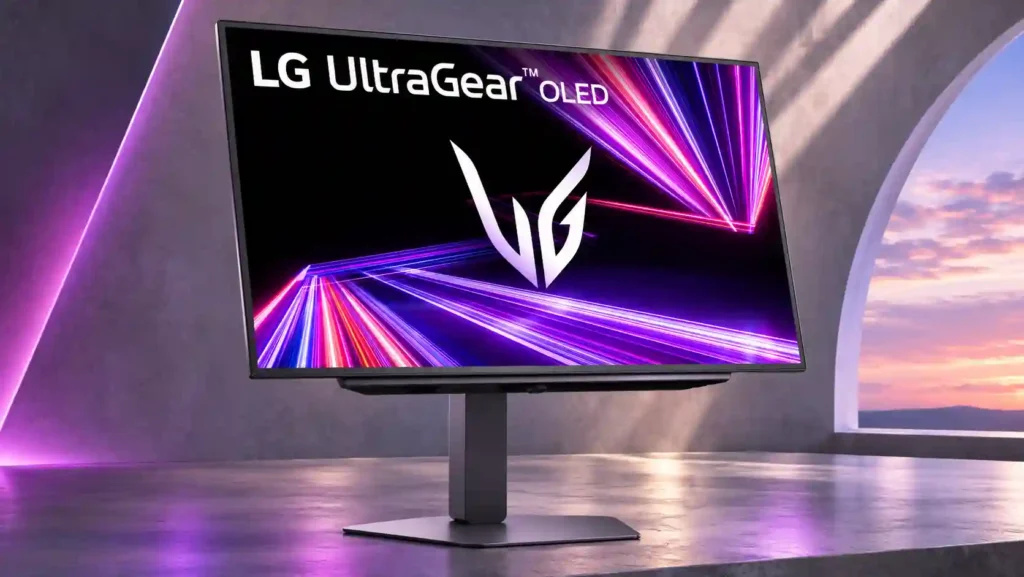
The LG 27GX704A-B delivers standout glossy OLED clarity, inky blacks and effortless 240Hz gaming at attractive sale prices. Mirror-like glare, fuzzy text and reported PS5 HDMI handshake problems limit its versatility.
PC and PS5 gamers who prioritize responsive 1440p OLED visuals and strong contrast, especially when they can control direct room reflections. Discount shoppers upgrading from LCD benefit the most.
People spending most of the day reading code or spreadsheets, users with sensitive eyes, and anyone placing the screen opposite bright windows. Buyers who need USB-C docking or effortless PS5 input switching should be cautious.
The LG 27GX704A-B is a compelling entry into glossy OLED gaming. At 27 inches and 1440p, its 240Hz WOLED panel offers outstanding motion clarity, responsive controls, deep blacks and crisp, low-haze image quality. Many owners and testers especially appreciate how well its blacks hold up with room lights on, and sale pricing makes the package easier to recommend. It also brings full-bandwidth HDMI 2.1 and a flexible stand. There are real compromises, though: glossy reflections can become distracting near windows, the WOLED subpixel structure makes text look fuzzy, and newer Tandem OLED or QD-OLED rivals deliver more saturated HDR color. HDR presets can also clip detail or appear dull, depending on the source. A long-term owner reported persistent PS5 signal detection failures and a sometimes unresponsive OSD joystick. For gaming-first buyers willing to manage lighting, its strengths are considerable; text-heavy office work is less persuasive.
Compared with other Monitors, this product is above average in Pixel defect control, Image retention, Content aspect-ratio support, near average in overall picture quality, color gamut, below average in Screen bezel design, Text fringing, on-screen display usability.
| Attribute | This product | Category average | Difference |
|---|---|---|---|
| Pixel defect control | 5.0 | 2.3 | +2.8 |
| Screen bezel design | 2.0 | 4.2 | -2.2 |
| Text fringing | 1.7 | 3.8 | -2.1 |
| Image retention | 5.0 | 2.9 | +2.1 |
| on-screen display usability | 2.0 | 4.0 | -2.0 |
| Content aspect-ratio support | 5.0 | 3.0 | +2.0 |
| PWM flicker comfort | 2.0 | 3.8 | -1.8 |
| setup ease | 3.0 | 4.7 | -1.7 |
Choose Samsung Odyssey OLED G80SH S32HG802S. It scores 5.0 vs 2.0 for HDR highlight detail, with a 4.1 overall score.
Choose LG 27GX790A-B. It scores 5.0 vs 2.0 for Screen bezel design, with a 4.0 overall score.
Choose Dell Alienware AW2725DF. It scores 4.4 vs 2.0 for on-screen display usability, with a 4.2 overall score.
Choose ASUS ROG Strix OLED XG27ACDNG. It scores 4.7 vs 2.0 for KVM switch performance, with a 4.4 overall score.
Products reviewers directly compared with this model, grouped into quick takeaways.
Yes. Its 240Hz refresh, near-instant OLED response, low input lag and VRR support keep fast action sharp and responsive.
It delivers exceptionally clear images but can act like a mirror around bright windows or direct lights. Black depth remains strong in moderate ambient light.
Games look excellent and HDMI 2.1 supports high refresh and VRR, but one long-term owner repeatedly had to restart the monitor when it failed to detect the PS5 signal.
Basic productivity works, but its WOLED subpixel layout can make text fuzzy or fringed. Conventional IPS screens are a better fit for extended text-heavy tasks.
OLED contrast produces impactful highlights, but color volume and HDR tone mapping trail some newer OLED models. Some presets clip detail, and one owner found Windows HDR dull.
One owner saw no visible burn-in after over 700 hours with static interfaces; OLED shift and cleaning tools seem helpful. That is encouraging short-term evidence, not a guarantee against future burn-in.
Discounts around $380–$500 received strong praise for bringing glossy OLED gaming within reach. At prices close to newer Tandem OLED competitors, the value argument weakens.
These are a few of the reviews included in our analysis.

LG’s 27-inch UltraGear Glossy OLED gaming monitor is $379.99 ($70 off). It features a glossy WOLED panel, a 240Hz refresh rate, and two HDMI...
The LG 27GX704A-B is an entry-level OLED gaming monitor. It uses a third-gen WOLED panel with a 27-inch, 1440p screen and 240Hz refresh rate...
The LG's 27GX704A-B is an OLED beast that's perfect for enthusiast gamers. Normally $799.99, it's now on Amazon for just $499.99!
US pricing information for LG's latest 27-inch WOLED gaming monitor has surfaced online. Undercutting the company's Primary RGB Tandem OLED...
The LG 27GX704A-B and the LG 27GX700A-B are both 1440p OLED gaming monitors, with a few differences, mainly due to their different panels...

This 360Hz QD-OLED ultrawide delivers exceptional gaming motion, vibrant HDR and dramatically cleaner text. Its high price, less-than-perfect bright-room blacks and occasional HDR dimming are the main reasons to hesitate.
Pros: color gamut, contrast
Cons: value for money, Resolution

The 360Hz QD-OLED panel delivers exceptional HDR gaming, responsive motion, and cleaner text than earlier ultrawides. Its 3440×1440 resolution is less sharp than 4K, and premium pricing remains a hurdle.
Pros: refresh rate, Text fringing
Cons: Resolution, GPU demands

A huge, sharp ultrawide workspace and unusually capable Thunderbolt dock make the U4025QW outstanding for demanding productivity and editing. Its high price, modest HDR, and imperfect motion handling keep it...
Pros: overall picture quality, color accuracy
Cons: value for money, built-in speakers

Lightning-fast 360Hz OLED gaming, rich color and an unusually flexible USB-C/KVM setup are the big draws. Strong room lighting, limited full-screen HDR brightness and static-content burn-in concerns keep it from...
Pros: color gamut, overall satisfaction
Cons: reflection handling, VRR flicker