#1
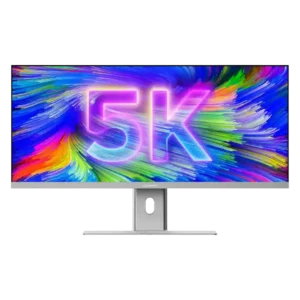
Overall: 4.3/5
This is the monitor’s standout quality: it handles timelines, spreadsheets, coding, writing, browsing, and multiple apps exceptionally well. Reviewers repeatedly found it capable of replacing a dual- or triple-monitor workspace.
Pros: productivity versatility, aspect ratio
Cons: built-in speakers, competitive gaming suitability
#2

Overall: 4.0/5
It is highly capable for mixed office tasks thanks to crisp 4K text, wide adjustment, laptop input and no OLED burn-in risk.
Pros: Dual-mode versatility, refresh rate
Cons: black levels, contrast
#3

Overall: 4.2/5
A wide panel and practical USB-C connectivity make juggling spreadsheets, browsers, terminals, and creative windows straightforward.
Pros: overall satisfaction, screen size
Cons: stand adjustability, Photo editing
#4

Overall: 4.1/5
Window-organization features work well for arranging a broad range of desktop tasks across the large display.
Pros: value for money, Resolution
Cons: HDR performance, refresh rate
#5

Overall: 4.2/5
Sharp 4K output and uniform-brightness control can make everyday desktop work pleasant, subject to static-content wear risk.
Pros: overall satisfaction, black levels
Cons: reflection handling, Color brightness
#6

Overall: 4.1/5
Writing, browsing and spreadsheets benefit from the generous screen space without feeling awkward on the curve.
Pros: value for money, overall satisfaction
Cons: HDR performance, Headphone output quality
#7
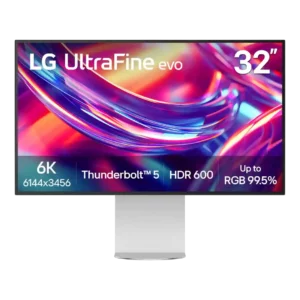
Overall: 3.9/5
Productivity is the strongest use case: the 6K canvas can show a full 4K preview alongside timelines, tools, code, or multiple large apps. Creators and developers repeatedly report faster, more...
Pros: port selection, overall satisfaction
Cons: value for money, cable management
#8
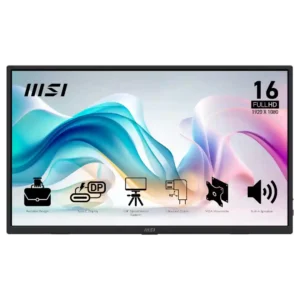
Overall: 4.1/5
Productivity is the monitor's clearest use case. Reviewers repeatedly praise it for second-screen work, coding, travel, editing, field diagnostics, and flexible office setups.
Pros: value for money, portability and weight
Cons: built-in speakers, color gamut
#9

Overall: 3.7/5
The wide uninterrupted work area fits several windows or a lengthy timeline, making this more than a gaming-only display.
Pros: ultrawide gaming experience, black levels
Cons: HDR performance, viewing angles
#10

Overall: 4.2/5
The monitor works particularly well as a central office display, connecting a variety of peripherals and machines. Entertainment is possible, but not every task gets equally strong performance.
Pros: port selection, USB hub functionality
Cons: competitive gaming suitability, motion clarity
#11
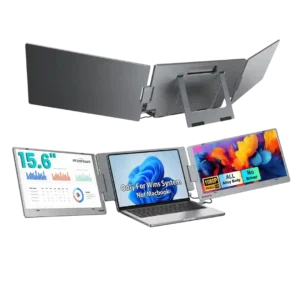
Overall: 4.2/5
Productivity is the X90E’s strongest use case. Reviewers repeatedly say the extra screens make spreadsheets, documents, coding, meetings, presentations, and travel work much easier by reducing constant window switching.
Pros: overall satisfaction, portability and weight
Cons: reliability over time
#12

Overall: 3.8/5
The strongest combination is sharp work output plus smooth casual gaming and media, rather than excellence at high-end HDR or competitive gaming.
Pros: value for money, Resolution
Cons: port selection, HDR performance
#13

Overall: 4.2/5
The large 4K screen, KVM and USB-C docking allow it to move comfortably from office work to PC gaming.
Pros: brightness, HDR performance
Cons: speaker quality, built-in speakers
#14

Overall: 3.5/5
4K text clarity, video connections and laptop features make it useful beyond gaming.
Pros: HDR performance, overall satisfaction
Cons: local dimming performance, Blooming control
#15

Overall: 4.1/5
The S2725DC covers office documents, coding and light entertainment without needing separate specialist displays, though it is not ideal for demanding creative work.
Pros: USB hub functionality, USB-C power delivery
Cons: speaker quality
#16

Overall: 3.7/5
Multitasking across several large windows works very well, yet the limited connectivity and stand options leave it short of premium office displays.
Pros: value for money, Resolution
Cons: stand adjustability, viewing angles
#17

Overall: 3.9/5
It can handle both work documents and gaming without OLED static-image anxiety, although limited USB features and local dimming issues reduce flexibility.
Pros: HDR performance, black levels
Cons: viewing angles, response time
#18

Overall: 4.1/5
Abundant horizontal and vertical workspace makes window tiling, timelines and simultaneous applications genuinely practical. The strong 800R curve and OLED burn-in concerns are the main compromises for full-time work.
Pros: Resolution, overall satisfaction
Cons: value for money, GPU demands
#19

Overall: 4.4/5
High-resolution text, excellent color, USB-C, and KVM make this more useful at work than many gaming displays. Heavy static desktop use remains a less comfortable long-term fit.
Pros: sharpness, overall satisfaction
Cons: value for money, VRR flicker
#20

Overall: 3.7/5
The monitor works well for everyday office tasks thanks to its clear text and adjustable stand, but the lack of USB and KVM functionality limits all-in-one workstation convenience.
Pros: overall satisfaction, PC gaming compatibility
Cons: color accuracy, local dimming performance
#21

Overall: 4.3/5
The G6 can handle office and creative work well thanks to strong color and usable 1440p sharpness, but opinions are split for all-day productivity. Text fringing, burn-in risk, missing USB-C,...
Pros: overall satisfaction, competitive gaming suitability
Cons: value for money, screen size
#22

Overall: 4.1/5
High pixel density, clear text, low reflections, and a compact stand make everyday work comfortable. Static desktop use and imperfect color accuracy limit professional productivity roles.
Pros: motion clarity, PC gaming compatibility
Cons: color accuracy, software support
#23

Overall: 4.0/5
The display can handle occasional office tasks alongside gaming, but OLED wear and imperfect text edges discourage all-day static work.
Pros: brightness, contrast
Cons: Text fringing, speaker quality
#24

Overall: 4.2/5
Sharp text, color presets and laptop connectivity broaden its appeal, although full-time word processing may favor a cheaper LCD with no burn-in concerns.
Pros: HDR performance, DisplayPort connectivity
Cons: value for money, brightness
#25

Overall: 4.3/5
Productivity versatility was mixed: excellent text clarity helped, but burn-in risk, no KVM, and weak USB-C limited work setups.
Pros: value for money, sharpness
Cons: brightness, USB hub functionality
#26

Overall: 4.2/5
The sharp panel is pleasant for general tasks, but competing displays with KVM and USB-C are easier to integrate into a work-first desk.
Pros: reflection handling, color gamut
Cons: value for money, brightness
