
A sleek aluminum chassis and restrained appearance are standout reasons to choose the Studio Display, particularly in carefully designed workspaces.
Pros: Monitor daisy-chaining, overall picture quality
Cons: value for money, refresh rate

A sleek aluminum chassis and restrained appearance are standout reasons to choose the Studio Display, particularly in carefully designed workspaces.
Pros: Monitor daisy-chaining, overall picture quality
Cons: value for money, refresh rate

The translucent rear shell and ROG lighting look distinctive and premium, although the elaborate gamer styling is not universally subtle.
Pros: black levels, sharpness
Cons: value for money, brightness

The thin, understated shell and sleek styling feel premium without overwhelming gaming flourishes; its appearance is widely praised.
Pros: overall satisfaction, contrast
Cons: value for money, port selection

The display’s appearance makes a strong initial impression; early coverage explicitly describes the ultrawide OLED as stunning.
Pros: refresh rate, color accuracy
Cons: console gaming compatibility, DisplayPort connectivity

Thin bezels, silver styling, and a restrained look fit naturally into a Mac-oriented workspace. A few details, including the plastic housing and front sensor, are less elegant.
Pros: port selection, color accuracy
Cons: built-in speakers, speaker quality

The restrained silver-and-black design, slim bezels, and clean rear styling receive near-universal praise. It looks professional and premium without the aggressive styling common to gaming displays.
Pros: productivity versatility, overall satisfaction
Cons: value for money, response time
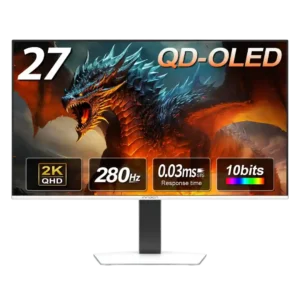
The clean white finish, slim bezels, and restrained styling look modern and distinctive. Rear RGB is less convincing, and the stand shape drew one mild criticism.
Pros: color gamut, overall picture quality
Cons: brightness, HDR performance

The slim silver-and-black housing looks clean and understated rather than aggressively gamer-styled, with optional rear lighting.
Pros: PC gaming compatibility, reflection handling
Cons: color accuracy, VRR flicker

The slim four-sided bezels and understated deep-blue rear styling work on both gaming and office desks. Some prefer its minimalist appearance, while others miss Alienware’s more distinctive designs.
Pros: overall satisfaction, Text fringing
Cons: brightness, Edge dimming behavior

A restrained chassis, slim bezels, and understated stand give the large OLED a clean, polished appearance.
Pros: Resolution, overall satisfaction
Cons: value for money, Image scaling

A restrained dark shell and clean front avoid flashy gaming styling. The thicker body and prominent bezels will not appeal to everyone.
Pros: competitive gaming suitability, motion clarity
Cons: contrast, overall picture quality

The minimalist silver-and-black design fits both gaming rooms and workspaces, with subdued rear lighting rather than excessive decoration.
Pros: competitive gaming suitability, refresh rate
Cons: Dual-mode versatility, GPU demands

The understated metal stand and restrained gaming styling are admired, with a practical pivoting design rather than an overly flashy look.
Pros: brightness, color gamut
Cons: AI scene optimization, value for money
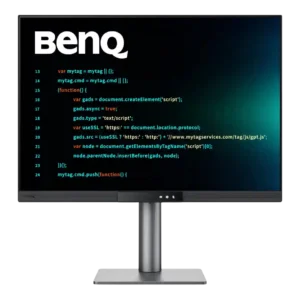
The design is clean, minimal, and professional rather than flashy. The flush Function Bar and restrained charcoal finish work particularly well in stacked or office setups.
Pros: productivity versatility, aspect ratio
Cons: value for money, competitive gaming suitability

An understated, slim-bezel front, flat metal base and optional rear RGB make for a tidy gaming setup. A few find the gray plastic less premium than expected.
Pros: Resolution, Dual-mode versatility
Cons: value for money, GPU demands

The restrained aluminum design looks handsome alongside Macs, though thick bezels and a familiar chassis divide opinion.
Pros: refresh rate, HDR performance
Cons: value for money, Device compatibility

Understated dark styling and a streamlined base make it more office-friendly than flashy gaming monitors, though not everyone finds it convincingly premium.
Pros: refresh rate, Text fringing
Cons: Resolution, GPU demands

The restrained, slim black shell suits both office and gaming desks, although reviewers differ on whether it feels polished enough for the price.
Pros: Resolution, sharpness
Cons: value for money, HDR performance

The understated black design, thin bezels, and restrained RGB are widely liked. The overall look is clean rather than flashy, though one reviewer thought the dark plastics appeared too ordinary.
Pros: brightness, reflection handling
Cons: cable management

The understated dark-indigo shell looks sleek and office-friendly, though opinions divide on its blue color and lack of the older Alienware styling.
Pros: brightness, value for money
Cons: port selection, built-in speakers

Aggressive ROG styling, sharp angles and RGB flourishes look striking to some but overly gamer-focused to others.
Pros: color gamut, contrast
Cons: value for money, Resolution

The mostly black, thin-bezel design is understated by gaming-monitor standards. Opinions differ on the illuminated rear ROG styling.
Pros: motion clarity, Backlight strobing
Cons: contrast, HDR performance

Its understated, thin-bezel appearance earns praise for fitting many desks, even if the simple shell lacks Alienware’s premium flourishes.
Pros: value for money, panel type
Cons: brightness, port selection

The thin front bezel looks clean and modern, but the heavily branded RGB accents and conspicuous tripod stand divide opinion. Much of the lighting can be switched off.
Pros: overall satisfaction, black levels
Cons: value for money, stand adjustability

Styling is restrained and desk-friendly rather than flashy. Some like the professional look, while others find it a little dull.
Pros: black levels, overall picture quality
Cons: brightness, Gaming feature selection