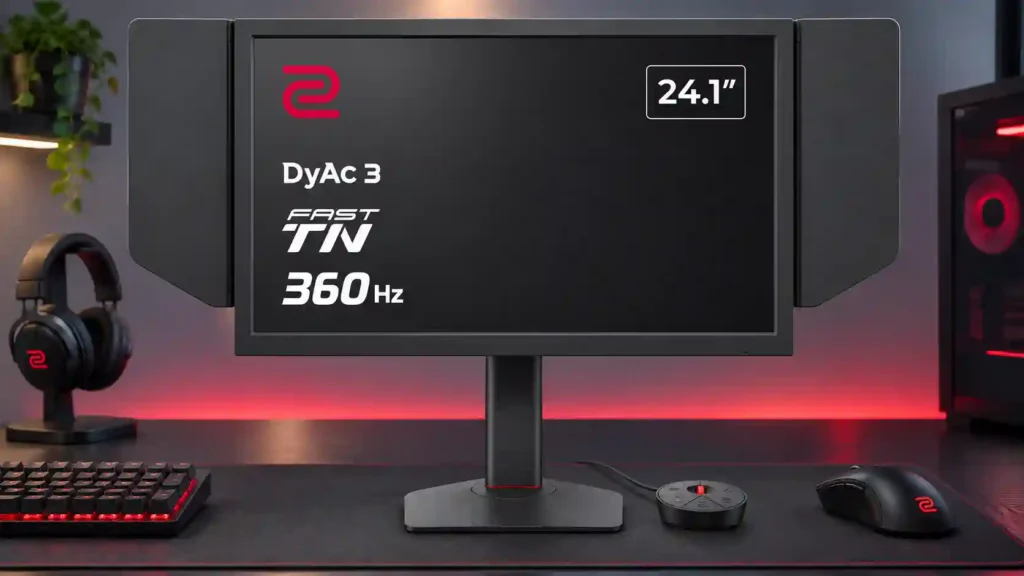
BenQ ZOWIE XQ2566X

BenQ ZOWIE XQ2566X Monitor Review

Brand: BenQ
Released: July 2, 2026
Updated: 13 hours ago
3.8
Overall review score
184
Review insights
61
Scored features
8
Expert reviews

Bottom Line

The XQ2566X pairs rare 24-inch QHD sharpness with exceptional esports motion clarity and helpful battle royale visibility controls. Its high price, weak viewing angles and missing HDR make it difficult to justify outside serious competitive play.

Dedicated competitive FPS and battle royale players who value sharp long-range target visibility, consistent tournament settings and exceptionally clear rapid motion.

Budget shoppers, cinematic single-player gamers, movie enthusiasts, color-critical editors and anyone needing one versatile monitor for office work and entertainment.

Verdict

The BenQ ZOWIE XQ2566X is an exceptionally focused esports monitor. Its compact 1440p panel makes distant targets easier to distinguish than conventional 24-inch 1080p screens, while 360Hz refresh and DyAc 3 keep rapid movement exceptionally clear. ZOWIE’s zone color filters, customizable profiles, S Switch and repeatable stand adjustments also make sense for battle royale players and LAN competitors. But this precision comes at a substantial cost. The Fast TN panel has noticeably narrow viewing angles, limited contrast and no HDR, so cinematic games, streaming and mixed work setups are better served elsewhere. Not everyone finds the motion improvement over fast OLED easy to see in normal gameplay, and some experience discomfort with strobing. A demanding 1440p game may not reach 360 fps consistently. Serious competitive players may love the balance of sharpness and visibility; most other buyers should prioritize a more versatile display.

Feature Scorecards

Summary

61 reviewed features
  • Very positive 4.5-5.0
    30 (49%)
  • Positive 3.5-4.4
    15 (25%)
  • Neutral 2.5-3.4
    7 (11%)
  • Negative 1.5-2.4
    6 (10%)
  • Very negative below 1.5
    3 (5%)

Pros highlights

  • 5.0
    7 reviews strong consensus
    competitive gaming suitability: 5.0, 7 reviews, strong consensus
    This is where the monitor excels: 360Hz, precise motion and competitive visibility controls make fast shooters feel remarkably controlled. Its advantages are most meaningful to committed esports players.
  • 4.9
    7 reviews strong consensus
    motion clarity: 4.9, 7 reviews, strong consensus
    Rapid tracking is remarkably well defined, especially with DyAc 3 engaged. The gain over top-end OLED can be obvious in tests yet subtle to some players in real matches.
  • 4.7
    7 reviews strong consensus
    gaming image presets: 4.7, 7 reviews, strong consensus
    Custom profiles and game-specific settings can improve target visibility. Some filters need moderation to avoid unnaturally subdued colors, and presets can be switched quickly.
  • 4.6
    7 reviews moderate consensus
    Backlight strobing: 4.6, 7 reviews, moderate consensus
    DyAc 3 can make fast movement extraordinarily crisp, and some testers prefer it to modern OLED motion. Others see only tiny differences in actual games, and strobing can create duplication or discomfort.
  • 3.8
    7 reviews strong consensus
    overall satisfaction: 3.8, 7 reviews, strong consensus
    Most praise its unusually effective esports focus while acknowledging that this is a niche, costly purchase. A few competitors and hands-on users question whether the gains justify the sacrifice.
  • 5.0
    6 reviews strong consensus
    Resolution: 5.0, 6 reviews, strong consensus
    A rare 1440p resolution at this compact size adds visible detail without moving to a larger esports display. It is an appealing upgrade from older 1080p ZOWIE monitors.

Cons highlights

  • 2.0
    7 reviews low consensus
    contrast: 2.0, 7 reviews, low consensus
    The TN panel cannot match OLED depth or contrast, and darker material can look comparatively flat. One enthusiastic tester finds its TN contrast adequate, but the wider preference is clear.
  • 3.1
    7 reviews moderate consensus
    overall picture quality: 3.1, 7 reviews, moderate consensus
    The 1440p panel looks crisp and surprisingly colorful for TN, yet OLED still delivers deeper contrast and much better viewing angles. Image quality is deliberately secondary to motion.
  • 1.3
    6 reviews strong consensus
    viewing angles: 1.3, 6 reviews, strong consensus
    Color shifts sharply whenever the screen is seen from the side or at the wrong vertical angle. The problem is minor when staring squarely into a match but unpleasant for relaxed viewing or office work.
  • 2.3
    6 reviews low consensus
    value for money: 2.3, 6 reviews, low consensus
    The price is the largest obstacle for most shoppers: only serious competitors are likely to justify paying so much for TN. One especially enthusiastic tester considered it worth the money.
  • 2.2
    5 reviews strong consensus
    black levels: 2.2, 5 reviews, strong consensus
    Blacks lack the depth of OLED and can look gray, although some players find them decent once the monitor is tuned. Dark-scene richness is not the priority.
  • 2.8
    5 reviews moderate consensus
    color accuracy: 2.8, 5 reviews, moderate consensus
    Colors are more lively than older TN displays might suggest, but accuracy still trails good OLED panels. This is a tuned gaming image, not a dependable professional reference.

Use Cases

Best for

  • 4.8
    6 reviews strong consensus
    Battle royale gaming: 4.8, 6 reviews, strong consensus
    Fortnite, Apex, PUBG and Warzone suit the dense 1440p image, which brings distant enemies into clearer view. Specialized zone filters further help separate targets from busy environments.
  • 5.0
    4 reviews strong consensus
    LAN and tournament play: 5.0, 4 reviews, strong consensus
    A compact, sturdy stand, portable settings, side shields and easily repacked packaging suit players who move between LANs and stages. Consistent physical setup is a major strength.
  • 5.0
    3 reviews strong consensus
    24-inch competitive viewing: 5.0, 3 reviews, strong consensus
    The small, sharp display keeps the whole battlefield easy to scan without the soft detail of older 1080p esports screens. Its compact view particularly suits players who prefer concentrated visual attention.

Not ideal for

  • Budget-conscious buyers
    1.0
    3 reviews strong consensus
    Budget-conscious buyers: 1.0, 3 reviews, strong consensus
    Its unusually high asking price makes little sense for cost-conscious shoppers. Cheaper IPS and OLED monitors better serve most mixed-use needs.
  • Mixed work-and-play setups
    1.8
    4 reviews strong consensus
    Mixed work-and-play setups: 1.8, 4 reviews, strong consensus
    Extra resolution helps the desktop, but narrow angles and weaker picture quality make this a poor one-monitor solution for work, media and games together. OLED is more balanced.

Compared With Category Average

Compared with other Monitors, this product is above average in Backlight strobing, competitive gaming suitability, Gaming feature selection, near average in response time, port selection, below average in productivity versatility, viewing angles, HDR performance.

Comparison summary

54 compared features
  • Above average 0.4+ pts higher
    23 (43%)
  • Same as average within 0.3 pts
    12 (22%)
  • Below average 0.4+ pts lower
    19 (35%)

Largest category differences

Attribute This product Category average Difference
productivity versatility 1.0 4.2 -3.2
viewing angles 1.3 4.3 -3.0
HDR performance 1.0 3.4 -2.4
contrast 2.0 4.3 -2.3
single-player cinematic gaming suitability 2.0 4.4 -2.4
Backlight strobing 4.6 2.5 +2.1
Photo editing 2.0 4.1 -2.1
black levels 2.2 4.1 -1.9

Consider This Instead

If you want better premium feel

Choose LG 27GR83Q-B. It scores 5.0 vs 3.0 for premium feel, with a 4.2 overall score.

Compare

Compared in Reviews

Products reviewers directly compared with this model, grouped into quick takeaways.

  • Better: overall picture quality and HDR The ASUS OLED is recommended instead when image quality is more important than the XQ2566X’s specialized motion.

BenQ ZOWIE XQ2766X

  • Alternative: 24-inch versus 27-inch frame The XQ2766X shares the format and gaming features in a physically larger display at a higher price.
  • Alternative: screen size and perceived target size The 27-inch XQ2766X is offered as a larger alternative that may help in distant-target battle royale engagements.
  • Alternative: 24-inch versus 27-inch size The XQ2566X is the smaller alternative to the similarly focused 27-inch XQ2766X.

BenQ ZOWIE XL2566K (2022)

  • Older model: incremental DyAc and resolution upgrade Moving up from the XL2566K produces a smaller perceived leap than replacing a cheaper, slower screen.
  • Older model: 1440p resolution and gaming detail Compared with the older 1080p XL2566K, the XQ2566X adds sharper QHD detail and HDMI 2.1.

FAQ

Is the XQ2566X good for Fortnite, Warzone and Apex Legends?

Yes. Its dense 1440p image improves distant-target visibility, and adjustable zone filters can help enemies stand out in cluttered battle royale environments.

Does DyAc 3 look better than OLED motion?

It can produce exceptionally sharp moving images and outperform some OLED displays in motion tests. Several testers found the difference subtle during actual gameplay, and DyAc can introduce duplication or eye strain.

Can DyAc 3 run with VRR at the same time?

No. Players must choose between strobing for maximum perceived motion clarity and variable refresh for smoother variable-frame-rate play.

Does this monitor support HDR?

No. That is a major limitation for cinematic single-player games and high-contrast movies.

Is 360Hz realistic at 1440p in Warzone?

Reaching a steady 360 fps is difficult even with strong hardware. The monitor still feels responsive at lower frame rates, but the ideal DyAc versus VRR setting depends on performance.

Is the XQ2566X a good all-purpose office and gaming monitor?

Not for most users. The high pixel density helps with text, but off-axis color shifts, mediocre contrast and price make OLED or IPS better balanced for work and entertainment.

What does ZOWIE Sync add?

It lets players manage, save and transfer customized monitor settings with a phone, which is handy for quickly recreating an esports setup.

Sample Expert Reviews We Analyzed

These are a few of the reviews included in our analysis.

Video Reviews

Article Reviews

rtings.com

The BenQ ZOWIE XQ2566X is a premium esports gaming monitor with a 24-inch screen and 360Hz refresh rate. With a 1440p resolution, it's...

Review score
3.5
prosettings.net

In our ZOWIE XQ2566X review, we focus on the competitive performance and go over the features, specs, and performance of the monitor.

Review score
4.0

Top Monitors to Consider

#1 Asus ROG Swift 34 QD-OLED PG34WCDN
4.5

This 360Hz QD-OLED ultrawide delivers exceptional gaming motion, vibrant HDR and dramatically cleaner text. Its high price, less-than-perfect bright-room blacks and occasional HDR dimming are the main reasons to hesitate.

Pros: color gamut, contrast

Cons: value for money, Resolution

#2 Dell U4025QW
4.4

A huge, sharp ultrawide workspace and unusually capable Thunderbolt dock make the U4025QW outstanding for demanding productivity and editing. Its high price, modest HDR, and imperfect motion handling keep it...

Pros: overall picture quality, color accuracy

Cons: value for money, built-in speakers

#3 ASUS ROG Strix OLED XG27ACDNG
4.4

Lightning-fast 360Hz OLED gaming, rich color and an unusually flexible USB-C/KVM setup are the big draws. Strong room lighting, limited full-screen HDR brightness and static-content burn-in concerns keep it from...

Pros: color gamut, overall satisfaction

Cons: reflection handling, VRR flicker

#4 ASUS ROG Swift OLED PG27UCDM
4.4

The 27-inch 4K OLED picture is exceptionally crisp and responsive, with useful USB-C and KVM extras. Its high price, oversized stand, and bright-room compromises limit its appeal.

Pros: sharpness, overall satisfaction

Cons: value for money, VRR flicker