If you want better reflection handling
Choose LG 27GR83Q-B. It scores 5.0 vs 2.0 for reflection handling, with a 4.2 overall score.

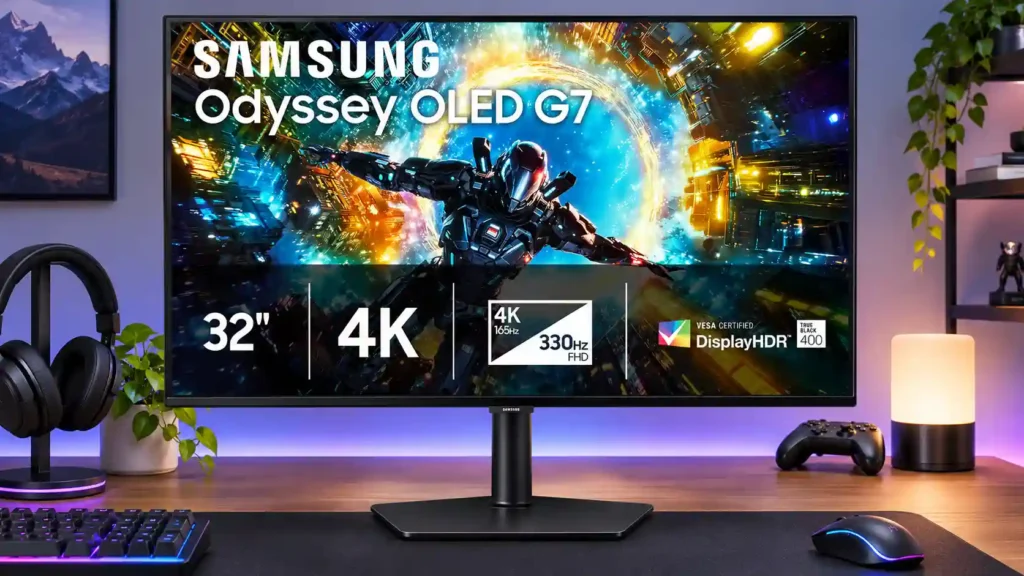
Spectacular 4K OLED contrast and ultra-clear motion make this a superb gaming screen. The 330Hz mode looks soft at 32 inches, and limited ports and pricing weaken the deal.
Players who favor immersive 4K single-player or HDR games and sometimes want a faster Full HD mode for competitive shooters.
Price-sensitive buyers, people who need a monitor for primarily desktop writing or development work, and those who expect lots of inputs or USB hub features.
The Odyssey OLED G73SH excels when you want richly detailed 4K games with deep blacks, vivid highlights, and almost instantaneous pixel response. Its dual-mode system adds a 330Hz Full HD option for fast competitive shooters, so one panel can cater to two styles of play. The catch is that 1080p looks noticeably soft on a 32-inch screen; even the simulated 24-inch view disappointed one tester. Its glossy finish looks clear and punchy, but it reflects more light than matte options, and bright-room performance is not its specialty. The adjustable stand and slim design win praise, yet port choices are sparse and everyday text scaling divides reviewers. Comparable OLED models can run faster or include a USB hub for similar money. It makes most sense for 4K-focused gamers who appreciate occasional speed-mode flexibility and can find a worthwhile discount.
Compared with other Monitors, this product is above average in HDR performance, Blooming control, black levels, near average in VRR compatibility, sharpness, below average in USB hub functionality, reflection handling, value for money.
| Attribute | This product | Category average | Difference |
|---|---|---|---|
| USB hub functionality | 1.8 | 3.7 | -2.0 |
| reflection handling | 2.0 | 3.7 | -1.7 |
| HDR performance | 4.8 | 3.2 | +1.5 |
| value for money | 2.3 | 3.8 | -1.5 |
| port selection | 2.2 | 3.6 | -1.4 |
| screen size | 3.0 | 4.4 | -1.4 |
| Desk footprint | 2.5 | 3.9 | -1.4 |
| panel type | 2.8 | 4.2 | -1.4 |
Choose LG 27GR83Q-B. It scores 5.0 vs 2.0 for reflection handling, with a 4.2 overall score.
Choose Acer Nitro XF243Y Pbmiiprx. It scores 5.0 vs 2.5 for GPU demands, with a 3.7 overall score.
Choose Dell Alienware AW2726DM. It scores 4.9 vs 2.3 for value for money, with a 3.8 overall score.
Choose Dell S2725DC. It scores 5.0 vs 3.0 for screen size, with a 4.1 overall score.
Products reviewers directly compared with this model, grouped into quick takeaways.
It switches from native 4K at 165Hz to Full HD at 330Hz. The faster option helps competitive gaming but looks visibly softer on a 32-inch screen.
Reviewers consistently praise deep blacks, bright highlights, sharp motion and excellent overall picture quality.
It is useful for speed-focused shooters, but multiple reviewers find the loss of 4K detail substantial. One tester also disliked its simulated 24-inch mode.
Opinions differ: one source praises the flat 4K screen for coding, while another finds small text and scaling frustrating during writing and development.
Its glossy surface looks clear but shows more mirror-like reflections than matte coatings, and some reviewers flag limited brightness in strongly lit rooms.
The source assessments criticize its single HDMI and DisplayPort options and the lack of a USB hub compared with similarly positioned OLED alternatives.
Several reviewers see better value in faster or better-connected rivals. The G73SH is more appealing when discounted.
These are a few of the reviews included in our analysis.

Big money for a big screen
The Samsung Odyssey OLED G73SH S32HG732S is a 4k, 165Hz OLED gaming monitor. Part of Samsung's 2026 Odyssey gaming lineup, it sits below the...
Samsung new buys panels from LG Display
Is the 2026 Samsung Odyssey OLED G7 the ultimate monitor for both AAA and competitive gaming? We review its Dual Mode tech and design.

This 360Hz QD-OLED ultrawide delivers exceptional gaming motion, vibrant HDR and dramatically cleaner text. Its high price, less-than-perfect bright-room blacks and occasional HDR dimming are the main reasons to hesitate.
Pros: color gamut, contrast
Cons: value for money, Resolution

The 360Hz QD-OLED panel delivers exceptional HDR gaming, responsive motion, and cleaner text than earlier ultrawides. Its 3440×1440 resolution is less sharp than 4K, and premium pricing remains a hurdle.
Pros: refresh rate, Text fringing
Cons: Resolution, GPU demands

A huge, sharp ultrawide workspace and unusually capable Thunderbolt dock make the U4025QW outstanding for demanding productivity and editing. Its high price, modest HDR, and imperfect motion handling keep it...
Pros: overall picture quality, color accuracy
Cons: value for money, built-in speakers

Lightning-fast 360Hz OLED gaming, rich color and an unusually flexible USB-C/KVM setup are the big draws. Strong room lighting, limited full-screen HDR brightness and static-content burn-in concerns keep it from...
Pros: color gamut, overall satisfaction
Cons: reflection handling, VRR flicker