If you want better USB-C power delivery
Choose TCL 32R84. It scores 4.3 vs 1.0 for USB-C power delivery, with a 4.2 overall score.

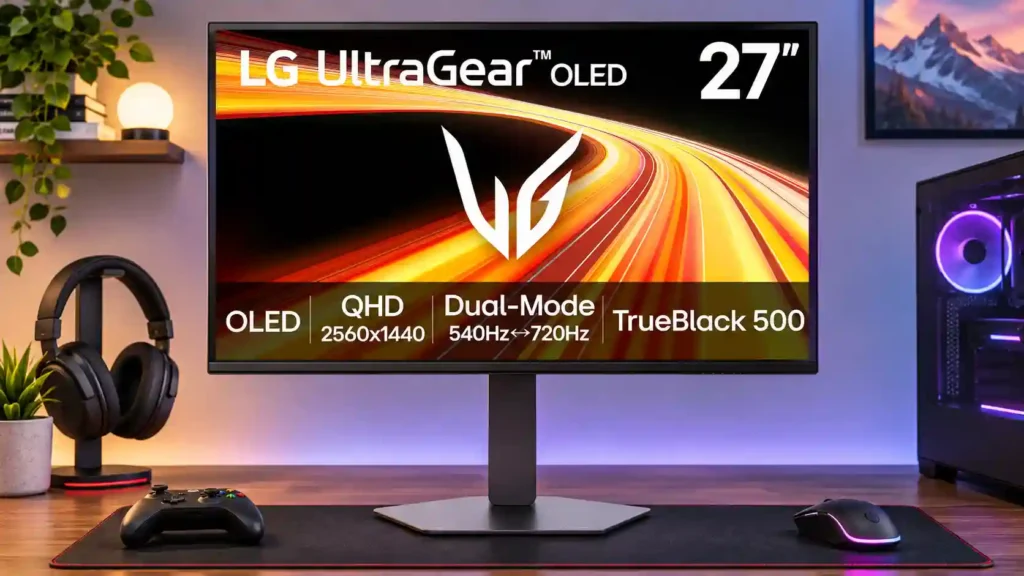
A superb 540Hz OLED for serious competitive gaming, with remarkably clear motion and vivid HDR. The 720Hz mode blurs the image at 720p, while matte-screen quirks and high hardware demands limit its appeal.
Dedicated competitive PC gamers who play high-frame-rate shooters and want the clearest possible fast motion without giving up vibrant OLED contrast.
Casual or budget-focused players, 4K-first single-player fans, and people needing flawless long-session text clarity or laptop charging through a single cable.
The LG 27GX790B-B is built for competitive PC gaming where speed matters more than pixel count. At its native 1440p resolution, the 540Hz Tandem OLED panel combines unusually sharp motion, low input lag, deep blacks, and bright HDR highlights. Reviewers also appreciate the adjustable stand, extensive picture controls, and modern connections. The main compromise is the headline 720Hz Dual Mode: dropping to 720p makes images conspicuously softer, and even powerful PCs struggle to feed the display enough frames. The matte coating helps with reflections but some testers prefer the clarity of glossy competitors; one unit also showed distracting gray-screen texture. Office-text comfort and long-term burn-in confidence are less consistent. At a steep discount it can be compelling value for esports enthusiasts; casual gamers and buyers prioritizing 4K sharpness have better-fitting alternatives.
Compared with other Monitors, this product is above average in Headphone output quality, competitive gaming suitability, ghosting control, near average in color gamut, USB hub functionality, below average in USB-C power delivery, Integrated power supply, warranty and support service.
| Attribute | This product | Category average | Difference |
|---|---|---|---|
| USB-C power delivery | 1.0 | 3.8 | -2.8 |
| Headphone output quality | 5.0 | 2.6 | +2.4 |
| Integrated power supply | 2.0 | 4.1 | -2.1 |
| warranty and support service | 2.0 | 3.8 | -1.8 |
| Resolution | 2.6 | 4.3 | -1.7 |
| competitive gaming suitability | 4.9 | 3.4 | +1.4 |
| USB port accessibility | 3.0 | 4.6 | -1.6 |
| Screen coating clarity | 2.5 | 3.8 | -1.3 |
Choose TCL 32R84. It scores 4.3 vs 1.0 for USB-C power delivery, with a 4.2 overall score.
Choose Dell Alienware AW2725DF. It scores 4.8 vs 2.0 for warranty and support service, with a 4.2 overall score.
Choose ASUS ROG Strix OLED XG27ACDNG. It scores 4.8 vs 2.0 for Integrated power supply, with a 4.4 overall score.
Choose HyperX OMEN OLED 27q. It scores 5.0 vs 2.8 for cable management, with a 4.1 overall score.
Products reviewers directly compared with this model, grouped into quick takeaways.
It runs up to 540Hz at its native 2560×1440 resolution, or up to 720Hz at 1280×720 in Dual Mode.
Usually only for extremely competitive play. Several reviewers found 720p too blurry to justify the increase over already-fast 540Hz QHD.
Yes, if you want to approach its highest frame-rate modes. Even high-end test systems struggled to reach 540fps in demanding games.
Deep OLED blacks and unusually bright highlights make HDR attractive, though overbrightening and the matte finish can compromise accuracy or visual punch.
Results are mixed: some found desktop text crisp and comfortable, while others noticed fringing or texture. Static-image use also raises OLED burn-in considerations.
It has a matte anti-glare coating. That helps with reflections but looks less clear or vivid than glossy OLEDs to some reviewers.
It has HDMI 2.1 connections, and one reviewer enjoyed smooth PS5 Pro gaming. Its ultra-high refresh capabilities are chiefly beneficial to gaming PCs.
These are a few of the reviews included in our analysis.

The LG 27GX790B-B pairs 1440p at 540Hz with a 720p/720Hz mode. See its gaming strengths, OLED drawbacks, and who should consider it.
This OLED monitor is a true stunner
Read our LG UltraGear GX7 27GX790B gaming monitor review to see if this 540Hz QHD/720Hz FHD Dual-Mode OLED gaming monitor is worth buying!
The LG UltraGear 27GX79B-B impresses with its high refresh rates. While it’s fast and offers high HDR brightness, it’s only for competitive...
Are insanely high refresh rates for gaming monitors worth it? We asked experts if they provide real benefits for gamers or if it's just...

This 360Hz QD-OLED ultrawide delivers exceptional gaming motion, vibrant HDR and dramatically cleaner text. Its high price, less-than-perfect bright-room blacks and occasional HDR dimming are the main reasons to hesitate.
Pros: color gamut, contrast
Cons: value for money, Resolution

Lightning-fast 360Hz OLED gaming, rich color and an unusually flexible USB-C/KVM setup are the big draws. Strong room lighting, limited full-screen HDR brightness and static-content burn-in concerns keep it from...
Pros: color gamut, overall satisfaction
Cons: reflection handling, VRR flicker

The 27-inch 4K OLED picture is exceptionally crisp and responsive, with useful USB-C and KVM extras. Its high price, oversized stand, and bright-room compromises limit its appeal.
Pros: sharpness, overall satisfaction
Cons: value for money, VRR flicker

Best for exceptional 4K HDR, accurate color, fast 240Hz gaming, and strong work connectivity. Skip it if you need built-in speakers, ultrawide immersion, television-level HDR brightness, or a budget-friendly upgrade.
Pros: brightness, reflection handling
Cons: cable management