If you want better USB hub functionality
Choose Dell Alienware AW2725DF. It scores 4.4 vs 1.0 for USB hub functionality, with a 4.2 overall score.

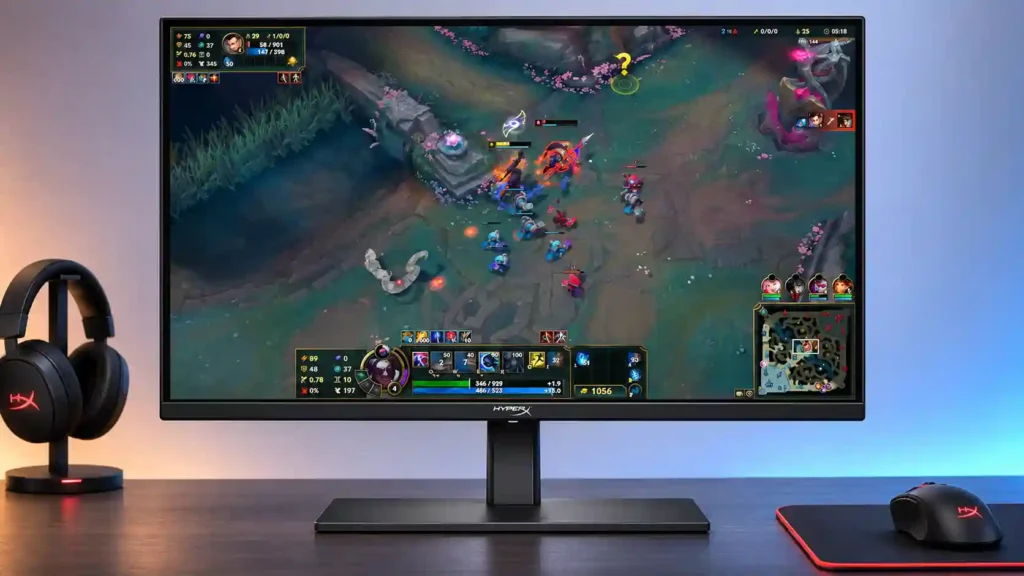
Fluid 240Hz OLED gaming, deep blacks and accurate colors make this an appealing lower-cost QD-OLED. Bright rooms, demanding HDR users and anyone needing a USB hub should look elsewhere.
Competitive and casual PC gamers, HDMI 2.1 console players, and OLED enthusiasts using a dim or controlled-light room benefit most from its deep blacks, fluid motion, and accessible OLED pricing.
Sunlit desks, HDR-focused buyers, and people doing long sessions of text-heavy office work are poor matches because of limited brightness, soft fine text, and OLED burn-in concerns.
The HyperX OMEN OLED 27q delivers the benefits that make OLED gaming so compelling: deep blacks, vivid color, and exceptionally clean movement at 240Hz. Factory color accuracy receives particular praise, and the 27-inch 1440p format is a sensible match for fast PC games and HDMI 2.1 consoles. Its straightforward setup and understated design are bonuses, while its price is especially attractive on sale. The tradeoffs are significant, though. SDR brightness is low, and HDR highlights lack the intensity of stronger rivals. You also give up a USB hub, integrated speakers, extensive calibration controls, and upgradeable firmware. Small text can look imperfect, and OLED burn-in remains a consideration for static desktop use. For gamers with controlled room lighting who want premium motion and contrast without flagship pricing, it remains a strong value; for sunny offices or HDR-first setups, a brighter alternative is safer.
Compared with other Monitors, this product is above average in Gamma tracking, competitive gaming suitability, ghosting control, near average in viewing angles, Resolution, below average in Color calibration controls, USB hub functionality, burn-in protection.
| Attribute | This product | Category average | Difference |
|---|---|---|---|
| Color calibration controls | 1.0 | 4.2 | -3.2 |
| USB hub functionality | 1.0 | 3.8 | -2.8 |
| burn-in protection | 2.0 | 4.4 | -2.4 |
| HDR adjustment controls | 2.0 | 4.1 | -2.1 |
| Text fringing | 2.0 | 3.9 | -1.9 |
| brightness | 2.3 | 4.1 | -1.8 |
| port selection | 2.0 | 3.8 | -1.8 |
| Gamma tracking | 5.0 | 3.5 | +1.5 |
Choose Dell Alienware AW2725DF. It scores 4.4 vs 1.0 for USB hub functionality, with a 4.2 overall score.
Choose ASUS ROG Strix XG27ACS. It scores 4.8 vs 1.0 for Color calibration controls, with a 3.8 overall score.
Choose TCL 32R84. It scores 4.8 vs 2.0 for burn-in protection, with a 4.2 overall score.
Choose MSI MAG 274QPF X30MV. It scores 5.0 vs 2.0 for Text fringing, with a 3.9 overall score.
Products reviewers directly compared with this model, grouped into quick takeaways.
Yes. Its 240Hz refresh rate and exceptionally fast OLED response give shooters and racing games excellent motion clarity.
Not especially well. The screen has relatively low brightness, and reflections or strong sunlight can interfere with viewing.
HDR games can still look vivid thanks to OLED contrast, but peak brightness and highlight punch trail better HDR displays.
Yes. HDMI 2.1 makes it suitable for 1440p gameplay up to 120Hz on compatible consoles.
Factory color accuracy and gamut coverage are strong, making light creative work attractive. Small text fringing and static-image burn-in concerns make long office sessions less ideal.
No. You will need separate speakers or a headset, and peripherals must connect through another device or hub.
The reviews view it as good OLED value, especially at the cited discounted price, although its brightness and limited extras explain the savings.
These are a few of the reviews included in our analysis.

The HyperX Omen OLED 27q is a solid gaming monitor with super-fast response times and a smooth 240Hz refresh rate for esports titles.
The HyperX OMEN OLED 27q is a 1440p, 240Hz QD-OLED gaming monitor with a 27-inch screen. As a budget-friendly OLED, it sits below the...
Upgrade your rig with the HyperX OMEN OLED 27q. Featuring a 0.03ms response time, 240Hz refresh rate, and stunning QD-OLED visuals for under...
In many respects, the HyperX Omen OLED 27q is a typical budget OLED monitor, but its color performance makes it really stands out.

This 360Hz QD-OLED ultrawide delivers exceptional gaming motion, vibrant HDR and dramatically cleaner text. Its high price, less-than-perfect bright-room blacks and occasional HDR dimming are the main reasons to hesitate.
Pros: color gamut, contrast
Cons: value for money, Resolution

Lightning-fast 360Hz OLED gaming, rich color and an unusually flexible USB-C/KVM setup are the big draws. Strong room lighting, limited full-screen HDR brightness and static-content burn-in concerns keep it from...
Pros: color gamut, overall satisfaction
Cons: reflection handling, VRR flicker

The 27-inch 4K OLED picture is exceptionally crisp and responsive, with useful USB-C and KVM extras. Its high price, oversized stand, and bright-room compromises limit its appeal.
Pros: sharpness, overall satisfaction
Cons: value for money, VRR flicker

Best for exceptional 4K HDR, accurate color, fast 240Hz gaming, and strong work connectivity. Skip it if you need built-in speakers, ultrawide immersion, television-level HDR brightness, or a budget-friendly upgrade.
Pros: brightness, reflection handling
Cons: cable management