
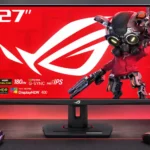
ASUS ROG Strix XG27ACS Feature Scores
Explore all 70 feature scores for ASUS ROG Strix XG27ACS, organized into pros and cons.
Scores by Feature
Summary
70 reviewed features-
Very positive 4.5-5.029 (41%)
-
Positive 3.5-4.417 (24%)
-
Neutral 2.5-3.49 (13%)
-
Negative 1.5-2.410 (14%)
-
Very negative below 1.55 (7%)
Pros
Sort
-
Excellent sRGB factory tuning is a consistent standout, with impressive accuracy before calibration. Some default wide-gamut settings can oversaturate standard content.
-
Height, swivel, tilt, and portrait pivot are repeatedly praised for comfort and flexibility. A few find the maximum height a little short.
-
Its motion tuning, color accuracy, and ergonomic stand are excellent for the money, especially on sale. Less expensive rivals can be better for HDR or particular features.
-
FreeSync and G-Sync support help keep gameplay smooth across changing frame rates. Variable overdrive also keeps artifacts in check as refresh falls.
-
Pixel response is exceptionally quick for this class, with balanced default settings that avoid large overshoot penalties.
-
Motion is exceptionally clean for an affordable IPS monitor. ELMB can sharpen fast movement further but adds distracting tradeoffs.
-
Fast pixel transitions, low latency, and 180Hz refresh suit quick multiplayer games particularly well. Extreme esports players may still want higher refresh rates.
-
The 2560×1440 resolution strikes a well-liked balance between crisp visuals and manageable GPU demands at 27 inches.
-
The joystick and clear menus give easy access to extensive color and gaming settings without excessive button hunting.
-
The 180Hz maximum makes gameplay fluid and responsive for the price, though enthusiasts seeking 240Hz or more may want another model.
-
Excellent sRGB modes and ample tuning options make accurate colors achievable with little extra work; the calibrated preset restricts some controls.
-
Unusually effective variable overdrive delivers a reliable one-setting experience. The highest slider levels can create unwanted inverse ghosting.
-
Very low processing delay makes controls feel immediate, including at lower fixed refresh rates.
-
SDR brightness is punchy enough for ordinary indoor gaming and many brighter rooms. Turning on ELMB cuts that headroom substantially.
-
The overall experience earns strong praise as an affordable, capable gaming setup, especially from owners upgrading an older or 1080p display.
-
The plastic body and sturdy stand generally feel well assembled for the price, even if the materials do not rival expensive flagship monitors.
-
DisplayPort and USB-C DisplayPort Alt Mode make the fastest refresh settings accessible from compatible PCs and laptops.
-
The stand is straightforward to assemble, and the joystick-controlled menus make everyday adjustments easy.
-
A 1440p, 180Hz IPS panel with adaptive sync fits mainstream PC graphics hardware well, delivering smooth games without the burden of 4K.
-
QHD on a 27-inch panel renders game interfaces and everyday text clearly, though fine detail is below native 4K.
-
The matte finish usually keeps reflections manageable, but direct sun or strong daylight can still wash out the image.
-
Crosshairs, FPS indicators, shadow adjustment, color modes, and adjustable blur reduction offer useful gaming customization.
-
SDR material looks unusually accurate even with HDR mode active, minimizing the need to swap Windows display modes.
-
Both major PC adaptive-sync ecosystems are supported, helping reduce tearing without demanding one graphics-card brand.
-
A cutout in the adjustable stand provides a practical way to route cables and keep the desk tidier.
-
The 27-inch format feels just right for close desktop gaming and gives QHD content pleasing sharpness.
-
The wide color range makes games and images lively, though coverage is more conventional than high-end quantum-dot or OLED alternatives.
-
Sharp, colorful, well-calibrated SDR imagery is the major attraction. Weak blacks hold it back for dark or HDR-heavy material.
-
A threaded mount above the screen offers an unusually convenient place to position a webcam or other compatible camera gear.
-
The default overdrive setting produces very little ghosting or overshoot across refresh rates. Pushing overdrive too hard can introduce inverse trails.
-
The IPS LCD avoids the burn-in worry associated with OLED screens, a reassuring advantage for static desktop elements.
-
Standard 100×100 VESA support gives buyers the option to replace the supplied stand with an arm or wall mount.
-
The restrained front and slim bezels appeal to those who dislike aggressive gaming styling, although the bulky rear and foot divide opinion.
-
The fast IPS panel excels at responsiveness and viewing angles but cannot escape its native contrast limitations.
-
The DisplayWidget utility provides functional software control, although its value depends on the connected PC and setup.
-
USB-C video input offers a convenient connection for supported laptops and mobile devices, though it is not a full laptop dock.
-
The enclosure stays comfortably cool to the touch in use, without drawing attention to heat buildup.
-
Assembly is easy and factory tuning is strong enough to enjoy games immediately, without a lengthy calibration process.
-
Some find the base compact and practical for smaller desks; others consider the deep, heavy stand a substantial space commitment.
-
Energy use is typical and reasonably efficient for a 27-inch IPS LCD without costly local dimming.
-
IPS viewing angles are broad enough to comfortably share the image, even if off-axis performance is not a class leader.
-
The conventional 16:9 screen is a comfortable fit for desktop and PC gaming, without the width or special layout of an ultrawide.
-
One extended hands-on account describes the display as a dependable gaming companion, though broader lifespan claims remain premature.
-
DisplayWidget gives convenient desktop control of the monitor, complementing the usable built-in menus.
-
Readable text and accurate colors make this more than a gaming-only screen, although it lacks advanced workstation connectivity.
-
The 1440p image and variable refresh support make it appealing for responsive console play, but HDMI 2.0 and the absence of 4K limit the experience.
Cons
Sort
-
USB-C accepts a video signal, but its 7.5W charging output is far too weak for laptop power or an easy one-cable workstation.
-
There is no local dimming hardware, so HDR cannot isolate bright highlights from dark backgrounds.
-
There are no downstream USB-A ports, making the monitor disappointing as a peripheral hub or simplified docking station.
-
HDR400 can add a little color and brightness excitement, but poor blacks and no local dimming prevent convincing HDR highlights.
-
Dark scenes look noticeably gray rather than inky black. The limitations are particularly apparent beside VA, mini-LED, and OLED displays.
-
A missing USB hub means it cannot serve as a KVM for sharing keyboard and mouse peripherals between computers.
-
IPS contrast leaves shadowy scenes looking gray and washed out. Brighter colorful games flatter this panel much more than dark cinematic material.
-
HDMI is limited to version 2.0 and a lower refresh ceiling than DisplayPort, reducing flexibility for demanding console setups.
-
The HDR label overpromises what the actual edge-lit hardware can deliver, despite otherwise capable motion specifications.
-
ELMB can introduce visible red fringing around moving elements even at high refresh rates.
-
ELMB can make fast motion clearer, especially at high refresh rates. Brightness loss, double images, crosstalk, and red fringing leave opinions sharply divided.
-
The lack of onboard speakers is disappointing beside similarly equipped alternatives, especially for a simple all-in-one desk setup.
-
The small USB-C power output cannot adequately power a laptop and offers little beyond light charging for smaller devices.
-
The package is relatively bare, with little beyond the stand and basic cables to get started.
-
The self-contained power supply avoids an external brick, but the sealed design is a drawback if power components ever need service.
-
A sealed internal power supply and guidance toward professional service make self-repair less appealing.
-
DisplayPort, HDMI, and USB-C video provide useful flexibility, but a single HDMI on some configurations and missing USB-A hub limit elaborate setups.
-
Several owners appreciate the solid finish, while others find the conventional plastic construction and chunky body clearly budget-minded.
-
The screen itself is manageable to handle, but the heavy stand and wide foot can make rearranging a compact desk awkward.
-
The matte coating contains moderate grain, a small clarity tradeoff for its anti-reflection properties.
-
Shadow Boost makes dark details easier to see, though pushing those shadows can spoil the atmosphere of some games.
-
Colorful adventures look impressive, but dark cinematic scenes suffer from gray blacks and modest HDR. Better-contrast rivals suit this style more.
-
Brightness and color uniformity are acceptable for games, but testers note some edge variation.
-
The slot in the base can neatly hold a phone for guides or calls, but large phones may not fit and some find it gimmicky.
Use Cases
Best for
Sort
-
Sharp text, comfortable brightness, and a versatile stand make ordinary office work and browsing pleasant alongside gaming.
-
A compelling midrange bargain when discounted, but price-first shoppers should compare cheaper 1440p options before committing.
-
Impressive factory sRGB accuracy makes color-sensitive SDR tasks plausible, but serious HDR grading and native 4K editing need more.
-
Good SDR brightness and matte anti-glare treatment usually keep content visible during the day, though direct sunlight can still overwhelm the image.
-
A handy camera-mounting point and strong PC gaming image make a neat streaming desk setup, though there is no built-in USB hub.
-
Video looks bright and colorful for casual viewing, though the limited contrast makes dark movies less convincing.
-
Wide IPS viewing angles make it a better choice than narrow-angle rivals when another person watches from the side.
Conditional or not ideal for
Sort
-
HDR gamingThis is a poor fit for gamers who prioritize deep blacks and dazzling HDR effects; HDR400 brings only modest improvements.
-
Handheld gamingUSB-C video works with supported handhelds, but low charging power means a separate charger may be necessary for sustained play.
-
Multi-computer workflowsThree types of video inputs help accommodate desktop, laptop, and console connections, but the missing KVM, USB hub, and strong USB-C charging complicate seamless switching.
-
Video editingAccurate SDR color helps with casual editing, but the 1440p canvas cannot show 4K footage at native resolution and HDR mastering is unsuitable.