
Overall: 4.1/5
Slim, evenly proportioned bezels and a logo-free front let the OLED image dominate. The restrained frame reinforces the premium, minimalist appearance.
Pros: Resolution, overall satisfaction
Cons: value for money, GPU demands

Overall: 4.1/5
Slim, evenly proportioned bezels and a logo-free front let the OLED image dominate. The restrained frame reinforces the premium, minimalist appearance.
Pros: Resolution, overall satisfaction
Cons: value for money, GPU demands

Overall: 4.2/5
Slim borders leave the screen looking clean and make the image feel more expansive.
Pros: overall satisfaction, black levels
Cons: reflection handling, Color brightness

Overall: 4.2/5
Slim, even borders and reduced front-facing branding make the display cleaner and more compact-looking than older office monitors.
Pros: port selection, overall satisfaction
Cons: value for money, competitive gaming suitability

Overall: 4.0/5
Thin top and side borders help the monitor look clean and contemporary.
Pros: overall satisfaction, refresh rate
Cons: HDR performance, HDMI 2.1 support

Overall: 3.8/5
Thin borders minimize visible plastic and give the screen a clean, premium-looking presentation.
Pros: overall satisfaction, picture quality
Cons: value for money, local dimming performance

Overall: 3.5/5
The slim front bezels keep the display relatively clean despite its overt gaming styling.
Pros: HDR performance, overall satisfaction
Cons: local dimming performance, Blooming control
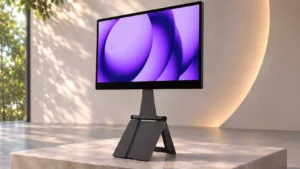
Overall: 4.3/5
The lower chin is less prominent than on earlier 15-inch models, contributing to a cleaner, more current appearance.
Pros: overall satisfaction, stand adjustability
Cons: value for money, reflection handling

Overall: 4.2/5
Slim bezels look modern, but one owner noticed brightness falling away at the screen edges.
Pros: HDR performance, overall satisfaction
Cons: HDR highlight detail, color accuracy

Overall: 3.6/5
The narrow top and side bezels, paired with a subdued lower logo, give the monitor a clean look.
Pros: refresh rate, value for money
Cons: HDR performance, contrast

Overall: 4.0/5
Slim, largely flush bezels make the picture dominant without an overly chunky bottom edge.
Pros: brightness, contrast
Cons: Text fringing, speaker quality

Overall: 3.7/5
Thin borders help the large screen feel neat and contemporary on a desk.
Pros: value for money, Resolution
Cons: stand adjustability, viewing angles

Overall: 4.1/5
Thin borders keep attention on the image and help the display look clean from the front.
Pros: Pixel density, Resolution
Cons: GPU demands, HDR performance

Overall: 4.2/5
The narrow side and top borders contribute to a clean, modern appearance without dominating the workspace.
Pros: HDR performance, DisplayPort connectivity
Cons: value for money, brightness

Overall: 4.0/5
Slim three-sided framing is attractive, but the thin lower bezel can be awkward beside a mismatched older display.
Pros: Dual-mode versatility, refresh rate
Cons: black levels, contrast

Overall: 3.7/5
The tracking cameras require an enlarged upper bezel, but they are discreetly incorporated into the frame. The finished monitor still looks reasonably streamlined from the front.
Pros: glasses-free 3D quality, AI 2D-to-3D conversion
Cons: 3D compatible game library, value for money

Overall: 4.2/5
The thin-edged screen looks modern, though the silver trim can be more noticeable in a bright room than dark bezels. It is mostly a preference issue.
Pros: reflection handling, color gamut
Cons: value for money, brightness

Overall: 3.6/5
Thin bezels on three sides keep the appearance relatively clean and modern. The small lower chin preserves a practical control area.
Pros: refresh rate, Dual-mode versatility
Cons: motion clarity, black levels

Overall: 3.9/5
Opinions differ on the relatively thick top and bottom bezels, with some liking the finished look.
Pros: brightness, portability and weight
Cons: value for money, port selection

Overall: 4.2/5
The top and side borders are slim, while the large fabric-covered speaker chin is a visible tradeoff for better audio.
Pros: overall picture quality, overall satisfaction
Cons: port selection, brightness

Overall: 4.0/5
Thicker inactive borders make the premium screen look somewhat less contemporary.
Pros: overall satisfaction, picture quality
Cons: size options, value for money

Overall: 4.2/5
One tester found the uneven, branded borders dated compared with cleaner competitors.
Pros: refresh rate, HDR performance
Cons: reflection handling, Text fringing

Overall: 4.1/5
Thick surrounds are an obvious cosmetic drawback despite the clean picture.
Pros: overall satisfaction, value for money
Cons: reflection handling, screen uniformity