
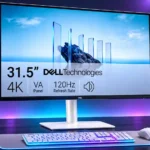
Dell S3225QS Feature Scores
Explore all 69 feature scores for Dell S3225QS, organized into pros and cons.
Scores by Feature
Summary
69 reviewed features-
Very positive 4.5-5.016 (23%)
-
Positive 3.5-4.425 (36%)
-
Neutral 2.5-3.414 (20%)
-
Negative 1.5-2.48 (12%)
-
Very negative below 1.56 (9%)
Pros
Sort
-
The VA panel produces punchy contrast, richer dark scenes, and defined shadows for its price; IPS alternatives trade some depth for wider viewing angles.
-
The 4K panel is a consistent highlight, giving text, charts, video, and images crisp detail on a spacious screen.
-
The large 31.5-inch workspace makes side-by-side windows, large spreadsheets, and streaming more comfortable; shallow desks may feel crowded.
-
The generous screen size, sharp 4K picture, and 120Hz refresh rate earn repeated praise at budget prices; shortcomings are easier to accept when discounted.
-
120Hz makes scrolling and general movement smoother than conventional 60Hz office monitors, though slow pixel transitions stop it from behaving like a high-end gaming screen.
-
Several reviewers like the deep blacks for an affordable LCD, although they do not reach OLED levels and one user found them underwhelming.
-
The off-white finish, narrow bezels, and simple styling earn consistent compliments, even when the plastic materials feel inexpensive.
-
Most experiences highlight very clear text and fine detail at normal scaling. A dissenting owner found image scaling hazy next to a higher-priced display.
-
Most assessments find it a sensible everyday 4K work screen, though one owner returned it after panel defects, odor, and eye-comfort complaints.
-
Multitasking across several large windows works very well, yet the limited connectivity and stand options leave it short of premium office displays.
-
Roughly 140 pixels per inch delivers finer desktop detail than typical 32-inch QHD displays.
-
FreeSync support is praised for smoother, tear-resistant play; one user wished its lower refresh range extended further.
-
Cinematic and story-driven games suit the spacious 4K picture and stronger VA blacks, even if moving objects can blur.
-
sRGB coverage is generally considered suitable for everyday content and lighter editing, but one test disputed the advertised DCI-P3 figure.
-
Built-in speakers are more useful than expected for an affordable monitor, though their sound is divisive for movies and music.
-
Most descriptions are positive about readability and blue-light-reduction features, but one owner reported discomfort and possible flicker.
-
Thin borders help the large screen feel neat and contemporary on a desk.
-
The rear joystick and logically arranged menus are convenient, though one critic found the menu text unnecessarily small.
-
The rear clip can tidy wires effectively, although thick cables can make it awkward to close or refit.
-
Color reproduction is often praised, especially in the sRGB preset, although factory white balance and color consistency may need adjustment. Some owners report muted color compared with IPS screens.
-
The two HDMI 2.1 inputs provide useful flexibility for 4K/120Hz-capable devices, including consoles and mixed PC setups.
-
Good detail and pleasing sRGB color make casual image editing practical, but precision work needs closer calibration and consistency.
-
Some testers praise unusually full, loud monitor audio, while others consider it only adequate and prefer external speakers for entertainment.
-
HDMI 2.1 and 120Hz are convenient for modern consoles, particularly slower games; motion smearing limits fast multiplayer play.
-
The coating keeps ordinary reflections manageable for many desks, but direct sunlight or a window opposite the screen can still cause distracting glare.
-
At least one owner observed no light bleed, although independent testing found some brightness nonuniformity.
-
Compared with an OLED alternative, its conventional LCD panel avoids the same static-image burn-in concern, a useful distinction for persistent desktop content.
-
The rear controls are easy to reach and navigate without accidental selections.
-
After five months of use, the monitor was still performing well and felt like a worthwhile upgrade over an older BenQ display.
-
The stand can be assembled and attached quickly, and an owner mounted a second screen after correcting a mounting mistake.
-
The VA panel maintains pleasing definition in dark areas from a central seat, contributing to its punchy, cinematic appearance.
-
The sRGB preset improves accuracy significantly, and calibration can correct white-balance and color-temperature issues. Out-of-box results are not equally strong in every mode.
-
The DisplayPort input works well for a PC connection and can support 4K at 120Hz, complementing the two HDMI ports.
-
It connects to gaming PCs through HDMI or DisplayPort and offers 4K/120Hz, but VA motion performance limits fast-paced games.
-
The 4K picture is generally detailed and punchy, particularly in SDR, even if HDR and off-axis uniformity fall short.
-
A streaming box or media player can connect through the HDMI inputs, while DisplayPort leaves another connection for a laptop or desktop.
-
Changing the color preset reduced visible trailing for one user, but it cannot fully solve the underlying VA response issue.
-
One overview praises the included cables and cleaning supplies as useful extras, although other accounts describe a more basic package.
-
Software controls on Windows offer a convenient alternative to repeatedly reaching behind the screen to adjust everyday settings.
-
Variable refresh rate provides a welcome gaming convenience, even though response times remain the limiting factor.
-
Its VA panel is valued for contrast, but it comes with narrower viewing angles and slower motion than many IPS alternatives.
Cons
Sort
-
The slow pixel response and motion blur make this a poor choice for competitive shooters and esports despite the 120Hz refresh rate.
-
The missing USB hub is a widely criticized omission for a productivity monitor. It cannot take over USB peripheral connections or laptop docking.
-
Slow VA pixel transitions are a recurring complaint, especially when moving around dark or fast-moving scenes.
-
Smearing around moving objects is one of the clearest weaknesses. Some users find presets help, but fast games still reveal distracting trails.
-
Off-center color and brightness shifts are repeatedly noted, and even the corners can look uneven from a close seat. It works best when viewed head-on.
-
Without sophisticated local dimming, HDR highlights and dark-scene precision cannot match premium displays.
-
Multiple tests find HDR underwhelming: brightness is limited and there is no advanced local dimming, so SDR often looks better.
-
A tested unit had conspicuous edge darkening, while other reports describe shifts across the panel; results may vary between units.
-
Despite its attractive looks, the lightweight plastic construction is not as upscale as Dell’s more expensive models.
-
One lab test disputed the published DCI-P3 coverage figure, finding materially lower gamut coverage than advertised.
-
One unit arrived wrapped in material that reportedly gave off a very unpleasant chemical smell, prompting immediate removal of the packaging.
-
The finish looks polished, but some testers find the plastic shell and stand light, creaky, or cheap; others find it solid enough for the class.
-
Desktop motion feels smooth enough, but fast-moving game objects show persistent blur and smearing.
-
One competitive gaming test described actions as slower to register than expected, reinforcing that speed-focused gaming is not the panel’s strength.
-
Dell’s closely named monitor lineup can be confusing, so checking the exact model number matters.
-
One dissatisfied user suspected faint flickering and did not find the panel easy on the eyes; this was not confirmed by measurement.
-
Windows scaling can make small 4K text comfortable; one dissatisfied user found some scaled resolutions noticeably blurry.
-
Panel experiences range from clean screens to dead pixels and edge dimming, suggesting buyers should inspect their individual unit.
-
The speakers offer audible bass for their category, but demanding listeners may want a separate audio system.
-
Native 4K gaming can demand a powerful graphics card; lowering resolution or using upscaling may be sensible for faster titles.
-
A returned unit had visible dead pixels, while another owner inspected a clean panel. Individual unit condition matters.
-
Experiences conflict dramatically: one owner returned the monitor after a harsh chemical smell, while another smelled nothing.
-
Its large panel requires comfortable desk depth; the compact stand base gives back some usable surface space.
-
Selectable response-time modes provide some control, but the fastest setting does not eliminate motion smearing for competitive play.
-
Height and tilt adjustment help, but extremely limited swivel and no portrait rotation draw complaints. Some users also want more height.
-
Two HDMI inputs and DisplayPort cover basic video connections, but a missing USB hub and USB-C input keep the feature set limited.
-
Daytime brightness is generally adequate for normal indoor work, but sunlight can still overwhelm the picture. In dark rooms, full brightness can feel uncomfortably intense.
-
Experiences differ: some report a secure stand, while others notice wobble at full height or when the screen is touched.
Use Cases
Best for
Sort
-
A strong fit for spreadsheets, browser windows, document editing, and general office tasks, thanks to the expansive 4K canvas.
-
A compelling route to a 32-inch 4K/120Hz screen at sale prices, as long as USB-C docking and strong gaming motion are not priorities.
-
Best for people who prioritize office work, streaming, and occasional slower games; serious competitive play remains a poor match.
-
The large 4K screen and good VA contrast make video enjoyable; HDR impact and off-axis viewing are less impressive.
-
A good home-office display for documents, spreadsheets, and calls, with limited docking convenience for laptop-focused setups.
-
Moving from an older 1080p monitor brings a substantial gain in sharpness and workspace without an enormous price premium.
-
Its 4K workspace and usable sRGB color work for casual content creation, but demanding color reference work needs a higher-end display.
-
Slower, relaxed games benefit from 4K sharpness and contrast, but noticeable ghosting makes fast action less enjoyable.
-
Deep VA blacks help in darker rooms, though very high brightness settings can be uncomfortable.
-
Built-in sound handles speech and routine calls, making this convenient for home-office meetings.
-
It offers a large, sharp canvas for casual timeline editing; its HDR limitations and viewing consistency make professional grading less suitable.
-
A pair of these large screens gives very generous desk space, as one happy owner found after arranging both displays.
-
Two 32-inch 4K screens provided ample work area for an owner, although mounting took some adjustments.
-
Background music is enjoyable for some through the built-in speakers, but listeners seeking fuller sound may prefer external equipment.
-
The expansive 4K desktop makes research, documents, and split-screen study comfortable if desk space allows.
-
The roomy 4K desktop and smooth refresh make it well suited to a fixed PC desk, particularly for users who value one large screen.
-
The light finish, slim edges, and uncluttered profile sit comfortably in a modern home office or studio.
-
Web and social-media design work is practical thanks to the sharp 4K image and usable sRGB colors, though precise reference tasks are less suitable.
-
With a streaming box or disc player attached, the large 4K panel works well as a small-room TV alternative; it has no TV tuner.
Conditional or not ideal for
Sort
-
USB-C laptop dockingThe lack of USB-C and a USB hub is inconvenient for laptop-centered desks that depend on a single cable for video, charging, and peripherals.
-
Portrait orientationThe included stand does not pivot into portrait mode, making it unsuitable for users who need vertical viewing.
-
Long-term ownershipThe low entry price is appealing, but one owner specifically declined to keep a unit with defects and perceived eye-comfort problems.
-
Single-cable laptop dockingIt lacks the USB-C video, charging, and peripheral hub functions needed for one-cable laptop operation.
-
HDR gamingIt can accept HDR and deliver attractive dark scenes, but limited peak brightness and local dimming undercut a convincing HDR gaming experience.
-
Color-critical workDespite decent sRGB behavior, white-balance and viewing-angle problems make this a compromise for strictly color-managed work.
-
Compact workspace ergonomicsIts wide screen can dominate a shallow desk, so adequate viewing distance and workspace depth matter.
-
Print photo editingGeneral photo edits are feasible, but the limitations in calibration, uniformity, and viewing angles make precision print work less compelling.
-
Racing gamesFast camera pans can expose smearing and blur, making dedicated gaming displays a better fit for racing.
-
Tactical shooter gamingFast shooters are not a strong fit: the panel’s slow response and dark-scene trails reduce clarity.
-
Shared-screen viewingThe panel works for a small group at sensible distances, but off-center viewers see reduced color and contrast consistency.
-
Bright-room viewingComfortable in typical lit offices, with enough brightness to offset some glare. Sunny-window placements are less convincing.