
ASUS ROG Strix GS-BE18000 Feature Scores
Overall Scorata score: 4.3/5
Based on 19 analyzed reviews · View source samples
Explore all 113 feature scores for ASUS ROG Strix GS-BE18000, organized into pros and cons.
Scores by Feature
Summary
113 reviewed features-
Very positive 4.5-5.063 (56%)
-
Positive 3.5-4.427 (24%)
-
Neutral 2.5-3.412 (11%)
-
Negative 1.5-2.411 (10%)
Pros
Sort
-
The unusually generous seven LAN ports plus a WAN port are one of the router's biggest selling points.
-
The abundance of 2.5GbE ports is especially useful for wired gaming PCs, storage and access points.
-
The software offers extensive control over SSIDs, traffic priorities, VPNs and other network settings.
-
High real-world Wi-Fi speeds are a consistent strength, often exceeding 2Gbps with capable clients and conditions.
-
Wireless performance is generally fast and capable under load, although some competing routers reach higher peak speeds.
-
All eight Ethernet connections are multi-gigabit, allowing multiple fast wired devices without a separate switch.
-
Simultaneous streams, gaming and downloads generally cause little performance degradation.
-
Range is impressive in many environments, particularly with AFC, although difficult walls and extreme distances can still limit reach.
-
Security tools, parental controls and advanced network management are available without a recurring subscription in the reviewed configurations.
-
Setup is generally straightforward and often takes around five minutes, though one ISP configuration caused difficulty.
-
The router handles numerous active devices well, including demanding mixes of streaming, gaming and file transfers.
-
Wi-Fi 7 offers substantial gains for compatible clients and a useful upgrade path as more devices adopt the standard.
-
The mobile app guides users through a quick QR-code-based setup process.
-
A single unit can cover many homes well, but attics, basements and other awkward spaces may still require additional access points.
-
Most extended tests found stable operation, though early firmware and some Apple-device configurations produced serious instability.
-
The 6GHz band delivers excellent nearby speeds and much greater usable reach with AFC, although some competitors reach higher peaks.
-
The browser interface provides comprehensive administration controls, though its dense dashboard may feel busy.
-
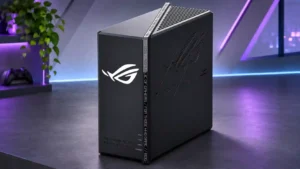
The customizable ROG logo provides plenty of lighting effects, although its brightness and styling are not to everyone's taste.
-
AiProtection offers a comprehensive security suite and useful device-level visibility without a recurring fee.
-
Download speeds are a major strength, with substantial improvements over older routers and notable AFC gains at distance.
-
Nearby clients generally achieve excellent speeds, with several tests approaching the 2.5Gbps wired ceiling.
-
The mobile app is convenient and feature-rich, though deeper settings can become complicated.
-
Traffic controls and dedicated gaming ports help prioritize latency-sensitive tasks when the network is busy.
-
Gaming modes, dedicated ports and Open NAT offer useful tools, although some premium acceleration features are absent and wireless latency gains vary.
-
The bright logo can be customized, dimmed with night mode or switched off entirely.
-
Connections generally remain reliable during gaming and streaming, but some users encountered crashes and dropouts.
-
Dedicated gaming ports make prioritizing connected devices simple and largely automatic.
-
Low jitter and consistent ping are strengths in several gaming tests, even when average latency is not exceptional.
-
Wired networking performs strongly within the 2.5Gbps port limit, with substantial gains over older hardware.
-
AFC helps 6GHz signals remain useful through several walls, though a particularly obstructed room can still see very low speeds.
-
At-a-glance traffic and connected-client information makes it easy to monitor network activity.
-
Adding compatible AiMesh nodes is a practical way to extend coverage in larger homes and apartments.
-
The app's prompts and QR-code workflow make installation easy to follow, although the model selection was unclear for one tester.
-
Automated Frequency Coordination can dramatically extend usable 6GHz download speeds, but requires regional approval, location reporting and suitable firmware; upload gains are not guaranteed.
-
The plentiful ports, high speeds and free software make the price attractive to many buyers, although others find it expensive given the 10GbE omission.
-
Several upstairs and downstairs tests showed substantial improvements, especially when AFC was active.
-
Passive cooling keeps the device quiet and reasonably cool during use and sustained workloads.
-
Separate SSIDs for gaming, guests, children, IoT and VPN use offer extensive flexibility.
-
Long-distance downloads can be excellent with AFC, but speeds fall sharply through severe obstructions and at the edge of coverage.
-
Several users experienced low gaming latency, but controlled testing found median wireless latency fairly ordinary.
-
Many find the vertical chassis compact for its capabilities, while others regard it as somewhat bulky for home placement.
-
The lightweight enclosure feels solid and carefully assembled.
-
At intermediate distances the router maintained over a gigabit in one benchmark, outperforming several peers.
-
Backup restoration and reuse of existing network names make migration from older ASUS setups relatively painless.
-
The passively cooled router runs silently in use.
-
The packaging is sturdy and has a premium gaming presentation.
-
Continual firmware and security updates are a welcome part of the package.
-
AiProtection offers capable threat protection, with one comparative test ranking it above competing security features.
-
The three-year warranty stands out positively among competing routers.
-
Ethernet backhaul is the preferred mesh configuration because it preserves wireless capacity for clients.
-
The angular, antenna-free enclosure is more understated than many gaming routers, but the gamer styling still divides opinion.
-
5GHz performance is generally strong, outperforming some pricier ASUS hardware in testing.
-
AiMesh can work reliably and improve coverage, but wireless backhaul and mixed hardware can complicate performance and stability.
-
Wi-Fi 7 offers substantial room for future client upgrades, but the absence of 10GbE reduces wired upgrade headroom.
-
The third band adds fast 6GHz connectivity and offers flexibility with compatible mesh equipment.
-
Parental controls are included and provide granular device scheduling, but content filtering is not foolproof.
-
Adaptive QoS is useful for prioritizing traffic, but it can trade peak throughput for responsiveness under heavy load.
-
Outdoor range tests showed useful throughput even across a street, with some drop-off as distance increased.
-
Settings are generally well organized and the interface makes configuration accessible.
-
Despite its substantial networking capabilities, the chassis is surprisingly light and easy to handle.
-
AiMesh monitors client signal and can steer devices toward a stronger source.
-
Congested traffic produced minimal throughput degradation in testing.
-
One household reported reliable operation with roughly 33 to 60 connected devices.
-
Flexible dual-WAN options allow a LAN or USB connection to serve as an additional internet source.
-
The dynamic DNS options include numerous services and a free ASUS offering.
-
The familiar ASUS controls are largely self-explanatory, particularly for existing ASUS owners.
-
Separate guest networks can restrict visitors to internet access while keeping local resources private.
-
Initial installation can be completed in about five minutes, including optimization and rebooting.
-
The app feels responsive when navigating its numerous controls.
-
A dedicated compatibility or IoT network makes it easier to retain older devices during an upgrade.
-
Extended testing over several months yielded positive reliability results, particularly with updated firmware.
-
Pairing an additional compatible AiMesh router was straightforward and improved coverage.
-
Lifetime product support is a welcome advantage alongside the three-year warranty.
-
AiMesh can automatically move devices between sources as signal strength changes.
-
Compatible mesh nodes can hand devices off seamlessly without requiring manual network switching.
-
Frequent firmware releases improve functionality and security.
-
Replacing older networking hardware can dramatically improve both coverage and throughput.
-
The USB port supports a particularly versatile range of storage, printer and backup-connectivity functions.
-
VPN Fusion makes per-device VPN routing particularly useful for remote workers and creators.
-
The interface makes it easy to see connected devices and related traffic.
-
The supplied braided Ethernet cable is a welcome inclusion.
-
Compatibility with other ASUS routers, including older models, makes later mesh expansion practical.
-
The app automates much of initial network configuration.
-
Identifying the devices involved in blocked connections helps pinpoint weak links in the home network.
-
AiProtection shows blocked malicious websites and identifies the affected devices.
-
Power consumption compared favorably with a more power-hungry competitor in one test.
-
Internet access schedules can be adjusted independently for individual devices.
-
A desktop browser provides a useful alternative to mobile-app setup and maintenance.
-
Older devices can migrate without changing credentials, but an Apple-device crash report highlights a possible firmware compatibility problem.
-
Local administration offers an alternative to cloud management, but AFC requires sharing precise location information.
Cons
Sort
-
The absence of 10GbE is a recurring complaint, especially at this price and for ultra-fast internet or local networks.
-
The 2.4GHz band is a recurring weakness, especially at longer distances, despite acceptable coverage in some installations.
-
Some reported firmware-related crashes involve multi-minute reboots, though many other installations remain stable.
-
The 2.5Gbps WAN port is ample for many plans but cannot fully exploit faster single-link broadband services.
-
The internal antennas keep the exterior clean but cannot be manually aimed to compensate for poor placement.
-
Using 6GHz as wireless backhaul can create a bottleneck for connected clients.
-
Adult content filtering missed some websites during testing.
-
The printed manual is rather rudimentary; its linked online version is more useful.
-
One tester encountered difficulty connecting to an Australian ISP whose authentication requirements did not match the default setup.
-
The large power adapter can be awkward around crowded outlets or power strips.
-
A fourth band would be useful for mesh backhaul without sacrificing the fast 6GHz client band.
-
Singapore availability was delayed pending local certification at the time of testing.
-
The lack of link aggregation limits wired scalability, although not every household will need bonded ports.
-
Wireless mesh is workable but may sacrifice the 6GHz client band; compatible hardware and wired backhaul are preferable.
-
The advertised 18Gbps wireless and 20Gbps wired totals are aggregate capacities, not speeds attainable by one client.
-
Distant 2.4GHz IoT clients can struggle, and early connectivity issues improved after firmware updates.
-
Later firmware improved AFC and IoT connectivity substantially, but reports of crashes and dropouts warrant caution.
-
The 2.5Gbps LAN connections are useful for many devices but limit individual high-speed wired transfers.
-
Firmware updates can resolve important issues, but a factory reset may be advisable after major upgrades.
-
Upload results vary; local transfers can be fast, but AFC did not consistently improve uploads and sometimes reduced them.
-
USB storage sharing is convenient, but speed assessments range from modest to fast enough for casual NAS-style use.
-
Many former weak spots improve considerably, but some difficult rooms, attics and basements remain problematic.
-
MLO adds flexibility for compatible hardware, but alternating operation, limited practical gains and reported compatibility issues temper its appeal.
Use Cases
Best for
Sort
-
Gaming prioritization and reliable connections are useful for busy homes, though competitive wireless latency results are mixed.
-
AiMesh makes expansion practical, including with compatible older ASUS routers, but wireless backhaul can consume the 6GHz band and firmware compatibility matters.
-
Seven 2.5GbE LAN ports make it easy to wire multiple fast devices without buying a separate switch.
-
Advanced users get granular control over traffic, separate networks and extensive browser-based settings.
-
The router generally maintains strong speeds and responsiveness while several devices stream, game and transfer files simultaneously.
-
Compatible Wi-Fi 7 devices see the largest gains in speed, range and responsiveness, especially on 6GHz.
-
Several multi-story homes saw major improvements, particularly with AFC, but difficult walls and distant floors can still require mesh nodes.
-
The router is especially well matched to internet plans up to 2.5Gbps and several multi-gigabit clients.
-
Wired NAS connections benefit from plentiful 2.5GbE ports, though router-hosted USB storage and distant wireless transfers can be modest.
-
Fast wireless links and strong coverage make this a good single-router choice for small and medium homes, including challenging apartments with appropriate placement.
-
Smart home devices can coexist with gaming and streaming traffic, but distant 2.4GHz devices and older firmware can cause problems.
-
Several owners and evaluators expect years of useful service, and one reported four months of rock-solid operation.
-
Streaming remains smooth while other devices download files, game or join video calls.
-
Large transfers are fast near the router or on wired connections, but severe obstructions can slow transfers dramatically or cause timeouts.
-
Parental controls provide flexible schedules and device-specific restrictions, but adult-site filtering missed some websites in testing.
-
Creators benefit from smoother large-file uploads, NAS transfers and simultaneous live streaming.
-
Seven fast LAN connections make this a particularly practical router for groups of wired gaming PCs.
-
Multiple wired gaming PCs can connect directly, and game downloads showed substantial improvements over older hardware.
-
Remote work benefits from reliable calls and flexible per-device VPN routing.
-
Zoom and Teams calls worked smoothly alongside other household traffic.
-
The striking enclosure suits open placement, which also helps signal reach; the internal antennas make positioning particularly important.
-
A separate compatibility network helps older devices transition easily, but they cannot fully exploit Wi-Fi 7 throughput.
-
A gigabit connection can be fully utilized over Wi-Fi, although such plans do not exploit the router's maximum capacity.
-
The generous LAN connections and strong real-world performance make it suitable for a small office as well as a gaming home.
-
Networking enthusiasts get extensive configuration choices, fast wireless links and plentiful wired connections.
-
Non-gamers can also benefit from straightforward setup and fast, stable home networking.
-
Ordinary online gaming is a reasonable fit, though wireless latency is less convincing for competitive play.
Conditional or not ideal for
Sort
-
Internet plans above 2.5 GbpsThe 2.5Gbps WAN connection prevents full use of faster single-port internet services.
-
Apple ecosystem householdsApple-heavy households should check firmware stability before buying; one owner reported hard crashes associated with Apple clients.
-
Competitive wireless gamingWireless competitive play is less convincing than wired gaming because measured latency may be ordinary despite good throughput.