
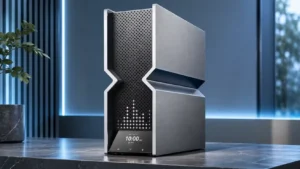
TP-Link Archer BE900 Feature Scores
Overall Scorata score: 4.1/5
Based on 12 analyzed reviews · View source samples
Explore all 93 feature scores for TP-Link Archer BE900, organized into pros and cons.
Scores by Feature
Summary
93 reviewed features-
Very positive 4.5-5.045 (48%)
-
Positive 3.5-4.423 (25%)
-
Neutral 2.5-3.413 (14%)
-
Negative 1.5-2.412 (13%)
Pros
Sort
-
Wireless throughput is a standout strength, with excellent results in many tests and some variation across devices, distance and building layouts.
-
Dual 10Gbps ports are a major selling point, allowing a fast WAN connection without sacrificing a 10Gbps wired LAN.
-
Peak and local Wi-Fi speeds are consistently impressive, including multi-gigabit transfers with suitable hardware.
-
The extensive Ethernet selection accommodates many wired devices and may eliminate the need for a separate switch.
-
The vertical hourglass housing and hidden antennas look distinctive and modern rather than like a conventional antenna-covered router.
-
Wired testing reached full 2Gbps and 5Gbps internet speeds, and Ethernet offers greater gaming stability.
-
Initial setup is consistently described as quick and straightforward.
-
A pair of 10Gbps connections alongside four 2.5Gbps ports provides unusually flexible multi-gig networking.
-
Range is often excellent, with strong reception far from the router, though building layout and band choice can change results considerably.
-
Nearby throughput is frequently outstanding, although older client devices may fall well short of a fast internet plan's full speed.
-
Dual front screens provide useful status information, easy touch controls and guest QR codes, although some buyers view them as expensive extras.
-
There is considerable flexibility to separate bands and fine-tune settings, with advanced controls available in the browser.
-
Tether makes initial configuration straightforward, with guided steps and QR-assisted onboarding.
-
The Tether app is clear, convenient and covers most common adjustments, with deeper settings available elsewhere.
-
Guest networks are easy to share using an on-screen QR code and keep visitors separate from the main network.
-
6GHz can deliver multi-gigabit local transfers and impressive nearby speeds, but some floor layouts sharply reduce reception.
-
Downloads are often extremely fast even at distance, though one fiber test found inconsistent wireless download results across devices and test services.
-
The router is designed for demanding households, and one test with around 80 connected devices ran without drops.
-
Custom messages, animations and graphics are fun to personalize, but may not justify the extra cost on their own.
-
Four 2.5Gbps ports give fast wired devices more room to connect without an extra switch.
-
The substantial packaging makes for a pleasing unboxing experience and presents the router neatly.
-
The 10Gbps WAN option provides headroom for fast broadband connections.
-
The browser interface offers a broad selection of advanced network controls beyond what is accessible in Tether.
-
5GHz throughput is often exceptional, although dividing the spectrum can restrict channel options and distance reduces speeds.
-
The fast ports and Wi-Fi 7 capabilities offer headroom for future upgrades, but the early implementation drew criticism for immaturity.
-
Stable operation is a strength, including a week with roughly 80 connected devices and no reported drops.
-
Getting the router running is quick, particularly through Tether's step-by-step setup.
-
A separate IoT network and stable operation with many smart devices make it useful for connected homes.
-
The SFP+ combo port adds flexibility for compatible fiber connections.
-
Both front screens can be dimmed or disabled, and can be scheduled to turn off overnight.
-
Upload speeds are often fast, although some tests show a greater drop at distance than downloads.
-
High-band downloads can remain impressively fast at 80–100 feet, but distant bedrooms and lower floors sometimes see much slower speeds.
-
Some tests maintained excellent speeds outdoors, while a balcony in another layout had weak coverage.
-
A single unit can deliver strong speeds throughout a home, but some distant rooms or balconies may still benefit from mesh expansion.
-
Latency is adequate to very good for ordinary tasks, although measured wireless latency is not exceptional among routers.
-
Strong wireless reach helps reduce weak spots, and compatible extenders can fill remaining gaps.
-
Dedicated IoT Wi-Fi helps keep smart devices organized and separate from other household traffic.
-
Midrange wireless speeds remain strong in testing, although throughput depends on the device and band.
-
Substantial wireless capacity makes simultaneous household activity a promising strength.
-
Step-by-step prompts and QR codes help guide users through the initial setup.
-
A single unit can serve multiple floors, but reinforced floors and basements may weaken certain bands considerably.
-
Performance through walls can be impressive, but 6GHz and basement coverage vary considerably with construction and layout.
-
Fast LAN connections can keep up with multi-gigabit internet service.
-
Combining two 2.5Gbps links for NAS connectivity helped increase local transfer performance.
-
The touchscreen makes live client counts and CPU and memory usage easy to monitor without opening a separate interface.
-
A busy network with dozens of devices ran without connection drops in one test.
-
The active cooling fan was inaudible in use.
-
The display-based approach avoids the annoyance of conventional blinking status lights.
-
Broad device support is useful, but MLO compatibility and wireless speeds on particular phones can vary.
-
Free parental controls are useful for basic filtering and schedules; more advanced controls require HomeShield.
-
The touchscreen is easy to interact with, but its scrolling is not as fluid as a smartphone's.
-
Wi-Fi 6E clients can achieve fast speeds, though results vary across devices and may not match newer Wi-Fi 7 hardware.
-
The four-band layout adds capacity, but its split 5GHz design can be less flexible than a second 6GHz band.
-
Ultra-wide 320MHz channels contribute to its high-speed appeal for compatible clients.
-
Automatic detection of the connected Ethernet cable simplifies initial setup.
-
The second 5GHz band is useful for distributing traffic and reducing congestion, although this benefit depends on the network.
-
Free expert setup assistance is a welcome option for buyers who need extra help.
-
Simple device connection options make everyday use approachable.
-
A tested 2Gbps fiber connection reached its full speed over Ethernet.
-
Guest network separation helps keep visitors away from the main home network.
-
Tether makes remote monitoring and management convenient after account setup.
-
Extra USB connectivity is handy for households with external devices and wired network needs.
-
Support for modern and older wireless standards makes the router versatile for a mix of client devices.
-
The 2.4GHz band can provide excellent speeds throughout an apartment, but basement and outdoor results vary considerably.
-
Jitter is decent for ordinary wireless gaming and communication; Ethernet is preferable for greater stability.
-
EasyMesh worked with another TP-Link router, while a tested third-party node failed to connect clients.
-
The app's settings are arranged in a relatively clear, intuitive interface.
-
Basic website filtering is available, but more advanced app filtering requires a paid plan.
Cons
Sort
-
HomeShield charges extra for more advanced parental controls, scheduling and security functions.
-
A tested D-Link EasyMesh node could be added but failed to serve clients; matching TP-Link equipment worked instead.
-
The original V1 revision's reported end-of-life status is disappointing for early adopters; check the hardware revision before buying.
-
MLO results depend on revision and client: some tests found little benefit or failed to connect, while another reported fast, stable operation. Alternating MLO is more limited than simultaneous links.
-
Splitting 5GHz into two bands restricts the room available for wide 160MHz channels, particularly when DFS channels are involved.
-
The aggregate bandwidth figure is ambitious; splitting a band can inflate the headline number without a comparable practical benefit.
-
Phones sometimes struggle to change bands when moving around the house.
-
The split 5GHz spectrum reduces the number of usable channel choices.
-
The two 5GHz radios divide the available spectrum, making wide channels harder to accommodate.
-
The original early-release Wi-Fi 7 implementation was criticized as unfinished.
-
The external power brick can be awkward to position around the router.
-
The V1 revision was reported to have reached the end of firmware support, a concern for ongoing security maintenance.
-
A dedicated wired backhaul is preferable when mesh bandwidth demands are high; the split 5GHz band is not necessarily a strong wireless backhaul solution.
-
Some phones do not switch bands smoothly as they move between rooms.
-
The housing can become quite warm under testing, even with active cooling.
-
The included flat Ethernet cable was disliked by one user who preferred to use a different cable.
-
Power consumption is higher than typical routers, especially during downloads and heavier activity.
-
A move from an older router can improve throughput, but the extra cost over less expensive Wi-Fi 7 models is difficult to justify for many homes.
-
Basic scheduling is available for free, but more detailed schedules and usage restrictions require a subscription.
-
USB storage sharing is useful, though configuration requires the browser and transfer speeds should not be expected to rival dedicated fast storage.
-
VPN support is useful, while advanced HomeShield security tools are behind a subscription.
-
The unit is heavy compared with some alternatives, although one buyer found much of the unboxing weight came from the packaging.
-
Wi-Fi 7 delivers excellent speeds with compatible clients; early implementations were less mature and MLO is not always reliable.
-
The high price is easier to justify for dual 10Gbps connectivity or the interactive screens; cheaper routers and mesh alternatives offer better value for many households.
-
Hidden antennas make the tower less sprawling than some rivals, but it is still a large, tall router that needs dedicated space.
Use Cases
Best for
Sort
-
Dual 10Gbps connections and multiple 2.5Gbps ports make this especially attractive for high-speed wired networks and NAS equipment.
-
The router is particularly well suited to multi-gigabit internet, with full wired speeds achieved on 2Gbps and 5Gbps plans.
-
Experienced users can benefit from extensive browser settings and flexible wireless band configuration.
-
Compatible Wi-Fi 7 devices can reach exceptional speeds, but the practical benefit of MLO varies by device and hardware revision.
-
EasyMesh provides an upgrade path for coverage, but cross-brand compatibility and wireless backhaul performance are caveats.
-
Dual 10Gbps ports suit internet plans above 2.5Gbps, provided the rest of the wired equipment can keep up.
-
High-speed Ethernet and wireless transfers suit users who regularly move large files across their network.
-
Households with many connected devices can benefit from the four-band capacity and stable connections demonstrated with roughly 80 devices.
-
Dedicated IoT Wi-Fi and stable connections with many smart devices make it a strong choice for connected homes.
-
Strong single-router reach can suit larger and multi-story homes, though reinforced floors and weak spots may still warrant mesh nodes.
-
The attractive tower works well in a living room or on a desk where the screens can be seen and touched, rather than tucked away.
-
Fast NAS transfers are a strength, especially with aggregated Ethernet links; USB-attached storage is more limited and requires browser configuration.
-
Web browsing works well, even in some locations where the signal is relatively weak.
-
Fast downloads and adequate wireless latency are useful for online gaming, but wired Ethernet is the more stable choice for competitive play.
-
Casual online games run comfortably over Wi-Fi with decent latency.
-
Built-in VPN functionality is useful for accessing private networks securely.
-
Families get useful basic parental controls without a subscription, though advanced restrictions cost extra.
-
Support for older wireless standards helps accommodate existing devices without replacing them all.
-
Built-in VPN functionality is useful for remote work and private network access.
-
Adequate latency and jitter make wireless video calls a comfortable use case.
-
High wireless capacity is well suited to bandwidth-intensive 4K and 8K streaming, assuming a sufficiently fast connection.
Conditional or not ideal for
Sort
-
Budget-conscious buyersLess expensive Wi-Fi 7 routers provide a more sensible option for shoppers who cannot justify the premium.
-
Low-distraction useThe constantly changing screens can be distracting when working, gaming or watching movies.
-
Access point modeAccess point mode is possible, but using this expensive, powerful router only as an access point may waste its capabilities.
-
Gigabit-or-slower internet plansCheaper Archer routers can serve slower internet plans well, making the flagship's extra capability unnecessary for many buyers.